
I changed the default value of Product is virtual from 0 to 1 and the radio button still comes up non virtual. What am I doing wrong?

Thread: default "1" product is virtual
Results 1 to 9 of 9
-
24 Jun 2008, 02:17 AM #1
 Suspended
- Join Date
- Jun 2007
- Location
- Eustis, Florida, USA, EARTH
- Posts
- 836
- Plugin Contributions
- 0
 default "1" product is virtual
-
24 Jun 2008, 02:29 AM #2
 Zen Follower
- Join Date
- Jun 2006
- Posts
- 157
- Plugin Contributions
- 0
Re: default "1" product is virtual
What product type did you change this on?
Is this happening incorrectly on a new product or when you edit an existing product?
-
24 Jun 2008, 03:36 AM #3
Suspended
- Join Date
- Jun 2007
- Location
- Eustis, Florida, USA, EARTH
- Posts
- 836
- Plugin Contributions
- 0
Re: default "1" product is virtual
I changed it in the database for all future new products. I just thought it would save me sometime if I had it defaulted to virtual product no shipping. Originally Posted by Justmetoo

I did the same for show discount quantities radio button, changed it from 0 to 1 in database structure table.
-
24 Jun 2008, 05:21 AM #4
Zen Follower
- Join Date
- Jun 2006
- Posts
- 157
- Plugin Contributions
- 0
Re: default "1" product is virtual
I believe that this is managed by a setting in the product type configuration for each product type.
Look under the edit layout button and you will see:
That would appear to override anything in the database structure as looking at the collect_info.php file is using it:Product Virtual Default Status - Skip Shipping Address - When adding new products?
Default Virtual Product status to be ON when adding new products?
PHP Code:$parameters = array('products_name' => '',
'products_description' => '',
'products_url' => '',
'products_id' => '',
'products_quantity' => '',
'products_model' => '',
'products_image' => '',
'products_price' => '',
'products_virtual' => DEFAULT_PRODUCT_PRODUCTS_VIRTUAL,
'products_weight' => '',
'products_date_added' => '',
'products_last_modified' => '',
'products_date_available' => '',
'products_status' => '',
'products_tax_class_id' => DEFAULT_PRODUCT_TAX_CLASS_ID,
'manufacturers_id' => '',
'products_quantity_order_min' => '',
'products_quantity_order_units' => '',
'products_priced_by_attribute' => '',
'product_is_free' => '',
'product_is_call' => '',
'products_quantity_mixed' => '',
'product_is_always_free_shipping' => DEFAULT_PRODUCT_PRODUCTS_IS_ALWAYS_FREE_SHIPPING,
'products_qty_box_status' => PRODUCTS_QTY_BOX_STATUS,
'products_quantity_order_max' => '0',
'products_sort_order' => '0',
'products_discount_type' => '0',
'products_discount_type_from' => '0',
'products_price_sorter' => '0',
'master_categories_id' => ''
);
-
24 Jun 2008, 01:47 PM #5
Suspended
- Join Date
- Jun 2007
- Location
- Eustis, Florida, USA, EARTH
- Posts
- 836
- Plugin Contributions
- 0
Re: default "1" product is virtual
I had a hard time finding that file collect_info.php. Since I renamed admin to something else, it never showed up in the developer tool kit search results......but I digress.
Here is something to look at.
BTW what is [scr] tag for?
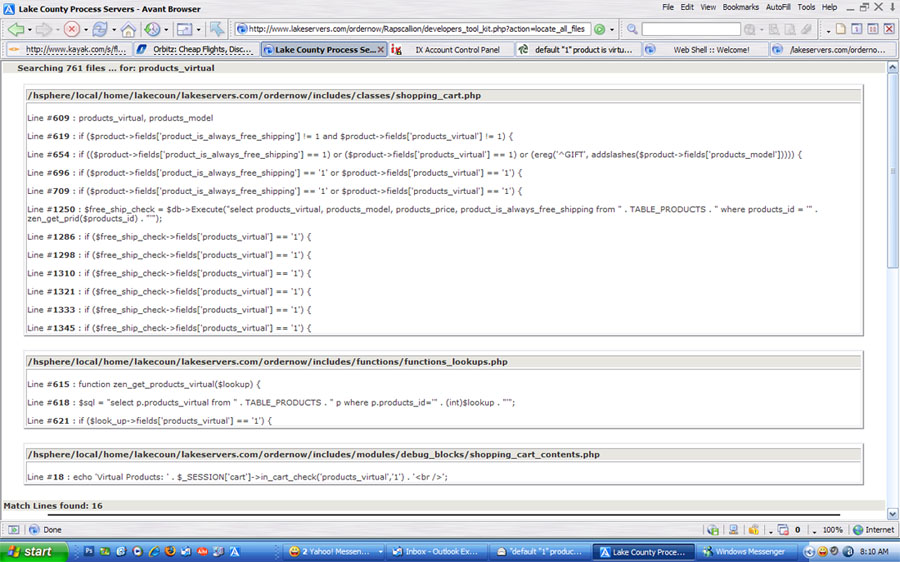
I looked in collectinfo and under virtual paragraph it set default to:
// Virtual Products
if (!isset($pInfo->products_virtual)) $pInfo->products_virtual = PRODUCTS_VIRTUAL_DEFAULT;
switch ($pInfo->products_virtual) {
case '0': $is_virtual = false; $not_virtual = true; break;
case '1': $is_virtual = true; $not_virtual = false; break;
default: $is_virtual = false; $not_virtual = false;Last edited by pixelpadre; 24 Jun 2008 at 01:54 PM.
-
24 Jun 2008, 02:01 PM #6
Suspended
- Join Date
- Jun 2007
- Location
- Eustis, Florida, USA, EARTH
- Posts
- 836
- Plugin Contributions
- 0
Re: default "1" product is virtual
// Virtual Products
if (!isset($pInfo->products_virtual)) $pInfo->products_virtual = PRODUCTS_VIRTUAL_DEFAULT;
switch ($pInfo->products_virtual) {
case '0': $is_virtual = false; $not_virtual = true; break;
case '1': $is_virtual = true; $not_virtual = false; break;
default: $is_virtual = true; $not_virtual = false;
default line above should reflect case 1. I corrected it but still no change in product listing.
-
24 Jun 2008, 02:42 PM #7
Zen Follower
- Join Date
- Jun 2006
- Posts
- 157
- Plugin Contributions
- 0
Re: default "1" product is virtual
You keep trying to touch the code.
Why don't you put the database field back to how it was and any code changes and just change the setting for this in your configuration settings?
In the Developers Tool Kit, you can enter the constant: DEFAULT_PRODUCT_PRODUCTS_VIRTUAL into the top input box, and do not choose anything from the dropdown, to see where this setting is and change it to be what you want it to be.
Pick the Product Type you are changing and hit the edit layout button and find the setting for the virtual default.
Now, new Products when added will use this new setting.
I am afraid that I do not understand what you mean by the: [scr] tag
-
24 Jun 2008, 03:09 PM #8
Suspended
- Join Date
- Jun 2007
- Location
- Eustis, Florida, USA, EARTH
- Posts
- 836
- Plugin Contributions
- 0
Re: default "1" product is virtual
scr and /scr are tags in this forum. no explanation how to use them.
ok....i found edit layout in products. now virtual product is set to default.
Still have the problem of default "show quantity box". I still have to check the radio button every time i add a new product to show quantity.
thanks
-
24 Jun 2008, 03:27 PM #9
Suspended
- Join Date
- Jun 2007
- Location
- Eustis, Florida, USA, EARTH
- Posts
- 836
- Plugin Contributions
- 0
Re: default "1" product is virtual
ok found it in another post. have to go to configurtion edit...product info.... toggle show qty. Why wouldnt they both be in the same place..... guess i need to buy the book

Similar Threads
-
Changing "Default Order Status" from "Delivered" to "Shipped"
By CookieMonster in forum Customization from the AdminReplies: 1Last Post: 25 Nov 2014, 12:22 AM -
v150 How do I edit Product Listing "Price", "Qty." and Product Info Move "details"?
By schobook in forum Templates, Stylesheets, Page LayoutReplies: 9Last Post: 18 Jan 2013, 01:02 AM -
Need to change the default quanity for "each" to "Set" on certain products
By whiskermouse in forum Setting Up Categories, Products, AttributesReplies: 0Last Post: 24 Apr 2010, 02:46 AM -
Can the Default cateogry in "Limit to Category" in "Advanced Search" be customized?
By zcnb in forum Customization from the AdminReplies: 0Last Post: 27 May 2009, 06:59 PM -
"Not shipping to your region" error when purchasing both physical and virtual product
By lazschu in forum General QuestionsReplies: 3Last Post: 18 Jan 2009, 06:20 AM

