
Hi all, this morning i just downloaded the Zen Cart...
And finished installing it.
So far, i really like it, but....i was wondering, especially about the layout and template...can i modify it?...at least like the way i want it to?
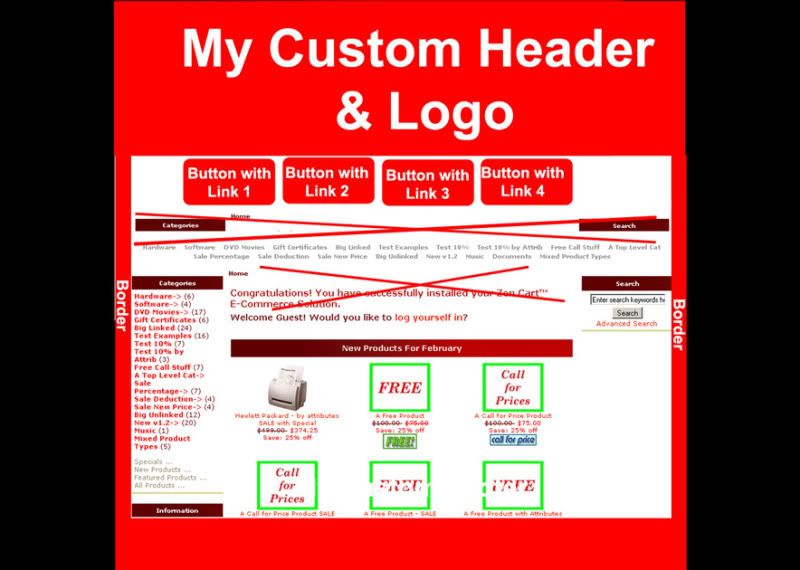
Anyway, this is the rough design of my template/layout..it's really standard and basic i think...
What I want to modify exactly are : (see the picture as refferece)
1.Can I replace the head and logo, without the link of Home and Log In (if possible, i want to put the Log In somewhere else)
2.Can I place Button with links underneath the header
3.Can I remove the links product category under my header?
4.Can I Make borders on the 'content' area (left and right)?
5 Can I make my own footer, without links, only image back ground
I'm so new in Zen cart, tryin hard to feel the Zen...
So any help will be highly appreciated.
Thank you in advance
"D"

Thread: Is This Possible?
Results 1 to 5 of 5
-
25 Feb 2010, 09:59 AM #1
 New Zenner
- Join Date
- Feb 2010
- Posts
- 5
- Plugin Contributions
- 0
 Is This Possible?
-
25 Feb 2010, 11:28 AM #2
Totally Zenned
- Join Date
- Apr 2006
- Location
- London, UK
- Posts
- 10,569
- Plugin Contributions
- 25
Re: Is This Possible?
In the order you asked them ...
- Yes
- Yes
- Yes
- Yes
- Yes
I recommend spending some time in the Tutorial/FAQ area. There's a special section in there that answers several of those questions already.Kuroi Web Design and Development | Twitter
(Questions answered in the forum only - so that any forum member can benefit - not by personal message)
-
25 Feb 2010, 04:01 PM #3
New Zenner
- Join Date
- Feb 2010
- Posts
- 5
- Plugin Contributions
- 0
Re: Is This Possible?
I see....
I'm sorry not be too specific..
I don't mean to be lazy...
1. I found the way to change the header banner...but i haven't find any way to move the login and home link, any refference on how to do it?
2.On the link thing, i know that we can place manually with ez pages....but it's not a button, just 'text link', what i really want is a linked button....how to put it?
3. Found the solution...i'm happy ^_^
4. I try to change and insert the border on the tpl_main_page.php ....but somehow it's just won't show...
Any clue where should i change that?
And also i want to re-size the 'content' area inside the border...including the main area and boxes......but i'm confused how to do it
Thank you in advance
-
25 Feb 2010, 07:43 PM #4
Black Belt
- Join Date
- Feb 2005
- Location
- Lansing, Michigan USA
- Posts
- 20,021
- Plugin Contributions
- 3
Re: Is This Possible?
Borders are best done in the stylesheet.
I don't know exactly where you want borders, but you need to install the Firefox browser and the Web Developer plugin for Firefox. You can use those to see where in the stylesheet you change the styling of the various sideboxes.
Ctrl-Shift-Y will allow you to hover over a section of the page and see the class and id names for that section.
Ctrl-Shift-E will open the CSS editor and allow you to edit the stylesheet and see the changes in real time without changing anything permanently. A very handy tool.
When you find the section you want the border on, it should look like this (for the center column):
.centerColumn {border: 1px solid #ff0000;}
The width of the site is set in #mainWrapper - the default is 750px.
-
25 Feb 2010, 08:41 PM #5
New Zenner
- Join Date
- Feb 2010
- Posts
- 5
- Plugin Contributions
- 0
Re: Is This Possible?
Hello stevesh, Originally Posted by stevesh

Thank you for your kind answer. I will try the firefox plugin.
If you look at the picture on my first post, it got this border writing. Basically i want to re-size the content/main part (including the left & Right side boxes) and then put left & right borders. I have try to change the #mainWrappr on the CSS file, but that then affect the whole site, including the header and footer
Anyway, again, thank you very much
"D"


Similar Threads
-
Is this possible?
By ScrapdragonDesigns in forum Templates, Stylesheets, Page LayoutReplies: 0Last Post: 8 Oct 2008, 12:08 AM -
Is this possible??
By Eagle75au in forum Setting Up Categories, Products, AttributesReplies: 5Last Post: 1 Oct 2008, 08:59 AM -
Is this possible?
By silentshadow in forum Setting Up Categories, Products, AttributesReplies: 2Last Post: 5 May 2008, 10:55 AM -
Is this possible?
By KickTheCan in forum General QuestionsReplies: 1Last Post: 8 Apr 2008, 09:48 PM -
Is this possible with this site
By chosin78 in forum Templates, Stylesheets, Page LayoutReplies: 1Last Post: 5 Feb 2008, 08:06 PM

