

I am having an issue customizing my order confirmation e-mail. I know that 1. The e-mails can be customized in the emails folder and 2. The orders.php file in the admin folder also determines how the order confirmation e-mail looks. I cannot figure out how to make a small adjustment so my order confirmation e-mail looks correct.
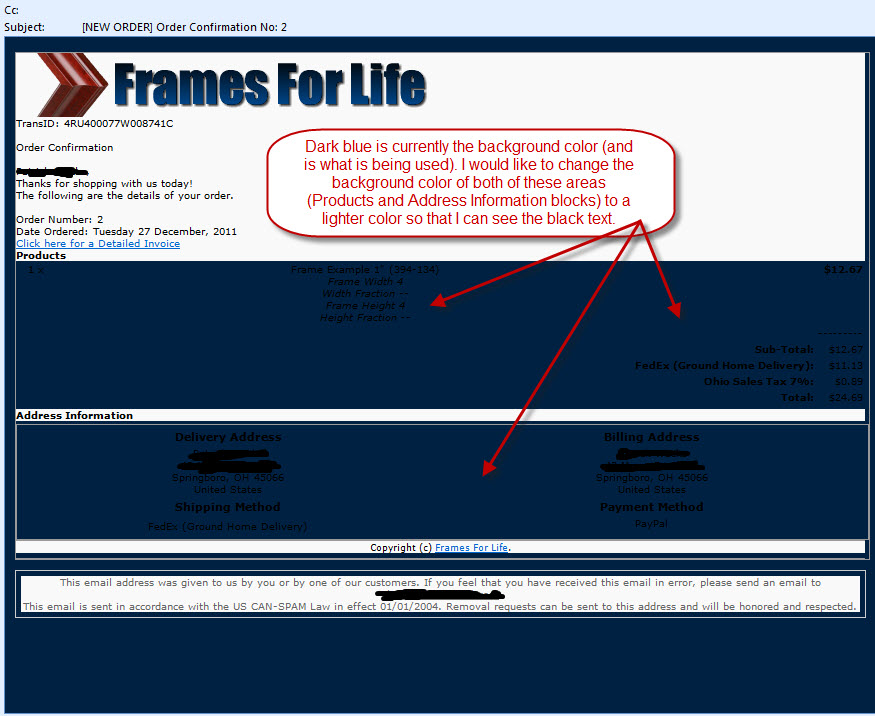
Here is a copy of an order confirmation e-mail:
Here is a copy of the source code for this e-mail:
I suspect I need to add/change a background color to the css but I don't know which e-mail file, css file (I could not find these definitions), or orders.php file to make the changes too.Code:<td class="product-details" valign="top">Frame Example 1" (394-134) <nobr><small><em> <br /> Frame Width 4<br /> Width Fraction --<br /> Frame Height 4<br /> Height Fraction --</em></small></nobr></td> <td class="product-details-num" valign="top" align="right">$12.67</td></tr> </table></div> <div class="order-detail-area"><table border="0" width="100%" cellspacing="0" cellpadding="2"> <td class="order-totals-text" align="right" width="100%"> </td> <td class="order-totals-num" align="right" nowrap="nowrap">---------</td> </tr> <tr><td class="order-totals-text" align="right" width="100%">Sub-Total:</td> <td class="order-totals-num" align="right" nowrap="nowrap">$12.67</td> </tr> <tr><td class="order-totals-text" align="right" width="100%">FedEx (Ground Home Delivery):</td> <td class="order-totals-num" align="right" nowrap="nowrap">$11.13</td> </tr> <tr><td class="order-totals-text" align="right" width="100%">Ohio Sales Tax 7%:</td> <td class="order-totals-num" align="right" nowrap="nowrap">$0.89</td> </tr> <tr><td class="order-totals-text" align="right" width="100%">Total:</td> <td class="order-totals-num" align="right" nowrap="nowrap">$24.69</td> </tr> <tr> </table></div> <div class="comments"></div> <div class="content-line"><strong>Address Information</strong></div> <div class="address-block"> <table border="0" width="100%" cellspacing="0" cellpadding="2"> <tr> <td valign="top" width="50%"> <table border="0" width="100%" cellspacing="0" cellpadding="2"> <tr> <td class="content-line-title"><strong>Delivery Address</strong></td> </tr> <tr> <td class="address">HIDDEN 45066<br />United States</td> </tr> <tr> <td class="content-line-title"><strong>Shipping Method</strong></td> </tr> <tr> <td class="content-line">FedEx (Ground Home Delivery)</td> </tr> </table> </td> <td valign="top" width="50%"> <table border="0" width="100%" cellspacing="0" cellpadding="2"> <tr> <td class="content-line-title">Billing Address</td> </tr> <tr> <td class="address">HIDDEN 45066<br />United States</td> </tr> <tr> <td class="content-line-title"><strong>Payment Method</strong></td> </tr> <tr> <td class="payment-detail">PayPal</td> </tr> <tr> <td class="payment-footer"></td> </tr> </table> </td> </tr> </table> </div> </div> <!-- Footer Section --> <div class="footer"> <div class="copyright">Copyright (c) <a href="HIDDEN" target="_blank">HIDDEN</a>.</div> </div> </div> <div class="disclaimer"> <div class="disclaimer1">This email address was given to us by you or by one of our customers. If you feel that you have received this email in error, please send an email to HIDDEN </div> <div class="disclaimer2">This email is sent in accordance with the US CAN-SPAM Law in effect 01/01/2004. Removal requests can be sent to this address and will be honored and respected.</div> </div> </body> </html>
Also, I suspect I need to add the background color to: order-detail-area and address-block area? I am not sure which block I need to change to make these areas lighter.
Here is another reason I wish we had an order confirmation e-mail in the e-mail folder instead of hard coded into the orders.php file. It would be so much easier for all of us to customize.
Please help.

Thread: Modify Order Confirmation Email
Results 1 to 6 of 6
-
4 Jan 2012, 04:51 PM #1
 Totally Zenned
- Join Date
- Apr 2007
- Location
- Dayton, Ohio
- Posts
- 682
- Plugin Contributions
- 0
 Modify Order Confirmation Email
-
4 Jan 2012, 05:06 PM #2
Administrator
- Join Date
- Sep 2009
- Location
- Stuart, FL
- Posts
- 13,893
- Plugin Contributions
- 96
Re: Modify Order Confirmation Email
You'll need to start with the email template for the order confirmation (/email/email_template_checkout.html). That file contains both the html and the css associated with that email.
-
4 Jan 2012, 06:25 PM #3
Totally Zenned
- Join Date
- Apr 2007
- Location
- Dayton, Ohio
- Posts
- 682
- Plugin Contributions
- 0
Re: Modify Order Confirmation Email
Here are the contents of this file: /email/email_template_checkout.html
But as you can see the .order-detail-area and .address-block already have background colors defined, that do not show up in the actual order confirmation email.Code:<html> <head> <meta http-equiv="Content-Type" content="text/html; charset=$CHARSET" /> <base href="$BASE_HREF" /> <style type="text/css"> body {background-color:#002142; color:#000000; font-family:Verdana, Arial, Helvetica, sans-serif; text-align:center;} a:link {color:#0066cc;} a:hover {background-color:#eeeecc; color:#0066cc;} a:visited {color:#0066cc;} .holder {background-color:#f9f9f9; border:1px solid #9a9a9a; font-size:9px; text-align:left; width:550px;} .header {font-size:10px; padding:10px; width:550px;} .content {font-size:10px; padding:5px; width:550px;} .footer {border-top:1px solid #9a9a9a; font-size:9px; text-align:center; width:550px;} .extra-info {background-color:#cccc99; border:1px dashed #9a9a9a; font-size:10px; margin-top:10px; padding:5px; width:550px;} .content-line {padding:5px; font-size:10px;} .content-line-title {font-weight:bold; font-size:11px; padding-top:3px;} .order-detail-area {background-color:#cbe5fe; border:1px #9a9a9a; width:542px; padding:2px; font-size:10px;} .product-details {font-size:10px;} .product-details-num {font-size:10px; font-weight:bold;} .order-totals-text {font-size:10px; font-weight:bold;} .order-totals-num {font-size:10px; } .comments {background-color:#88c3fb; border:1px #9a9a9a; width:542px; padding:2px; font-size:10px;} .address-block {background-color:#dbdbdb; border:1px solid #9a9a9a; margin-top:3px;} .address {font-size:10px;} .payment-detail, .payment-footer {font-size:10px;} .extra-info {background-color:#cccc99; border:1px solid #9a9a9a; font-size:10px; margin-top:10px; padding:5px; width:550px;} .extra-info-bold {font-weight:bold;} .disclaimer {background-color:#f9f9f9; border:1px solid #cccccc; font-size:10px; margin-top:10px; padding:5px; width:550px;} .disclaimer1 {color:#666666; padding:5px;} .disclaimer1 a:link {color:#666666;} .disclaimer1 a:visited {color:#666666;} .disclaimer2 {color:#666666; padding:5px;} .copyright {border-bottom:0px solid #9a9a9a; padding:5px;} </style> </head> <body> <div class="holder"> <!-- Header Section --> <div class="header"> <img src="email/logo.png" alt="logo" /> </div> <!-- Content Section --> <div class="content" style="width: 550px; height: 313px"> <div class="content-line"> $EMAIL_TEXT_HEADER <br /><br /> $EMAIL_FIRST_NAME $EMAIL_LAST_NAME,<br /> $EMAIL_THANKS_FOR_SHOPPING<br /> $EMAIL_DETAILS_FOLLOW<br /><br /> $INTRO_ORDER_NUM_TITLE $INTRO_ORDER_NUMBER<br /> $INTRO_DATE_TITLE $INTRO_DATE_ORDERED<br /> <a href="$INTRO_URL_VALUE">$INTRO_URL_TEXT</a> </div> <div class="content-line"><strong>$PRODUCTS_TITLE</strong></div> <div class="order-detail-area">$PRODUCTS_DETAIL</div> <div class="order-detail-area">$ORDER_TOTALS</div> <div class="comments">$ORDER_COMMENTS</div> <div class="content-line"><strong>$HEADING_ADDRESS_INFORMATION</strong></div> <div class="address-block"> <table border="0" width="100%" cellspacing="0" cellpadding="2"> <tr> <td valign="top" width="50%"> <table border="0" width="100%" cellspacing="0" cellpadding="2"> <tr> <td class="content-line-title"><strong>$ADDRESS_DELIVERY_TITLE</strong></td> </tr> <tr> <td class="address">$ADDRESS_DELIVERY_DETAIL</td> </tr> <tr> <td class="content-line-title"><strong>$SHIPPING_METHOD_TITLE</strong></td> </tr> <tr> <td class="content-line">$SHIPPING_METHOD_DETAIL</td> </tr> </table> </td> <td valign="top" width="50%"> <table border="0" width="100%" cellspacing="0" cellpadding="2"> <tr> <td class="content-line-title">$ADDRESS_BILLING_TITLE</td> </tr> <tr> <td class="address">$ADDRESS_BILLING_DETAIL</td> </tr> <tr> <td class="content-line-title"><strong>$PAYMENT_METHOD_TITLE</strong></td> </tr> <tr> <td class="payment-detail">$PAYMENT_METHOD_DETAIL</td> </tr> <tr> <td class="payment-footer">$PAYMENT_METHOD_FOOTER</td> </tr> </table> </td> </tr> </table> </div> </div> <!-- Footer Section --> <div class="footer"> <div class="copyright">$EMAIL_FOOTER_COPYRIGHT</div> </div> </div> <div class="disclaimer"> <div class="disclaimer1">$EMAIL_DISCLAIMER</div> <div class="disclaimer2">$EMAIL_SPAM_DISCLAIMER</div> </div> </body> </html>
-
4 Jan 2012, 06:29 PM #4
Black Belt
- Join Date
- Feb 2005
- Location
- Lansing, Michigan USA
- Posts
- 20,021
- Plugin Contributions
- 3
Re: Modify Order Confirmation Email
In the image you posted, the background color of the part you want to be lighter is #002142, according to Colorzilla. That (body) is the rule you want to change first, then add that color to the sections you want to be that color. I don't know why the later rules aren't being applied.
-
4 Jan 2012, 07:14 PM #5
Totally Zenned
- Join Date
- Apr 2007
- Location
- Dayton, Ohio
- Posts
- 682
- Plugin Contributions
- 0
Re: Modify Order Confirmation Email
Hmmmm. The background (body) is one of the main components for my template. Please see my website here: http://www.framesforlife.com/ I was able to change the darker boxes to the correct lighter color in every e-mail template (without the background color getting into the way) except for this e-mail. My hope was to just make these two dark boxes white or the correct lighter color. Not to change the background of every other e-mail that I already customized.
If I change the body color then the e-mails are not going to match my template as well. I want the background color blue. I just do not want these two boxes that contain my information to be blue. Couldn't I add some code to my order.php and/or css to make just these two backgrounds lighter? Once again all my other e-mails are already customized and showing properly. This is the only e-mail that the dark blue background comes into play with the dark text.
-
17 Jan 2012, 06:07 PM #6
Totally Zenned
- Join Date
- Apr 2007
- Location
- Dayton, Ohio
- Posts
- 682
- Plugin Contributions
- 0
Re: Modify Order Confirmation Email
Thank you, I just changed the background image on this one e-mail to white. All other e-mails display just fine with the blue background. Originally Posted by lat9


 Reply With Quote
Similar Threads
-
v138a Modify Product Details in order confirmation email
By WilpackPackaging in forum General QuestionsReplies: 3Last Post: 6 Jan 2015, 10:57 PM -
Order Confirmation Email content, trying to find and modify...
By tcarden in forum General QuestionsReplies: 2Last Post: 15 Jul 2013, 06:22 PM -
Modify Order Confirmation Email
By Damianj in forum General QuestionsReplies: 0Last Post: 10 Jan 2010, 10:16 PM -
Modify Order Confirmation email text for moneyorder payment module
By JohnBoyCR in forum General QuestionsReplies: 2Last Post: 30 Sep 2009, 07:29 PM

