

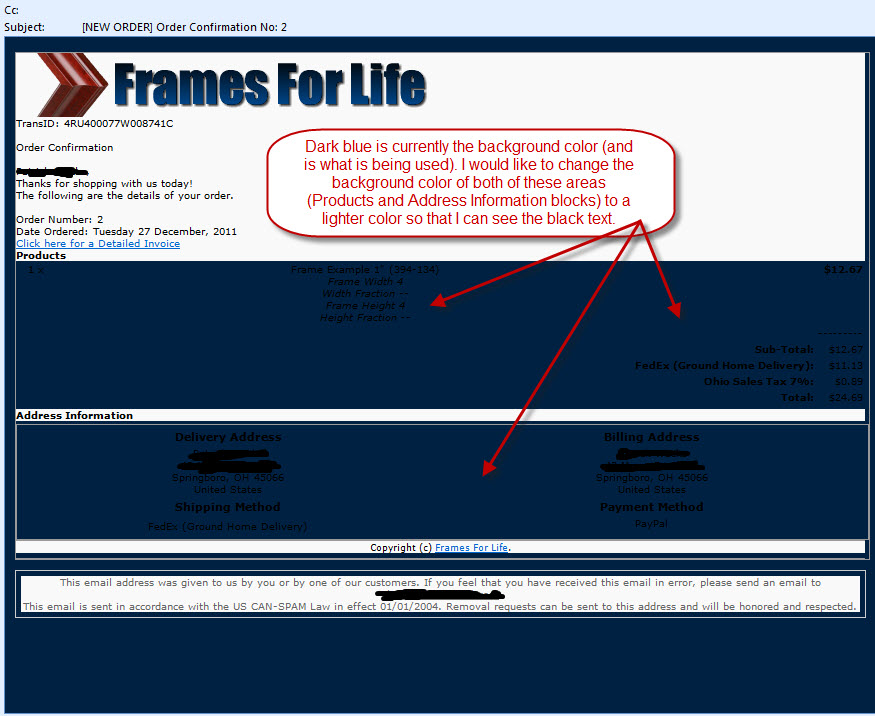
I am having an issue customizing my order confirmation e-mail. I know that 1. The e-mails can be customized in the emails folder and 2. The orders.php file in the admin folder also determines how the order confirmation e-mail looks. I cannot figure out how to make a small adjustment so my order confirmation e-mail looks correct.
Here is a copy of an order confirmation e-mail:
Here is a copy of the source code for this e-mail:
I suspect I need to add/change a background color to the css but I don't know which e-mail file, css file (I could not find these definitions), or orders.php file to make the changes too.Code:<td class="product-details" valign="top">Frame Example 1" (394-134) <nobr><small><em> <br /> Frame Width 4<br /> Width Fraction --<br /> Frame Height 4<br /> Height Fraction --</em></small></nobr></td> <td class="product-details-num" valign="top" align="right">$12.67</td></tr> </table></div> <div class="order-detail-area"><table border="0" width="100%" cellspacing="0" cellpadding="2"> <td class="order-totals-text" align="right" width="100%"> </td> <td class="order-totals-num" align="right" nowrap="nowrap">---------</td> </tr> <tr><td class="order-totals-text" align="right" width="100%">Sub-Total:</td> <td class="order-totals-num" align="right" nowrap="nowrap">$12.67</td> </tr> <tr><td class="order-totals-text" align="right" width="100%">FedEx (Ground Home Delivery):</td> <td class="order-totals-num" align="right" nowrap="nowrap">$11.13</td> </tr> <tr><td class="order-totals-text" align="right" width="100%">Ohio Sales Tax 7%:</td> <td class="order-totals-num" align="right" nowrap="nowrap">$0.89</td> </tr> <tr><td class="order-totals-text" align="right" width="100%">Total:</td> <td class="order-totals-num" align="right" nowrap="nowrap">$24.69</td> </tr> <tr> </table></div> <div class="comments"></div> <div class="content-line"><strong>Address Information</strong></div> <div class="address-block"> <table border="0" width="100%" cellspacing="0" cellpadding="2"> <tr> <td valign="top" width="50%"> <table border="0" width="100%" cellspacing="0" cellpadding="2"> <tr> <td class="content-line-title"><strong>Delivery Address</strong></td> </tr> <tr> <td class="address">HIDDEN 45066<br />United States</td> </tr> <tr> <td class="content-line-title"><strong>Shipping Method</strong></td> </tr> <tr> <td class="content-line">FedEx (Ground Home Delivery)</td> </tr> </table> </td> <td valign="top" width="50%"> <table border="0" width="100%" cellspacing="0" cellpadding="2"> <tr> <td class="content-line-title">Billing Address</td> </tr> <tr> <td class="address">HIDDEN 45066<br />United States</td> </tr> <tr> <td class="content-line-title"><strong>Payment Method</strong></td> </tr> <tr> <td class="payment-detail">PayPal</td> </tr> <tr> <td class="payment-footer"></td> </tr> </table> </td> </tr> </table> </div> </div> <!-- Footer Section --> <div class="footer"> <div class="copyright">Copyright (c) <a href="HIDDEN" target="_blank">HIDDEN</a>.</div> </div> </div> <div class="disclaimer"> <div class="disclaimer1">This email address was given to us by you or by one of our customers. If you feel that you have received this email in error, please send an email to HIDDEN </div> <div class="disclaimer2">This email is sent in accordance with the US CAN-SPAM Law in effect 01/01/2004. Removal requests can be sent to this address and will be honored and respected.</div> </div> </body> </html>
Also, I suspect I need to add the background color to: order-detail-area and address-block area? I am not sure which block I need to change to make these areas lighter.
Here is another reason I wish we had an order confirmation e-mail in the e-mail folder instead of hard coded into the orders.php file. It would be so much easier for all of us to customize.
Please help.

Thread: Modify Order Confirmation Email
Results 1 to 6 of 6
Threaded View
-
4 Jan 2012, 04:51 PM #1
 Totally Zenned
- Join Date
- Apr 2007
- Location
- Dayton, Ohio
- Posts
- 682
- Plugin Contributions
- 0
 Modify Order Confirmation Email

 Reply With Quote
Similar Threads
-
v138a Modify Product Details in order confirmation email
By WilpackPackaging in forum General QuestionsReplies: 3Last Post: 6 Jan 2015, 10:57 PM -
Order Confirmation Email content, trying to find and modify...
By tcarden in forum General QuestionsReplies: 2Last Post: 15 Jul 2013, 06:22 PM -
Modify Order Confirmation Email
By Damianj in forum General QuestionsReplies: 0Last Post: 10 Jan 2010, 10:16 PM -
Modify Order Confirmation email text for moneyorder payment module
By JohnBoyCR in forum General QuestionsReplies: 2Last Post: 30 Sep 2009, 07:29 PM

