

The demo site is working without any issues.
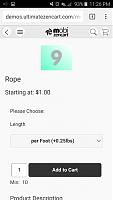
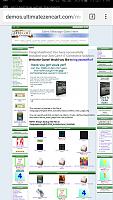
Here are some pictures of the theme on as shown on Android using a Samsung Galaxy S6
- picture of the home page on an Android using a Samsung Galaxy S6
- picture of s product page after following a link from the home page
- picture of the site after tapping on the "View Desktop Site" link at the bottom


Thread: MobiZenCart
Results 1 to 10 of 45
Hybrid View
-
12 Oct 2015, 04:46 AM #1
 Zen Follower
- Join Date
- Jun 2008
- Location
- Osprey, Florida
- Posts
- 151
- Plugin Contributions
- 14
 Re: MobiZenCart
-
12 Oct 2015, 03:21 PM #2
New Zenner
- Join Date
- Oct 2015
- Posts
- 2
- Plugin Contributions
- 0
Re: MobiZenCart
Hello, is this work with Zen Cart v1.3.9h?
-
12 Oct 2015, 05:40 PM #3
Zen Follower
- Join Date
- Jun 2008
- Location
- Osprey, Florida
- Posts
- 151
- Plugin Contributions
- 14
Re: MobiZenCart
No, I'm sorry. You could use a file comparison software to merge the changes. Compare the theme to a clean 1.3.9h installation and see what code doesn't belong there in order to make the appropriate changes. Most of the files are template based, by that I mean they use the template override system and will not interfere with any other theme.
Those that are core file will more than likely not interfere either since they will only override the display when viewed on mobile devices.
-
22 Oct 2015, 01:04 PM #4
New Zenner
- Join Date
- Dec 2009
- Posts
- 32
- Plugin Contributions
- 0
Re: MobiZenCart
Hi
I am trying out Mobizen Cart and so far it's great.
I have a few questions that I can't find an answer to in the read me file.
1. On my phone the icons for the menu, shop and search are not displaying. I think they use a font but when I look at the source code I don't see a link to a stylesheet for the fonts. How should those icons be loading into the template? i checked and the fonts are uploaded to the templates folder, the mobizencart one.
2. Second question is how to I get the Main Page text to show on the mobile device?
On the help file it says to open it in the define pages editor:
"If you don't need to modify the file, skip the textbox editor and simply hit the save button.
Your page on the mobile theme has been created and saved to the includes/languages/english/html_includes/mobizencart folder"
I did this but the page is not saved in the folder. the permissions on the folder is 755.
What am I doing wrong there please?
Thanks
B
-
22 Oct 2015, 08:34 PM #5
Zen Follower
- Join Date
- Jun 2008
- Location
- Osprey, Florida
- Posts
- 151
- Plugin Contributions
- 14
Re: MobiZenCart
It all sounds like not all of the files uploaded correctly. Try downloading the plugin again and make sure to upload all of the files to your installation.
The icons I use in that theme are found here: http://ionicons.com. The css file needs to upload and so does the fonts folder inside templates/mobizencart.
As for the main page. Make sure that the define_pages_editor.php file inside your admin folder overrides the one in your current installation. Make a backup of yours first. If you have made changes to your file, make sure to compare the files and add the code to yours. Incidentally that file was a contribution from Scott Wilson (thatsoftwareguy). That file saves a lot of work, no pun intended. If your installation is not saving the files then simply add a copy of your define_main_page.php to the languages/english/html_includes/mobizencart folder.
A link to your site would help also in order to inspect the source code.
Hope that helps.
-
28 Oct 2015, 10:32 AM #6
New Zenner
- Join Date
- Dec 2009
- Posts
- 32
- Plugin Contributions
- 0
Re: MobiZenCart
Thanks I'll try that.
B
-
3 Nov 2015, 05:25 PM #7
Zen Follower
- Join Date
- Jul 2010
- Location
- L'Aquila
- Posts
- 113
- Plugin Contributions
- 1
MobiZenCart with seo url
Hi I installed mobizen carts, and even seo url latest version, activating both will not work while the MObizencart disabling seo url works, is there any configuration to be changed? Thank you
-
4 Nov 2015, 01:42 AM #8
Zen Follower
- Join Date
- Jun 2008
- Location
- Osprey, Florida
- Posts
- 151
- Plugin Contributions
- 14
Re: MobiZenCart with seo url
That is not going to work. MobiZenCart is built with jQuery Mobile which kinda' rewrites the URL.
-
4 Nov 2015, 06:34 PM #9
Zen Follower
- Join Date
- Jul 2010
- Location
- L'Aquila
- Posts
- 113
- Plugin Contributions
- 1
Re: MobiZenCart with seo url
Thanks because Mobizen Cart and Seo url not working together?
-
4 Feb 2016, 03:24 PM #10
Totally Zenned
- Join Date
- Aug 2007
- Location
- Amarillo, Tx
- Posts
- 1,674
- Plugin Contributions
- 0
Re: MobiZenCart
ultimate_zc,
I am using this plugin "Easy Google Analytics" I have copied some files from that into the "MobiZenCart" template folder and everything is working fine for any mobile devices. But I have one issue, when a customer touches a screen and it changes pages on the Google Analytics doesn't show what pages they went to on there device. I hope you know what I am getting at.
Thanks.
-Wade


 Reply With Quote

