

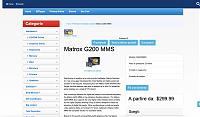
Hello, how to adjust the width of the right columns
and on the left, especially the one on the right in the product page which is really too wide, see attached image

Results 1 to 10 of 1685
Hybrid View
-
13 Nov 2022, 09:12 AM #1
 Zen Follower
- Join Date
- Jan 2010
- Location
- France
- Posts
- 291
- Plugin Contributions
- 0
 Re: ZCA Bootstrap 4 Template [Support Thread]
Giovanni,
Re: ZCA Bootstrap 4 Template [Support Thread]
Giovanni,
Zen Cart V2.1
-
13 Nov 2022, 04:23 PM #2
Zen Follower
- Join Date
- Jan 2010
- Location
- France
- Posts
- 291
- Plugin Contributions
- 0
Re: ZCA Bootstrap 4 Template [Support Thread]
Hello, I would like to know how to change color example h1 only on the product page, the shopping cart page, I know how to do it for the home page but not for the other pages.
PHP Code:<?php
// -----
// Set a different color for the h1 tag only on the home page.
//
if ($this_is_home_page) {
?>
<style>
h1 {color: red;}
</style>
<?php
}
// -----
// Load an additional stylesheet.
//
?>Giovanni,
Zen Cart V2.1
-
13 Nov 2022, 04:44 PM #3
Administrator
- Join Date
- Feb 2006
- Location
- Tampa Bay, Florida
- Posts
- 10,536
- Plugin Contributions
- 127
Re: ZCA Bootstrap 4 Template [Support Thread]
The product page and shopping cart page have their own css files you can set up.
includes/templates/bootstrap/css/shopping_cart.css
includes/templates/bootstrap/css/product_info.cssThat Software Guy. My Store: Zen Cart Support
Available for hire - See my ad in Services
Plugin Moderator, Documentation Curator, Chief Cook and Bottle-Washer.
Do you benefit from Zen Cart? Then please support the project.
-
13 Nov 2022, 06:12 PM #4
Zen Follower
- Join Date
- Jan 2010
- Location
- France
- Posts
- 291
- Plugin Contributions
- 0
Re: ZCA Bootstrap 4 Template [Support Thread]
By the way what I want to know is how to replace if ($this_is_home_page) with the name of the page example if ($this_is_product_info_page) does not work as well as ($this_is_shopping_cart_page) does not work. it's not to complicate my life but, it will allow me to do a lot of things if I know the exact name of the page to put on if ($this_is_home_page).
Giovanni,
Zen Cart V2.1
-
13 Nov 2022, 06:28 PM #5
Administrator
- Join Date
- Feb 2006
- Location
- Tampa Bay, Florida
- Posts
- 10,536
- Plugin Contributions
- 127
Re: ZCA Bootstrap 4 Template [Support Thread]
$this_is_home_page is a special case; it's not done for other pages.
If you want to check the name of the current page you can do so using the variable $current_page_base.
if ($current_page_base == 'shopping_cart') {
...
}
if ($current_page_base == 'product_info') {
...
}
but if all you're doing is adding page-specific CSS, you'd be better off doing it the way I suggested; that way you can upgrade your template at any time and not lose these customizations.That Software Guy. My Store: Zen Cart Support
Available for hire - See my ad in Services
Plugin Moderator, Documentation Curator, Chief Cook and Bottle-Washer.
Do you benefit from Zen Cart? Then please support the project.
-
13 Nov 2022, 08:29 PM #6
Zen Follower
- Join Date
- Jan 2010
- Location
- France
- Posts
- 291
- Plugin Contributions
- 0
Re: ZCA Bootstrap 4 Template [Support Thread]
Exact it is so as not to touch the basic model. Thank you, it worked for me
, if now I want to put 2 or more pages for exampleHTML Code:if ($current_page_base == 'product_info') { +HTML Code:if ($current_page_base == 'product_info PLUS another page, ') {Giovanni,
Zen Cart V2.1
-
13 Nov 2022, 08:55 PM #7
Administrator
- Join Date
- Feb 2006
- Location
- Tampa Bay, Florida
- Posts
- 10,536
- Plugin Contributions
- 127
Re: ZCA Bootstrap 4 Template [Support Thread]
The PHP syntax for this would be
if ($current_page_base == 'product_info' || $current_page_base == 'some-other-page' ) {That Software Guy. My Store: Zen Cart Support
Available for hire - See my ad in Services
Plugin Moderator, Documentation Curator, Chief Cook and Bottle-Washer.
Do you benefit from Zen Cart? Then please support the project.

 Reply With Quote
Similar Threads
-
v155 Clone a Template [Support Thread]
By lat9 in forum Addon Admin ToolsReplies: 107Last Post: 11 Nov 2024, 08:28 PM -
v150 aBagon Template Support Thread
By VJef in forum Addon TemplatesReplies: 54Last Post: 5 Sep 2020, 08:44 PM -
v155 ZCA Bootstrap Template 1.0 (BETA)
By rbarbour in forum Addon TemplatesReplies: 74Last Post: 25 Apr 2018, 07:05 PM -
TB Sempre Template Support Thread
By brandonturpin in forum Addon TemplatesReplies: 48Last Post: 19 Mar 2015, 06:33 PM -
Wallet Template - Support Thread
By zami in forum Addon TemplatesReplies: 45Last Post: 25 Mar 2010, 10:15 PM

