
Question: is there already built-in settings to have the Add to Cart Box float at the top of the page of the mobile menu (in vertical/portrait orientation)?
If the phone is sideways (landscape mode), it's perfect because the Add to Cart Box floats on the right side of the screen.
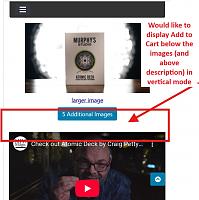
But if the phone is in vertical/portrait mode, the Add to Cart Box is at the very bottom of the product page. I am getting a lot of customers who think the product is available and asking questions, because they aren't scrolling to the very bottom and seeing that it's out of stock or discontinued.
Just wondering if that functionality already exists (to both display the Add to Cart box near the top of the product description when in vertical screen orientation), or if it's something I can add through CSS (making a block of code hidden or visible depending on the size of the display, etc).

Results 1 to 10 of 1673
Hybrid View
-
6 Mar 2025, 10:38 PM #1
 Totally Zenned
- Join Date
- Aug 2004
- Posts
- 818
- Plugin Contributions
- 0
 Re: ZCA Bootstrap Template
Last edited by Jeff_Mash; 6 Mar 2025 at 10:42 PM.
- Jeff
-
7 Mar 2025, 01:16 PM #2
Administrator
- Join Date
- Sep 2009
- Location
- Stuart, FL
- Posts
- 13,874
- Plugin Contributions
- 96
Re: ZCA Bootstrap Template
That would require moving the various block-elements of the tpl_product_info_display.php template around in your site's "clone". Originally Posted by Jeff_Mash

-
8 Mar 2025, 03:08 PM #3
Administrator
- Join Date
- Sep 2009
- Location
- Stuart, FL
- Posts
- 13,874
- Plugin Contributions
- 96
Re: ZCA Bootstrap Template
v3.7.6 of the ZCA Bootstrap Template is now available for download: https://www.zen-cart.com/downloads.php?do=file&id=2191
This release contains changes for the following GitHub issues:
#471: Correct XSS vulnerabilty in Bootstrap carousels.
#472: Correct duplicate ID featuredCenterbox-card-header in featured-categories centerbox.
#468: Retire use of E_USER_ERROR; deprecated for PHP 8.4.
#473: Add icons to upper nav-bar links.
#470: Correct font-awesome class used for front-page slider.
#474: Correct action used for product notifications on the checkout_success page.
#476: Add about_us page-link to site_map page listing.
#477: Use consistent heading numbers for checkout_shipping_address page.
-
3 Apr 2025, 07:00 PM #4
Totally Zenned
- Join Date
- Aug 2004
- Posts
- 818
- Plugin Contributions
- 0
Re: ZCA Bootstrap Template
Can someone tell me how (if possible) to display a Shopping Cart icon in the top menu header for MOBILE devices?
In regular desktop mode, if someone adds an item to their shopping cart, the Shopping Cart link will display. But in mobile devices, if someone adds an item, there is no icon for them to see and click.
Instead, they have to click the menu (three horizontal lines) and then go to the Shopping Cart. It would be easier if the template would reduce this to one click instead of two.
We have had some customers complain that they couldn't find how to checkout, and we figured out it's because they continue browsing for more items, and then forget how to get back to the Shopping Cart. Having a little icon at the top of the mobile menu would eliminate this issue.
I didn't see if there was any configuration item in the Admin Menu to allow that to display or not.- Jeff
-
10 Apr 2025, 12:57 AM #5
Zen Follower
- Join Date
- Aug 2020
- Location
- Richarson
- Posts
- 158
- Plugin Contributions
- 0
Re: ZCA Bootstrap Template
Using this template with ZC 2.1.0. Looks great !
I am trying to display EZ Pages and possibly banners in the header instead of side boxes by way of layout boxes controller. I have no problem w/ search in the header, but that is the only box I am able to move to it. I have 3-6-3 set-up on template settings for columns and have reset the boxes, but still the only box that will go to header boxes is the search box. And for clarification, when I try and drag the box over I get a small icon to display not allowed icon. What am I missing? Anyone? Thanks !Last edited by chuckrey; 10 Apr 2025 at 01:01 AM.
-
10 Apr 2025, 02:36 AM #6
Totally Zenned
- Join Date
- Jan 2004
- Location
- N of San Antonio TX
- Posts
- 9,684
- Plugin Contributions
- 11
Re: ZCA Bootstrap Template
Not really a bootstrap item as both are controllerd by your Configuration menu.
Under Configuration >> EZ-Pages Settings, you can turn the Header Bar on or off.
https://docs.zen-cart.com/user/admin...-banner-groups gives a good explanation of how to position banners and a visualization of where the three header/footer options can be placed.A little help with colors.
myZenCartHost.com - Zen Cart Certified, PCI Compatible Hosting by JEANDRET
Free SSL & Domain with semi-annual and longer hosting. Updating 1.5.2 and Up.
-
10 Apr 2025, 02:43 AM #7
Zen Follower
- Join Date
- Aug 2020
- Location
- Richarson
- Posts
- 158
- Plugin Contributions
- 0
Re: ZCA Bootstrap Template
Thanks for your response. I just realized it will go within the navmain bar. I was hoping to place w/ a float right within the logoWrapper. I was thinking I may need to adjust the tpl_header.php file to move that string to a new location. Does that sound right? Thanks again.

 Reply With Quote

Similar Threads
-
v155 Clone a Template [Support Thread]
By lat9 in forum Addon Admin ToolsReplies: 107Last Post: 11 Nov 2024, 08:28 PM -
v150 aBagon Template Support Thread
By VJef in forum Addon TemplatesReplies: 54Last Post: 5 Sep 2020, 08:44 PM -
v155 ZCA Bootstrap Template 1.0 (BETA)
By rbarbour in forum Addon TemplatesReplies: 74Last Post: 25 Apr 2018, 07:05 PM -
TB Sempre Template Support Thread
By brandonturpin in forum Addon TemplatesReplies: 48Last Post: 19 Mar 2015, 06:33 PM -
Wallet Template - Support Thread
By zami in forum Addon TemplatesReplies: 45Last Post: 25 Mar 2010, 10:15 PM

