
Hi DrByte, do you mean in Admin>Configuration>Customer Details? I couldn't find it in Admin->Configuration->My Store->
But yes, 'always display as pulldown' is off. Always been that way. Having it on would be very bad as non-U.S. customers cannot enter their state/province.
Not sure if you understood my issue correctly.
Something else I notice, not that I need or want this, but if I turn on 'state-always display as pull down' it always displays as pull down on the account create page, but not on the 'checkout change delivery address' page. I'm not sure if that's how it's supposed to work, but just thought I'd let you know.
Please see images below that should illustrate a little better my problem:
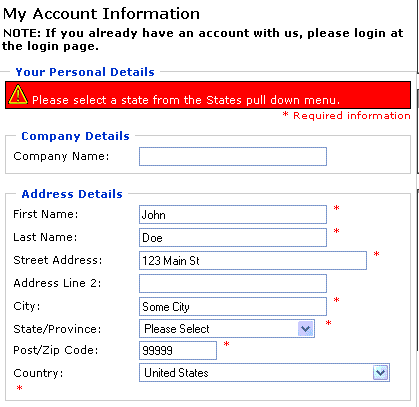
Here we see the account create page, which works great. I have entered "cal.", which ZC won't recognize because of the period. So it shows the following:
Since ZC couldn't recognize the state, it asks you to choose from a pull down. Excellent.
Now the problem comes when you change the address via the 'checkout change address' page.
Click on 'change your address' button
Checkout change address page. As you can see, I have entered "ICanEnterAnythingIwant" in the state field. If ZC was working correctly as the create account page, it would promtp me to choose from the drop down list, but it doesn't. It lets you enter anything. Even if you enter 'CA' or 'California', which is a taxed zone, ZC won't charge tax.

Results 1 to 10 of 41
Hybrid View
-
17 Jul 2006, 09:00 PM #1
 Totally Zenned
- Join Date
- Mar 2005
- Location
- California
- Posts
- 663
- Plugin Contributions
- 0
 Re: ZC 1.3.0.2 will not calculate tax, entering state/province bug
-
17 Jul 2006, 09:05 PM #2
Totally Zenned
- Join Date
- Mar 2005
- Location
- California
- Posts
- 663
- Plugin Contributions
- 0
Re: ZC 1.3.0.2 will not calculate tax, entering state/province bug
...continued previous post, it would only let me include 4 images, I needed to post one more.

So ZC didn't prompt to choose from a pull down and this is the issue I'm having.
My cart will let you continue the checkout process like this, which is good because I've seen many carts that will not let you go past the first step of the checkout process if you change the address this way, even if the address is exactly the same as you had it originally.
-
18 Jul 2006, 05:05 PM #3
New Zenner
- Join Date
- Jul 2006
- Posts
- 5
- Plugin Contributions
- 0
Re: ZC 1.3.0.2 will not calculate tax, entering state/province bug
I'm not sure I do have the same problem, but it seems so. When I create a new account, log in with that account, no tax will show, even the option 'show tax... in the configuration - my store'.
I think it comes due a bug or other shortcoming that I can't explain. It something with the State field for the customer details. ENTRY_ZONE_ID. But I don't get it to work.
In brief:
- logged out: all prices with tax showing ok
- logged in with some test accounts I made; no tax at all shows up.
Hopefully someone can help us with this to fix the situation
TIA
-
18 Jul 2006, 07:27 PM #4
Totally Zenned
- Join Date
- Mar 2005
- Location
- California
- Posts
- 663
- Plugin Contributions
- 0
Re: ZC 1.3.0.2 will not calculate tax, entering state/province bug
fosmaster, yours sounds like a different issue, more of a configuration thing. But I'm sure that if you are using ZC 1.3.0.2, you should have the same problem I'm describing, all the ZC 1.3.0.2 I've seen so far have this problem, so in that respect, I'm glad it's just not me.
It puzzles me though that no one else has reported this yet. Perhaps they've just been lucky enough that they're customers haven't changed the address during checkout and aren't from a taxable zone.
Not me though, I've had to put my ZC 1.3.0.2 store down for maintenance and I'm using the old 1.2.6 until I can get this issue fixed.
-
26 Jul 2006, 02:48 PM #5
New Zenner
- Join Date
- May 2005
- Posts
- 18
- Plugin Contributions
- 0
Re: ZC 1.3.0.2 will not calculate tax, entering state/province bug
Same exact issue here. If a new account is created using the taxable zone - tax is added properly.
If the customer, for example, is returning (already has an account) and now needs to enter a NEW address that should be taxable - it does not total up the tax.
We go live tomorrow morning - was not expecting this issue. Stinks. LOL
-
29 Jul 2006, 10:36 AM #6
New Zenner
- Join Date
- Mar 2006
- Location
- Durham, UK
- Posts
- 84
- Plugin Contributions
- 0
Re: ZC 1.3.0.2 will not calculate tax, entering state/province bug
Yep! Exactly the same issue here too. It seems that customers who change Shipping or Payment Addresses on checkout don't get taxed.

As far as I understand it, if zones for a country are defined, then what ought to happen is that the id number of the zone is entered into the entry_zone_id field in the address_book table. Whereas what seems to be happening is that changing address on checkout is adding a text string to the entry_state field - which should happen if no zones for that country are defined.
I've tried looking through the code, but there are so many complicated and interconnected layers of logic that all I can see at the moment is fog.
At first sight, it looks like most of the relevant code in the 1.2 series used to reside in:
includes\modules\pages\checkout_payment_address\header_php.php
and
includes\modules\pages\checkout_shipping_address\header_php.php
This was moved in the 1.3 series to:
includes\modules\checkout_new_address.php
And the code in that file was changed quite radically from 1.3.1 to 1.3.2.
That's as far as I've got at the moment I'm afraid. But until this issue is resolved we can't really risk going live with any 1.3.0.2 installation, so 'll keep looking in in the hope that something might click. If there are any Zen Masters around at the moment - we sure could do with your help on this one
-
30 Jul 2006, 12:23 AM #7
New Zenner
- Join Date
- Jul 2006
- Posts
- 3
- Plugin Contributions
- 0
Re: ZC 1.3.0.2 will not calculate tax, entering state/province bug
I just upgraded to to 1.3.0.2, a huge accomplishment for a newbie like me.
I've received several orders and have experienced this same issue. My situation is a bit worse because I only ship within my state and customers constantly change the shipping address during the checkout process.
I sell in large volume and make little profit, usually 5%. I collect 8.25% sales tax. So I would be losing 3.25% each time I don't collect sales tax. So far I have cancelled all orders that should've charged and didn't charge sales tax.
Hopefully the customers will understand and not take their business elsewhere.
I will try to install and older version until there's a fix for this.
Honestly, I can't help but feel like we are being ignored. This is the thread with most views in the first page, yet there has been no reply or at least acknowledgement whether this is a bug or just a configuration issue.
I have seen replies to all other threads on this section, even the ones that don't belong here, but no reply or acknowledgement to this so far.
I just would like to know if this is a bug or we are just making some configuration mistake. If this is a configuration mistake, please, do tell us.
Do tell me that I'm too dumb and that I don't know where to look, I don't mind, I know I'm not the brightest person when it comes to this.
-
19 Jul 2006, 04:25 AM #8
Sensei
- Join Date
- Jan 2004
- Posts
- 66,443
- Plugin Contributions
- 279
Re: ZC 1.3.0.2 will not calculate tax, entering state/province bug
The problem reported by tj1 appears to only occur when entering a new address manually during the checkout stage.
Investigating....
Zen Cart - putting the dream of business ownership within reach of anyone!
Donate to: DrByte directly or to the Zen Cart team as a whole
Remember: Any code suggestions you see here are merely suggestions. You assume full responsibility for your use of any such suggestions, including any impact ANY alterations you make to your site may have on your PCI compliance.
Furthermore, any advice you see here about PCI matters is merely an opinion, and should not be relied upon as "official". Official PCI information should be obtained from the PCI Security Council directly or from one of their authorized Assessors.
-
19 Jul 2006, 06:14 AM #9
New Zenner
- Join Date
- Apr 2006
- Location
- Kaneohe, Hawaii USA
- Posts
- 22
- Plugin Contributions
- 0
Re: ZC 1.3.0.2 will not calculate tax, entering state/province bug
Dr Byte and Tj1,
I have to agree that this is a problem that is occuring when entering a new shipping address (intermittently for me--even with identical steps through the checkout, though). I was finally able to replicate the problem on http://MiladysGifts.com. Again, I have to say that the previous calculation errors were definitely config. and the other thread's step by step definitely cured quite a few of the glitches. Looking forward to the results of your investigation. :)
Thanks,
-Christine808's ZenCart: http://808StockPhoto.com/gallery/
Royalty Free Stock Photos at 808 Stock Photography: http://808StockPhoto.com/
-
20 Jul 2006, 11:40 PM #10
Totally Zenned
- Join Date
- Mar 2005
- Location
- California
- Posts
- 663
- Plugin Contributions
- 0
Re: ZC 1.3.0.2 will not calculate tax, entering state/province bug
Exactly. :) Originally Posted by DrByte
Have you found the cause for this yet? Can you confirm whether this is a bug or just a configuration issue.
Thanks for looking into it.



Similar Threads
-
v155 [Done v155a] State/Province dropdown is not displayed the same as other fields
By Perry D. Vogel in forum Bug ReportsReplies: 4Last Post: 9 Apr 2016, 07:53 PM -
[Not a bug] Tax bug - 1.3.9d - for country states different to where the shop is
By deviouscow in forum Bug ReportsReplies: 4Last Post: 24 Jul 2010, 01:06 PM -
1.3.37 - Manual State/Province block appears even when not required - ship estimator
By JLA in forum Upgrading from 1.3.x to 1.3.9Replies: 19Last Post: 6 Feb 2007, 03:41 AM -
Tax will not calculate
By Niaknow in forum Currencies & Sales Taxes, VAT, GST, etc.Replies: 11Last Post: 22 Aug 2006, 04:19 AM

