
There are several addons but none image related.

Results 1 to 10 of 3727
Hybrid View
-
3 Oct 2011, 07:51 PM #1

 Zen Follower
- Join Date
- Oct 2007
- Posts
- 412
- Plugin Contributions
- 0
 Re: Zen Lightbox...
-
4 Oct 2011, 05:51 AM #2
Zen Follower
- Join Date
- Oct 2007
- Posts
- 412
- Plugin Contributions
- 0
Re: Zen Lightbox...
ok, I finally got this working. Found out I had to add the rel="lightbox" to each image link for it to work.
-
8 Oct 2011, 07:20 AM #3
 New Zenner
- Join Date
- Aug 2010
- Location
- Egypt - USA
- Posts
- 86
- Plugin Contributions
- 0
Re: Zen Lightbox...
i just installed ZLB on my site and it's work fine... but there is small problem ... my product page look like this :-
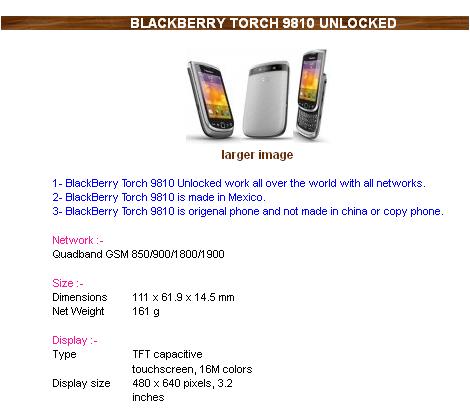
after i upload = tpl_modules_main_product_image.php
the product page is not as it was ???
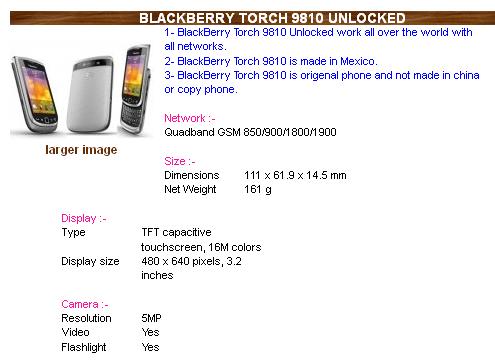
my original ( tpl_modules_main_product_image.php ) file contain :-
what should i do to make it look as it is ... and make the main image work fine with the mod ??<?php
/**
* Module Template
*
* @package templateSystem
* @copyright Copyright 2003-2005 Zen Cart Development Team
* @copyright Portions Copyright 2003 osCommerce
* @license http://www.zen-cart.com/license/2_0.txt GNU Public License V2.0
* @version $Id: tpl_modules_main_product_image.php 3208 2006-03-19 16:48:57Z birdbrain $
*/
?>
<?php require(DIR_WS_MODULES . zen_get_module_directory(FILENAME_MAIN_PRODUCT_IMAGE)); ?>
<div id="productMainImage" class="centeredContent">
<script language="javascript" type="text/javascript"><!--
document.write('<?php echo '<a href="javascript opupWindow(\\\'' . zen_href_link(FILENAME_POPUP_IMAGE, 'pID=' . $_GET['products_id']) . '\\\')">' . zen_image($products_image_medium, addslashes($products_name), MEDIUM_IMAGE_WIDTH, MEDIUM_IMAGE_HEIGHT) . '<br /><span class="imgLink">' . TEXT_CLICK_TO_ENLARGE . '<\/span><\/a>'; ?>');
//--></script>
<noscript>
<?php
echo '<a href="' . zen_href_link(FILENAME_POPUP_IMAGE, 'pID=' . $_GET['products_id']) . '" target="_blank">' . zen_image($products_image_medium, $products_name, MEDIUM_IMAGE_WIDTH, MEDIUM_IMAGE_HEIGHT) . '<br /><span class="imgLink">' . TEXT_CLICK_TO_ENLARGE . '</span></a>';
?>
</noscript>
</div>
you can check that on my site => www.srokey.infoLast edited by thunder2010; 8 Oct 2011 at 07:24 AM.
-
8 Oct 2011, 03:53 PM #4
 Totally Zenned
- Join Date
- Jul 2008
- Posts
- 772
- Plugin Contributions
- 7
Re: Zen Lightbox...
I looked at this in Firefox, IE, Chrome, and Safari. They all looked the same - like you wanted it to look.
It appears you solved your own issue. If you're seeing something different when you look at it, that's a whole other issue unrelated to this mod.
Good luck and happy zenning
 Originally Posted by thunder2010

-
8 Oct 2011, 07:37 PM #5
Totally Zenned
- Join Date
- May 2010
- Location
- WA State
- Posts
- 1,678
- Plugin Contributions
- 3
Re: Zen Lightbox...
Looks like he solved it by uninstalling Lightbox.It appears you solved your own issue.
-
8 Oct 2011, 09:18 PM #6
New Zenner
- Join Date
- Aug 2010
- Location
- Egypt - USA
- Posts
- 86
- Plugin Contributions
- 0
Re: Zen Lightbox...
It's great mod. and i didn't find one better than it. So it's still there Originally Posted by RescoCCC
 , But it's only not working for the main image and work for all sup images.
-
9 Oct 2011, 12:35 AM #7
Totally Zenned
- Join Date
- Jul 2008
- Posts
- 772
- Plugin Contributions
- 7
Re: Zen Lightbox...
Originally Posted by thunder2010
Ok, so is the issue a layout issue of the product page (as indicated by your screen shots in your initial post), or is the issue one of the lightbox not functioning correctly.
If it's a function issue, please list the specific issue you are experiencing, what you've done so far to troubleshoot it, and provide a link to the exact page where the problem exists
-
8 Oct 2011, 09:15 PM #8
New Zenner
- Join Date
- Aug 2010
- Location
- Egypt - USA
- Posts
- 86
- Plugin Contributions
- 0
Re: Zen Lightbox...
Thank you for your replay Originally Posted by ScriptJunkie
,But i didn't solve it yet. I only didn't replace my [ tpl_modules_main_product_image.php ] with the one come with the mod.
that's why i posted my [ tpl_modules_main_product_image.php ] contains so any one can tell me where to add the ZLB cod for this file in my file.
-
10 Oct 2011, 02:57 AM #9
 Zen Follower
- Join Date
- Jan 2010
- Location
- Broome
- Posts
- 325
- Plugin Contributions
- 0
Re: Zen Lightbox...
Hi client is not using images so I wish to uninstall lightbox .. havent been able to find any instructions on how to do this. I know there is an uninstall sql but not really sure whether do this from my php my admin or from zen cart admin and not completely sure how to do it. Thanks for any instructions
-
10 Oct 2011, 02:02 PM #10
Totally Zenned
- Join Date
- Jul 2008
- Posts
- 772
- Plugin Contributions
- 7
Re: Zen Lightbox...
Hi Amanda,
The first thing you need to do is find out what version of Zen Lightbox your client is using...as the uninstall sql will be version specific.
Next, visit the ZLB page of the community addon section of the forum. There you will see a list of ZLB versions, each with its own download link.
The versions are listed in chronological order, starting with the most recent version at the top. If your client is using an older version, scroll down until you find it.
Use the download link to grab the installation package zip file. The uninstall sql file will be in that package.
You can run the uninstall.sql either from the store admin or from phpMyAdmin. Some sites (including my own) have had trouble with this mod's sql files properly installing/uninstalling from the store admin and have had to run the file from phpMyAdmin.
If you know how and feel comfortable usingphpMyAdmin, I recommend doing it that way to avoid any snags.
Once you've run the uninstall sql file, simply delete the ZLB files. To know which files are the ZLB files, have a look at the Read_Me file that comes with the download pack.
Or - just read the Read_Me and follow the installation instructions in reverse
Originally Posted by wotnow

 Reply With Quote
Similar Threads
-
Free Shipping Rules addon [Support Thread]
By numinix in forum Addon Shipping ModulesReplies: 36Last Post: 2 Dec 2016, 01:56 PM -
v151 Reviews Reply addon [Support Thread]
By mikestaps in forum All Other Contributions/AddonsReplies: 9Last Post: 17 Oct 2014, 01:29 AM -
Jquery Lightbox [Support thread]
By yellow1912 in forum All Other Contributions/AddonsReplies: 257Last Post: 2 Aug 2012, 10:57 PM -
File Upload Required addon [Support Thread]
By 1100101 in forum All Other Contributions/AddonsReplies: 21Last Post: 10 Dec 2011, 03:00 AM -
[Support Thread] IE only JavaScripts and Stylesheets Addon
By Meshach in forum All Other Contributions/AddonsReplies: 16Last Post: 31 May 2011, 08:18 PM

