

I have a site that I am porting to Zen Cart (http://classygroundcovers.com -> http://classygroundcovers.com/cart/i...=index&cPath=1).
It needs categories to be displayed with both latin and common names (on separate lines for readability).
There are two Categories side boxes on the left of the ZC site presently:
- the one at the bottom works OK and displays multiple lines per category
- the one at the top is the css flyout version that I am trying to get working, it displays only the first line of each category when you mouseover All Types
Can anyone advise me how to get Css Flyout Categories to display categories on more than one line? (like the category box below)

Thread: Support for CSS Flyout Menu
Results 1 to 10 of 754
Hybrid View
-
5 Aug 2007, 05:47 AM #1
 New Zenner
- Join Date
- Aug 2004
- Posts
- 28
- Plugin Contributions
- 0
 How to make Css Flyout Categories Menu support multiple lines?
Classy Groundcovers (current) -> Classy Groundcovers (Zen)
How to make Css Flyout Categories Menu support multiple lines?
Classy Groundcovers (current) -> Classy Groundcovers (Zen)
-
5 Aug 2007, 09:42 PM #2
Totally Zenned
- Join Date
- Feb 2007
- Location
- South Florida, USA
- Posts
- 1,374
- Plugin Contributions
- 4
creating a separator
I installed this mod without a problem, and it works fine.
However, I noticed that it loaded a blank tab, and after that, the tabs for "Specials...", "New Products...", etc.
I would like to get rid of this blank tab and introduce in its place some nice-looking separator.
How do I do that?
Also, I noticed that "Featured Products..." is too long and overlaps on the image. Maybe I could fix this by adding a > instead of the ...
How do I do that?
Thanks.
-
5 Oct 2007, 12:11 PM #3
New Zenner
- Join Date
- Sep 2007
- Posts
- 58
- Plugin Contributions
- 0
Re: Support for CSS Flyout Menu
Hi,
I'm sorry to ask a question that I know has been raised a hundred times before - my problem is that none of the answers that I've seen posted have worked for me.
I'm using CSS Flyout Menu v1.3.0.3.2. I've installed it and it's working perfectly on Firefox, but the subcategories refuse to appear in IE6. So far I have:
a) copied csshover.htc into both my main directory and into includes
b) ensured that all references in includes/configure.php and admin/includes/configure.php to http(s)://www.possumbooks.com include the full "www.possumbooks.com" and not just the "possumbooks.com"
c) updated the first few lines of stylesheet_categories_menu.css to include the full path
All with no success. If anyone out there has any ideas on what I should try next I'd REALLY appreciate it.Code:*/body { behavior: url(http://www.possumbooks.com/includes/csshover.htc); /* WinIE behavior call */}
Thanks,
Possum
www.possumbooks.com
-
5 Oct 2007, 12:32 PM #4
New Zenner
- Join Date
- Sep 2007
- Posts
- 58
- Plugin Contributions
- 0
Spacing between subcategory menus
Hi again,
I've been struggling to get the same vertical spacing between the subcategory items as appeared for the main categories. Based on the screenshot that came with the download this no-vertical-space layout is the default.
I've been playing with the following code but with no luck.
This is the css I think I'm supposed to be updating.
Can anyone help out with suggestions?Code:div#nav-cat ul.level2 {margin: -1px 0 0 -1px; padding: 0; width: 150px; background-color: transparent; border: none; }
Thanks,
Possum.
-
6 Oct 2007, 09:28 PM #5
New Zenner
- Join Date
- Sep 2007
- Posts
- 8
- Plugin Contributions
- 0
Re: Support for CSS Flyout Menu
Hello.
How it is possible to change THIS design of menu

to this?
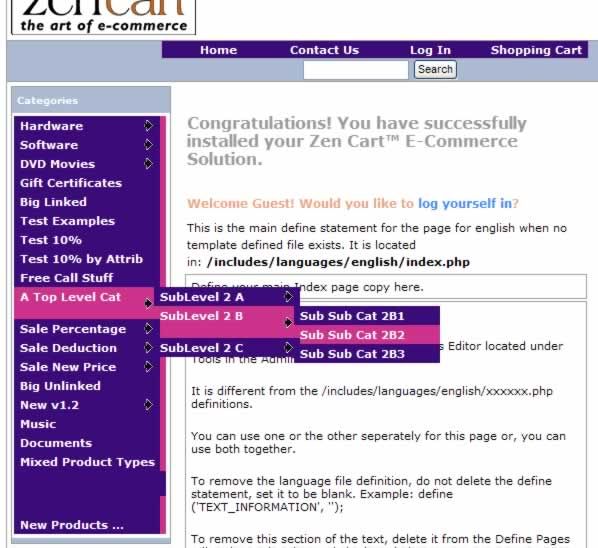
Thank you.
Nickolay.
-
7 Jun 2008, 04:42 PM #6
Totally Zenned
- Join Date
- Dec 2006
- Location
- Seligman, MO U.S.A.
- Posts
- 2,101
- Plugin Contributions
- 5
Re: Support for CSS Flyout Menu
So sorry, everyone. I was out of commission for a while, but I'm back, and stronger than ever. Everyone who has posted on this thread, let me know if you're still here and Zenning, and if you're still having these issues, or if you've got them resolved by now.
Thank you.Teach them to shop and they will shop today;
Teach them to Zen and they will OWN a shop tomorrow!
-
7 Jun 2008, 06:02 PM #7
Zen Follower
- Join Date
- Apr 2008
- Posts
- 193
- Plugin Contributions
- 0
Re: Support for CSS Flyout Menu
This is my current menu (i cant take a screen grab while hovering so i’ve photoshoped it, but you get the idea);
http://www.jameschetwood.com/css/men1.jpg
This is the menu Im trying to make;
http://www.jameschetwood.com/css/men2.jpg
How can i get the text for each link in the fly out menu to alight to the right of ‘More Gems’?
I made this with
css_horizontal_dynamic_menu_pauls_edition_1-1
-
12 Jun 2008, 07:28 AM #8
Totally Zenned
- Join Date
- Dec 2006
- Location
- Seligman, MO U.S.A.
- Posts
- 2,101
- Plugin Contributions
- 5
Re: Support for CSS Flyout Menu
Nickolay, go to includes/templates/YOUR_TEMPLATE/css/stylesheet_categories_menu.css and over-write ALL the code in there with this:
Code:body { behavior: url(includes/csshover.htc); } /* WinIE behavior call */ div#nav-cat { margin-top: 0em; background-color: #838367; width: 95%; margin-left: auto; margin-right: auto; font-weight: bold; font-size: 1.0em; } div#nav-cat ul { margin: 0; padding: 0; width: 100%; background-color: #838367; z-index: 1000; /* border: 1px solid #AAA;*/ } div#nav-cat ul.level2 {background-color: #c65928; width: 180px;} div#nav-cat ul.level3 {background-color: #c65928;} div#nav-cat ul.level4 {background-color: #c65928;} div#nav-cat ul.level5 {background-color: #c65928;} div#nav-cat ul.level6 {background-color: #c65928;} div#nav-cat li { z-index: 1; position: relative; list-style: none; margin: 0; margin-top: 2px; /* change it to whatever space you want to put space between buttons*/ border-bottom: 1px solid #CCC; /* <---this line may help or hinder IE menu shifting issues */ } div#nav-cat li li { margin: 0; /* this overrides the margin-top in the declaration above */ } div#nav-cat li:hover {background-color: #c65928;} div#nav-cat li.submenu {background-color: #838367;} div#nav-cat li.submenu:hover {background-color: #c65928;} div#nav-cat li a { display: block; padding: 0.25em 0 0.25em 0.5em; text-decoration: none; width: 99%; color: white; } div#nav-cat>ul a { width: auto; } div#nav-cat ul ul { position: absolute; top: 0; left: 100%; display: none; z-index: 1000; } div#nav-cat ul.level1 li.submenu:hover ul.level2, div#nav-cat ul.level2 li.submenu:hover ul.level3, div#nav-cat ul.level3 li.submenu:hover ul.level4, div#nav-cat ul.level4 li.submenu:hover ul.level5, div#nav-cat ul.level5 li.submenu:hover ul.level6 { display:block; background-color: #756783; }
That is one I just done with solid color backgrounds, so it won't give you the little arrows, as they are images. But it will give you solid background colors that will be a LOT easier for you to work with. If you do want those arrows, then just change images from the ones that's included to a couple of arrows. Then, you'll have to play with the margins, paddings, and such to make it work for you. That's the OLD-OLD version of the menu. I'm currently working on the next version for 1.3.8.
Hope this helpsTeach them to shop and they will shop today;
Teach them to Zen and they will OWN a shop tomorrow!
-
12 Jun 2008, 07:59 AM #9
Totally Zenned
- Join Date
- Dec 2006
- Location
- Seligman, MO U.S.A.
- Posts
- 2,101
- Plugin Contributions
- 5
Re: creating a separator
ckosloff, First of all, nice to see you're still around. Been a long time. Originally Posted by ckosloff

Now, go to includes/templates/YOUR_TEMPLATE/templates/tpl_categories_css.php and find this line (around 27-28):
Code:if (SHOW_CATEGORIES_BOX_SPECIALS == 'true' or SHOW_CATEGORIES_BOX_PRODUCTS_NEW == 'true') { $content .= '<ul class="level1"><li><a href=""> </a></li></ul>';
Now, take out the (---<ul class="level1"><li><a href=""> </a></li></ul>----) to make this whole section look like this:
And, there ya' go........blank tab gone! You also mentioned putting something else there? Sure you can. Anything you want. Want a link saying "Zen-Cart Rules!" with a link leading to Zen-Cart? just put it in your code, like this:Code:if (SHOW_CATEGORIES_BOX_SPECIALS == 'true' or SHOW_CATEGORIES_BOX_PRODUCTS_NEW == 'true') { $content .= '';
That will give you a nice little link to ZC that reads Zen-Cart Rules!Code:if (SHOW_CATEGORIES_BOX_SPECIALS == 'true' or SHOW_CATEGORIES_BOX_PRODUCTS_NEW == 'true') { $content .= '<ul class="level1"><li><a href="http://www.zen-cart.com">Zen-Cart Rules!</a></li></ul>';
Note: If you don't add the "http://" to the URL, it will be treated as an internal link, and not be resolved.
Yes, you can also put an image in there, if you like.
Hope this helps.Teach them to shop and they will shop today;
Teach them to Zen and they will OWN a shop tomorrow!
-
12 Jun 2008, 02:00 PM #10
Totally Zenned
- Join Date
- Feb 2007
- Location
- South Florida, USA
- Posts
- 1,374
- Plugin Contributions
- 4
Re: Support for CSS Flyout Menu
Thanks for all the help.
Sure been a long time, but your post comes in right on time.
I am planning to send online the updated site (1.3.8a) this weekend.
After that, I will certainly have to look into more advanced customization, including a better menu.
I will play around with your suggestions and see what I can come up with.
Actually I wasn't thinking of a link nor an image, but an HTML or CSS horizontal ruler to put in between.

 Reply With Quote

Similar Threads
-
v151 How to uninstall CSS Horizontal Drop Down Menu (CSS Flyout Header 1.5)
By cmike in forum Templates, Stylesheets, Page LayoutReplies: 3Last Post: 15 Feb 2014, 07:39 AM -
Flyout Menu CSS For My Template.
By NathanLee0921 in forum Templates, Stylesheets, Page LayoutReplies: 1Last Post: 26 May 2010, 01:24 AM -
Extra text or image inbetween categories for css flyout menu?
By arniesbarmyarmy in forum Addon SideboxesReplies: 0Last Post: 23 Nov 2009, 10:30 AM -
css flyout menu (for side nav)
By gsdcypher in forum General QuestionsReplies: 0Last Post: 3 Dec 2007, 12:10 AM

