
I cannot find the first part anywhere in the file... is there something new since this post was made?Originally Posted by
[B

Thread: Add a field into create account
Results 81 to 90 of 138
-
21 Jan 2010, 07:50 PM #81
 New Zenner
- Join Date
- Oct 2009
- Posts
- 53
- Plugin Contributions
- 0
 Re: Add a field into create account
-
27 Jan 2010, 11:40 PM #82
New Zenner
- Join Date
- Jan 2007
- Posts
- 54
- Plugin Contributions
- 0
Re: Add a field into create account
Someone asked in an earlier post about getting a javascript error for drop down menus in create account. I manage to do this for the How did you hear about us add on drop down menu as follows:
1. First install How did you hear about us add on
2. Then find
/includes/languages/YOURTEMPLATE/english.php
Search for:
define('ENTRY_REFERENCE_FROM', 'How did you hear about us?');
…right after that line enter the following…
define('ENTRY_REFERENCE_FROM_ERROR', 'You must select a choice from How did you hear about us? pull down menu.');
3. Then find
/includes/modules/pages/create_account/jscript_form_check.php
Search for:
check_select("country", "", "<?php echo ENTRY_COUNTRY_ERROR; ?>");
…right after that line enter the following…
check_select("source", "", "<?php echo ENTRY_REFERENCE_FROM_ERROR; ?>");
That should give a java script error for the dropdown menu itself.
However, I need some help to do a javascript error if someone chooses the other option from the how did you hear about us drop down menu but leaves the other field blank. Any help would be greatly appreciated.
-
8 Feb 2010, 08:10 PM #83
Zen Follower
- Join Date
- Jun 2009
- Location
- NC
- Posts
- 174
- Plugin Contributions
- 1
Re: Add a field into create account (Make Dropdown??)
I've noticed previous posts associated with this particular question, but no answers to the issue.
I have done what was outlined in this thread to the letter, and I have successfully created a "free input field" (as it was called earlier in this thread) that is present on the Registration page, and inserts its respective data into the database. But, I'm curious on how to make it a dropdown. We're a medical supply company and would like to enable facilities to list their specialty to better target email marketing campaigns.
Any help would be greatly appreciated,
-
10 Feb 2010, 08:06 PM #84
Zen Follower
- Join Date
- Jun 2009
- Location
- NC
- Posts
- 174
- Plugin Contributions
- 1
Re: Add a field into create account
So, no takers, huh? Well, if and when I figure it out, I'll post the solution.
-
14 Feb 2010, 02:17 AM #85
New Zenner
- Join Date
- Jan 2007
- Posts
- 54
- Plugin Contributions
- 0
Re: Add a field into create account (Make Dropdown??)
Hi, Originally Posted by jdw1979

You could probably figure this out with the how did you hear about us add on and this thread. The how did you hear about us add on includes a drop dow menu into the create account page. Let me know if you cannot figure it out. Thanks
-
15 Feb 2010, 02:53 PM #86
Zen Follower
- Join Date
- Jun 2009
- Location
- NC
- Posts
- 174
- Plugin Contributions
- 1
Re: Add a field into create account
I've been wrestling with this particular issue on and off for a few days now. Thank you very much for your suggestion. I've perused the mod you mentioned, and it very well could work with a little tweaking...I'll update on my progress.
-
15 Feb 2010, 06:40 PM #87
New Zenner
- Join Date
- Oct 2007
- Location
- North Carolina
- Posts
- 98
- Plugin Contributions
- 0
Re: Add a field into create account
These instructions were great. Pretty easy to implement.
BUT ...
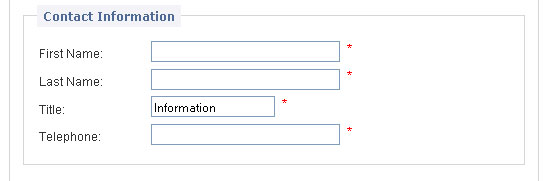
The new "Title" field I have created is pulling the value "Information" from somewhere ... and I can't figure out where.
SNAPSHOT:
PHP CODE:
<label class="inputLabel" for="title"><?php echo ENTRY_TITLE; ?></label>
<?php echo zen_draw_input_field('title', $value='', '', zen_set_field_length(TABLE_CUSTOMERS, 'customers_title', '40') . ' id="title"') . (zen_not_null(ENTRY_TITLE_TEXT) ? '<span class="alert">' . ENTRY_TITLE_TEXT . '</span>': ''); ?>
<br class="clearBoth" />
SOURCE CODE FROM BROWSER:
<label class="inputLabel" for="title">Title:</label>
<input type="size = "33" maxlength = "32" id="title"" name="title" value="Information" /><span class="alert">*</span><br class="clearBoth" />
LINK TO PAGE:
http://platinumnc.com/papers/index.p...create_account
If anyone could point me in the proper direction for a solution it would be greatly appreciated.
Thanks!
Charles
-
18 Feb 2010, 03:08 PM #88
New Zenner
- Join Date
- May 2007
- Posts
- 9
- Plugin Contributions
- 1
Re: Add a field into create account
thegoodlifestore,
here is where your "information" is coming from.
look at the code you posted for this
name="title" value="Information"
where it says value = "information" that is why it is displaying that in the box.
simply take the "information" out like this
value=""
* never mind i re-read your post and see that is coming in from the browser. you may want to look at your variables to see where it might be coming from.
you may want to look at it in multiple browsers as well and see if it shows up in all of them like that.
you may also want to look at if "title" is used anywhere else as variable.
also look at ENTRY_TITLE_TEXT, and especially in the english.php file to see if "information" is set there.
if all else fails i would re-write the code (doesn't take that long) and use different names/variablesLast edited by wolderiii; 18 Feb 2010 at 03:22 PM.
-
18 Feb 2010, 03:14 PM #89
New Zenner
- Join Date
- May 2007
- Posts
- 9
- Plugin Contributions
- 1
Re: Add a field into create account
i do have a questions of my own that no one else has seemed to ask in this thread.
when using the ENTRY_FAX_NUMBER_TEXT
example
<?php echo zen_draw_input_field('magtxt', $account->fields['customers_hear_magtxt'], 'id="magtxt"') . (zen_not_null(ENTRY_FAX_NUMBER_TEXT) ? '<span class="alert">' . ENTRY_FAX_NUMBER_TEXT . '</span>': ''); ?>
how can you make the input box bigger?
i have added quite a few entries to the create_account.php and there are a couple of them i would like to be longer or multi-line.
thanks in advance
-
12 Mar 2010, 09:42 PM #90
Zen Follower
- Join Date
- Jun 2009
- Location
- NC
- Posts
- 174
- Plugin Contributions
- 1
Re: Add a field into create account
Well, just an update. For those of you looking to create a dropdown menu on your customer registration page, I highly recommend just taking the "How Did You Hear About Us" mod from the downloads section and customize it to your needs. You can add fields, and modify fields directly from the admin, thus creating a dropdown that does get entered into the database. In order to modify the text that is actually output to the end user (both customers and administrators), you will need to modify the "referral_defines.php" file in the "extra definitions" folder. It actually is quite easy. I am currently using that mod as a way for doctors and purchasing agents to indicate what type of facility they represent and it is working flawlessly. (I'm running a medical supply site). So, I'm calling my particular problem solved, thanks to the Zen Cart community.


 Reply With Quote
Similar Threads
-
How do I add a custom pulldown field to create account page?
By margarita in forum Templates, Stylesheets, Page LayoutReplies: 1Last Post: 3 May 2008, 07:48 PM -
add a field to "create account"
By bobio in forum Templates, Stylesheets, Page LayoutReplies: 0Last Post: 26 Jan 2008, 07:35 AM -
Create account Form field allign
By manfer72 in forum Templates, Stylesheets, Page LayoutReplies: 1Last Post: 8 Jan 2008, 12:01 AM -
Create a requested field in registration account
By rosponina in forum Managing Customers and OrdersReplies: 6Last Post: 31 Jul 2006, 09:15 PM

