

Overwrite the previous folders in your root files -> admin, includes, etc. folders that isOriginally Posted by alillowr


Results 1 to 10 of 786
Hybrid View
-
22 May 2008, 03:46 AM #1
 Zen Follower
- Join Date
- Jun 2007
- Location
- Australia - Melbourne
- Posts
- 310
- Plugin Contributions
- 6
 Re: AJAX IMAGE Swapper support thread
The greatest pleasure in life is doing what people say you cannot do.
Re: AJAX IMAGE Swapper support thread
The greatest pleasure in life is doing what people say you cannot do.
Check on www.WebExtremeCustomiser.com for my modules (free contribution):
AJAX Image Swapper
AJAX Banner Swapper
Fixed Navigation
-
22 May 2008, 03:49 AM #2
Zen Follower
- Join Date
- Jun 2007
- Location
- Australia - Melbourne
- Posts
- 310
- Plugin Contributions
- 6
Re: AJAX IMAGE Swapper support thread
Updated version ready!!

AJAX Image Swapper v.3.1.
Now added with "Setup Images" button - Now if you install this module to a working site, you don't need to re-setup the images, simply click the button and trust all is well
FAQ page ready - its way easier to look for answer in the FAQ than forum I suppose? Check it out here.The greatest pleasure in life is doing what people say you cannot do.
Check on www.WebExtremeCustomiser.com for my modules (free contribution):
AJAX Image Swapper
AJAX Banner Swapper
Fixed Navigation
-
23 May 2008, 07:23 AM #3
New Zenner
- Join Date
- Apr 2008
- Posts
- 32
- Plugin Contributions
- 0
Re: AJAX IMAGE Swapper support thread
Originally Posted by jaycode
I tried purchasing this module from your site in hopes that it will work for me because v3.0 is giving me problems and is unusable, but when I go to confirm the order, it will take me to paypal with the following error:
We are unable to complete your request at this time. Please click Retry or try again later. We apologize for the inconvenience.
Message 3004
Is it not downloadable at this time?
-
23 May 2008, 03:45 PM #4
New Zenner
- Join Date
- Mar 2008
- Posts
- 15
- Plugin Contributions
- 0
Re: AJAX IMAGE Swapper support thread
Hello
Sorry for my english, I'm french
I have a problem with image swapper : I installed image swapper 3.0 which was OK, but I wanted to install the 3.1.
Since, I had to reinstall all my zencart ( I must have done something wrong.. )
)
But now, image swapper 3.1 is installed, and I don't find how to insert photo of my objects...
here is what I have :
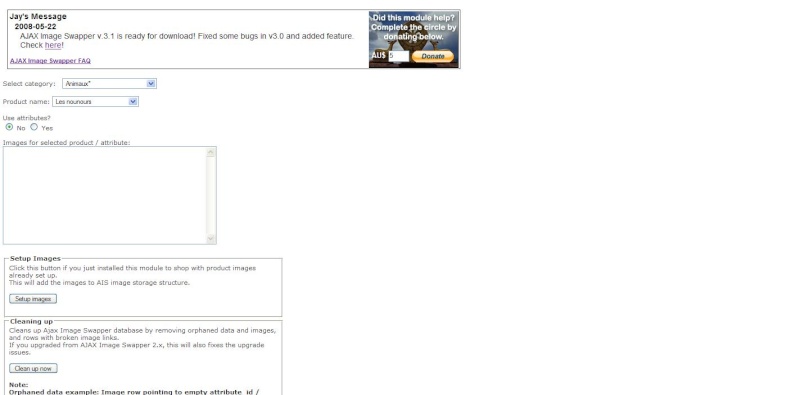
Before ( with 3.0 ), I had boxes where I could insert the files, but now, with 3.1, I have nothing. There is a big gap on the right side of my page
Did I do something wrong ? must I change something on the configuration of zencart ?
Many thanks
-
23 May 2008, 08:25 PM #5
New Zenner
- Join Date
- May 2008
- Posts
- 65
- Plugin Contributions
- 0
Re: AJAX IMAGE Swapper support thread
The right side of the page is going to be blank until you select the Yes radio button under use attributes! Also, if you're on a fresh install of zen cart remember you will need to have your attributes built before you can select them... Originally Posted by liliebrode
-
23 May 2008, 11:12 PM #6
New Zenner
- Join Date
- Mar 2008
- Posts
- 15
- Plugin Contributions
- 0
Re: AJAX IMAGE Swapper support thread
Hello Originally Posted by greydawgjr
I tried with 1 item, but with or without the Yes radio button selected, I always have the right side blank ( I created one attribute for this item )
But i thought it would works even if the yes button not selected ( description of image swapper : Ability to work with non-attribute products ). Have I misunderstood ?
-
24 May 2008, 05:57 AM #7
Zen Follower
- Join Date
- Jun 2007
- Location
- Australia - Melbourne
- Posts
- 310
- Plugin Contributions
- 6
Re: AJAX IMAGE Swapper support thread
Yes, it should be working without you needing to click the yes button beforehand. Originally Posted by liliebrode
I bet $20 you haven't copied your mootools file into the admin area.
The greatest pleasure in life is doing what people say you cannot do.
Check on www.WebExtremeCustomiser.com for my modules (free contribution):
AJAX Image Swapper
AJAX Banner Swapper
Fixed Navigation
-
24 May 2008, 07:37 AM #8
New Zenner
- Join Date
- May 2008
- Posts
- 65
- Plugin Contributions
- 0
Re: AJAX IMAGE Swapper support thread
My mistake, I had never selected a product with the no radio button selected which is when it image upload box pops in... Sorry! Originally Posted by liliebrode
-
24 May 2008, 05:46 AM #9
Zen Follower
- Join Date
- Jun 2007
- Location
- Australia - Melbourne
- Posts
- 310
- Plugin Contributions
- 6
Re: AJAX IMAGE Swapper support thread
That must've been one of those rare times when paypal server's down. Could you try again? Originally Posted by alillowr
The greatest pleasure in life is doing what people say you cannot do.
Check on www.WebExtremeCustomiser.com for my modules (free contribution):
AJAX Image Swapper
AJAX Banner Swapper
Fixed Navigation
-
24 May 2008, 02:33 PM #10
New Zenner
- Join Date
- Apr 2008
- Posts
- 32
- Plugin Contributions
- 0
Re: AJAX IMAGE Swapper support thread
I was able to purchase the 3.1 version this time and downloaded it but I still have the same issue, this did not solve anything for me exept being a dollor shorter. (Im not complaining I know there is something that I must be doing wrong because it seems to work fine for a great number of people). Originally Posted by jaycode
After following the install directions, the only place that I can see "ajax image swapper" in the zen admin is under configuration tab and nowhere else. I am in the impression that it should be in the catagory tab also.
I dont know what to do to troubleshoot this issue.

 Reply With Quote
Similar Threads
-
AJAX BANNER Swapper support thread
By jaycode in forum All Other Contributions/AddonsReplies: 19Last Post: 11 Oct 2012, 05:55 AM -
Any way to import image massively to AJAX Image Swapper ?
By mybiz9999 in forum All Other Contributions/AddonsReplies: 0Last Post: 17 Sep 2010, 04:35 PM -
Is there any way to massivly upload image to Ajax Image swapper?
By mybiz9999 in forum All Other Contributions/AddonsReplies: 0Last Post: 26 Jul 2010, 03:38 PM -
Error on AJAX IMAGE Swapper
By easy665 in forum All Other Contributions/AddonsReplies: 0Last Post: 28 Aug 2009, 02:38 PM -
AJAX Image Swapper Basic Support
By jaycode in forum All Other Contributions/AddonsReplies: 34Last Post: 31 Dec 2007, 06:48 PM

