If this is your first visit, check our documentation. To post, register or login.
Forums / Code Matters / Bug Reports / ZC 1.3.0.2 will not calculate tax, entering state/province bug

ZC 1.3.0.2 will not calculate tax, entering state/province bug

Locked

Started by tj1 on 10 Jul 2006, 8:17 PM · Views: 14,360

Results 1 to 20 of 41
This thread is locked. New replies are disabled.
10 Jul 2006, 8:17 PM
#1
tj1 avatar

tj1

Totally Zenned

Join Date:
Mar 2005
Location:
California
Posts:
628
Plugin Contributions:
0

Post #1 by tj1

I'm using ZC 1.3.02, I received some orders for a zone where I collect sales tax; however, ZC did not charge any sales tax as it was supposed to.

I found the reason why this happens, and I think this is a bug.

This only happens when the customer enters a new shipping address during the checkout process by clicking on the change shipping address button.

If a new address is entered this way, ZC won't match the state and thus it can't calculate zone/tax rate. It will let you enter anything for the state field, whereas in ZC 1.2.x it would prompt you to select a state/province from the drop down list if it couldn't make the match automatically. Doesn't matter if enter something ZC can't recognize like or the exact state name or abbreviation, it doesn't seem to make a match a Zone/Tax Rate.

In previous versions, you could enter anything like fl, Flo, florid, fLoR, etc and it would automatically change it to FL/Florida. ca, cal, calif, etc would change to CA/California and so on for all other states. And if you entered something ZC couldn't recognize, it would prompt you to choose from a drop down list.
This still happens in ZC 1.3.0.2, but only on the sign up page and if you edit the addresses via My Account>View or Change Entries in My Address Book.

Is there a fix for this?

Thanks you.

13 Jul 2006, 7:58 PM
#2
tj1 avatar

tj1

Totally Zenned

Join Date:
Mar 2005
Location:
California
Posts:
628
Plugin Contributions:
0

Post #2 by tj1

Sorry to keep insisting on this. Could someone please confirm if this is a bug or this just happens to me.

I just did a couple new ZC 1.3.0.2 installations and I see the same issue.

My shop has been down for a couple of days now. If there's no fix to this I guess I'll have to restore a backup of the old 1.2.6 store.

P.S. I noticed there are some missing or extra words in my previous post and this might make things a bit hard to understand, not to mention I'm also not very good at explaining things. If you need some clarification please let me know.

15 Jul 2006, 11:31 PM
#3
glasshoppah avatar

glasshoppah

New Zenner

Join Date:
Apr 2006
Location:
Kaneohe, Hawaii USA
Posts:
15
Plugin Contributions:
0

Post #3 by glasshoppah

tj1,

I had identical problems to yours happen during testing a new site. I don't think it is a bug--just some seemingly convoluted configuration issues.

Gift certificates wouldn't tally, tax was off, if you switched shipping addresses it would not recalculate (even though it was set to), as well as not acknowledge the state change, etc. It was a mess.

However, I was able to resolve all issues (thank you so much Dr. Byte!) but one (the payment method doesn't necessarily display after different types of changes in the checkout process, but processes according to what the selection was--not important for CC transactions, but check/money order people don't see the mailing address when this occurs.

The adjustments I had to make were a couple of those listed here: http://www.zen-cart.com/forum/showthread.php?t=40651

Hope that helps. I agree this was most frustrating, since all appeared to be correctly configured.

808's ZenCart: http://808StockPhoto.com/gallery/
Royalty Free Stock Photos at 808 Stock Photography: http://808StockPhoto.com/

17 Jul 2006, 3:18 AM
#4
tj1 avatar

tj1

Totally Zenned

Join Date:
Mar 2005
Location:
California
Posts:
628
Plugin Contributions:
0

Post #4 by tj1

I want to really thank you for replying to this thread and keeping it from sinking into oblivion.

Unfortunately, I don't think the issues discussed on the thread you provided relate at all to the issue I'm having.

I visited your store, and your store also has this issue, just as all those other 1.3.0.2 stores I've visited.

If this has been discussed before and that's the reason why there are no replies, please point me in the right direction. I have done many searches and haven't found anything related to this.

Anyone else has some advise...DrByte...Merlin...

Thanks.

17 Jul 2006, 3:57 AM
#5
tj1 avatar

tj1

Totally Zenned

Join Date:
Mar 2005
Location:
California
Posts:
628
Plugin Contributions:
0

Post #5 by tj1

...perhaps some small error or typo on /includes/modules/checkout_new_address.php ?

Sorry, I really don't know any php, but I was just having a look at it and thinking.

17 Jul 2006, 4:32 AM
#6
glasshoppah avatar

glasshoppah

New Zenner

Join Date:
Apr 2006
Location:
Kaneohe, Hawaii USA
Posts:
15
Plugin Contributions:
0

Post #6 by glasshoppah

The site in my sig is still early in development. I'm working on these problems at http://MiladysGifts.com/ (which is the where I ran into some of your difficulties). I've not been able to replicate the issue there at all, with the exception of the payment type display on step 3 of the checkout.

Update your progress if you come up with anything else, please. Wil ldo the same. Thanks.

808's ZenCart: http://808StockPhoto.com/gallery/
Royalty Free Stock Photos at 808 Stock Photography: http://808StockPhoto.com/

17 Jul 2006, 4:55 AM
#7
drbyte avatar

drbyte

Sensei

Join Date:
Jan 2004
Posts:
63,512
Plugin Contributions:
176

Post #7 by drbyte

Admin->Configuration->My Store->State - Always display as pulldown? ... if you set this to false, does the problem correct itself?

.
Zen Cart - putting the dream of business ownership within reach of anyone!
Donate to: DrByte directly or to the Zen Cart team as a whole

Remember: Any code suggestions you see here are merely suggestions. You assume full responsibility for your use of any such suggestions, including any impact ANY alterations you make to your site may have on your PCI compliance.
Furthermore, any advice you see here about PCI matters is merely an opinion, and should not be relied upon as "official". Official PCI information should be obtained from the PCI Security Council directly or from one of their authorized Assessors.

17 Jul 2006, 8:00 PM
#8
tj1 avatar

tj1

Totally Zenned

Join Date:
Mar 2005
Location:
California
Posts:
628
Plugin Contributions:
0

Post #8 by tj1

Hi DrByte, do you mean in Admin>Configuration>Customer Details? I couldn't find it in Admin->Configuration->My Store->

But yes, 'always display as pulldown' is off. Always been that way. Having it on would be very bad as non-U.S. customers cannot enter their state/province.

Not sure if you understood my issue correctly.

Something else I notice, not that I need or want this, but if I turn on 'state-always display as pull down' it always displays as pull down on the account create page, but not on the 'checkout change delivery address' page. I'm not sure if that's how it's supposed to work, but just thought I'd let you know.

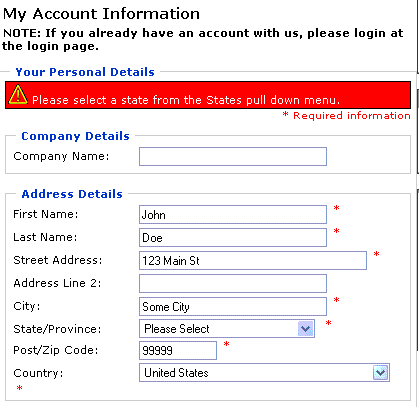
Please see images below that should illustrate a little better my problem:


Here we see the account create page, which works great. I have entered "cal.", which ZC won't recognize because of the period. So it shows the following:


Since ZC couldn't recognize the state, it asks you to choose from a pull down. Excellent.

Now the problem comes when you change the address via the 'checkout change address' page.


Click on 'change your address' button


Checkout change address page. As you can see, I have entered "ICanEnterAnythingIwant" in the state field. If ZC was working correctly as the create account page, it would promtp me to choose from the drop down list, but it doesn't. It lets you enter anything. Even if you enter 'CA' or 'California', which is a taxed zone, ZC won't charge tax.

17 Jul 2006, 8:05 PM
#9
tj1 avatar

tj1

Totally Zenned

Join Date:
Mar 2005
Location:
California
Posts:
628
Plugin Contributions:
0

Post #9 by tj1

...continued previous post, it would only let me include 4 images, I needed to post one more.


So ZC didn't prompt to choose from a pull down and this is the issue I'm having.

My cart will let you continue the checkout process like this, which is good because I've seen many carts that will not let you go past the first step of the checkout process if you change the address this way, even if the address is exactly the same as you had it originally.

18 Jul 2006, 4:05 PM
#10
fosmaster avatar

fosmaster

New Zenner

Join Date:
Jul 2006
Posts:
5
Plugin Contributions:
0

Post #10 by fosmaster

I'm not sure I do have the same problem, but it seems so. When I create a new account, log in with that account, no tax will show, even the option 'show tax... in the configuration - my store'.

I think it comes due a bug or other shortcoming that I can't explain. It something with the State field for the customer details. ENTRY_ZONE_ID. But I don't get it to work.

In brief:

  • logged out: all prices with tax showing ok
  • logged in with some test accounts I made; no tax at all shows up.

Hopefully someone can help us with this to fix the situation

TIA

18 Jul 2006, 6:27 PM
#11
tj1 avatar

tj1

Totally Zenned

Join Date:
Mar 2005
Location:
California
Posts:
628
Plugin Contributions:
0

Post #11 by tj1

fosmaster, yours sounds like a different issue, more of a configuration thing. But I'm sure that if you are using ZC 1.3.0.2, you should have the same problem I'm describing, all the ZC 1.3.0.2 I've seen so far have this problem, so in that respect, I'm glad it's just not me.

It puzzles me though that no one else has reported this yet. Perhaps they've just been lucky enough that they're customers haven't changed the address during checkout and aren't from a taxable zone.
Not me though, I've had to put my ZC 1.3.0.2 store down for maintenance and I'm using the old 1.2.6 until I can get this issue fixed.

19 Jul 2006, 3:25 AM
#12
drbyte avatar

drbyte

Sensei

Join Date:
Jan 2004
Posts:
63,512
Plugin Contributions:
176

Post #12 by drbyte

The problem reported by tj1 appears to only occur when entering a new address manually during the checkout stage.

Investigating...

.
Zen Cart - putting the dream of business ownership within reach of anyone!
Donate to: DrByte directly or to the Zen Cart team as a whole

Remember: Any code suggestions you see here are merely suggestions. You assume full responsibility for your use of any such suggestions, including any impact ANY alterations you make to your site may have on your PCI compliance.
Furthermore, any advice you see here about PCI matters is merely an opinion, and should not be relied upon as "official". Official PCI information should be obtained from the PCI Security Council directly or from one of their authorized Assessors.

19 Jul 2006, 5:14 AM
#13
glasshoppah avatar

glasshoppah

New Zenner

Join Date:
Apr 2006
Location:
Kaneohe, Hawaii USA
Posts:
15
Plugin Contributions:
0

Post #13 by glasshoppah

Dr Byte and Tj1,

I have to agree that this is a problem that is occuring when entering a new shipping address (intermittently for me--even with identical steps through the checkout, though). I was finally able to replicate the problem on http://MiladysGifts.com. Again, I have to say that the previous calculation errors were definitely config. and the other thread's step by step definitely cured quite a few of the glitches. Looking forward to the results of your investigation. :)

Thanks,
-Christine

808's ZenCart: http://808StockPhoto.com/gallery/
Royalty Free Stock Photos at 808 Stock Photography: http://808StockPhoto.com/

20 Jul 2006, 10:40 PM
#14
tj1 avatar

tj1

Totally Zenned

Join Date:
Mar 2005
Location:
California
Posts:
628
Plugin Contributions:
0

Post #14 by tj1

DrByte:

The problem reported by tj1 appears to only occur when entering a new address manually during the checkout stage.

Investigating...

Exactly. :)

Have you found the cause for this yet? Can you confirm whether this is a bug or just a configuration issue.

Thanks for looking into it.

24 Jul 2006, 8:36 PM
#15
marcelox8 avatar

marcelox8

New Zenner

Join Date:
Mar 2006
Posts:
24
Plugin Contributions:
0

Post #15 by marcelox8

Please can someone help us!!! I'm having the same problem!
The problem appears only when entering a new address manually during the checkout stage.

My version is 1.3.0.2
Thanks!!

Marcelox8

26 Jul 2006, 1:48 PM
#16
amandac avatar

amandac

New Zenner

Join Date:
May 2005
Posts:
15
Plugin Contributions:
0

Post #16 by amandac

Same exact issue here. If a new account is created using the taxable zone - tax is added properly.

If the customer, for example, is returning (already has an account) and now needs to enter a NEW address that should be taxable - it does not total up the tax.

We go live tomorrow morning - was not expecting this issue. Stinks. LOL

29 Jul 2006, 9:36 AM
#17
imac avatar

imac

New Zenner

Join Date:
Mar 2006
Location:
Durham, UK
Posts:
78
Plugin Contributions:
0

Post #17 by imac

Yep! Exactly the same issue here too. It seems that customers who change Shipping or Payment Addresses on checkout don't get taxed. :cry:

As far as I understand it, if zones for a country are defined, then what ought to happen is that the id number of the zone is entered into the entry_zone_id field in the address_book table. Whereas what seems to be happening is that changing address on checkout is adding a text string to the entry_state field - which should happen if no zones for that country are defined.

I've tried looking through the code, but there are so many complicated and interconnected layers of logic that all I can see at the moment is fog.

At first sight, it looks like most of the relevant code in the 1.2 series used to reside in:
includes\modules\pages\checkout_payment_address\header_php.php
and
includes\modules\pages\checkout_shipping_address\header_php.php

This was moved in the 1.3 series to:
includes\modules\checkout_new_address.php

And the code in that file was changed quite radically from 1.3.1 to 1.3.2.

That's as far as I've got at the moment I'm afraid. But until this issue is resolved we can't really risk going live with any 1.3.0.2 installation, so 'll keep looking in in the hope that something might click. If there are any Zen Masters around at the moment - we sure could do with your help on this one :smile:

29 Jul 2006, 11:23 PM
#18
frederick avatar

frederick

New Zenner

Join Date:
Jul 2006
Posts:
3
Plugin Contributions:
0

Post #18 by frederick

I just upgraded to to 1.3.0.2, a huge accomplishment for a newbie like me.

I've received several orders and have experienced this same issue. My situation is a bit worse because I only ship within my state and customers constantly change the shipping address during the checkout process.

I sell in large volume and make little profit, usually 5%. I collect 8.25% sales tax. So I would be losing 3.25% each time I don't collect sales tax. So far I have cancelled all orders that should've charged and didn't charge sales tax.
Hopefully the customers will understand and not take their business elsewhere.

I will try to install and older version until there's a fix for this.

Honestly, I can't help but feel like we are being ignored. This is the thread with most views in the first page, yet there has been no reply or at least acknowledgement whether this is a bug or just a configuration issue.

I have seen replies to all other threads on this section, even the ones that don't belong here, but no reply or acknowledgement to this so far.:(

I just would like to know if this is a bug or we are just making some configuration mistake. If this is a configuration mistake, please, do tell us.
Do tell me that I'm too dumb and that I don't know where to look, I don't mind, I know I'm not the brightest person when it comes to this.

29 Jul 2006, 11:39 PM
#19
ajeh avatar

ajeh

Oba-san

Join Date:
Sep 2003
Location:
Ohio
Posts:
62,757
Plugin Contributions:
1

Post #19 by ajeh

A nice fix is coming ... thanks for the updates ... :smile:

Linda McGrath
If you have to think ... you haven't been zenned ...

**Did YOU buy the Zen Cart Team a cup of coffee and a donut today? Just click here to support the Zen Cart Team!!**

Are you using the latest? Perhaps you've a problem that's fixed in the latest version: [Upgrade today!]
Officially PayPal-Certified! Just click here

Try our Zen Cart Recommended Services - Hosting, Payment and more ...
Signup for our Announcements Forums to stay up to date on important changes and updates!

4 Aug 2006, 2:11 PM
#20
joanorsky avatar

joanorsky

New Zenner

Join Date:
Jul 2006
Posts:
25
Plugin Contributions:
0

Post #20 by joanorsky

Ajeh:

A nice fix is coming ... thanks for the updates ... :smile:

Isn't there any fix for this particular issue yet ? This is the only thing that is keeping me from going live... any help would be great... :cry: