

If you are having a problem with the WorldPay callback with Zen Cart version 1.39 then the problem might be with the default Payment Response URL <wpdisplay item="MC_callback"> entry in the Integration Setup at WorldPay.
I have found that the following resolution works for my customer sites:
Add http:// or https:// in front of the Payment Response URL
i.e. http://<wpdisplay item="MC_callback">
OR https://<wpdisplay item="MC_callback"> if you have SSL activated

Results 661 to 670 of 730
-
1 Jun 2011, 08:24 AM #661
 New Zenner
- Join Date
- Jun 2009
- Location
- Porthleven, Cornwall, UK
- Posts
- 45
- Plugin Contributions
- 1
 Re: WorldPay Module version 2.0 - Support thread
-
1 Jun 2011, 01:36 PM #662
New Zenner
- Join Date
- Jan 2011
- Posts
- 4
- Plugin Contributions
- 0
Re: WorldPay Module version 2.0 - Support thread
Hi,
If you were replying to me I'm afraid it's not that. I've tried various permutations of the callback URL and I've now put it back to what it should be (and which was working for 9 months):
http://<wpdisplay item="MC_callback">
From scanning various pages on the topic it seems that various PHP settings, particularly to do with sessions, might affect the 302 error. It seems to me that when Worldpay issues the callback (which it does, and with the correct callback pw) Zen Cart has forgotten who it's talking about and therefore redirects it to the hacker response page.
I've finally had some word from our host and they've only sent me a link to the servers config page - phpinfo.php
I've looked at the section on sessions, but basically don't have a clue what most of it means.... can someone send me their PHP 5.3 info page in a PM or something so that I can compare??
I've been told I might be able to make changes via a php.ini file - does anyone have experience of doing that?
Thanks,
Nick
-
1 Jun 2011, 05:58 PM #663
New Zenner
- Join Date
- Apr 2011
- Posts
- 13
- Plugin Contributions
- 0
Re: WorldPay Module version 2.0 - Support thread
First check that in Configuration > Sessions the following are all set to false:
Force Cookie Use
Check SSL Session ID
Check User Agent
Check IP Address
If it's still not working after that look at phpinfo.php and check that the following are turned off:
register globals
magic quotes
session.use_trans_sid
That's just my two pence. No doubt there are many other settings that might be involved.
-
2 Jun 2011, 09:49 AM #664
New Zenner
- Join Date
- Jan 2011
- Posts
- 4
- Plugin Contributions
- 0
Re: WorldPay Module version 2.0 - Support thread
Thanks for those that have replied - I've managed to crack it finally! (With absolutely bugger all help from our hosts Hostpapa.)
Eventually I did get them to forward a phpinfo page for the new server and also one from a server yet to have the upgrade. After comparing the two I noticed that the only relevant setting that was changed was
session.use_only_cookies
which used to be off and with the the PHP upgrade to 5.3 it by default gets set to ON.
As it is CGI-running server (I learnt the odd thing or two!) I uploaded a php.ini file in the root of the server with the sole line being:
session.use_only_cookies = off
This immediately fixed it and the callback was coming through, orders into ZC, confirmation email to customer from ZC etc.
I'm glad it's over, just wished the hosts (who you would think would be knowledgeable about the possible solutions) would have responded sooner!
btw, I did check those session settings in ZC first.
Also, to anyone frantically doing a google search, like I've been doing the last 5 days, I am on ZC 1.3.9b and Worldpay for ZC 2.10
Bye,
Nick
-
4 Jun 2011, 08:01 AM #665
New Zenner
- Join Date
- Jun 2009
- Location
- Porthleven, Cornwall, UK
- Posts
- 45
- Plugin Contributions
- 1
Re: WorldPay Module version 2.0 - Support thread
No I wasn't replying to you specifically niknfa, just pointing out that, by default WorldPay sets the callback URL to <wpdisplay item="MC_callback"> (without the preceding http:// or https:// ) which will result in a callback failure. Originally Posted by niknfa

WorldPay's callback always tries to return to an https connection irrespective of whether you enter http or https in the Payment Response URL so will result in security messages flagging up in the users browser if you don't have SSL installed. Ideally, for customer confidence and compliance with WorldPay's merchant T&C's your website should have an SSL certificate installed.
The WorldPay module normally worked 'out of the box' in earlier versions of Zen Cart, but additional security protocols in 1.39 versions seems to be causing issues with getting the integration set up.
For anyone having problems it's worth trying the following settings in the Integration setup at WorldPay:-
Payment response: checked
Recurring Payment response: checked
Enable Shopper response: checked
Suspension of Payment Response: not checked
Using the WP copy from the test integration to the live integration appears 'lose' or corrupt the password so always re-type (or copy paste) the matching Payment Response password from your Zen Cart store setup into the 'live' integration.
I've found that setting MD5 secret for transactions to on in most of my clients setup usually results in callback failure, so I always leave it empty and unused.
Hope this helps anyone having problems with the WP setup...
-
27 Jun 2011, 09:42 PM #666
Zen Follower
- Join Date
- Jun 2011
- Posts
- 145
- Plugin Contributions
- 0
Re: WorldPay Module version 2.0 - Support thread
Hi all, well i read pretty much of these 60 pages!
My problem i only have with this mod, is that it times out?
Here is the email i received:
Our systems have detected that your callback has failed.
This callback failure means we were unable to pass information
to your server about the following transaction:
Transaction ID: 2064097426
Cart ID: b02c5f86f8941dac71bf2f3cbb7598b0
Installation ID: XXXXXX
Error reported: Callback to: http://www.cakekraft.co.uk/index.php...e=wp_callback: failed CAUSED BY Read timed out
Server Reference: mm2imsps4p:callbackFailureEmail-130046:MerchReq-377-42
Also, if you usually return a response page for us to display to the Shopper
within the time allowed (1 minute), this will not have been displayed.
RBS WorldPay will have displayed to the Shopper the response page file
(resultY.html or resultC.html) held for your installation on the RBS WorldPay
server. This will be your own custom version, if you have supplied one, or,
if not, the RBS WorldPay default version.
Please can someone help, as people are placing orders and it's not showing in Zencart.
Thank You.
Nic
-
13 Sep 2011, 01:17 PM #667
New Zenner
- Join Date
- Jun 2007
- Posts
- 7
- Plugin Contributions
- 0
Re: WorldPay Module version 2.0 - Support thread
I am using Zencart 1.3.9h amd WorldPay 2.1.0.
I have read all reply for this topic, but still not working automatic redirect after successful payment from Worldpay. It stops there showing Thanks you message.
I have done WorldPay account setting same explained above and also check phpinfo.php, it also same as we want. Still it's not working.
Thanks in advanceLast edited by dixittejas; 13 Sep 2011 at 01:19 PM. Reason: Version added
-
13 Sep 2011, 10:14 PM #668
New Zenner
- Join Date
- Sep 2011
- Posts
- 2
- Plugin Contributions
- 0
Re: WorldPay Module version 2.0 - Support thread
Hi,
This is a little bit of a long shot, but I haven't been able to work it out on my own thus far and this is one of the last things I need to sort out to get a site live.
I'm running Zen Cart 1.3.8a with this template http://www.zen-cart.com/index.php?ma...oducts_id=1740
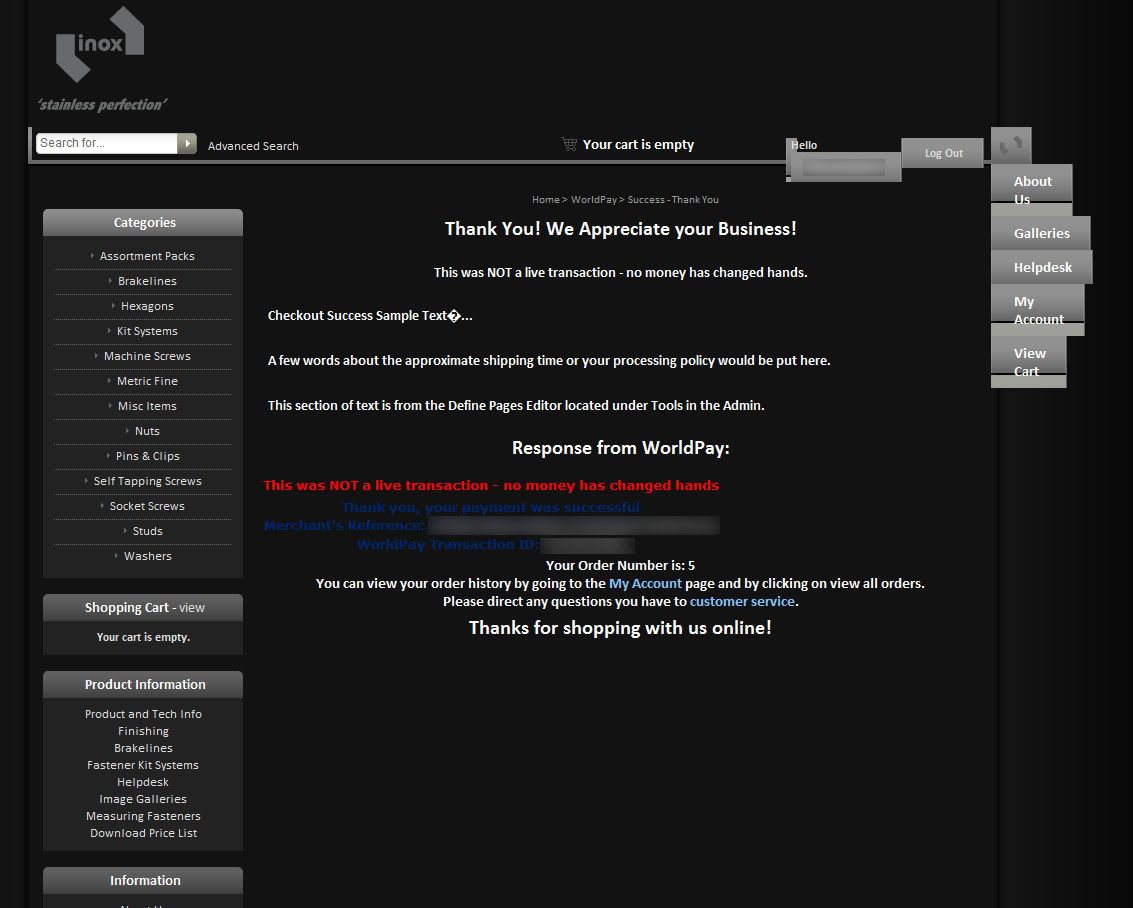
It seems that something is breaking the template on the worldpay successful payment page, but I haven't been able to work out what it is and how to correct it.
This is what the broken page looks like:
And this is what the top of a normal page looks like:
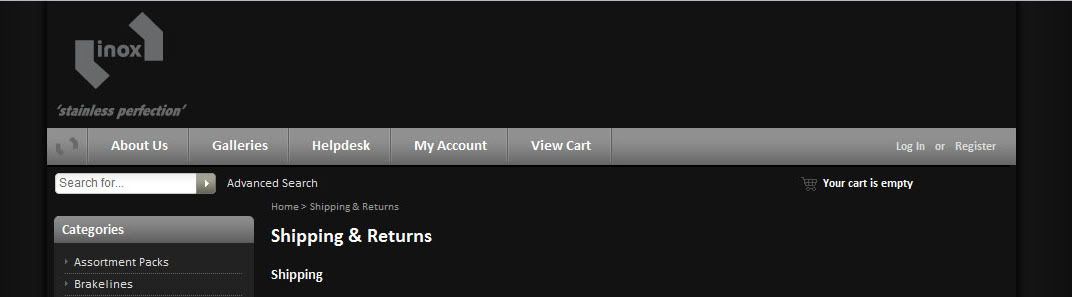
I note that it has centered all of the text in my left menus as well, so maybe whatever is causing that to happen is also breaking the layout of the top navigation?
So I guess what I'm asking really is how worldpay pulls through this template page and how does it decide to display it. I feel like with a bit more information I could probably work something out on my own, but at the moment I've hit a bit of a wall with it.
-
14 Sep 2011, 01:45 AM #669
New Zenner
- Join Date
- Sep 2011
- Posts
- 2
- Plugin Contributions
- 0
Re: WorldPay Module version 2.0 - Support thread
Well, I ended up using the overrides idea mentioned earlier in the thread (it took a while of trawling through) here - http://www.zen-cart.com/forum/showpo...&postcount=384
Used that to disable the top navigation for the call back pages, which makes them look much more acceptable.
-
20 Sep 2011, 08:19 AM #670
New Zenner
- Join Date
- Oct 2010
- Posts
- 5
- Plugin Contributions
- 0
Re: WorldPay Module version 2.0 - Support thread
Originally Posted by dixittejas
Hi dixittejas, did you find a way out of this problem? I am also stuck on thank you page worldpay isn't redirecting to site.

Similar Threads
-
v154 WorldPay Module version 3.0 - Support thread
By countrycharm in forum Addon Payment ModulesReplies: 116Last Post: 31 Dec 2025, 11:36 AM -
MultiSite Module Support Thread
By Gerome in forum All Other Contributions/AddonsReplies: 2246Last Post: 29 Dec 2025, 10:13 AM -
v151 Codetrio Sphinx Search Version 1.0 Support Thread
By imranulh in forum All Other Contributions/AddonsReplies: 5Last Post: 16 Jul 2014, 01:24 AM -
Simple SEO URL (OLD version) [support thread]
By yellow1912 in forum All Other Contributions/AddonsReplies: 5053Last Post: 30 Jun 2014, 02:42 PM

