
Hi, Thank you for the template which I am intend to use in my site.
My problem is that I've been trying to put a paypal logo between the links in the footer and the copyright line and have not been able to do it. When I try it gets positioned in a different place, other than where I want it.
If you look at the attached image, it is below the 'Important Links' link. And where it says 'HERE' is where I actually want it to go. Any suggestion would be appreciated. Thank you.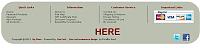

Results 1 to 10 of 477
Hybrid View
-
7 Mar 2013, 08:37 PM #1
 New Zenner
- Join Date
- Jan 2013
- Posts
- 21
- Plugin Contributions
- 0
 Re: Aberdeen Neutral Template Support Thread
-
8 Mar 2013, 05:56 PM #2
Totally Zenned
- Join Date
- Jul 2009
- Location
- picaflor-azul.com
- Posts
- 6,928
- Plugin Contributions
- 45
Re: Aberdeen Neutral Template Support Thread
You need to add your code to the incldues/templates/aberdeen_neutral/common/tpl_footer.php file and you can use css to position it. Originally Posted by Isabella

Thanks,
Anne
-
9 Mar 2013, 05:00 AM #3
New Zenner
- Join Date
- Jan 2013
- Posts
- 21
- Plugin Contributions
- 0
Re: Aberdeen Neutral Template Support Thread
Thank you. That's precisely where I added it. I tried several positions but my problem was that I could not find the exact place where to add it so it would fall in the middle above the copyright line.
The last place I tried was under: "<!--eof-navigation display -->" and it was when it fell under the 'Important Links' link.
But, since I was unable to figure out how to position it where I wanted, I decided to put the logo on a sidebar. Thank you.
-
9 Mar 2013, 04:35 PM #4
Totally Zenned
- Join Date
- Jul 2009
- Location
- picaflor-azul.com
- Posts
- 6,928
- Plugin Contributions
- 45
Re: Aberdeen Neutral Template Support Thread
I am happy that you figured out a solution :-) Originally Posted by Isabella
Thanks,
Anne
-
10 Mar 2013, 03:56 PM #5
New Zenner
- Join Date
- Jan 2013
- Posts
- 21
- Plugin Contributions
- 0
Re: Aberdeen Neutral Template Support Thread
Thank you :)
One more question: How can I hide or delete the little 'fLike' and 'Tweet' icons located under the product description? I would like to leave just the little 'Share' icon for now.
-
10 Mar 2013, 10:02 PM #6
Totally Zenned
- Join Date
- Jul 2009
- Location
- picaflor-azul.com
- Posts
- 6,928
- Plugin Contributions
- 45
Re: Aberdeen Neutral Template Support Thread
You can edit the includes/templates/aberdeen_neutral/templates/tpl_main_page.php file. You may also be able to just add a display:none; to the elements in the stylesheet.css file. Originally Posted by Isabella
Thanks,
Anne
-
10 Mar 2013, 10:26 PM #7
New Zenner
- Join Date
- Jan 2013
- Posts
- 21
- Plugin Contributions
- 0
Re: Aberdeen Neutral Template Support Thread
Originally Posted by picaflor-azul
Thank you.
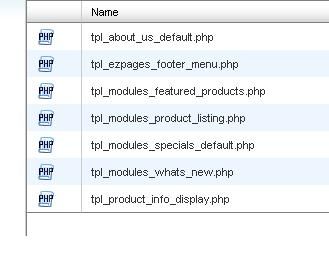
Sorry, I followed the path above and there is not a 'tpl_main_page.php file' at the end of the path. See attached image.

 Reply With Quote
Similar Threads
-
v150 aBagon Template Support Thread
By VJef in forum Addon TemplatesReplies: 54Last Post: 5 Sep 2020, 08:44 PM -
v154 Aberdeen Neutral Template Completely Lost Slide Show and nearly everything else HELP!
By SilverHD in forum Addon TemplatesReplies: 6Last Post: 3 Sep 2015, 07:04 PM -
v153 Missing Box File Names in Layout Controller for Template Aberdeen Neutral
By fribble in forum Customization from the AdminReplies: 2Last Post: 26 Feb 2015, 12:15 AM -
v151 Slideshow On Aberdeen Neutral
By SilverHD in forum Templates, Stylesheets, Page LayoutReplies: 1Last Post: 18 Dec 2014, 01:07 AM -
Aberdeen Neutral Template missing about us page
By Minu in forum Addon TemplatesReplies: 3Last Post: 25 Nov 2012, 08:01 PM

