
Thanks mc12345678Originally Posted by mc12345678

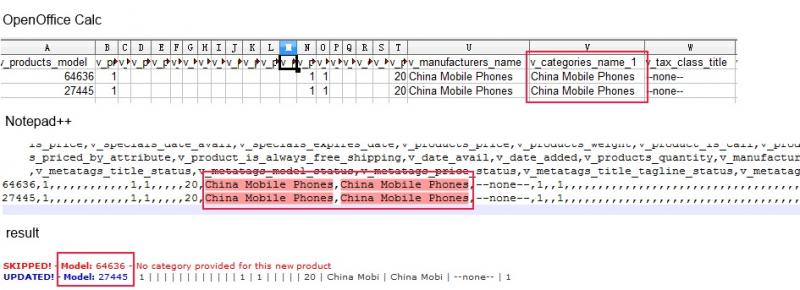
However, after deleted almost everything, I got the same result. I had dumped the $categories_name_exists on screen, it was null.

Thread: EasyPopulate 4.0 Support Thread
Results 1,271 to 1,280 of 3673
-
29 Nov 2013, 02:50 AM #1271
 Zen Follower
- Join Date
- Oct 2011
- Posts
- 168
- Plugin Contributions
- 0
 Re: EasyPopulate 4.0 Support Thread
Last edited by su35; 29 Nov 2013 at 02:54 AM.
-
29 Nov 2013, 03:09 AM #1272
Totally Zenned
- Join Date
- Jul 2012
- Posts
- 16,817
- Plugin Contributions
- 17
Re: EasyPopulate 4.0 Support Thread
I am assuming that the correct variable was used for the screen dump, would expect it to not be a "true" value because the error message is displayed. It would be more important to track backwards and see if a value was provided at all for the category and other information to see where/when it "lost" the name. Originally Posted by su35
I haven't used NotePad++, I see that there are no quotes around the text in the string. This could be a problem. I'm not sure that it is causing your problem. Also, considering how much has been removed, there is little that could/would get in the way. I haven't counted the commas, but hope that the right data got to the right place. (BTW, unless you have corrected it, I think that the lack of description used in this upload will cause your description to be erased for that/those models.. )
I'm trying to help, but this is a really odd situation that it is not working for a few cases... :/ If you only have model 64636 in a file, will it add it? (I'm thinking no because the failed row is before the successful row. ) I'm trying to think how to help without having a copy of the file causing the problem. :/ZC Installation/Maintenance Support <- Site
Contribution for contributions welcome...
-
30 Nov 2013, 01:34 AM #1273
New Zenner
- Join Date
- Nov 2013
- Location
- Palm Bay, FL
- Posts
- 7
- Plugin Contributions
- 0
Re: EasyPopulate 4.0 Support Thread
can you tell me what the longest field length is for the "v_products_description_1" field is?
Thank you kindly in advance!
-
5 Dec 2013, 06:59 PM #1274
Zen Follower
- Join Date
- Sep 2013
- Location
- Texas
- Posts
- 315
- Plugin Contributions
- 0
Re: EasyPopulate 4.0 Support Thread
Thanks for the GREAT plugin. Seems to work ok just need to do more testing in my particular store.
This is an operational nit with oo and Excel but may save some a lot of time.
If you Creating a part name (or any other entry in zc) with a leading zero, as in "078453M" when editing in oo or Excel you must set the appropriate column to "text" .
To do this after you DOWNLOAD the *.cvs file on your local machine first rename it with a *.txt extension before opening with Excel or oo.
When opening file you have the opportunity to change the "General" type to "Text" which you must do for columns you want to retain the leading zero(s) in.
Save as a *.txt file then rename to *.cvs before uploading and Viola! you will retain the leading zero(s)
To do this when you create a NEW *.cvs file on your local machine first save it with a *.txt extension change the "General" type to "Text" for columns you want to retain the leading zero(s) in.
Save as a *.txt file then rename to *.cvs before uploading and Viola! you will retain the leading zero(s)
You can use this special naming convention to group different product lines etc.. in applications like zc and QuickBooks.
-
8 Dec 2013, 05:26 PM #1275
Totally Zenned
- Join Date
- Oct 2006
- Location
- Italy
- Posts
- 634
- Plugin Contributions
- 0
Re: EasyPopulate 4.0 Support Thread
where I can download this 4.0 version?
-
8 Dec 2013, 09:02 PM #1276
Totally Zenned
- Join Date
- Jul 2012
- Posts
- 16,817
- Plugin Contributions
- 17
Re: EasyPopulate 4.0 Support Thread
Please see the first post of the thread. Originally Posted by 100asa
ZC Installation/Maintenance Support <- Site
Contribution for contributions welcome...
-
8 Dec 2013, 09:34 PM #1277
Totally Zenned
- Join Date
- Jul 2012
- Posts
- 16,817
- Plugin Contributions
- 17
Re: EasyPopulate 4.0 Support Thread
From what I have been able to gather, there is nothing about EP4 that specifically limits the length of the field. The field is a text field in the database, the applicable editor may have some limitations or maybe a function that is called, but EP4 doesn't truncate the field length of the description, regardless of the language. Originally Posted by laquilino68
ZC Installation/Maintenance Support <- Site
Contribution for contributions welcome...
-
9 Dec 2013, 04:07 PM #1278
Totally Zenned
- Join Date
- Apr 2006
- Location
- Dark Side of the Moon
- Posts
- 987
- Plugin Contributions
- 1
Re: EasyPopulate 4.0 Support Thread
Hi All! No, I did not fall off the planet Originally Posted by mc12345678

EP4 does NOT limit field lengths, but it does check the database to see what the size of the fields are and gives you a warning/error message if you go over that length.
I believe that non-critical data gives a warning, but something like a category name generate an error and does not add that record. This is necessary especially when creating category names, or even manufacturer names. With out it, a name the exceeds the length in the database would be truncated and added multiple times (there would be not match when comparing values). Other versions of EP don't do this unless they've fixed it recently.
Multi-byte encoded languages are a bit harder to work with, but should function correctly.
-chadd
-
9 Dec 2013, 05:38 PM #1279
New Zenner
- Join Date
- Aug 2013
- Posts
- 4
- Plugin Contributions
- 0
Re: EasyPopulate 4.0 Support Thread
no solution mc123456... relating to my post on 08/24/2013
please answer with a simple yes or no.Last edited by any_way; 9 Dec 2013 at 05:42 PM.
-
9 Dec 2013, 06:37 PM #1280
Totally Zenned
- Join Date
- Jul 2012
- Posts
- 16,817
- Plugin Contributions
- 17
Re: EasyPopulate 4.0 Support Thread
Originally Posted by any_way
Originally Posted by any_way
Wow... My apologies. I can generate a solution. Not a difficult add in, at least if just want to have the data displayed on the screen. If want the program to use the data, that may take a little more. Below is the changes to show the products name (multilingual potential) for the product model being discussed when doing price quantity discounts. It does not necessarily import that data back into the database. (Haven't looked through the import code, nor did I see that it was expected to import the name.) So this is just for user benefit when updating the other fields.
In admin/includes/functions/extra_functions/easypopulate_4_functions.php
Main code section: function ep_4_set_filelayout
At the case for priceqty: (Add the foreach statement after the first $filelayout and before the next $filelayout... This forces the name to be after the model...)
in admin/easypopulate_4_export.php find the end of the 'full' routine as shown below, insert the text in red (oops, used php tags... There is no custom coloring for PHP tags so the code area as described) before the //BEGIN: Specials. (This just happens to be a convenient location and is not required to be at that specific point in the code. There is an area lower in the code that addresses the calculations of the priceqty discount; however, after quickly coding this, it seemed like this area still may be preferred. The lower area is heavy in math and affects of performing a discount and not so much in the other "random" data to be exported.PHP Code:case 'priceqty':
$filelayout[] = 'v_products_model';
foreach ($langcode as $key => $lang) { // create variables for each language id
$l_id = $lang['id'];
$filelayout[] = 'v_products_name_'.$l_id;
}
$filelayout[] = 'v_status'; // 11-23-2010 added product status to price quantity option
PHP Code:} // if($ep_dltype == 'full')
if ($ep_dltype == 'priceqty') {
foreach ($langcode as $key => $lang) {
$lid = $lang['id'];
$sql2 = 'SELECT * FROM '.TABLE_PRODUCTS_DESCRIPTION.' WHERE products_id = '.$row['v_products_id'].' AND language_id = '.$lid.' LIMIT 1 ';
$result2 = ep_4_query($sql2);
$row2 = mysql_fetch_array($result2);
$row['v_products_name_'.$lid] = $row2['products_name'];
} // end foreach $langcode
} //end if ($ep_dltype == 'priceqty')
// BEGIN: Specials
Last edited by mc12345678; 9 Dec 2013 at 06:39 PM.
ZC Installation/Maintenance Support <- Site
Contribution for contributions welcome...

 Reply With Quote
Similar Threads
-
Hebrew Support - latest release [Support Thread]
By eranariel in forum Addon Language PacksReplies: 22Last Post: 26 Jan 2026, 06:47 AM -
BackUp ZC [Support Thread]
By skipwater in forum All Other Contributions/AddonsReplies: 285Last Post: 23 Dec 2020, 10:40 AM -
Wordpress On ZC [Support Thread]
By hira in forum All Other Contributions/AddonsReplies: 1858Last Post: 17 Jan 2014, 01:24 AM -
ZJ Black 2 support thread
By Liamv in forum Addon TemplatesReplies: 1Last Post: 15 Feb 2010, 02:53 PM

