
Goodmorning all,
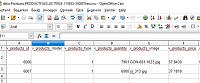
I have a question about importing csv-files with new products. I have downloaded a product-csv file with the dbio manager, and then I changed the products and I have uploaded it to the webstore throught the dbio manager, but then I received the following message:
But when I check the file on the missing columns, they are just there into the file..Code:Foutmelding The current import-file is missing these (v_products_id, v_products_model) required columns; the import is disallowed.

Results 1 to 10 of 614
Hybrid View
-
24 Sep 2017, 11:10 AM #1
 Zen Follower
- Join Date
- Jan 2016
- Location
- Netherlands
- Posts
- 150
- Plugin Contributions
- 0
 Re: Database I/O Manager (DbIo) Plugin [Support Thread]
-
24 Sep 2017, 11:28 AM #2
Totally Zenned
- Join Date
- Dec 2009
- Location
- Amersfoort, The Netherlands
- Posts
- 2,845
- Plugin Contributions
- 25
Re: Database I/O Manager (DbIo) Plugin [Support Thread]
I suspect you need to add a value for "v_products_model" to your products Originally Posted by LadyoftheCave
 Zen cart installation / maintenance / customisation / hosting
Supported Modules: Dutch language pack, Multi site, Dynamic Price Updater and more.
-
24 Sep 2017, 11:31 AM #3
Zen Follower
- Join Date
- Jan 2016
- Location
- Netherlands
- Posts
- 150
- Plugin Contributions
- 0
Re: Database I/O Manager (DbIo) Plugin [Support Thread]
Hi design75. I have tried to add 0, but it didn't worked..
-
24 Sep 2017, 11:33 AM #4
Zen Follower
- Join Date
- Jan 2016
- Location
- Netherlands
- Posts
- 150
- Plugin Contributions
- 0
Re: Database I/O Manager (DbIo) Plugin [Support Thread]
I have also tried to double the model and id-colums, to change place of these columns and many other variables, but for some reason the manager doesn't see these two columns..
-
24 Sep 2017, 11:55 AM #5
Zen Follower
- Join Date
- Jan 2016
- Location
- Netherlands
- Posts
- 150
- Plugin Contributions
- 0
Re: Database I/O Manager (DbIo) Plugin [Support Thread]
Could it maybe has something to do with this? (when I try to make a new template, the two missing columns are already there and cannot being moved). I have the impression that the manager sees only the manually attached template fiels, not the two that are already there, because these two columns are missing.....
Last edited by LadyoftheCave; 24 Sep 2017 at 12:00 PM.
-
24 Sep 2017, 12:41 PM #6
Administrator
- Join Date
- Sep 2009
- Location
- Stuart, FL
- Posts
- 13,949
- Plugin Contributions
- 96
Re: Database I/O Manager (DbIo) Plugin [Support Thread]
Nope, when you create a DbIo template, there are sometimes (like for the Products handler) database fields that are required. The Products handler requires that the v_products_id and v_products_model fields both be present in the import ... even though (as you found) the v_products_id value has no bearing when the product is being created. Originally Posted by LadyoftheCave
-
24 Sep 2017, 12:39 PM #7
Administrator
- Join Date
- Sep 2009
- Location
- Stuart, FL
- Posts
- 13,949
- Plugin Contributions
- 96
Re: Database I/O Manager (DbIo) Plugin [Support Thread]
When you are performing a product insert, the v_products_model column is what DbIo uses to determine that the product is new. The products_id values are automatically calculated by the database; you have no control over those for a product insert/create operation. Originally Posted by LadyoftheCave
-
24 Sep 2017, 12:48 PM #8
Zen Follower
- Join Date
- Jan 2016
- Location
- Netherlands
- Posts
- 150
- Plugin Contributions
- 0
Re: Database I/O Manager (DbIo) Plugin [Support Thread]
Hi lat9, thank you for your answer. I am not completely sure what you mean Originally Posted by lat9
 , but do you know how I can insert product-files without this error? Do I have to remove the id column?
-
24 Sep 2017, 01:41 PM #9
Administrator
- Join Date
- Sep 2009
- Location
- Stuart, FL
- Posts
- 13,949
- Plugin Contributions
- 96
Re: Database I/O Manager (DbIo) Plugin [Support Thread]
You'll need to keep the v_products_id column (set that value for new products to 0) and supply a unique v_products_model value for a new product to be created.
When creating a new product, you'll also want to make sure that you have the v_categories_name column set to identify the category "tree" associated with the to-be-added product's master-category.
When you're performing any kind of import, I suggest that you first perform an Import (Check-only) first. That processing will do every step of the import ... except that the database is not updated. You can then see what will happen before actually committing the information to your database.
Once the import is finished, a link shows next to the action-selection dropdown that reads View import details; click that link and a popup will display showing you the status of that import.
After you've verified your import-csv using Import (Check-only), that's the time to use Import (Full) which will actually write the requested information to your database.
-
24 Sep 2017, 01:47 PM #10
Zen Follower
- Join Date
- Jan 2016
- Location
- Netherlands
- Posts
- 150
- Plugin Contributions
- 0
Re: Database I/O Manager (DbIo) Plugin [Support Thread]
thank you very much,
I will try that out now :)

 Reply With Quote

Similar Threads
-
Support Thread for CKEditor Plugin
By DivaVocals in forum Addon Admin ToolsReplies: 213Last Post: 18 Nov 2024, 04:17 AM -
Back to Top Plugin [Support Thread]
By picaflor-azul in forum All Other Contributions/AddonsReplies: 31Last Post: 6 Feb 2016, 10:52 PM -
v151 Plug 'n' Pay plugin [Support Thread]
By KetchRescue in forum Addon Payment ModulesReplies: 5Last Post: 28 Nov 2015, 04:56 AM -
Justuno Plugin [Support Thread]
By JustunoApp in forum All Other Contributions/AddonsReplies: 8Last Post: 24 May 2015, 11:00 PM -
VendingBox Plugin Support Thread
By vb_support in forum All Other Contributions/AddonsReplies: 31Last Post: 10 Feb 2013, 07:24 PM

