
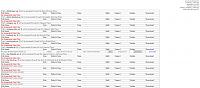
update ... as soon as a file is exported it shows up as 'CSV Unknown Delimiter' in the table as an import error in admin/tools/EP4 ... see image ... any ideas as to why?Originally Posted by shags38


Thread: EasyPopulate 4.0 Support Thread
Results 1 to 10 of 3673
Hybrid View
-
4 Aug 2022, 05:13 AM #1
 Totally Zenned
- Join Date
- Jan 2011
- Location
- Adelaide, Australia
- Posts
- 1,673
- Plugin Contributions
- 1
 Re: My CSV file uploads the categories, but not the products
-
4 Aug 2022, 08:32 AM #2
Totally Zenned
- Join Date
- Jul 2012
- Posts
- 16,817
- Plugin Contributions
- 17
Re: My CSV file uploads the categories, but not the products
If I had my guess correctly, because when I added the file location protection to the code, I made a mistake about handling files stored in the catalog side of the store and then subsequently the patch provided in this forum was not applied. Originally Posted by shags38
This is further described at this post and the link within the quote of that post: https://www.zen-cart.com/showthread....22#post1385422
To be clear, your previous post does or does not still apply? There are other reasons for what may have been seen or described there.ZC Installation/Maintenance Support <- Site
Contribution for contributions welcome...
-
5 Aug 2022, 02:16 AM #3
Totally Zenned
- Join Date
- Jan 2011
- Location
- Adelaide, Australia
- Posts
- 1,673
- Plugin Contributions
- 1
Re: My CSV file uploads the categories, but not the products
Thanks for your response mc ... I updated admin/easypopulate_4.php with the code from github (using the above and below codes for verification my line numbers varied from that shown in the github but the code snippet was placed ti the correct sequence) .... but there is no change, i.e. Originally Posted by mc12345678
a) file when exported immediately shows in table as per figure previously posted with comment under 'import' tab "CSV Unknown Delimiter", and
b) upon uploading the file with data changes, clicking save in current format (v_status changed from '0' to '9' for about 100 products) this message appears in green across the top of the page "File uploaded Successfully: PriceBreaks-EP2022Aug05-104531.csv Issues with the CSV file delimiter(s)" - the exact same thing occurs in uploading an unmodified file, which would indicate that the exported file is the issue, not anything to do with modifying and reuploading?
c) products are not deleting ... ** the assumption here is that if the file was valid it would automativcally update the database (yes/no?)
downloaded files are opened in Open Office (OpenOffic Calc) and data changed in v_status column only then saved and upoladed. Because I need to change only v_status I have used only these file format requests Model/Price/Qty (with Specials) and Model/Price/Breaks (the latter to determine if the former file request was the issue)
The version installed is the LATEST downloaded from the EP4 plugin page - this is the configuration
Configuration Settings
Upload Directory: admin/temp/
Primary Key: products_model
Import Language Override: EASYPOPULATE_4_CONFIG_IMPORT_OVERRIDE
Verbose Feedback: TRUE
Split Records: 2000
Execution Time: 60
Convert Curly Quotes: No Change
Convert Char 0x92: Basic
Enable Products Metatags: 1
Enable Products Music: 0
Custom Products Fields
Product Short Descriptions: FALSE
Product Unit of Measure: FALSE
Product UPC Code: FALSE
Google Product Category: FALSE
Manufacturer's Suggested Retail Price: FALSE
Manufacturer's Advertised Price: FALSE
Group Pricing Per Item: FALSE
Exclusive Products Mod: FALSE
Stock By Attributes Mod: FALSE
CEON URI Rewriter Mod: TRUE
Dual Pricing Mod: TRUE
User Defined Products Fields:
Installed Languages
1-en: English
Default Language: 1-English
Internal Character Encoding: UTF-8
DB Collation: utf8mb4
Database Field Lengths
categories_name:64
manufacturers_name:32
products_model:32
products_name:64
products_url:255
artists_name:32
record_company_name:32
music_genre_name:32
-
5 Aug 2022, 03:14 AM #4
Totally Zenned
- Join Date
- Jul 2012
- Posts
- 16,817
- Plugin Contributions
- 17
Re: My CSV file uploads the categories, but not the products
The latest file may be present but the updates to that version have not been executed. Obvious because of this line: Originally Posted by shags38
Import Language Override: EASYPOPULATE_4_CONFIG_IMPORT_OVERRIDE
In the upper right corner of that screen there should be a link offering to update the installation. After that is done then can talk about other aspects of operation.ZC Installation/Maintenance Support <- Site
Contribution for contributions welcome...
-
5 Aug 2022, 11:19 PM #5
Totally Zenned
- Join Date
- Jan 2011
- Location
- Adelaide, Australia
- Posts
- 1,673
- Plugin Contributions
- 1
Re: My CSV file uploads the categories, but not the products
So mc - updating the EP4 Database did the trick - for the life of me I didn't see that in any of the readme documents, must have missed it - live and learn I guess. Originally Posted by mc12345678
Again - many thanks for your help.
cheers, Mike

 Reply With Quote
Similar Threads
-
Hebrew Support - latest release [Support Thread]
By eranariel in forum Addon Language PacksReplies: 22Last Post: 26 Jan 2026, 06:47 AM -
BackUp ZC [Support Thread]
By skipwater in forum All Other Contributions/AddonsReplies: 285Last Post: 23 Dec 2020, 10:40 AM -
Wordpress On ZC [Support Thread]
By hira in forum All Other Contributions/AddonsReplies: 1858Last Post: 17 Jan 2014, 01:24 AM -
ZJ Black 2 support thread
By Liamv in forum Addon TemplatesReplies: 1Last Post: 15 Feb 2010, 02:53 PM

