If this is your first visit, check our documentation. To post, register or login.
Forums / Addon Templates / Cold Steel Template Support Thread

Cold Steel Template Support Thread

Started by clydejones on 10 Nov 2008, 5:13 PM · Views: 133,154

Results 561 to 580 of 691
10 Sep 2010, 10:02 PM
#561
libertyguy avatar

libertyguy

New Zenner

Join Date:
Oct 2009
Posts:
37
Plugin Contributions:
0

Cold Steel Template Support Thread

clydejones:

Why didn't you leave the menu bar in its original position and move the "date" down?

did what I could with my limited programing ability
thought of leaving date off if that would center menu

Nick

10 Sep 2010, 10:30 PM
#562
clydejones avatar

clydejones

Deceased

Join Date:
Nov 2005
Location:
Colorado Springs, CO USA
Posts:
7,017
Plugin Contributions:
12

Re: Cold Steel Template Support Thread

libertyguy:

did what I could with my limited programing ability
thought of leaving date off if that would center menu

Nick

There are "hidden" menu items that will only be displayed when a customer is on certain pages. This is the reason that the menu "expands".

Moving the menu up won't "center" it.
If you want the menu centered, open the stylesheet.css find the following section of code and make the highlighted change

#navMain {
** margin:0 auto;**
padding: 0;
}

NOTE: We are sorry that Clyde is no longer with us.
We are grateful for all his contributions to the Zen Cart community.

13 Sep 2010, 3:39 PM
#563
libertyguy avatar

libertyguy

New Zenner

Join Date:
Oct 2009
Posts:
37
Plugin Contributions:
0

Re: Cold Steel Template Support Thread

Clyde This didn't help I have

/*BOF top main navigation*/		

#navMainWrapper {
position:absolute;
left: 265px;
top: 93px;/**************************/
font-size: 1.2em;
}
#navMain {
margin:0 auto;
padding: 0;
}

"home" is at left margin

Thanks
Nick

13 Sep 2010, 3:49 PM
#564
clydejones avatar

clydejones

Deceased

Join Date:
Nov 2005
Location:
Colorado Springs, CO USA
Posts:
7,017
Plugin Contributions:
12

Re: Cold Steel Template Support Thread

libertyguy:

Clyde This didn't help I have

/BOF top main navigation/
#navMainWrapper {
position:absolute;
left: 265px;
top: 93px;/**************************/
font-size: 1.2em;
}
#navMain {
margin:0 auto;
padding: 0;
}

"home" is at left margin

Thanks
Nick

You could try changing the following as indicated by the highlight

#navMainWrapper {
position:absolute;
left: 365px;
top: 93px;/**************************/
font-size: 1.2em;
}

NOTE: We are sorry that Clyde is no longer with us.
We are grateful for all his contributions to the Zen Cart community.

13 Sep 2010, 4:10 PM
#565
libertyguy avatar

libertyguy

New Zenner

Join Date:
Oct 2009
Posts:
37
Plugin Contributions:
0

Re: Cold Steel Template Support Thread

Clyde On one of my other computers, "view cart" already overlaps date If I increase "left" it will only make overlap worse.

Nick

13 Sep 2010, 5:00 PM
#566
clydejones avatar

clydejones

Deceased

Join Date:
Nov 2005
Location:
Colorado Springs, CO USA
Posts:
7,017
Plugin Contributions:
12

Re: Cold Steel Template Support Thread

libertyguy:

Clyde On one of my other computers, "view cart" already overlaps date If I increase "left" it will only make overlap worse.

Nick

You can always cause the date to NOT display:

open includes/templates/cold_steel/css/stylesheet.css

find the following and make the highlighted change

.date {
display:none;
padding-left:0px;
position: absolute;
top: 95px;
right: 17px;
color:#000;
font-weight: bold;
text-align: left;
font-size: 1.2em;
line-height:normal;
}

NOTE: We are sorry that Clyde is no longer with us.
We are grateful for all his contributions to the Zen Cart community.

13 Sep 2010, 6:14 PM
#567
libertyguy avatar

libertyguy

New Zenner

Join Date:
Oct 2009
Posts:
37
Plugin Contributions:
0

Re: Cold Steel Template Support Thread

Clyde took out date "home.." text dropped which is OK trying to center it but not having any luck

Nick

13 Sep 2010, 6:42 PM
#568
clydejones avatar

clydejones

Deceased

Join Date:
Nov 2005
Location:
Colorado Springs, CO USA
Posts:
7,017
Plugin Contributions:
12

Re: Cold Steel Template Support Thread

libertyguy:

Clyde took out date "home.." text dropped which is OK trying to center it but not having any luck

Nick

You've obviously also changed this:
position:center is not a valid css attribute and will not work.
#navMainWrapper {
position:center;
/* float:center;*/
/position:absolute;/

left: 265px;
top: 93px;/**************************/
font-size: 1.2em;
}

NOTE: We are sorry that Clyde is no longer with us.
We are grateful for all his contributions to the Zen Cart community.

13 Sep 2010, 7:07 PM
#569
libertyguy avatar

libertyguy

New Zenner

Join Date:
Oct 2009
Posts:
37
Plugin Contributions:
0

Re: Cold Steel Template Support Thread

Clyde Thanks for the help....
Nick

14 Sep 2010, 9:49 PM
#570
celtic avatar

celtic

Zen Follower

Join Date:
Feb 2010
Posts:
154
Plugin Contributions:
0

Re: Cold Steel Template Support Thread

Libertyguy,

Assuming you want your menu links to stay centered when the window size changes, I recommend changing your 'navMainWrapper to...

#navMainWrapper {
font-size: 1.2em;
left: 260px;
position: relative;
top: -30px;
}

14 Sep 2010, 11:06 PM
#571
daster avatar

daster

New Zenner

Join Date:
Nov 2009
Posts:
9
Plugin Contributions:
0

Re: Cold Steel Template Support Thread

I've searched the thread and still cant figure out how I can expand the width of the center main content? I've looked through the stylesheet and have changed values, but the text ends up popping out of the gray border lined box in the center. I would like to make it a little wider. Specifically 943px. Can anyone help?

14 Sep 2010, 11:11 PM
#572
clydejones avatar

clydejones

Deceased

Join Date:
Nov 2005
Location:
Colorado Springs, CO USA
Posts:
7,017
Plugin Contributions:
12

Re: Cold Steel Template Support Thread

daster:

I've searched the thread and still cant figure out how I can expand the width of the center main content? I've looked through the stylesheet and have changed values, but the text ends up popping out of the gray border lined box in the center. I would like to make it a little wider. Specifically 943px. Can anyone help?

link to your site?

NOTE: We are sorry that Clyde is no longer with us.
We are grateful for all his contributions to the Zen Cart community.

14 Sep 2010, 11:15 PM
#573
daster avatar

daster

New Zenner

Join Date:
Nov 2009
Posts:
9
Plugin Contributions:
0

Re: Cold Steel Template Support Thread

not up yet. just running zencart off my computer for testing. i can take a screen shot and host it somewhere if you'd like to see which spot im talking about

14 Sep 2010, 11:16 PM
#574
celtic avatar

celtic

Zen Follower

Join Date:
Feb 2010
Posts:
154
Plugin Contributions:
0

Re: Cold Steel Template Support Thread

Daster,

The grey border lined box is a graphic, used in #mainWrapper and located at: /includes/templates/cold_steel/images/main_wrapper_middle.gif

It's 917px wide, so you'd need to make that wider to start with.

However, personally, I'd rethink my approach if I needed to make a website any wider than that.

15 Sep 2010, 12:04 AM
#575
clydejones avatar

clydejones

Deceased

Join Date:
Nov 2005
Location:
Colorado Springs, CO USA
Posts:
7,017
Plugin Contributions:
12

Re: Cold Steel Template Support Thread

daster:

not up yet. just running zencart off my computer for testing. i can take a screen shot and host it somewhere if you'd like to see which spot im talking about

Celtic:

Daster,

The grey border lined box is a graphic, used in #mainWrapper and located at: /includes/templates/cold_steel/images/main_wrapper_middle.gif

It's 917px wide, so you'd need to make that wider to start with.

However, personally, I'd rethink my approach if I needed to make a website any wider than that.

open includes/templates/cold_steel/css/stylesheet.css

check the width setting you have for for the following declaration:

.centerColumn {
margin: 0 auto/5px 0 5px/;
padding: 1em;
font-size: 1.2em;
width: 700px;
}

NOTE: We are sorry that Clyde is no longer with us.
We are grateful for all his contributions to the Zen Cart community.

15 Sep 2010, 3:38 PM
#576
libertyguy avatar

libertyguy

New Zenner

Join Date:
Oct 2009
Posts:
37
Plugin Contributions:
0

Re: Cold Steel Template Support Thread

Celtic:

Libertyguy,

Assuming you want your menu links to stay centered when the window size changes, I recommend changing your 'navMainWrapper to...

#navMainWrapper {
font-size: 1.2em;
left: 260px;
position: relative;
top: -30px;
}

Celtic Thanks this drops text between header and body and on left margin but looks better I'll keep fiddling with it
Nick

15 Sep 2010, 4:41 PM
#577
daster avatar

daster

New Zenner

Join Date:
Nov 2009
Posts:
9
Plugin Contributions:
0

Re: Cold Steel Template Support Thread

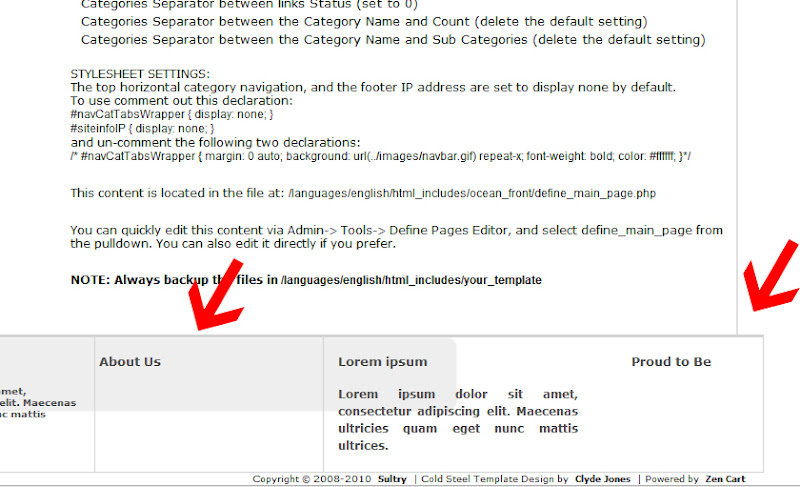
I already tried changing the .centerColumn value and it just moves the text outside the box. Here is a picture of what I am trying to fix. I added a custom footer taken from Rubik Integration template. I want it to align. Also I am trying to get rid of that light gray box inside. I believe its remnant from coldsteel. The red arrows shows the areas I am talking about. Any ideas?

15 Sep 2010, 5:02 PM
#578
clydejones avatar

clydejones

Deceased

Join Date:
Nov 2005
Location:
Colorado Springs, CO USA
Posts:
7,017
Plugin Contributions:
12

Re: Cold Steel Template Support Thread

daster:

I already tried changing the .centerColumn value and it just moves the text outside the box. Here is a picture of what I am trying to fix. I added a custom footer taken from Rubik Integration template. I want it to align. Also I am trying to get rid of that light gray box inside. I believe its remnant from coldsteel. The red arrows shows the areas I am talking about. Any ideas?

open includes/templates/cold_steel/css/stylesheet.css

find the following declarations; delete the highlighted portions.

adjust the width settings to match the width of the Rubik Integration template footer

#mainWrapper {
margin: 0 auto;
padding:0;
background: url(../images/main_wrapper_middle.gif);
background-repeat:repeat-y;
text-align: left;
width: 917px;
}

#footer {
margin: 0 auto;
text-align: left;
width: 913px;
height:90px;
}
#footerLogo {
margin: 0 5px;
padding: 0;
background: url(../images/inr_logo.gif) no-repeat;
float:left;
text-align:center;
height: 78px;
width:249px;
}

#navSuppWrapper {
margin: 0 5px;
padding: 0;
background: url(../images/footer.gif) no-repeat;
float:right;
font-weight: bold;
height: 78px;
color: #000;
width:619px;
}

NOTE: We are sorry that Clyde is no longer with us.
We are grateful for all his contributions to the Zen Cart community.

16 Sep 2010, 3:03 PM
#579
dragoon09 avatar

dragoon09

New Zenner

Join Date:
Sep 2010
Location:
Cahokia, IL
Posts:
19
Plugin Contributions:
0

Re: Cold Steel Template Support Thread

Hello Clyde been reading most of your responses to the Cold Steel temp. I have would like to know how to remove the numbers from behind the Categories? (perhaps I missed it on earlier pages?) i.e.

Action Movies --> (7)
Cartoons --> (4)
Thriller --> (10)

Thanks in advance!
Matt

Matts Movie Mart

ps - I know this is off topic, but why can't I edit pages from the admin center (tools-->define pages editor).
It says it saved the edits, but if click on that same page again, the changes aren't saved. Any Ideas? Thanks again!

Matt Doty
https://www.MoodBoosters.net
"It's better to be a Smart A$$ than a Dumb A$$

16 Sep 2010, 3:42 PM
#580
itseemedsosimple avatar

itseemedsosimple

New Zenner

Join Date:
Aug 2009
Location:
St. Louis, MO
Posts:
69
Plugin Contributions:
0

Re: Cold Steel Template Support Thread

[QUOTE=dragoon09;935531]Hello Clyde been reading most of your responses to the Cold Steel temp. I have would like to know how to remove the numbers from behind the Categories? (perhaps I missed it on earlier pages?) i.e.

Action Movies --> (7)
Cartoons --> (4)
Thriller --> (10)

Thanks in advance!
Matt

Matts Movie Mart

Admin - Configuration -> My Store -> Show Category Counts (change to false)