Zen Cart Logo
Forums / Templates, Stylesheets, Page Layout / New Zenner having some trouble... looking for help

New Zenner having some trouble... looking for help

Locked

Views: 1,170

Results 1 to 6 of 6
This thread is locked. New replies are disabled.
17 Apr 2009, 1:17 AM
#1
dojora4 avatar

dojora4

New Zenner

Join Date:
Apr 2009
Posts:
8
Plugin Contributions:
0

New Zenner having some trouble... looking for help

So... I'm new to this. And I'm running into a couple issues that you more experienced folk might have some experience with...

First... I have a broken link box showing up in my header... How do I get rid of that? I don't even know where to look for the problem... someone suggested stylesheets.. but... I can't figure that out.

Secondly.... how do I get rid of my total stock on the product info page?
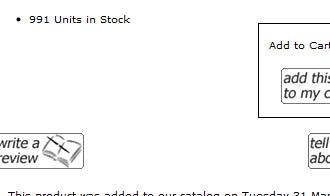
I haven't found a way to do that yet... I'm probably looking past it... but I'm about to pull my hair out!

Many thanks!

17 Apr 2009, 1:29 AM
#2
kobra avatar

kobra

Black Belt

Join Date:
Aug 2005
Location:
Arizona
Posts:
31,500
Plugin Contributions:
4

Re: New Zenner having some trouble... looking for help

First... I have a broken link box showing up in my header... How do I get rid of that? I don't even know where to look for the problem... someone suggested stylesheets.. but... I can't figure that out.
Easiest to create a logo image but I can not see your site
Secondly.... how do I get rid of my total stock on the product info page?
admin > catalog > product types > general > at far right select "edit layout" > Show Quantity in Stock > set to "0"

Zen-Venom Get Bitten

17 Apr 2009, 2:05 AM
#3
tony_sar avatar

tony_sar

Totally Zenned

Join Date:
Jul 2006
Location:
Montreal, Canada
Posts:
2,276
Plugin Contributions:
0

Re: New Zenner having some trouble... looking for help

header issue seems to show it self in IE .. and that is logo that is defined by zencart .. you can fix this your header.php located in your english folder .

those are the defines you might want to look at .

Line #22 : define('HEADER_LOGO_WIDTH', '200px');

Line #23 : define('HEADER_LOGO_HEIGHT', '70px');

Line #24 : define('HEADER_LOGO_IMAGE', 'logo.gif');

or simply add this to end of your stylesheet.css

#logo {
display:none;
}

i assume you have created your own logo as part of your header background ?

18 Apr 2009, 7:12 AM
#4
dojora4 avatar

dojora4

New Zenner

Join Date:
Apr 2009
Posts:
8
Plugin Contributions:
0

Re: New Zenner having some trouble... looking for help

Thanks for the help... I was able to hide my stock quantity... still having some trouble getting that pain in the :censored: broken link to go away... if you want to have a closer look at the site... visit

https://www.dr4productions.com/store

18 Apr 2009, 12:21 PM
#5
kobra avatar

kobra

Black Belt

Join Date:
Aug 2005
Location:
Arizona
Posts:
31,500
Plugin Contributions:
4

Re: New Zenner having some trouble... looking for help

Dojora4:

First... I have a broken link box showing up in my header... How do I get rid of that?
Undo what ever you have attempted to rid yourself of the logo.
If you undo it correctly you will then see the ZenCart Logo as you have the image logo.gif present at includes/templates/classic/images/logo.gif

Now that this is showing up look in your /images folder for
pixel_trans.gif. FTP to your PC - rename this to logo.gif and FTP it to includes/templates/classic/images/ and replace the logo.gif that is there.

Zen-Venom Get Bitten

21 Apr 2009, 5:21 AM
#6
dojora4 avatar

dojora4

New Zenner

Join Date:
Apr 2009
Posts:
8
Plugin Contributions:
0

Re: New Zenner having some trouble... looking for help

Thanks for the help!!