Zen Cart Logo
Forums / Basic Configuration / Missing images or how to delete them

Missing images or how to delete them

Locked

Views: 940

Results 1 to 3 of 3
This thread is locked. New replies are disabled.
22 Oct 2009, 3:22 PM
#1
southernlady avatar

southernlady

Zen Follower

Join Date:
Mar 2005
Location:
TN
Posts:
116
Plugin Contributions:
0

Missing images or how to delete them

I had to take my store back to a plain vanilla format and now am back to my real setup but in the process, I have misplaced a few things...like the images here:
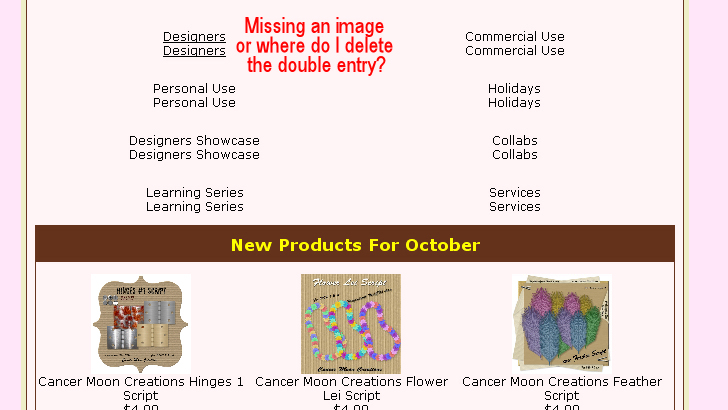
Yes, I searched for appropriate threads, none fit the bill as most are related to IH and I do not have that installed.
I currently have THESE mods installed:
TinyMice
Email Exporter
Paypal Verified Logo
Sales Report
Maximum Allowed in Cart

I have a template installed in the classic folder as putting it in any other folder broke my store (went thru that in July)

I am on a managed vps, use winscp.

Here is my site: GBLCreations Digital Store

Liz

22 Oct 2009, 4:20 PM
#2
stevesh avatar

stevesh

Black Belt

Join Date:
Feb 2005
Location:
Lansing, Michigan USA
Posts:
19,793
Plugin Contributions:
2

Re: Missing images or how to delete them

I'm thinking those Tiny Mice ate the images.

Whatever happened, all those links show images/pixel_trans.gif in the source, so whatever images you wanted there aren't in the images folder.

22 Oct 2009, 4:28 PM
#3
southernlady avatar

southernlady

Zen Follower

Join Date:
Mar 2005
Location:
TN
Posts:
116
Plugin Contributions:
0

Re: Missing images or how to delete them

Okay, that fixed it...

What happened was I didn't upload all the original images again in my fix of the site. See this thread

But I had edited that folder and I must have edited that particular image out and not uploaded it again.

Thank you for helping me fix it.

Liz