Zen Cart Logo
Forums / Addon Templates / Modern Zen [RI07] Template

Modern Zen [RI07] Template

Views: 59,637

Results 41 to 60 of 203
19 Jan 2010, 3:06 AM
#41
yellow1912 avatar

yellow1912

Totally Zenned

Join Date:
Oct 2006
Posts:
5,422
Plugin Contributions:
0

Modern Zen [RI07] Template

The sql patch, if you read very carefully, simply helps you to set certain options without having to go through lots of things and do everything one by one. If your site doesnt display, you should refer to the debug:
https://www.zen-cart.com/tutorials/index.php?article=82
Normally, you may have 1 or more files not uploaded successfully

If you want to revert the change made by the sql, the easiest way is to revert your sql database back (it was mentioned in the package that you should back up, normally people dont ready it, it's your fault then to ignore the important notice). You can also read the sql patch, line by line, and revert the changes it made if you understand sql. But seriously, the sql patch doesn't do anything that can damage your store.

Another option is to go through the configuration menu in the admin, and well make the changes you need. For example if you want to show special on the front page, just go to find the option that turns on special on the front page, it's all inside the admin panel (which sometime can be hard to find, which is why we included sql patch for this very specific reason)

19 Jan 2010, 6:23 AM
#42
rival904 avatar

rival904

New Zenner

Join Date:
Oct 2009
Posts:
32
Plugin Contributions:
0

Re: Modern Zen [RI07] Template

Whats a step by step to get the featured products to show up in the middle of the page, Ive tried everything and all I managed to get is the ctegory to show up in the middle.

19 Jan 2010, 8:02 AM
#43
yellow1912 avatar

yellow1912

Totally Zenned

Join Date:
Oct 2006
Posts:
5,422
Plugin Contributions:
0

Re: Modern Zen [RI07] Template

rival904:

Whats a step by step to get the featured products to show up in the middle of the page, Ive tried everything and all I managed to get is the ctegory to show up in the middle.
Honestly, I dont remember it, the zen menu is really a mess sometimes (which is why I spent time to include a patch)

Anyhow, it is there some where in there, I would suggest looking under configuration/index listing first. Someone more used to the menu will be at better position to assist you with this.

19 Jan 2010, 11:54 PM
#44
rival904 avatar

rival904

New Zenner

Join Date:
Oct 2009
Posts:
32
Plugin Contributions:
0

Re: Modern Zen [RI07] Template

I got it to show back on the left, cant get it back to the center, any ideas?

https://www.downlowcaraudio.com

I also noticed there is no more right column, like its turned off somewhere.

21 Jan 2010, 6:36 PM
#45
rival904 avatar

rival904

New Zenner

Join Date:
Oct 2009
Posts:
32
Plugin Contributions:
0

Re: Modern Zen [RI07] Template

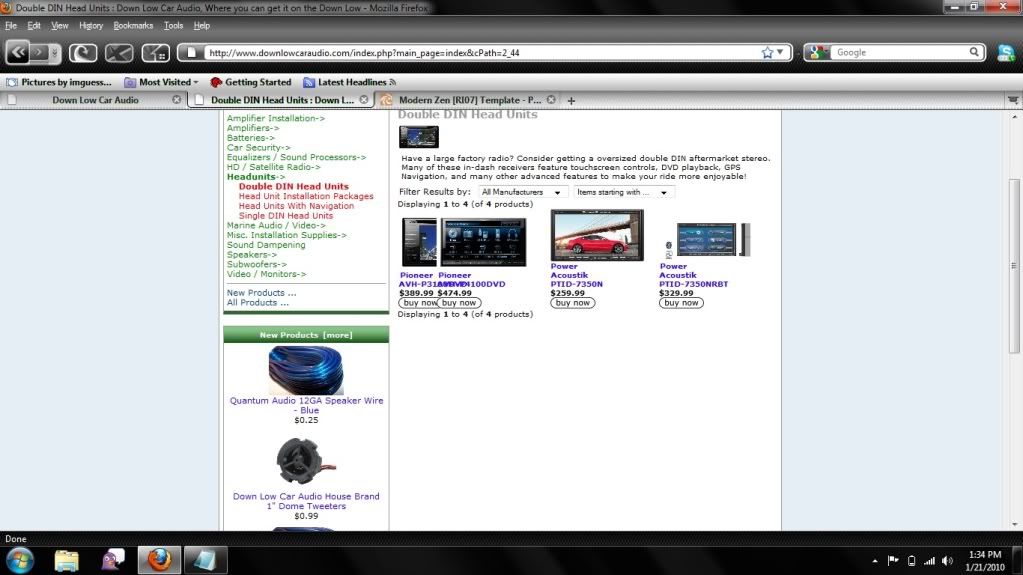
Is there a better spot to put this than in here as I am NOT worried about the template anymore, just want my website back up and running.

Here is ANOTHER problem I have.

25 Jan 2010, 12:14 AM
#46
str8fromtheworld avatar

str8fromtheworld

New Zenner

Join Date:
Jan 2010
Posts:
16
Plugin Contributions:
0

Re: Modern Zen [RI07] Template

Hello and thank you so much for this awesome template,

just a stupid question..

How to install the template?

It won't show up in my templates menu in Zen Cart admin.

29 Jan 2010, 5:52 PM
#48
gameomi avatar

gameomi

New Zenner

Join Date:
Jan 2010
Posts:
1
Plugin Contributions:
0

Re: Modern Zen [RI07] Template

Hello, i'm having some error over here. The layout of the template is messed up, is there any method i could position it manually? And what are the steps to edit the positioning of the boxes, thanks!

30 Jan 2010, 4:44 PM
#49
valeroice avatar

valeroice

New Zenner

Join Date:
Jan 2010
Posts:
1
Plugin Contributions:
0

Re: Modern Zen [RI07] Template

Hello,

I am having a problem with this template. Everything (so far) seems to be working except for the shopping cart. When I add a item to my cart and click 'My Cart' I am taken to http://www.valeroice.com/cart1/index.php?main_page=shopping_cart which just a blank center page. I still see the content side boxes etc.. just not the cart.

21 Feb 2010, 8:37 PM
#50
robsnowden avatar

robsnowden

Zen Follower

Join Date:
Apr 2004
Location:
Up t'north, UK
Posts:
264
Plugin Contributions:
0

Re: Modern Zen [RI07] Template

I have just stumbled across this template tonight. Fantastic and well done for dragging ZenCart into the 21st century - it looks great.

I have a couple of questions please. Please see the screenshot for details of these questions:

  1. I am seeing an error with the headings on the home page:

TABLE_HEADING_IMAGE, TABLE HEADING_PRICE

What could cause this and how can i fix please?

  1. On the demo and on the screenshot included with the mod download the 'New products' items are layed out differently and not under each other as in my screen shot. How can I change layout to be same as the demo please?

  2. How do I edit the footer area to change the lorem ipsum...... Again on the demo I see the newsletter block in the footer but can't see how to do that on my install. I have activated the newsletter sidebox but it is not showing. Also on the demo I see links in the About Us block which are different from the EZ pages on the top menu. How is this achieved? Any ideas?

Hope somebody can assist.

Many thanks

Rob

22 Feb 2010, 3:01 PM
#51
helpmesell avatar

helpmesell

New Zenner

Join Date:
Feb 2007
Posts:
77
Plugin Contributions:
0

Re: Modern Zen [RI07] Template

Have you installed the SQL patch? I think this might be your problem.

For the writing in the footer you need to edit the tpl_footer.php

I also couldn't get the newsletter sidebox to show up, so hopefully some one can chime in.

robsnowden:

I have just stumbled across this template tonight. Fantastic and well done for dragging ZenCart into the 21st century - it looks great.

I have a couple of questions please. Please see the screenshot for details of these questions:

  1. I am seeing an error with the headings on the home page:

TABLE_HEADING_IMAGE, TABLE HEADING_PRICE

What could cause this and how can i fix please?

  1. On the demo and on the screenshot included with the mod download the 'New products' items are layed out differently and not under each other as in my screen shot. How can I change layout to be same as the demo please?

  2. How do I edit the footer area to change the lorem ipsum...... Again on the demo I see the newsletter block in the footer but can't see how to do that on my install. I have activated the newsletter sidebox but it is not showing. Also on the demo I see links in the About Us block which are different from the EZ pages on the top menu. How is this achieved? Any ideas?

Hope somebody can assist.

Many thanks

Rob

22 Feb 2010, 7:42 PM
#52
ericg avatar

ericg

New Zenner

Join Date:
Oct 2006
Posts:
8
Plugin Contributions:
0

Re: Modern Zen [RI07] Template

Hi Everyone,

Great template, loving the looks of it!

Have a problem though and would be hugely appreciative if anyone could help out. I'm using 1.3.8, and I'm hosted with HostGator.

http://www.uniformshopinc.com

^ 'See larger image' as well as 'Estimate Shipping' not working. Don't know if it has to do with the javascript in the template, but everything works good in the default zen cart template.

Thanks for looking, and any help would be appreciated.

22 Feb 2010, 9:05 PM
#53
robsnowden avatar

robsnowden

Zen Follower

Join Date:
Apr 2004
Location:
Up t'north, UK
Posts:
264
Plugin Contributions:
0

Re: Modern Zen [RI07] Template

Hi

Nope not working on mine either. Shame coz it looks mighty fine!

I also see that I can no longer edit the main page text with this template. Am I missing something or is this correct? (define page editor - main page).

Rob

22 Feb 2010, 11:48 PM
#54
helpmesell avatar

helpmesell

New Zenner

Join Date:
Feb 2007
Posts:
77
Plugin Contributions:
0

Re: Modern Zen [RI07] Template

I have the same problems on my test site with this template.

I thought it had to do with my installation so I deleted and started with a fresh zencart install with only this template loaded and still had the same problems.

Hopefully yellow1912 can chime in and help us out :)

I think if we were to sum up the problems it would be:

  1. When you click to "larger picture" button nothing pops up and page gives an error.
  2. When you click to "estimate shipping" button nothing pops up and page gives an error.
  3. It seems like the subscribe to newsletter sidebox doesn't show up.
  4. Drop down box on the manufacturers sidebox isn't centered.

ericG:

Hi Everyone,

Great template, loving the looks of it!

Have a problem though and would be hugely appreciative if anyone could help out. I'm using 1.3.8, and I'm hosted with HostGator.

http://www.uniformshopinc.com

^ 'See larger image' as well as 'Estimate Shipping' not working. Don't know if it has to do with the javascript in the template, but everything works good in the default zen cart template.

Thanks for looking, and any help would be appreciated.

23 Feb 2010, 7:47 PM
#55
robsnowden avatar

robsnowden

Zen Follower

Join Date:
Apr 2004
Location:
Up t'north, UK
Posts:
264
Plugin Contributions:
0

Re: Modern Zen [RI07] Template

I have solved the issue of the pop up boxes/large image not working.

There is an additional SQL file to run that is missing from this package. I found the instructions for Minify online and downloaded the complete package which included this sql file.

SET @t4=0;
SELECT (@t4:=configuration_group_id) as t4
FROM configuration_group
WHERE configuration_group_title= 'CSS/JS Loader';
DELETE FROM configuration WHERE configuration_group_id = @t4;
DELETE FROM configuration_group WHERE configuration_group_id = @t4;

INSERT INTO configuration_group VALUES ('', 'CSS/JS Loader', 'Set CSS/JS Loader Options', '1', '1');
UPDATE configuration_group SET sort_order = last_insert_id() WHERE configuration_group_id = last_insert_id();

SET @t4=0;
SELECT (@t4:=configuration_group_id) as t4
FROM configuration_group
WHERE configuration_group_title= 'CSS/JS Loader';

INSERT INTO configuration (configuration_title, configuration_key, configuration_value, configuration_description, configuration_group_id, sort_order, last_modified, date_added, use_function, set_function) VALUES
('Enable Minify', 'MINIFY_STATUS', 'true', 'Minifying will speed up your site's loading speed by combining and compressing css/js files.', @t4, 1, NOW(), NOW(), NULL, 'zen_cfg_select_option(array('true', 'false'),'),
('Max URL Lenght', 'MINIFY_MAX_URL_LENGHT', '2083', 'On some server the maximum lenght of any POST/GET request URL is limited. If this is the case for your server, you can change the setting here', @t4, 2, NOW(), NOW(), NULL, NULL),
('Minify Cache Time', 'MINIFY_CACHE_TIME_LENGHT', '31536000', 'Set minify cache time (in second). Default is 1 year (31536000)', @t4, 3, NOW(), NOW(), NULL, NULL),
('Latest Cache Time', 'MINIFY_CACHE_TIME_LATEST', '0', 'Normally you don't have to set this, but if you have just made changes to your js/css files and want to make sure they are reloaded right away, you can reset this to 0.', @t4, 4, NOW(), NOW(), NULL, NULL);

This solved the problems of the pop-ups but not the Newsletter Box. Still working on that one!

Rob

23 Feb 2010, 8:07 PM
#56
robsnowden avatar

robsnowden

Zen Follower

Join Date:
Apr 2004
Location:
Up t'north, UK
Posts:
264
Plugin Contributions:
0

Re: Modern Zen [RI07] Template

It gets better. It's amazing what a little bit of tenacity can do!

To get the Newsletter Sidebox showing you need to open up includes > Modules > Sideboxes > RI_TEMPLATE_07 > subscribe.php and change the word 'false' on line 25 to 'true'. this gets the Newsletter Sidebox showing on my site anyway.

Rob

23 Feb 2010, 8:41 PM
#57
ericg avatar

ericg

New Zenner

Join Date:
Oct 2006
Posts:
8
Plugin Contributions:
0

Re: Modern Zen [RI07] Template

Hi Rob,

Popups still don't seem to be working for me... Could you point me to the actual SQL file?

Thanks in advance!
Eric

23 Feb 2010, 10:25 PM
#58
robsnowden avatar

robsnowden

Zen Follower

Join Date:
Apr 2004
Location:
Up t'north, UK
Posts:
264
Plugin Contributions:
0

Re: Modern Zen [RI07] Template

Hi Eric

Have you tried copying and pasting the sql data from my post above? This is copied from the actual sql file.

For info check out: http://wiki.rubikintegration.com/zencart/modules/css_javascript_loader/about

And to download package with the sql file in (look in the docs folder once you download and unzipped everything): http://blog.rubikintegration.com/2009/08/08/zencart-css-javascript-loader-released/

Cheers and good luck.

Rob

BTW although I got the newsletter box to display it doesn't work and I get error page after 'subscribing'. To be honest I use mailchimp anyway so i just installed the mailchimp sidebox mod and everything is peachy.

Now to get that cool slider that is on the demo page.!!

24 Feb 2010, 2:48 AM
#59
helpmesell avatar

helpmesell

New Zenner

Join Date:
Feb 2007
Posts:
77
Plugin Contributions:
0

Re: Modern Zen [RI07] Template

ericG:

Hi Rob,

Popups still don't seem to be working for me... Could you point me to the actual SQL file?

Thanks in advance!
Eric

It didn't work for me at first either but then I downloaded the entire package from http://blog.rubikintegration.com/2009/08/08/zencart-css-javascript-loader-released/

and uploaded to my server and the popups started working

24 Feb 2010, 11:51 AM
#60
helpmesell avatar

helpmesell

New Zenner

Join Date:
Feb 2007
Posts:
77
Plugin Contributions:
0

Re: Modern Zen [RI07] Template

robsnowden:

It gets better. It's amazing what a little bit of tenacity can do!

To get the Newsletter Sidebox showing you need to open up includes > Modules > Sideboxes > RI_TEMPLATE_07 > subscribe.php and change the word 'false' on line 25 to 'true'. this gets the Newsletter Sidebox showing on my site anyway.

Rob

I think I figured out the newsletter issue.

It seems that it uses the newsletter subscribe contribution.
http://www.zen-cart.com/index.php?main_page=product_contrib_info&products_id=106

And it's basically missing a bunch of files from it.
Download the contribution and upload the missing files to your server. Follow the instructions to install the the contribution as in the readme file of it and it should start working

:clap: