Zen Cart Logo
Forums / Templates, Stylesheets, Page Layout / How can I change sub-category product listing row height?

How can I change sub-category product listing row height?

Locked

Views: 1,844

Results 1 to 3 of 3
This thread is locked. New replies are disabled.
1 Feb 2010, 6:34 PM
#1
enchantart avatar

enchantart

New Zenner

Join Date:
Jan 2010
Posts:
11
Plugin Contributions:
0

How can I change sub-category product listing row height?

Hello,

When I click on a sub-category in my Zen Cart store and the sub-category's products are then displayed, there is no space between the rows of product listings.

This causes the product listing images to be displayed right on top of each other, with no space in between. In the image below, I highlighted this lack of space with a red box.
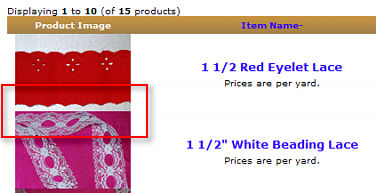
I realize that I might be able to create the space between the rows by reducing the size of the images, but I want to display those thumbnails at their current size.

Is there any way to configure the sub-category product listing rows to add more space between them?

Thanks!

Zen Cart v. 1.3.8a

1 Feb 2010, 6:36 PM
#2
kobra avatar

kobra

Black Belt

Join Date:
Aug 2005
Location:
Arizona
Posts:
31,500
Plugin Contributions:
4

Re: How can I change sub-category product listing row height?

Where is your site?

This can be template specific

1 Feb 2010, 7:13 PM
#3
enchantart avatar

enchantart

New Zenner

Join Date:
Jan 2010
Posts:
11
Plugin Contributions:
0

Re: How can I change sub-category product listing row height?

You can go to the page that's illustrated in the image above by going to this link:

http://enchantart.com/index.php?main_page=index&cPath=6_11_14

The template used is a modified version of the Classic template.

Thanks for your help.