Zen Cart Logo
Forums / Addon Sideboxes / Shopping Cart Sidebox with Checkout Button - Button Missing

Shopping Cart Sidebox with Checkout Button - Button Missing

Locked

Views: 5,040

Results 1 to 13 of 13
This thread is locked. New replies are disabled.
24 Jun 2010, 6:15 PM
#1
nineve avatar

nineve

New Zenner

Join Date:
Jun 2010
Posts:
53
Plugin Contributions:
1

Shopping Cart Sidebox with Checkout Button - Button Missing

Hello,
I'm using Zen Cart v1.3.9d and just downloaded and added the Shopping Cart Sidebox with Checkout Button (http://www.zen-cart.com/index.php?main_page=product_contrib_info&products_id=1175) and it works great except the Check Out Button is missing.

Is it a conflict with the newest version of Zen Cart and a mod made for 1.3.8? Or did I do something wrong?

It's the only mod I have installed.

How do I fix it?

24 Jun 2010, 6:48 PM
#2
dbltoe avatar

dbltoe

Totally Zenned

Join Date:
Jan 2004
Location:
N of San Antonio TX
Posts:
9,815
Plugin Contributions:
16

Re: Shopping Cart Sidebox with Checkout Button - Button Missing

I see nothing in the mod that would mess with 11.3.9. Have you checked to see if the image defined as BUTTON_IMAGE_CHECKOUT exists in your template images?

24 Jun 2010, 7:30 PM
#3
nineve avatar

nineve

New Zenner

Join Date:
Jun 2010
Posts:
53
Plugin Contributions:
1

Re: Shopping Cart Sidebox with Checkout Button - Button Missing

I'm sorry where do I look? I was expecting a gif or jpg named that ....:blush:

24 Jun 2010, 8:44 PM
#4
dbltoe avatar

dbltoe

Totally Zenned

Join Date:
Jan 2004
Location:
N of San Antonio TX
Posts:
9,815
Plugin Contributions:
16

Re: Shopping Cart Sidebox with Checkout Button - Button Missing

Using the Developers Too Kit in the admin, you can search for BUTTON_IMAGE_CHECKOUT and find the define for that variable. Then check to see if that image is in the buttons folder of your template.

24 Jun 2010, 10:16 PM
#5
nineve avatar

nineve

New Zenner

Join Date:
Jun 2010
Posts:
53
Plugin Contributions:
1

Re: Shopping Cart Sidebox with Checkout Button - Button Missing

It is in zencart/includes/templates/templat_default/buttons/english/button_checkout.gif

Is it somehow not directing it to the right place?:blink:

24 Jun 2010, 11:24 PM
#6
dbltoe avatar

dbltoe

Totally Zenned

Join Date:
Jan 2004
Location:
N of San Antonio TX
Posts:
9,815
Plugin Contributions:
16

Re: Shopping Cart Sidebox with Checkout Button - Button Missing

Hard to tell without a look at your site. A URL would help.

25 Jun 2010, 9:15 AM
#7
stevesh avatar

stevesh

Black Belt

Join Date:
Feb 2005
Location:
Lansing, Michigan USA
Posts:
19,793
Plugin Contributions:
2

Re: Shopping Cart Sidebox with Checkout Button - Button Missing

Nineve:

and it works great except the Check Out Button is missing.

Since it's just the regular Cart box without the button, I'm going to guess you didn't change the CUSTOM_TEMPLATE folder name in the mod to the name of your custom template.

25 Jun 2010, 1:57 PM
#8
nineve avatar

nineve

New Zenner

Join Date:
Jun 2010
Posts:
53
Plugin Contributions:
1

Re: Shopping Cart Sidebox with Checkout Button - Button Missing

It's on my system (local host) while in development so I can't direct ya to it. :(

25 Jun 2010, 3:42 PM
#9
nineve avatar

nineve

New Zenner

Join Date:
Jun 2010
Posts:
53
Plugin Contributions:
1

Re: Shopping Cart Sidebox with Checkout Button - Button Missing

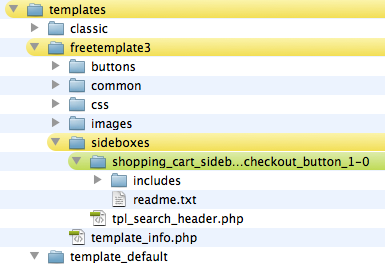
Perhaps I have it in the wrong place OR perhaps I'm looking in the wrong place to activate it in Admin?

Here is where I put it;

And I'm looking under Tools>Layout Box Controller

25 Jun 2010, 3:52 PM
#10
stevesh avatar

stevesh

Black Belt

Join Date:
Feb 2005
Location:
Lansing, Michigan USA
Posts:
19,793
Plugin Contributions:
2

Re: Shopping Cart Sidebox with Checkout Button - Button Missing

That's not right.

When a mod has an 'includes' folder, in almost every case, you need to drag that folder to the root (top directory) of your store, and all the folders and files therein will fall where they need to be.

Since that mod only has one file, you could just copy that file to includes/templates/freetemplate3/sideboxes

The Shopping Cart sidebox will be enabled from Admin - Tools - Layout Boxes Controller, but there won't be a separate entry for the box with checkout button.

There are options in Admin - Configuration to allow the shopping cart sidebox to display when empty or when not.

25 Jun 2010, 4:35 PM
#11
nineve avatar

nineve

New Zenner

Join Date:
Jun 2010
Posts:
53
Plugin Contributions:
1

Re: Shopping Cart Sidebox with Checkout Button - Button Missing

Oh, so it should be like this?

If so it's still not showing the button.... :no:

I know I have to be doing something dumb.

25 Jun 2010, 4:56 PM
#12
stevesh avatar

stevesh

Black Belt

Join Date:
Feb 2005
Location:
Lansing, Michigan USA
Posts:
19,793
Plugin Contributions:
2

Re: Shopping Cart Sidebox with Checkout Button - Button Missing

That's the right place, but it looks like we're talking about different mods. It should be tpl_shopping_cart.php.

25 Jun 2010, 5:02 PM
#13
nineve avatar

nineve

New Zenner

Join Date:
Jun 2010
Posts:
53
Plugin Contributions:
1

Re: Shopping Cart Sidebox with Checkout Button - Button Missing

WOW I don't know how I did that but I fixed it with the right file and now IT WORKS!

Thank you soooo much!

:clap:

So the key is taking it out of all those folders...