Forums / Templates, Stylesheets, Page Layout / Categories side box need help with list marker placement

Categories side box need help with list marker placement

Locked

Views: 1,479

Results 1 to 13 of 13
This thread is locked. New replies are disabled.
10 Oct 2010, 12:23 PM
#1
aozhaver avatar

aozhaver

Zen Follower

Join Date:
Sep 2010
Posts:
121
Plugin Contributions:
0

Categories side box need help with list marker placement

Hi Everyone!

Yet again I am stuck due to my very poor HTML skills.:frusty:

Basically I need a list marker to appear besides each category type and sub category and sub sub category etc etc but I need each "level" of categories to be indented.

The original code for my template has list markers in a single column so even if you click on a subcategory the list marker would remain in place while the category name would be indented. here is an idea:
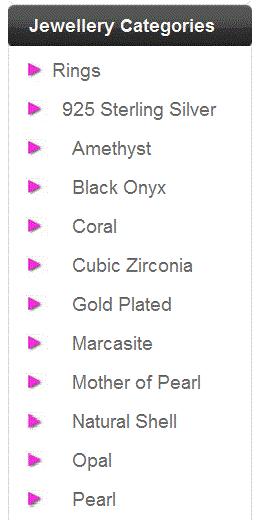
As you can see in the image "Rings" is one of the top main categories and it has a subcategory "925 Sterling Silver".
"925 Sterling Silver" subcategory also has subs: Amethyst, Black Onyx etc etc.
Yet the list markers are in one vertical line and dont get indented according to the category tree level.

This is the relevant part of my code in tpl_categories.php

if (zen_get_product_types_to_category($box_categories_array[$i]['path']) == 3 or ($box_categories_array[$i]['top'] != 'true' and SHOW_CATEGORIES_SUBCATEGORIES_ALWAYS != 1)) {
// skip if this is for the document box (==3)

  } 
  
  else {

$content .= '<li><a class="' . $new_style . '" href="' . zen_href_link(FILENAME_DEFAULT, $box_categories_array[$i]['path']) . '">';

  if ($box_categories_array[$i]['current']) {
    if ($box_categories_array[$i]['has_sub_cat']) {
      $content .= '<span class="category-subs-parent">' . $box_categories_array[$i]['name'] . '</span>';
    } else {
      $content .= '<span class="category-subs-selected">' . $box_categories_array[$i]['name'] . '</span>';
    }
  } else {
    $content .= $box_categories_array[$i]['name'];
  }

  //if ($box_categories_array[$i]['has_sub_cat']) {
  //  $content .= CATEGORIES_SEPARATOR;
  //}
  $content .= '';

  if (SHOW_COUNTS == 'true') {
    if ((CATEGORIES_COUNT_ZERO == '1' and $box_categories_array[$i]['count'] == 0) or $box_categories_array[$i]['count'] >= 1) {
      $content .= CATEGORIES_COUNT_PREFIX . $box_categories_array[$i]['count'] . CATEGORIES_COUNT_SUFFIX;
    }
  }

  $content .= '</a></li>' . "\n";
}

As you can see there is an <li> tag in:

else {
$content .= '<li><a class="' . $new_style . '" href="' . zen_href_link(FILENAME_DEFAULT, $box_categories_array[$i]['path']) . '">';

Which makes the list markers appear but incorrectly!

Please help me know which tags to insert so that the list markers next to each category display next to the category level and not in just one straight vertical column line.

I hope this all makes sense - THANKS!:smile:

Silver Jewellery

RESPECT to the Zen Cart Team, I'm PERFECTLY Zenned!

10 Oct 2010, 7:00 PM
#2
darkangel avatar

darkangel

Totally Zenned

Join Date:
Oct 2007
Location:
Emporia, Kansas
Posts:
1,729
Plugin Contributions:
0

Re: Categories side box need help with list marker placement

without actually getting in there and experimenting this is a shot in the dark...try adding the part in red and see if that works

else {
$content .= '<li>&nbsp<a class="' . $new_style . '" href="' . zen_href_link(FILENAME_DEFAULT, $box_categories_array[$i]['path']) . '">';

10 Oct 2010, 7:18 PM
#3
aozhaver avatar

aozhaver

Zen Follower

Join Date:
Sep 2010
Posts:
121
Plugin Contributions:
0

Re: Categories side box need help with list marker placement

That doesn't really do it you see since it adds a space but all the list markers still stay in one straight column...

Any more ideas anyone? :blink:

Silver Jewellery

RESPECT to the Zen Cart Team, I'm PERFECTLY Zenned!

11 Oct 2010, 12:46 PM
#4
econcepts avatar

econcepts

Totally Zenned

Join Date:
Dec 2005
Posts:
1,505
Plugin Contributions:
2

Re: Categories side box need help with list marker placement

aozhaver:

As you can see there is an <li> tag in:

Which makes the list markers appear but incorrectly!

Please help me know which tags to insert so that the list markers next to each category display next to the category level and not in just one straight vertical column line.

Just on <li> tag won't do it. You need to set it up (in the code that you have singled out) to be a nested list. So a 'list' within a 'list' etc...

The one list element makes it think there is only one list.

Did you try to create something like the following:

<ul> <li>Top Level Category Here</li> <ul><li>Sub cat here</li> <li>Sub cat 2 here</li> <li>Sub cat 3 here</li> <ul> <li>Sub Sub Cat 1 here</li> <li>Sub Sub Cat 2 here</li> </ul> </ul> </ul>

Notice there are nested lists within the others where each sub cat starts / ends. Set a style sheet element on each nested list item and then adjust your stylesheet to increase / decrease the indent as needed (being that they are nested lists, they should auto indent to some degree anyhow.)

You'll also need to set the 'list item image' (or you could use a background image for each item in the list). This should put the list item image (the arrow you are showing) next to the item desired, and indented as you want.

Eric
20 Ways to Increase Sales Using Zen Cart
Zen Cart contribs: Simple Google Analytics, Export Shipping Information

11 Oct 2010, 1:10 PM
#5
aozhaver avatar

aozhaver

Zen Follower

Join Date:
Sep 2010
Posts:
121
Plugin Contributions:
0

Re: Categories side box need help with list marker placement

Hey thanks so much for replying! Finally someone takes notice here...

Well its so hard for me to make real to you what I'm doing so i edited my code according to what you said here it is

else {
$content .= '<ul><li><a class="' . $new_style . '" href="' . zen_href_link(FILENAME_DEFAULT, $box_categories_array[$i]['path']) . '"></li>';

  if ($box_categories_array[$i]['current']) {
    if ($box_categories_array[$i]['has_sub_cat']) {
      $content .= '<ul><li><span class="category-subs-parent">' . $box_categories_array[$i]['name'] . '</span></li>';
    } else {
      $content .= '<ul><li><span class="category-subs-selected">' . $box_categories_array[$i]['name'] . '</span></li>';
    }
  } else {
    $content .= $box_categories_array[$i]['name'];
  }

  //if ($box_categories_array[$i]['has_sub_cat']) {
   // $content .= CATEGORIES_SEPARATOR;
  //}
  $content .= '';

  if (SHOW_COUNTS == 'true') {
    if ((CATEGORIES_COUNT_ZERO == '1' and $box_categories_array[$i]['count'] == 0) or $box_categories_array[$i]['count'] >= 1) {
      $content .= CATEGORIES_COUNT_PREFIX . $box_categories_array[$i]['count'] . CATEGORIES_COUNT_SUFFIX;
    }
  }

  $content .= '</a></li></ul></ul></ul>' . "\n";

And you can see the (disastrous) results on my website directly https://www.majesticsilver.co.uk/store

Firstly lets consider if there is something basically wrong with the way ive arranged the HTML, if yes ill correct and try again if not ill discuss the css stylesheet with you... lets see I hope you subscribed to this thread and will reply soon

Thanks again!:clap:

Silver Jewellery

RESPECT to the Zen Cart Team, I'm PERFECTLY Zenned!

11 Oct 2010, 1:14 PM
#6
aozhaver avatar

aozhaver

Zen Follower

Join Date:
Sep 2010
Posts:
121
Plugin Contributions:
0

Re: Categories side box need help with list marker placement

PS Please ignore the last </li> I realised its wrong, still even after removing in no noticeable difference...

Silver Jewellery

RESPECT to the Zen Cart Team, I'm PERFECTLY Zenned!

11 Oct 2010, 1:26 PM
#7
econcepts avatar

econcepts

Totally Zenned

Join Date:
Dec 2005
Posts:
1,505
Plugin Contributions:
2

Re: Categories side box need help with list marker placement

You've got it coded wrong. The list is all off (view your source when looking at the page.)

There are too many list items compounding on each other and this throws everything off.

Try this add-on. It should automatically code it for you (at least give you a starting point.)

Categories menu - replace with ul/li

Let me know if that helps.

You might also want to look at the following (more in depth but should let you customize as needed).

http://www.zen-cart.com/index.php?main_page=product_contrib_info&products_id=609

Eric
20 Ways to Increase Sales Using Zen Cart
Zen Cart contribs: Simple Google Analytics, Export Shipping Information

11 Oct 2010, 1:42 PM
#8
aozhaver avatar

aozhaver

Zen Follower

Join Date:
Sep 2010
Posts:
121
Plugin Contributions:
0

Re: Categories side box need help with list marker placement

OK I did that code and Im exactly back to square one I got all my categories with a list marker next to them, then you open a subcategory the list marker remains exactly where it is...
what to do :lookaroun

You can see the results on my web page

Silver Jewellery

RESPECT to the Zen Cart Team, I'm PERFECTLY Zenned!

11 Oct 2010, 2:46 PM
#9
econcepts avatar

econcepts

Totally Zenned

Join Date:
Dec 2005
Posts:
1,505
Plugin Contributions:
2

Re: Categories side box need help with list marker placement

Almost there.

Did you set separate style items for 'category-top' vs 'category-subs' vs. 'category-products'? If not you need to do that.

Also, if you can't get that to work, you might want to consider altering the current code you are using (again.)

It has you almost there, but it still has all items in on 'list'.

You should be able to achieve what you want without altering that (adding more <ul> </ul> for the sub categories) but it is an option.

Just as a quick example (IF you were to go with adding the extra <ul> tags (try the stylesheet method first) it may look like this:

<ul> <li><a class="category-top" href="http://www.majesticsilver.co.uk/store/index.php?main_page=index&cPath=1"><span class="category-subs-parent">Rings</span>-></a></li> <ul><li><a class="category-subs" href="http://www.majesticsilver.co.uk/store/index.php?main_page=index&cPath=1_17">   925 Sterling Silver-></a></li> <ul> <li><a class="category-products" href="http://www.majesticsilver.co.uk/store/index.php?main_page=index&cPath=1_4">   999 Thai Karen Silver</a></li> </ul> </ul> </ul>

Eric
20 Ways to Increase Sales Using Zen Cart
Zen Cart contribs: Simple Google Analytics, Export Shipping Information

11 Oct 2010, 3:20 PM
#10
aozhaver avatar

aozhaver

Zen Follower

Join Date:
Sep 2010
Posts:
121
Plugin Contributions:
0

Re: Categories side box need help with list marker placement

Hi again,

Im not sure what style sheets you are referring to exactly.
I have in stylesheet.css

categoryListBoxContents a {text-decoration:none; color:#C00505; text-transform:uppercase; text-align:center;}

but that doesnt seem to make a difference to anything

then I also have lots of options in stylesheet_boxes.css

one that affects all my side boxes directly and also the category side box is

.box ul{ font-size:16px;padding:0 0 0 4px !important; margin:-3px 0 0 0 !important;}
.box ul li{font-size:16px; line-height:27px; background:url(../images/list-marker.gif) no-repeat 0 12px; padding-left:16px; padding-top:6px;}
.box ul li a{ text-decoration:none;}
.box ul li a:hover{ font-weight:bold; color:#f42fdb;}

otherwise ive looked thru many options I cant see exactly what to edit, can you give more specific information?

Silver Jewellery

RESPECT to the Zen Cart Team, I'm PERFECTLY Zenned!

11 Oct 2010, 3:31 PM
#11
aozhaver avatar

aozhaver

Zen Follower

Join Date:
Sep 2010
Posts:
121
Plugin Contributions:
0

Re: Categories side box need help with list marker placement

Its no use... Ive been playing around with the html code for days :wacko: trying different combinations of tags. Do you have a copy of a working TPL_categories.php file just for me to look at and see.
It seems like such a basic requirement to have subcategories indented AND and bullet or sign marker indented as well yet im really stuck here....:frusty:

Silver Jewellery

RESPECT to the Zen Cart Team, I'm PERFECTLY Zenned!

11 Oct 2010, 6:11 PM
#12
aozhaver avatar

aozhaver

Zen Follower

Join Date:
Sep 2010
Posts:
121
Plugin Contributions:
0

Re: Categories side box need help with list marker placement

Hi!!

I just finished installing Categories Dressing Mod and it seems to do the job fine!
Im gonna need to tweak it to suit my own bullet images and backgrounds but its really seems to fix a really big hole in zen cart out the box or even that crappy template I bought for $69 :P

It gives you a simple expected category tree structure all indented correctly - bliss!:yes::D

Silver Jewellery

RESPECT to the Zen Cart Team, I'm PERFECTLY Zenned!

12 Oct 2010, 3:11 PM
#13
gjh42 avatar

gjh42

Black Belt

Join Date:
Jul 2005
Location:
Upstate NY
Posts:
21,876
Plugin Contributions:
8

Re: Categories side box need help with list marker placement

I see you found an answer:) Yes, Categories Dressing does create a correctly nested category list structure. The flyout menus do too (they have to to make the flyout happen), but the "Categories menu - replace with ul/li" mod creates only one list, ignoring nesting levels.

The stock categories box in Zen Cart correctly indents levels, but since it has no <ul> at all, there is nothing to base differing list markers on beside top category vs. subcat, and categories with products vs. categories with subs.