Forums / Setting Up Categories, Products, Attributes / How can I change the width where all the products are listed?

How can I change the width where all the products are listed?

Locked

Views: 1,842

Results 1 to 16 of 16
This thread is locked. New replies are disabled.
17 Nov 2010, 6:10 PM
#1
sharontan avatar

sharontan

New Zenner

Join Date:
Nov 2010
Posts:
57
Plugin Contributions:
0

How can I change the width where all the products are listed?

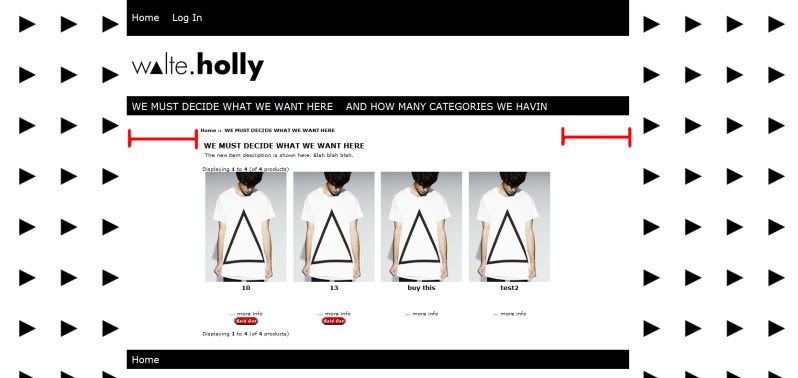
Hi, how can i extend the width of my product listings? As I've drawn the red area. I would like the width to extend to fill up that space. Any idea how to do that?

Thanks.
17 Nov 2010, 7:42 PM
#2
kobra avatar

kobra

Black Belt

Join Date:
Aug 2005
Location:
Arizona
Posts:
31,500
Plugin Contributions:
4

Re: How can I change the width where all the products are listed?

Pics are nice but a link to the page will get more response

Place ONE SPACE in it to break link as in
http: //www.zen-cart.com/

Zen-Venom Get Bitten

17 Nov 2010, 9:52 PM
#3
sharontan avatar

sharontan

New Zenner

Join Date:
Nov 2010
Posts:
57
Plugin Contributions:
0

Re: How can I change the width where all the products are listed?

Hey, here's the link

htt p://walteholly.com/store/index.php?main_page=index&cPath=1

I can't figure out how to extend the white part as shown in picture above.

17 Nov 2010, 9:59 PM
#4
kobra avatar

kobra

Black Belt

Join Date:
Aug 2005
Location:
Arizona
Posts:
31,500
Plugin Contributions:
4

Re: How can I change the width where all the products are listed?

It appears that you are not using any sideboxes

If that is the case turn off the space for them

admin > config > layout settings > Column Left Status - Global
admin > config > layout settings > Column Right Status - Global

Set both to"0"

Zen-Venom Get Bitten

17 Nov 2010, 10:05 PM
#5
sharontan avatar

sharontan

New Zenner

Join Date:
Nov 2010
Posts:
57
Plugin Contributions:
0

Re: How can I change the width where all the products are listed?

Okay. It works! Thanks.

But right now the spaces between the product listing are too far apart. How do i set them closer together?

Also is there a way to put the search box on top? And is it possible to change the Home and Log In link to images?

So sorry for so many questions as I'm still learning.

Thank you very much. :smile:

17 Nov 2010, 10:07 PM
#6
sharontan avatar

sharontan

New Zenner

Join Date:
Nov 2010
Posts:
57
Plugin Contributions:
0

Re: How can I change the width where all the products are listed?

Sorry, one more question, is there also a way to put the shopping cart just below the Home and Login area??

17 Nov 2010, 10:15 PM
#7
kobra avatar

kobra

Black Belt

Join Date:
Aug 2005
Location:
Arizona
Posts:
31,500
Plugin Contributions:
4

Re: How can I change the width where all the products are listed?

is there also a way to put the shopping cart just below the Home and Login area?
What shopping cart?

Zen-Venom Get Bitten

17 Nov 2010, 10:18 PM
#8
sharontan avatar

sharontan

New Zenner

Join Date:
Nov 2010
Posts:
57
Plugin Contributions:
0

Re: How can I change the width where all the products are listed?

Example http://www.asos.com/

They have the shopping bag at the top right.

17 Nov 2010, 10:30 PM
#9
kobra avatar

kobra

Black Belt

Join Date:
Aug 2005
Location:
Arizona
Posts:
31,500
Plugin Contributions:
4

Re: How can I change the width where all the products are listed?

I don't see a bag???

But go here and select demo and the simple zen selection

http://(sorry, site offline)/

You can use this as a basis to do the same with any cart image you might want

Zen-Venom Get Bitten

18 Nov 2010, 5:26 AM
#10
sharontan avatar

sharontan

New Zenner

Join Date:
Nov 2010
Posts:
57
Plugin Contributions:
0

Re: How can I change the width where all the products are listed?

Hi, I was refering to

At the top right of the page, cause right now I only have Home and Log In. And I can't figure where's the file to get the rest of the other stuff like shopping cart and my account to appear.

Thanks in advance!

18 Nov 2010, 5:34 AM
#11
kobra avatar

kobra

Black Belt

Join Date:
Aug 2005
Location:
Arizona
Posts:
31,500
Plugin Contributions:
4

Re: How can I change the width where all the products are listed?

to get the rest of the other stuff like shopping cart and my account to appear.
The default action is that these appear once logged in

Template might have this default disabled

Zen-Venom Get Bitten

18 Nov 2010, 9:41 AM
#12
sharontan avatar

sharontan

New Zenner

Join Date:
Nov 2010
Posts:
57
Plugin Contributions:
0

Re: How can I change the width where all the products are listed?

any idea where i can find the file to have those enabled?

18 Nov 2010, 3:38 PM
#13
kobra avatar

kobra

Black Belt

Join Date:
Aug 2005
Location:
Arizona
Posts:
31,500
Plugin Contributions:
4

Re: How can I change the width where all the products are listed?

any idea where i can find the file to have those enabled?
As stated this is automatic

Zen-Venom Get Bitten

18 Nov 2010, 4:53 PM
#14
drbyte avatar

drbyte

Sensei

Join Date:
Jan 2004
Posts:
63,513
Plugin Contributions:
176

Re: How can I change the width where all the products are listed?

sharontan:

Hi, I was refering to

http://i874.photobucket.com/albums/ab310/indiesins/Untitled-3.jpg

At the top right of the page, cause right now I only have Home and Log In. And I can't figure where's the file to get the rest of the other stuff like shopping cart and my account to appear.

Thanks in advance!

Add something to your cart, and you'll see them appear automatically.

.
Zen Cart - putting the dream of business ownership within reach of anyone!
Donate to: DrByte directly or to the Zen Cart team as a whole

Remember: Any code suggestions you see here are merely suggestions. You assume full responsibility for your use of any such suggestions, including any impact ANY alterations you make to your site may have on your PCI compliance.
Furthermore, any advice you see here about PCI matters is merely an opinion, and should not be relied upon as "official". Official PCI information should be obtained from the PCI Security Council directly or from one of their authorized Assessors.

20 Nov 2010, 1:40 PM
#15
sharontan avatar

sharontan

New Zenner

Join Date:
Nov 2010
Posts:
57
Plugin Contributions:
0

Re: How can I change the width where all the products are listed?

Hey, when I add to cart, it doesn't state the quantity. The shopping cart link just appeared automatically without the quantity. How can i enable that?

20 Nov 2010, 2:53 PM
#16
kobra avatar

kobra

Black Belt

Join Date:
Aug 2005
Location:
Arizona
Posts:
31,500
Plugin Contributions:
4

Re: How can I change the width where all the products are listed?

How can i enable that?
You would have to add the code for it to your templates tpl_header.php dile

Zen-Venom Get Bitten