Forums / Installing on a Linux/Unix Server / Moved to new server (GoDaddy), now I'm lost

Moved to new server (GoDaddy), now I'm lost

Started by toylady on 3 Mar 2011, 2:00 AM · Views: 15,044

Results 21 to 30 of 30
13 Mar 2011, 8:50 AM
#21
frank18 avatar

frank18

Deceased

Join Date:
Nov 2007
Location:
Sunny Coast, Australia
Posts:
3,427
Plugin Contributions:
2

Moved to new server (GoDaddy), now I'm lost

If you have a local LAMP, WAMP or XAMPP installation then try to import your DB there using your local phpMyAdmin.

If that doesn't want to play then I am only guessing that the DB is possibly corrupted.

NOTE: We are sorry that Frank is no longer with us.
We are grateful for all his contributions to the Zen Cart community.

13 Mar 2011, 4:38 PM
#22
toylady avatar

toylady

New Zenner

Join Date:
Sep 2006
Posts:
21
Plugin Contributions:
0

Re: Moved to new server (GoDaddy), now I'm lost

It appears I'm in a worse predicament than I thought.
When I decided to move from godaddy, I hired a hosting company to make the move for me. They have installed the latest version of zc and while attempting to intall my databasesm they are claiming all 3 may be corrupt. Something doesnt sound right. None of my sites are working.
They all give db errors. Could there possibly be a fix for all of this? 2 of my websites had current versions of zc, the 3rd website had a 1.3.7 (I believe)

Here are the errors I see:
1st site:
1146 Table 'cloud10s_zencart.configuration' doesn't exist
in:
[select configuration_key as cfgkey, configuration_value as cfgvalue from configuration]

2nd site:
There seems to be a problem connecting to our database. Please give us a few minutes to remedy the problem. Thank you.

Older site:
1146 Table 'rushince_zencart.product_type_layout' doesn't exist
in:
[select configuration_key as cfgkey, configuration_value as cfgvalue from product_type_layout]

13 Mar 2011, 5:46 PM
#23
usr50 avatar

usr50

Zen Follower

Join Date:
Mar 2009
Location:
Niagara Ontario
Posts:
136
Plugin Contributions:
0

Re: Moved to new server (GoDaddy), now I'm lost

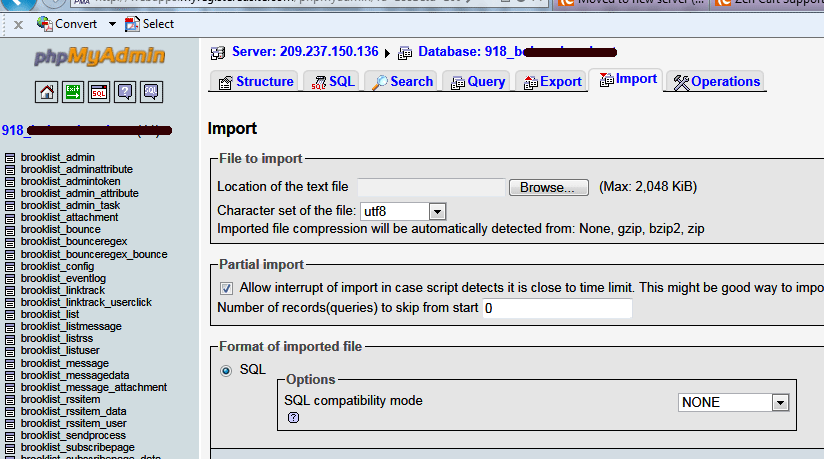
Recommend asking your new host to assist with the problems you're experiencing and ask if compression /uncompression enabled on your server's version of PHP? they should be able to use 'import' in PHPmyadmin with your zipped backup file.

*The second comment above is a host problem "There seems to be a problem connecting to our database. Please give us a few minutes to remedy the problem. Thank you."
and *all 3 error messages may be a result of not connecting to the database.

13 Mar 2011, 7:08 PM
#24
usr50 avatar

usr50

Zen Follower

Join Date:
Mar 2009
Location:
Niagara Ontario
Posts:
136
Plugin Contributions:
0

Re: Moved to new server (GoDaddy), now I'm lost

toylady:

I have the db file as a tar.gz
compressed its 1,129 kb

GZip automatically detected

Use Winrar to unzip your file

16 Mar 2011, 8:41 PM
#25
trees2wood avatar

trees2wood

Zen Follower

Join Date:
Mar 2009
Posts:
114
Plugin Contributions:
0

Re: Moved to new server (GoDaddy), now I'm lost

Hey Toylady, did you get this straightened out ?
I Dont know if this is your case or not , but I have seen several people over the last few months with the 1146 table 'configuration' dosent exist warning and it came from them being hacked because they were not using the most up to date version.
Hopefully this is not your problem and you have fixed already it, just something to look at if the problem is still there.

All of my wood is cut from recycled trees

17 Mar 2011, 12:39 AM
#26
toylady avatar

toylady

New Zenner

Join Date:
Sep 2006
Posts:
21
Plugin Contributions:
0

Re: Moved to new server (GoDaddy), now I'm lost

No, my problem is not resolved. My host company is saying my databases are corrupt. If that's the case, I find it hard to believe that all 3 databses are corrupt since they all were working just fine before this move.

17 Mar 2011, 3:06 AM
#27
toniscraparoni avatar

toniscraparoni

Zen Follower

Join Date:
Apr 2009
Posts:
158
Plugin Contributions:
0

Re: Moved to new server (GoDaddy), now I'm lost

As a former SloDaddy hosting customer, may I offer my theory? I had similar issues when I left them. Your issues might be due to their proprietary "C-panel" which isn't C-panel. Their admin is nothing like C-panel and myPHPAdmin. My hosting account didn't even have the database and the domain on the same server.

So, if you're trying to upload copies of last-saved-at-GoDaddy databases to a new host using different admin tools, you could indeed have what now translates to "corruption." If you still have access to the GD account, try saving your tables individually and importing them that way to a new database created at the new host. That helped a bit for me.

GD is a great domain registrar, but they know nada about hosting. I feel your pain!

If you want something done right, you have to get Zenned.
♥-My Zen Cart Mods-♥

17 Mar 2011, 3:26 AM
#28
toylady avatar

toylady

New Zenner

Join Date:
Sep 2006
Posts:
21
Plugin Contributions:
0

Re: Moved to new server (GoDaddy), now I'm lost

Actually, my prev host went out of business. Before they "pulled the plug" I backed up all my websites incl databases.

I went over to godaddy hoping to bring all my sites back to the web quickly - so my backups aren't from godaddy's servers.

After realizing godaddy was the wrong decision, I found a new hosting company. I hired them to install everything because I am too frustrated to think straight.

Everytime this new hosting company uploads the databases for me, or if I do it myself, they don't load all the way and thus give errors.

I followed the tutorials time and time again and have had no success.

17 Mar 2011, 3:57 AM
#29
toniscraparoni avatar

toniscraparoni

Zen Follower

Join Date:
Apr 2009
Posts:
158
Plugin Contributions:
0

Re: Moved to new server (GoDaddy), now I'm lost

That's exactly what happened to me, except my backups were actually from GD. I suppose it can happen between hosts anywhere. Which still doesn't change the fact you're stuck with an incomplete database, I know.

It could be possible you already had a corruption in the database copies you're trying to restore. You might be surprised how little a thing can make them go kerflooey. Or you might not. LOL!

If you have a text editor that can handle .sql files and will color code, you can open the database copy you're trying to restore and find exactly where the problem is with a quick skim. Maybe an extra apostrophe has been added, or gone missing, or a parentheses, comma, etc. Look right around the part in the file which corresponds to the last table you can successfully import. Bet you'll find your culprit.

Best of luck! :)

If you want something done right, you have to get Zenned.
♥-My Zen Cart Mods-♥

19 Mar 2011, 12:03 AM
#30
jetx avatar

jetx

Zen Follower

Join Date:
Apr 2006
Posts:
425
Plugin Contributions:
0

Re: Moved to new server (GoDaddy), now I'm lost

To test your backup database you could install zen locally (xampp) and then import your saved database.