Zen Cart Logo
Forums / Bug Reports / defines not loading correctly all the time

defines not loading correctly all the time

Locked

Views: 2,638

Results 1 to 14 of 14
This thread is locked. New replies are disabled.
30 Mar 2011, 1:04 PM
#1
kamion avatar

kamion

New Zenner

Join Date:
Mar 2011
Posts:
93
Plugin Contributions:
0

defines not loading correctly all the time

Zen Cart: v1.3.9h

I'm adding a new product type, and have got the preview_info.php working no problem when I create a new product or edit a product via the admin Catalog->Categories/Products page.

The problem is for existing products that I have already created and I click on the "Preview" icon in the list view under the Catalog->Categories/Products page.

My preview_info.php loads, but all the defines I use for my printout are not being translated to show the correct output.

Example, in /admin/includes/languages/english/product_<my_type>.php I have:

  define('TEXT_DIMENSIONS_PREVIEW',          'Dimensions: %s');

This appears correctly when I get to preview_info.php when creating a new product or editing an existing one.

 Dimensions: 200 x 100 x 50 mm

But when I click on the "Preview" icon, it displays incorrectly:

TEXT_DIMENSIONS_PREVIEW

I have tracked down this "Preview" link to /admin/includes/modules/category_product_listing.php, but can't figure out what's wrong.

It is definitely resolving to point to the correct preview_info.php that I have in /admins/includes/modules/product_<my_type>/preview_info.php, but some how, the defines php file is not getting included. :frusty:

4 Apr 2011, 12:37 PM
#2
kamion avatar

kamion

New Zenner

Join Date:
Mar 2011
Posts:
93
Plugin Contributions:
0

Re: defines not loading correctly all the time

Anyone has any ideas?

7 Apr 2011, 3:41 AM
#3
kamion avatar

kamion

New Zenner

Join Date:
Mar 2011
Posts:
93
Plugin Contributions:
0

Re: defines not loading correctly all the time

Here's an easy way to reproduce this in the demo site v1.3.9h.

First, check that the product_music type preview works correctly by clicking on the "preview icon" in the Categories/Product admin view of a product that is of product_music type. You will see the text "This product was added to our catalog on <whatever date>".

Now:

  1. Change the name of the TEXT_PRODUCT_DATE_ADDED to TEXT_PRODUCT_DATE_ADDED_MUSIC for the product_music type in the define file \admin\includes\languages\english\product_music.php

from:

define('TEXT_PRODUCT_DATE_ADDED', 'This product was added to our catalog on %s.');

to:

define('TEXT_PRODUCT_DATE_ADDED_MUSIC', 'This product was added to our catalog on %s.');
  1. Update the admin/includes/modules/product_music/preview_info.php to use the new define name TEXT_PRODUCT_DATE_ADDED_MUSIC

from:

<td align="center" class="smallText"><?php echo sprintf(TEXT_PRODUCT_DATE_ADDED, zen_date_long($pInfo->products_date_added)); ?></td>

to:

<td align="center" class="smallText"><?php echo sprintf(TEXT_PRODUCT_DATE_ADDED_MUSIC, zen_date_long($pInfo->products_date_added)); ?></td>

Now, go back to the Categories/Products admin page and click on the Preview icon again for the product_music type product and you will see TEXT_PRODUCT_DATE_ADDED_MUSIC instead of the correct text.

7 Apr 2011, 3:41 AM
#4
kamion avatar

kamion

New Zenner

Join Date:
Mar 2011
Posts:
93
Plugin Contributions:
0

Re: defines not loading correctly all the time

Can a mod move this to the bug report section? Thanks.

7 Apr 2011, 9:39 AM
#5
kuroi avatar

kuroi

Totally Zenned

Join Date:
Apr 2006
Location:
London, UK
Posts:
10,475
Plugin Contributions:
11

Re: defines not loading correctly all the time

I done some testing of this on a clean installation and it seems to be working perfectly.

An easier test to confirm this is to change:

define('TEXT_PRODUCT_DATE_ADDED', 'This product was added to our catalog on %s.');
define('TEXT_PRODUCT_DATE_ADDED', 'This music product was added to our catalog on %s.');

and the appearance of the extra word on the preview page confirms that the file is being loaded correctly.

The only time that I saw symptoms similar to those you described were when I confused the definition for TEXT_PRODUCT_DATE_ADDED with that for TEXT_DATE_ADDED and then tried to load a genuinely undefined constant on the preview page.

Kuroi Web Design and Development | Twitter

(Questions answered in the forum only - so that any forum member can benefit - not by personal message)

7 Apr 2011, 10:37 AM
#6
kamion avatar

kamion

New Zenner

Join Date:
Mar 2011
Posts:
93
Plugin Contributions:
0

Re: defines not loading correctly all the time

Hi Kuroi,
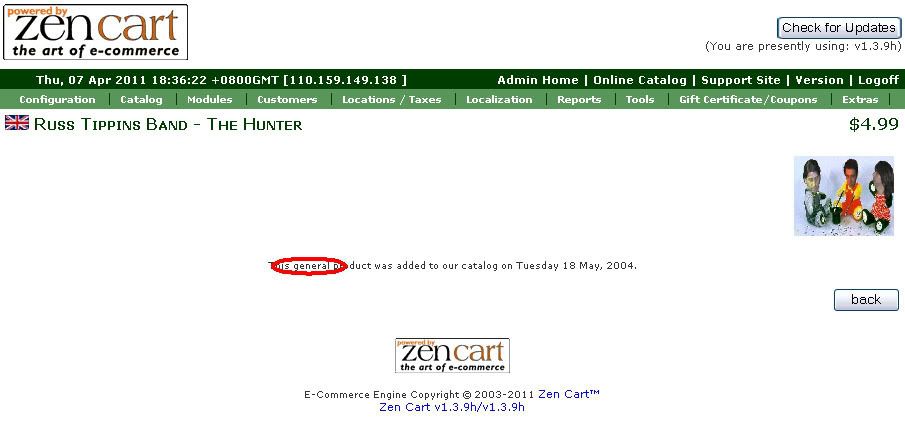
I too have tried this with a clean install of the v1.3.9h Zen Cart. This is what I've done along with screen shots, pleaes note the place where I click the "Preview" icon. I have done as you suggested and added extra words into the text.

I changed /admin/includes/languages/english/product.php inserting the word "general" into the text:

define('TEXT_PRODUCT_DATE_ADDED', 'This general product was added to our catalog on %s.');

and /admin/includes/languages/english/product_music.php inserting the word "music" into the text:

define('TEXT_PRODUCT_DATE_ADDED', 'This music product was added to our catalog on %s.');

Click this Preview icon:

You can see it picked up the "general product" define:

7 Apr 2011, 3:03 PM
#7
ajeh avatar

ajeh

Oba-san

Join Date:
Sep 2003
Location:
Ohio
Posts:
62,757
Plugin Contributions:
1

Re: defines not loading correctly all the time

I cannot reproduce the problem and I get the same results as kuroi when I change the language files ... :unsure:

Linda McGrath
If you have to think ... you haven't been zenned ...

**Did YOU buy the Zen Cart Team a cup of coffee and a donut today? Just click here to support the Zen Cart Team!!**

Are you using the latest? Perhaps you've a problem that's fixed in the latest version: [Upgrade today!]
Officially PayPal-Certified! Just click here

Try our Zen Cart Recommended Services - Hosting, Payment and more ...
Signup for our Announcements Forums to stay up to date on important changes and updates!

7 Apr 2011, 3:07 PM
#8
kuroi avatar

kuroi

Totally Zenned

Join Date:
Apr 2006
Location:
London, UK
Posts:
10,475
Plugin Contributions:
11

Re: defines not loading correctly all the time

Clutching at straws here, but what is the URL of the page that you snapped for your second screenshot? What values do you have for type_handler for each product in your product_types table?

Kuroi Web Design and Development | Twitter

(Questions answered in the forum only - so that any forum member can benefit - not by personal message)

8 Apr 2011, 3:38 AM
#9
ajeh avatar

ajeh

Oba-san

Join Date:
Sep 2003
Location:
Ohio
Posts:
62,757
Plugin Contributions:
1

Re: defines not loading correctly all the time

I checked your site and everything is working correctly ...

A Product for Music says:

This music product was added to our catalog on Monday 12 July, 2004.

A Product General says:

This general product was added to our catalog on Monday 12 July, 2004.

Linda McGrath
If you have to think ... you haven't been zenned ...

**Did YOU buy the Zen Cart Team a cup of coffee and a donut today? Just click here to support the Zen Cart Team!!**

Are you using the latest? Perhaps you've a problem that's fixed in the latest version: [Upgrade today!]
Officially PayPal-Certified! Just click here

Try our Zen Cart Recommended Services - Hosting, Payment and more ...
Signup for our Announcements Forums to stay up to date on important changes and updates!

8 Apr 2011, 3:45 AM
#10
kamion avatar

kamion

New Zenner

Join Date:
Mar 2011
Posts:
93
Plugin Contributions:
0

Re: defines not loading correctly all the time

Hi Ajeh,
Thanks for checking the site, did you click on the "Preview" icon with the red arrow as I indicated in my screen capture above from the Categories/Products list? It's not the preview through adding or editing a product.

Thanks.

8 Apr 2011, 4:46 AM
#11
ajeh avatar

ajeh

Oba-san

Join Date:
Sep 2003
Location:
Ohio
Posts:
62,757
Plugin Contributions:
1

Re: defines not loading correctly all the time

Now I can repeat it ... eeks! :eek:

This is a ... umm ... err ... you know ... need a can of Raid ... :lamo:

For now, use the E for Edit ...

I will look at this more tomorrow when I am awake and get a fix in for it ...

Thanks!

Linda McGrath
If you have to think ... you haven't been zenned ...

**Did YOU buy the Zen Cart Team a cup of coffee and a donut today? Just click here to support the Zen Cart Team!!**

Are you using the latest? Perhaps you've a problem that's fixed in the latest version: [Upgrade today!]
Officially PayPal-Certified! Just click here

Try our Zen Cart Recommended Services - Hosting, Payment and more ...
Signup for our Announcements Forums to stay up to date on important changes and updates!

8 Apr 2011, 4:47 AM
#12
kamion avatar

kamion

New Zenner

Join Date:
Mar 2011
Posts:
93
Plugin Contributions:
0

Re: defines not loading correctly all the time

Great! :) Thanks for trying again. At least I'm not going bonkers. :D Good night!

8 Apr 2011, 8:38 AM
#13
kuroi avatar

kuroi

Totally Zenned

Join Date:
Apr 2006
Location:
London, UK
Posts:
10,475
Plugin Contributions:
11

Re: defines not loading correctly all the time

Penny's dropped for me too. Thread moved to bugs section of forum as requested.

The fix is easy. Go to line 329 of YOUR_ADMIN/includes/modules/category_product_listing.php file and replace "FILENAME_PRODUCTS" with "$type_handler".

Thanks for persisting with this.

Kuroi Web Design and Development | Twitter

(Questions answered in the forum only - so that any forum member can benefit - not by personal message)

8 Apr 2011, 9:42 AM
#14
kamion avatar

kamion

New Zenner

Join Date:
Mar 2011
Posts:
93
Plugin Contributions:
0

Re: defines not loading correctly all the time

The fix is good, kuroi. :)

Thanks. Learning something new everyday.