Zen Cart Logo
Forums / Setting Up Categories, Products, Attributes / Download Attribute Disappears

Download Attribute Disappears

Views: 755

Results 1 to 8 of 8
10 Jun 2011, 2:31 AM
#1
enchantart avatar

enchantart

New Zenner

Join Date:
Jan 2010
Posts:
11
Plugin Contributions:
0

Download Attribute Disappears

Environment: ZenCart 1.3.8.a hosting a web site that offers both physical products and at least 100 downloadable files that can be purchased.

The Problem:
The download attribute has disappeared from all the digital files available for purchase.

There was no update and no change in our Zen Cart set up to explain this.

How You can See the Problem:
If you add any digital file to your shopping cart, the first screen that you get shows the problem:

Notice the red highlighter box that I put there. If this were working correctly, it would show "Download - Zip file." But it does not. If you were to go all the way and buy the file, you'll be able to buy it successfully, but no download button will appear.

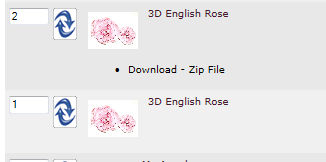
It should look like this:

...saying, "Download - Zip File"

And it gets stranger:
On some digital files, I was able to go into the Attribute Controller, re-select "Download" and "Zip," and then the Download attribute came back, as shown in the second image. But that wasn't the solution, because within minutes the Download attribute disappeared again, just like in the first image.

On other digital files, I reselect things in the Attribute Controller and it makes no change whatsoever in the result: the download attribute still isn't there. I even delete the attribute entirely from the product, and re-set it up, and the problem still continues.

The closest thing I've found in the forums to my problem is this thread:
http://www.zen-cart.com/forum/showthread.php?t=160624

However, the solution to that problem was getting into the MySQL tables and cleaning the database, making sure the tables match, etc. I am not MySQL literate, and I was hoping I didn't have to know MySQL to run Zen Cart. And also, the problem in the thread is not exactly like mine.

You can quickly see the problem in action without purchasing anything by going to http://www.enchantart.com, selecting any Digital file and adding it to your shopping cart - there will be no Download attribute.

For moments, it seems to work: I just tried testing it, and suddenly it was working, with the Download attribute appearing. I removed the products from my shopping cart, and once more, the Download attribute did not appear.

The Download functionality has been working for us without any problem, until a customer who purchased the files brought this to our attention a few days ago.

Can anyone please help us with this issue?
10 Jun 2011, 3:29 AM
#2
enchantart avatar

enchantart

New Zenner

Join Date:
Jan 2010
Posts:
11
Plugin Contributions:
0

Re: Download Attribute Disappears

Here's another quirk that we noticed:

On the home page, if you go to any of the digital file categories in the Categories list, click on any of the products in the New Products section and add that to your cart, the Download attribute appears.

But if you go to that product any other way and then add it to your cart, the Download attribute isn't there. No download attribute, no download for the customer is possible.

To see this in action, in the Categories list, select Digital Files > Cutting Files > 3 D Projects, select one of the two products that appear in the New Products section, add it to your cart, and the Download attribute will appear.

But if you go to Digital Files > Cutting Files > 3 D Projects and select the product in the Item Name list, and not in the New Products section, and add that to your shopping cart, the Download attribute will not appear. This behavior is consistent:

This doesn't make any sense. Any ideas?

10 Jun 2011, 4:21 AM
#3
drbyte avatar

drbyte

Sensei

Join Date:
Jan 2004
Posts:
63,513
Plugin Contributions:
177

Re: Download Attribute Disappears

Two things:

  1. You're using a very old version of Zen Cart which contains some well known security vulnerabilities. It's quite possible you've been hacked.

  2. If your attributes are set up to allow adding to cart without requiring a download choice be selected, then the symptoms you mention are entirely expected.

10 Jun 2011, 1:45 PM
#4
enchantart avatar

enchantart

New Zenner

Join Date:
Jan 2010
Posts:
11
Plugin Contributions:
0

Re: Download Attribute Disappears

Thanks for your post.

I'm not sure where to select the attribute choice to force the download option to be selected. If you're referring to the option "Default Attribute to be Marked Selected," in the Attribute Controller for the product, I've tried changing that to Yes and it doesn't make a difference.

I'll upgrade over the weekend; as you've said, maybe that's the problem. But please let me know if I'm looking in the right place to change the above option.

10 Jun 2011, 7:30 PM
#5
drbyte avatar

drbyte

Sensei

Join Date:
Jan 2004
Posts:
63,513
Plugin Contributions:
177

Re: Download Attribute Disappears

No, to force someone to make a selection, create a "please select" that's a read-only choice and selected by default, and shows at the top of the list etc. It's all explained in this FAQ: https://www.zen-cart.com/tutorials/index.php?article=190

12 Jun 2011, 1:55 AM
#6
enchantart avatar

enchantart

New Zenner

Join Date:
Jan 2010
Posts:
11
Plugin Contributions:
0

Re: Download Attribute Disappears

I found a workaround to the problem.

We realized that the problem occurred specifically when adding the downloadable file to cart from the product listing, when you clicked "Add Selected Buttons to Cart."

A while back, I had followed the steps in this forum tutorial to remove the "...more info" from the product listing so that the user can add the downloadable items to the cart and select the "Add Selected Products to Cart" button:

http://www.zen-cart.com/forum/showthread.php?t=142161

The failure to retain the download attribute now only occurred when clicking the "Add Selected Products to Cart" button. When you added to cart any other way, like from the product's page, it worked fine.

What I did was to upload a "clean" product_listing.php file that was unmodified from the original Zen Cart install files. This removed the "Add Selected Products to Cart" capability from the product listing of the downloadable products, returning it to the state of displaying "...more info" instead of a box where you could add the product to your cart.

By removing the capability to add to cart from the product listing of the downloadable files, I also remove the problem that occured when the downloadable files were added to the cart from there.

I write this in case someone else comes across the same problem, they can try the same solution and see if it works. You would first make a backup copy of the includes/modules/product_listing.php file, and then you would post a copy of the file from the original install.

12 Jun 2011, 3:33 AM
#7
drbyte avatar

drbyte

Sensei

Join Date:
Jan 2004
Posts:
63,513
Plugin Contributions:
177

Re: Download Attribute Disappears

Thanks for reporting back that the problem was related to you having removed built-in functionality which would normally prevent those problems from occurring.

12 Jun 2011, 3:36 AM
#8
drbyte avatar

drbyte

Sensei

Join Date:
Jan 2004
Posts:
63,513
Plugin Contributions:
177

Re: Download Attribute Disappears

The following coding enhancements (after adjusting them to suit your version of Zen Cart) might be more in line with what you're wishing to accomplish: http://www.zen-cart.com/forum/showthread.php?p=809142#post809142