Zen Cart Logo
Forums / Templates, Stylesheets, Page Layout / Navigation Bar Link Show /#

Navigation Bar Link Show /#

Views: 821

Results 1 to 4 of 4
17 Jul 2011, 8:14 PM
#1
chinelly avatar

chinelly

New Zenner

Join Date:
Feb 2011
Posts:
7
Plugin Contributions:
0

Navigation Bar Link Show /#

Hi

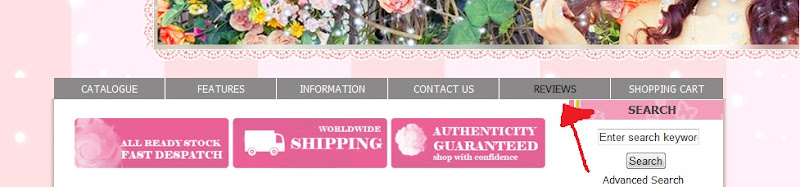
Sorry, I am new to zen cart. I just installed a new template. But the navigation bar (the one that says categories, contact us, about us...) is not installed properly. When I click on them, it just lead me to https://www.mystore.com/#

How do I change the link to lead to my desired page?

Thanks!

17 Jul 2011, 8:36 PM
#2
stevesh avatar

stevesh

Black Belt

Join Date:
Feb 2005
Location:
Lansing, Michigan USA
Posts:
19,793
Plugin Contributions:
2

Re: Navigation Bar Link Show /#

We'll need a link to the site.

18 Jul 2011, 1:37 AM
#3
chinelly avatar

chinelly

New Zenner

Join Date:
Feb 2011
Posts:
7
Plugin Contributions:
0

Re: Navigation Bar Link Show /#

stevesh:

We'll need a link to the site.

i guess another way to phrase the question is where do I go (what file) to add a link to the navigation bar. Like a picture, if I haven't set up a link for it, it just show https://www.mystore.com/#

18 Jul 2011, 4:18 AM
#4
chinelly avatar

chinelly

New Zenner

Join Date:
Feb 2011
Posts:
7
Plugin Contributions:
0

Re: Navigation Bar Link Show /#

stevesh:

We'll need a link to the site.

Navigation Bar, click on "Review"

All it shows is the home page with:

I need to add a link to that and change #

But I don't know what file to change

Thank you so muchhh