Zen Cart Logo
Forums / All Other Contributions/Addons / "Google Plus One (+1), Facebook Send and Twitter Follow" addon Support

"Google Plus One (+1), Facebook Send and Twitter Follow" addon Support

Views: 16,533

Results 41 to 60 of 76
4 Apr 2012, 2:56 AM
#41
cybagirl avatar

cybagirl

Zen Follower

Join Date:
Jul 2009
Posts:
119
Plugin Contributions:
0

"Google Plus One (+1), Facebook Send and Twitter Follow" addon Support

kamion:

I don't have any problems with the Addthis sidebox sort order. It works just fine when I modify "LEFT/RIGHT COLUMN Sort Order".

Thanks for your reply. I too don't have any problems with moving it too LEFT/RIGHT. The issue I seem to have is when I change the sort order number so that it will display below or above other sideboxes.

For me it just stays at the very top.

Also for those PHP errors that other people are experiencing and no doubt many others are too but they are not checking their error logs I found this thread. Although not very helpful as it has been closed. So perhaps there is no fix for this or we have to wait until someone is more knowledgeable about it.

Thread #155384

4 Apr 2012, 4:33 AM
#42
gopinathgoswami avatar

gopinathgoswami

New Zenner

Join Date:
Nov 2011
Posts:
32
Plugin Contributions:
1

Re: "Google Plus One (+1), Facebook Send and Twitter Follow" addon Support

CybaGirl:

The issue I seem to have is when I change the sort order number so that it will display below or above other sideboxes.
Thread #155384

I could change the sort order up and down without any problem. It will stay on top always only if the sort order is set to "0". It is possible that you are setting the sort order value for a wrong sidebox. Please ensure that the name of the side box file is "sideboxes/addthis.php".

Regarding the other php error, as you have rightly pointed out, this is the issue of AutoFacebookOG contribution that has been incorporated into this module. As I am not a programmer myself, I am waiting for some one who could fix this issue. In the meanwhile, as this issue is trivial, it is safe to use.

4 Apr 2012, 4:40 AM
#43
gopinathgoswami avatar

gopinathgoswami

New Zenner

Join Date:
Nov 2011
Posts:
32
Plugin Contributions:
1

Re: "Google Plus One (+1), Facebook Send and Twitter Follow" addon Support

gopinathgoswami:

Regarding the other php error, as you have rightly pointed out, this is the issue of AutoFacebookOG contribution that has been incorporated into this module. As I am not a programmer myself, I am waiting for some one who could fix this issue. In the meanwhile, as this issue is trivial, it is safe to use.

DrByte, could you kindly look into this error explained on this thread http://www.zen-cart.com/forum/showpost.php?p=1111367&postcount=29 fix this issue...

Thanks in advance

4 Apr 2012, 5:21 AM
#44
drbyte avatar

drbyte

Sensei

Join Date:
Jan 2004
Posts:
63,513
Plugin Contributions:
176

Re: "Google Plus One (+1), Facebook Send and Twitter Follow" addon Support

It basically means that the $product_info_metatags->fields doesn't contain any data, which probably suggests (assuming based on the variable name) that there are no metatags defined for the specified product. You'll want to accommodate that scenario in your custom code.

4 Apr 2012, 5:27 AM
#45
webkat avatar

webkat

Zen Follower

Join Date:
Jan 2012
Location:
New England
Posts:
238
Plugin Contributions:
0

Re: "Google Plus One (+1), Facebook Send and Twitter Follow" addon Support

I ended up taking the AddThis code out of the addthis sidebox and putting it into the Who's Online sidebox. It's less messy that way, for me. You can see what I mean here: http://opalessenceshop.com/

I Just edited my /sideboxes/tpl_whos_online.php template in my custom template folder like this:

<?php
/**
 * Side Box Template
 *
 * @package templateSystem
 * @copyright Copyright 2003-2005 Zen Cart Development Team
 * @copyright Portions Copyright 2003 osCommerce
 * @license http://www.zen-cart.com/license/2_0.txt GNU Public License V2.0
 * @version $Id: tpl_whos_online.php 2982 2006-02-07 07:56:41Z birdbrain $
 */
  $content = '';
  $content .= '<div id="' . str_replace('_', '-', $box_id . 'Content') . '" class="sideBoxContent centeredContent">';
  for ($i=0; $i<sizeof($whos_online); $i++) {
    $content .= $whos_online[$i];
  }
    $content .= '<br /><hr style="width:85%;"><span class="center"><strong>Share This</strong><br/><hr style="width:85%;"></span><!-- AddThis Button BEGIN -->
<div class="addthis_toolbox addthis_default_style ">
<a href="http://www.addthis.com/bookmark.php?v=250&pubid=ra-4f7ba393385f001d" class="addthis_button_compact">Share</a>
<span class="addthis_separator">|</span>
<a class="addthis_button_preferred_1"></a>
<a class="addthis_button_preferred_2"></a>
<a class="addthis_button_preferred_3"></a>
<a class="addthis_button_preferred_4"></a>
<a class="addthis_button_preferred_5"></a>
</div>
<script type="text/javascript" src="http://s7.addthis.com/js/250/addthis_widget.js#pubid=ra-4f7ba393385f001d"></script>
<!-- AddThis Button END -->';
  $content .= '</div>';
  $content .= '';
?>
4 Apr 2012, 10:06 AM
#46
cybagirl avatar

cybagirl

Zen Follower

Join Date:
Jul 2009
Posts:
119
Plugin Contributions:
0

Re: "Google Plus One (+1), Facebook Send and Twitter Follow" addon Support

gopinathgoswami:

It will stay on top always only if the sort order is set to "0". It is possible that you are setting the sort order value for a wrong sidebox. Please ensure that the name of the side box file is "sideboxes/addthis.php".

Thanks for your reply and yes I do realise that if I set the sort order to 0 that it will stay on top. But I have set the sort order to numerous different values with no change. If I get time I will try it with one of my live sites although it is something that I probably won't use very often. The reason for mentioning it was mainly to see if others were having this issue.

DrByte:

It basically means that the $product_info_metatags->fields doesn't contain any data, which probably suggests (assuming based on the variable name) that there are no metatags defined for the specified product. You'll want to accommodate that scenario in your custom code.

Thanks DrByte I hesitated in guessing that this may have been the issue as I don't use meta tags in my products even though I know I should! Either way I am still unsure as to how to resolve the errors when you don't use meta tags in your products.

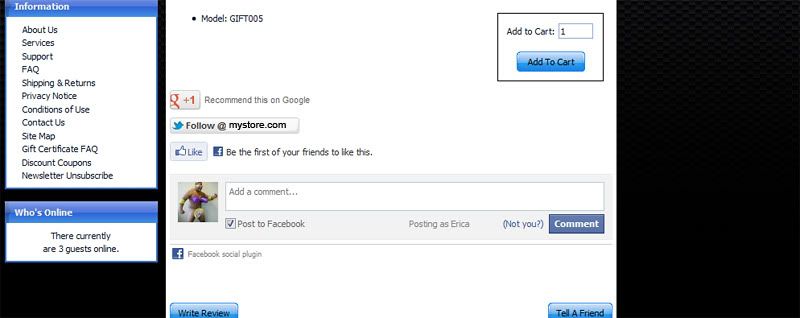
Good news is I ended up spending today modifying the release a little bit. So now I don't get the errors anymore as I removed the included Facebook Like button and replaced it with something else. I also added the Facebook Comments plugin to give it a nice little touch as shown here on my test cart.

:wink:

4 Apr 2012, 10:20 AM
#47
cybagirl avatar

cybagirl

Zen Follower

Join Date:
Jul 2009
Posts:
119
Plugin Contributions:
0

Re: "Google Plus One (+1), Facebook Send and Twitter Follow" addon Support

WebKat:

I ended up taking the AddThis code out of the addthis sidebox and putting it into the Who's Online sidebox. It's less messy that way, for me. You can see what I mean here: http://opalessenceshop.com/

WebKat just as I suspected you need to wrap the addthis code into SSL tags as Internet Explorer is currently throwing back errors and it might scare some of your customers away. I had the same issue when I use to use that addthis addon at the top of my pages.

This is what you need to do.

<?php if ($request_type == 'NONSSL') { ?>
YOUR CODE WRAPPED BETWEEN THESE TAGS					
<?php } ?>
4 Apr 2012, 10:49 AM
#48
gopinathgoswami avatar

gopinathgoswami

New Zenner

Join Date:
Nov 2011
Posts:
32
Plugin Contributions:
1

Re: "Google Plus One (+1), Facebook Send and Twitter Follow" addon Support

Dear DrByte, thanks for your prompt assistance. As I am using custom product meta tags and custom category meta tags, perhaps, I could not reproduce this error.

Is it possible to get rid of this error? If yes, how this code can be modified...?

Thanks again....

4 Apr 2012, 2:44 PM
#49
webkat avatar

webkat

Zen Follower

Join Date:
Jan 2012
Location:
New England
Posts:
238
Plugin Contributions:
0

Re: "Google Plus One (+1), Facebook Send and Twitter Follow" addon Support

CybaGirl:

WebKat just as I suspected you need to wrap the addthis code into SSL tags as Internet Explorer is currently throwing back errors and it might scare some of your customers away. I had the same issue when I use to use that addthis addon at the top of my pages.

This is what you need to do.

<?php if ($request_type == 'NONSSL') { ?>

YOUR CODE WRAPPED BETWEEN THESE TAGS

<?php } ?>

Oh thanks! I hadn't looked at it in IE yet. It looks fine in Chrome. I'll add those tags.
4 Apr 2012, 3:06 PM
#50
webkat avatar

webkat

Zen Follower

Join Date:
Jan 2012
Location:
New England
Posts:
238
Plugin Contributions:
0

Re: "Google Plus One (+1), Facebook Send and Twitter Follow" addon Support

CybaGirl:

WebKat just as I suspected you need to wrap the addthis code into SSL tags as Internet Explorer is currently throwing back errors and it might scare some of your customers away. I had the same issue when I use to use that addthis addon at the top of my pages.

This is what you need to do.

<?php if ($request_type == 'NONSSL') { ?>

YOUR CODE WRAPPED BETWEEN THESE TAGS

<?php } ?>

Ok, I'm confused. I can't quite figure out how to add what you're saying. I can't have <?php  ?> codes inside other ones, can I? So I'd have to split it up somehow, right? I tried several different ways and all of them broke it. I also figured out that removing the empty lines in the php code broke it, so I left them in. Currently this code works in Chrome 18.blahblah, IE 9, and Firefox 11.0 without giving me any errors:

<?php /** * Side Box Template * * @package templateSystem * @copyright Copyright 2003-2005 Zen Cart Development Team * @copyright Portions Copyright 2003 osCommerce * @license http://www.zen-cart.com/license/2_0.txt GNU Public License V2.0 * @version $Id: tpl_whos_online.php 2982 2006-02-07 07:56:41Z birdbrain $ */ $content = ''; $content .= '<div id="' . str_replace('_', '-', $box_id . 'Content') . '" class="sideBoxContent centeredContent">'; for ($i=0; $i<sizeof($whos_online); $i++) { $content .= $whos_online[$i]; } $content .= '<br /><hr style="width:85%;"><span class="center"><strong>Share This</strong><br/><hr style="width:85%;"></span> <!-- AddThis Button BEGIN --> <div class="addthis_toolbox addthis_default_style "> <a href="http://www.addthis.com/bookmark.php?v=250&pubid=ra-4f7ba393385f001d" class="addthis_button_compact">Share</a> <span class="addthis_separator">|</span> <a class="addthis_button_preferred_1"></a> <a class="addthis_button_preferred_2"></a> <a class="addthis_button_preferred_3"></a> <a class="addthis_button_preferred_4"></a> <a class="addthis_button_preferred_5"></a> </div> <script type="text/javascript" src="http://s7.addthis.com/js/250/addthis_widget.js#pubid=ra-4f7ba393385f001d"></script> <!-- AddThis Button END -->'; $content .= '</div>'; $content .= ''; ?>

Are you still getting errors? If so, can you repaste my template code (all of it) with your tags inserted in the right places, since I am too php-dumb to figure it out? Heh. Thanks!
5 Apr 2012, 12:16 AM
#51
romancoins avatar

romancoins

New Zenner

Join Date:
Oct 2009
Posts:
21
Plugin Contributions:
0

Re: "Google Plus One (+1), Facebook Send and Twitter Follow" addon Support

Hello,

I just installed your addon. It work's great. Thank's.

I have a newbie question. How can i manage to display the thee icons in a row?

Instead of seeing them in three rows i would like them to be displayed in one row. Is that possible? How can i achieve that?

Here is my site:
http://www.vapori.ro/Tigara_Electronica_DSE901/Atomizator_pentru_901_Alb

Thank you!
Csorik Janos

5 Apr 2012, 3:47 AM
#52
kamion avatar

kamion

New Zenner

Join Date:
Mar 2011
Posts:
93
Plugin Contributions:
0

Re: "Google Plus One (+1), Facebook Send and Twitter Follow" addon Support

DrByte:

It basically means that the $product_info_metatags->fields doesn't contain any data, which probably suggests (assuming based on the variable name) that there are no metatags defined for the specified product. You'll want to accommodate that scenario in your custom code.

Would something like this work?

if(isset($product_info_metatags->fields) && !empty($product_info_metatags->fields)) {
    extract($product_info_metatags->fields);
}
if(isset($category_metatags->fields) && !empty($category_metatags->fields)) {
    extract($category_metatags->fields);
25 Apr 2012, 1:09 AM
#53
oitem avatar

oitem

New Zenner

Join Date:
Apr 2012
Posts:
82
Plugin Contributions:
0

Re: "Google Plus One (+1), Facebook Send and Twitter Follow" addon Support

how to override the html header because i already have one plss tell me step by step

4 Jun 2012, 6:05 PM
#54
oitem avatar

oitem

New Zenner

Join Date:
Apr 2012
Posts:
82
Plugin Contributions:
0

Re: "Google Plus One (+1), Facebook Send and Twitter Follow" addon Support

hi can any one teach me how to do that like in the picture Attachment 10551
the twitter and google facebook they are all in the header and all of them showing the number like twit and share google is it possible to that using this software plss can any one answer it for me, where can i paste the code my website is http://www.oitem.com/

8 Jun 2012, 6:25 AM
#55
kamion avatar

kamion

New Zenner

Join Date:
Mar 2011
Posts:
93
Plugin Contributions:
0

Re: "Google Plus One (+1), Facebook Send and Twitter Follow" addon Support

gopinathgoswami, in regards to the Facebook Open Graph tag in includes/templates/<your_custom_template/common/html_header.php

<meta property="og:url" content="<?php echo $prod_url; ?>" />

I suggest using the canonical link if it's available thus:

if (isset($canonicalLink) && $canonicalLink != '') {
   $prod_url = $canonicalLink;
}
else
{
   $prod_url = "http://" . $_SERVER['HTTP_HOST'] . $_SERVER['REQUEST_URI'];
}

This is because the original code will include the "&zenid=" field if it happens to be in the URL.

And for the Facebook like button code in individual product pages, I think there needs to be a "href" field in the link:

<!--bof Facebook Like button code-->
<div id="fb-root"></div>
<script>(function(d, s, id) {
  var js, fjs = d.getElementsByTagName(s)[0];
  if (d.getElementById(id)) {return;}
  js = d.createElement(s); js.id = id;
  js.src = "//connect.facebook.net/en_US/all.js#xfbml=1&appId=YOUR-APP-ID";
  fjs.parentNode.insertBefore(js, fjs);
}(document, 'script', 'facebook-jssdk'));</script>

<fb:like send="true" width="450" show_faces="true" href="<?php echo $prod_url; ?>"></fb:like>
<!--eof Facebook Like button code-->

If the FB Like button is the general like button for your website, I think it's a good idea to link it back to your website's Facebook page. Let's say the address of your website's Facebook page is "http://www.facebook.com/yourWebsite", then the general like button for your website should include the href to point to this.

<fb:like send="true" width="450" show_faces="true" href="http://www.facebook.com/yourWebsite"></fb:like>

Without this href, I found that the likes were being counted, but there's no where on Facebook that "collects" the likes and you can't see who's liked your page.

Hope I haven't gotten the wrong end of the stick to this whole thing. :unsure:

8 Jun 2012, 6:28 AM
#56
kamion avatar

kamion

New Zenner

Join Date:
Mar 2011
Posts:
93
Plugin Contributions:
0

Re: "Google Plus One (+1), Facebook Send and Twitter Follow" addon Support

oitem:

hi can any one teach me how to do that like in the picture Attachment 10551
the twitter and google facebook they are all in the header and all of them showing the number like twit and share google is it possible to that using this software plss can any one answer it for me, where can i paste the code my website is http://www.oitem.com/

You can try putting the FB, Twitter, Google code into includes/templates/<your_template>/common/tpl_header.php.

14 Jul 2012, 2:12 PM
#57
chiliboy avatar

chiliboy

New Zenner

Join Date:
Jul 2012
Posts:
11
Plugin Contributions:
0

Re: "Google Plus One (+1), Facebook Send and Twitter Follow" addon Support

I see several other folks have posted this problem in the html_header.php file:

PHP Warning: extract() [<a href='function.extract'>function.extract</a>]: First argument should be an array in html_header.php on line 50
PHP Warning: extract() [<a href='function.extract'>function.extract</a>]: First argument should be an array in html_header.php on line 51

Referred lines in the file are:

extract($product_info_metatags->fields);
extract($category_metatags->fields);

I also see where it was brushed-off as frivolous because it doesn't effect the user's experience. Well, it's not frivolous. I received a notice from my host provider threatening to shutdown my site due to an overload of files (100,000+). I checked the cache file and they were all the above error. Each time my site loads it generates from 5 to 10 error log files. I had to ask the hosting company to remove them because I couldn't. I tried using Filezilla and cPanel to delete the files and they immediately returned. This file overload also prevented my auto backup cron job from running because of the file overload.

We need a correction to this please.

14 Jul 2012, 4:47 PM
#58
kamion avatar

kamion

New Zenner

Join Date:
Mar 2011
Posts:
93
Plugin Contributions:
0

Re: "Google Plus One (+1), Facebook Send and Twitter Follow" addon Support

chiliboy:

I see several other folks have posted this problem in the html_header.php file:

PHP Warning: extract() [<a href='function.extract'>function.extract</a>]: First argument should be an array in html_header.php on line 50
PHP Warning: extract() [<a href='function.extract'>function.extract</a>]: First argument should be an array in html_header.php on line 51

We need a correction to this please.

See my solution above: Link

This error is generated when the arguments are empty. So I just checked if the arguments contained anything before I call the extract() functions. It has cleared up the error for me.

15 Jul 2012, 1:45 AM
#59
cybagirl avatar

cybagirl

Zen Follower

Join Date:
Jul 2009
Posts:
119
Plugin Contributions:
0

Re: "Google Plus One (+1), Facebook Send and Twitter Follow" addon Support

I ended up taking out the Facebook code that was included in this mod and replaced it with code from another Facebook mod I found elsewhere and that stopped the errors for me. Plus the Facebook code I am using now has a couple of other features over the one included in this mod if my memory serves me right.

Anyway you should try Kamion's suggested fix to see if this helps.

23 May 2013, 9:42 AM
#60
mike_dean avatar

mike_dean

Totally Zenned

Join Date:
Feb 2006
Location:
Central Coast, NSW, Australia
Posts:
531
Plugin Contributions:
0

Re: "Google Plus One (+1), Facebook Send and Twitter Follow" addon Support

romancoins:

Hello,

I just installed your addon. It work's great. Thank's.

I have a newbie question. How can i manage to display the thee icons in a row?

Instead of seeing them in three rows i would like them to be displayed in one row. Is that possible? How can i achieve that?

Here is my site:
http://www.vapori.ro/Tigara_Electronica_DSE901/Atomizator_pentru_901_Alb

Thank you!
Csorik Janos

I just started using this mod and have a few questions, one of which relates to the above question...

Did anyone come up with an answer to get the buttons on one line ?

Thanks,
Mike