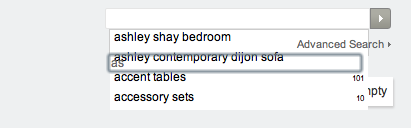
Instant Search

Views: 59,246

Results 61 to 80 of 262
18 Mar 2012, 12:19 AM
#61
shapirosupply avatar

shapirosupply

New Zenner

Join Date:
Mar 2012
Posts:
4
Plugin Contributions:
0

Instant Search

AyoobG:

You sure you uploaded file, i can't see instant search in source code.

Sorry, I had 'em in the wrong directory. I just moved 'em and it does look like its working now but the results don't look quite right. It looks like its trying to cram many results into the window..

18 Mar 2012, 10:35 AM
#62
ayoobg avatar

ayoobg

New Zenner

Join Date:
Nov 2011
Posts:
34
Plugin Contributions:
1

Re: Instant Search

Na, thats because your product names are very long, and they are being push under the next items in the list, you can hide these letters by opening the instantSearch.js file and changing:

.resultsContainer a {
	display : block;
	color : #000;
	background-color : #fff;
	padding : 0.1em 0.4em;
	text-decoration : none;
	overflow:hidden;
	height:18px;
	
}

into:

.resultsContainer a {
display : block;
color : #000;
background-color : #fff;
padding : 0.1em 0.4em;
text-decoration : none;
overflow:hidden;
height:100%;
line-height:100%;
}

or experiment with different values of "height" and "line-height".

Shapirosupply:

Sorry, I had 'em in the wrong directory. I just moved 'em and it does look like its working now but the results don't look quite right. It looks like its trying to cram many results into the window..

18 Mar 2012, 2:47 PM
#63
shapirosupply avatar

shapirosupply

New Zenner

Join Date:
Mar 2012
Posts:
4
Plugin Contributions:
0

Re: Instant Search

Oh.. I see. I'm not finding that code in instantsearch.js though.. maybe another js file? I'll look around. Thanks for your help.

20 Mar 2012, 2:15 PM
#64
familynow avatar

familynow

Zen Follower

Join Date:
Aug 2011
Location:
Near Ottawa, Ontario, Canada
Posts:
321
Plugin Contributions:
0

Re: Instant Search

Can anyone help with css please? I can't figure out how to match the rest of my site. I'd like the suggestion list to match my header dropdown.

familynowDOTca

21 Mar 2012, 1:49 AM
#65
shapirosupply avatar

shapirosupply

New Zenner

Join Date:
Mar 2012
Posts:
4
Plugin Contributions:
0

Re: Instant Search

AyoobG:

Na, thats because your product names are very long, and they are being push under the next items in the list, you can hide these letters by opening the instantSearch.js file and changing:

.resultsContainer a {
display : block;
color : #000;
background-color : #fff;
padding : 0.1em 0.4em;
text-decoration : none;
overflow:hidden;
height:18px;

}

> 
> into:
> 
> ```
.resultsContainer a {
display : block;
color : #000;
background-color : #fff;
padding : 0.1em 0.4em;
text-decoration : none;
overflow:hidden;
height:100%;
line-height:100%;
}

or experiment with different values of "height" and "line-height".

Still can't find this code anywhere.. any other suggestions?

21 Mar 2012, 12:12 PM
#66
familynow avatar

familynow

Zen Follower

Join Date:
Aug 2011
Location:
Near Ottawa, Ontario, Canada
Posts:
321
Plugin Contributions:
0

Re: Instant Search

ShapiroSupply, it's instantsearch.css under your themes' css directory in case you're still looking.

Thanks AyoobG. That's much better.

My next Q is where the heck do I apply this[1]. When I apply it to .resultsContainer a only the hover and border are rounded and transparent. I want to apply this to the whole background. I feel like I'm never gonna get this css stuff [ *-) ]

references
[1]
background-color: #0D474E;
border-radius:3px 3px 3px 3px;
-moz-border-radius:3px 3px 3px 3px;
-webkit-border-radius:3px 3px 3px 3px;
opacity:0.95; filter:alpha(opacity=95);

21 Mar 2012, 3:58 PM
#67
bigstore avatar

bigstore

New Zenner

Join Date:
Jan 2012
Posts:
63
Plugin Contributions:
0

Re: Instant Search

I moved my search bar up above my navigation and I've been playing with the css file for way too long. Here is what it looks like. I'm actually thinking of disabling it for good.

Playing with Line-height and height, width seems to bring me closer but doesn't solve the issue.

.resultsContainer {
z-index: 10000;
text-align: left;
vertical-align: bottom;
font-family: Arial, Helvetica, sans-serif;
font-size: 12px;
font-weight: ;
background: white;
width: auto;
border: 1px solid #CCC;
background-color: white;
margin: 0;
margin-top: 17px;
margin-left: 0px;
height: 25px;
line-height: 12px;
}
21 Mar 2012, 4:22 PM
#68
familynow avatar

familynow

Zen Follower

Join Date:
Aug 2011
Location:
Near Ottawa, Ontario, Canada
Posts:
321
Plugin Contributions:
0

Re: Instant Search

I've got mine technically preforming the way I want with height & width : 100%; but I can't get the rest of the css to play nice ie the background, transparency and border-radius. No matter where I put them I don't get the results I want. I suspect I need to pull some of the css out of the default instantsearch.css and specific the elements but I just can't seem to grasp how to do that.

I did line-height : 20px; and a font of 13px to give lots of room everything kinda balanced out.

31 Mar 2012, 2:23 PM
#69
lindasdd avatar

lindasdd

Zen Follower

Join Date:
Jun 2007
Posts:
474
Plugin Contributions:
0

Re: Instant Search

bigstore:

I moved my search bar up above my navigation and I've been playing with the css file for way too long. Here is what it looks like. I'm actually thinking of disabling it for good.

Playing with Line-height and height, width seems to bring me closer but doesn't solve the issue.

.resultsContainer {
z-index: 10000;
text-align: left;
vertical-align: bottom;
font-family: Arial, Helvetica, sans-serif;
font-size: 12px;
font-weight: ;
background: white;
width: auto;
border: 1px solid #CCC;
background-color: white;
margin: 0;
margin-top: 17px;
margin-left: 0px;
height: 25px;
line-height: 12px;
}


Why not expand the width. It won't match the search box, but that really shouldn't matter.

-lindasdd
31 Mar 2012, 2:25 PM
#70
lindasdd avatar

lindasdd

Zen Follower

Join Date:
Jun 2007
Posts:
474
Plugin Contributions:
0

Re: Instant Search

Two quick issues:

  1. The MOD works for me on the advanced search page, but not in my header search. Should I assume that is just a JSCRIPT conflict issue? Although I would think if that was the case it would happen in both spots (since the header search doesn't work on the advanced search page either.)

  2. Is there any way to moderate the number of returns displayed? I'd like more potential results displayed. For instance typeing in the letter 'S' should return a large set on a big store, not just 1-2 items.

Thanks,
lindasdd

10 Apr 2012, 7:27 AM
#71
barezinjo avatar

barezinjo

New Zenner

Join Date:
Feb 2012
Location:
Croatia
Posts:
1
Plugin Contributions:
0

Re: Instant Search

AyoobG:

Hi, the json_encode() function is a php function which sends data from php format into javascript format.

If some of the products contain foreign characters like è then json_encode won't work properly, and the product containing the character will stop instant search from functioning properly, hence the error.

However if you open searches.php and replace:

echo json_encode($results);

with:

echo json_encode(utf8json($results));

function utf8json($inArray) {

static $depth = 0;

/* our return object */
$newArray = array();

/* safety recursion limit */
$depth ++;
if($depth >= '30') {
    return false;
}

/* step through inArray */
foreach($inArray as $key=>$val) {
    if(is_array($val)) {
        /* recurse on array elements */
        $newArray[$key] = utf8json($val);
    } else {
        /* encode string values */
        $newArray[$key] = utf8_encode($val);
    }
}

/* return utf8 encoded array */
return $newArray;

}

> 
> 
> then it will be able to convert these foreign characters properly.

I have similar problem. I am using utf-8_general_ci in zencart database, Instant search works fine for me, but when i enter special character like (čćžšđ) if wont display anything.
Here is a two picture below. Please help! :cry:
11 May 2012, 1:56 PM
#72
triumph avatar

triumph

New Zenner

Join Date:
Feb 2010
Posts:
36
Plugin Contributions:
0

Re: Instant Search

Hi

It's very good contrib!

It's working perfect to me on 1.39h, but there is 1 point to update!

I discovered that if you have multiple products with the same keywords but in a different order, only the results with the words in the same order as the research emerge. I need all the products with the same keywords in any order can emerge!

thanks for you help!

23 Jun 2012, 3:54 AM
#73
fandara avatar

fandara

New Zenner

Join Date:
May 2012
Location:
Venezuela
Posts:
5
Plugin Contributions:
0

Re: Instant Search

AyoobG:

I think the problem lies in the order of each .js file being called in your web page.

for example instantSearch.js depends on jquery.js, so if we want both of these files to work we need to call jquery.js first and then instantSearch.js, i.e:

<script type="text/javascript" src="jquery.js"></script> <script type="text/javascript" src="instantSearch.js"></script>

however if we do it the other way round it will not work i.e call instantSearch.js first and then jquery.js:

<script type="text/javascript" src="instantSearch.js"></script> <script type="text/javascript" src="jquery.js"></script>

My theory is that the image swapper is compatible with the old jquery file and will not work with the new one that comes with instantsearch, i.e when we install instant search with your image swapper this is how it looks:

<script type="text/javascript" src="jquery.js"></script> <--new <script type="text/javascript" src="instantSearch.js"></script> <script type="text/javascript" src="jquery.js"></script> <--old <script type="text/javascript" src="imageSwaper.js"></script>

from the above you can see that instant search will work since it calls the new jquery file and image swapper will not work since it is also stuck with the new jquery file (it will ignore the old jquery file).

I think this might be your problem, but i'm not sure, it would be better if i could of had access to your sites header code.

what you can try is to remove both the references to jquery.js and instantSearch.js that came with instant search. Then go into the image swapper part of the code and add the instantSearch.js reference there, i.e:

<script type="text/javascript" src="jquery.js"></script> <--old <script type="text/javascript" src="imageSwaper.js"></script> <script type="text/javascript" src="instantSearch.js"></script>

again i would like to say this may be one possibility, not 100% sure!

Esto me ayudo a solventar el problema. Efectivamente, si no se muestra correctamente el slider de tu tienda zencart, entonces esta es la solución que debes aplicar, incluyendo el .js correspondiente al slider en el archivo jscript_instantSearch.php ubicado en la contribución Instant Search.

Al creador de esta contribución, lo saludo y agradezco por ella, es muy útil y causa una mejor experiencia al cliente cuando visita tu tienda zencart.

Saludos a todo y perdón por el idioma.

25 Jun 2012, 2:11 PM
#74
long_john avatar

long_john

New Zenner

Join Date:
Dec 2011
Posts:
19
Plugin Contributions:
0

Re: Instant Search

Now that would be a very nice and logical modification. Does anyone know how to do this?

triumph:

Hi

It's very good contrib!

It's working perfect to me on 1.39h, but there is 1 point to update!

I discovered that if you have multiple products with the same keywords but in a different order, only the results with the words in the same order as the research emerge. I need all the products with the same keywords in any order can emerge!

thanks for you help!

30 Jul 2012, 5:22 AM
#75
loter avatar

loter

New Zenner

Join Date:
Jun 2009
Posts:
19
Plugin Contributions:
0

Re: Instant Search

The addon does not generate full cPath for categories, for example.. if the product is in subcategory
index.php?main_page=index&cPath=35_37_43

search script only generates
index.php?main_page=index&cPath=43

How can I make the script to generate full cpath?

30 Jul 2012, 7:54 AM
#76
loter avatar

loter

New Zenner

Join Date:
Jun 2009
Posts:
19
Plugin Contributions:
0

Re: Instant Search

Loter:

The addon does not generate full cPath for categories, for example.. if the product is in subcategory
index.php?main_page=index&cPath=35_37_43

search script only generates
index.php?main_page=index&cPath=43

How can I make the script to generate full cpath?

I've added a function in searches.php that generates full cpaths

function getcPath($catid)
{
global $db;
$retstr=0;
if($catid!=0)
{
$sqlcPath = "SELECT parent_id from ".TABLE_CATEGORIES." where categories_id=".mysql_real_escape_string($catid);
//echo "<br>".$sqlcPath."<br>";
$dbcPath = $db->Execute($sqlcPath);
if ($dbcPath->RecordCount() > 0) {
$retstr = $dbcPath->fields['parent_id'];
}
}else
{
$retstr = 0;
}
return $retstr;
}
function calccPath($catid)
{
$sep = "_";
$retstr = $catid;
do
{
$currpath = getcPath($catid);
$catid=$currpath;
if($catid!=0)
{
$retstr = $catid.$sep.$retstr;
}
}while($currpath!=0);
return $retstr;
}

then below:
$prodResult = strip_tags($dbCategories->fields['categories_name']);

added:
$dbCategories->fields['categories_id'] = calccPath($dbCategories->fields['categories_id']);

22 Sep 2012, 1:51 PM
#77
dw08gm avatar

dw08gm

Totally Zenned

Join Date:
Sep 2008
Location:
DownUnder, overlooking South Pole.
Posts:
1,018
Plugin Contributions:
2

Re: Instant Search

I only want to use this mod on a particular new page to conduct a search of a particular new DB table.

From the readme.htm, I am wondering if it would be better to change the following file placements from

searches.php
includes/templates/MYTEMPLATE/css/instantSearch.css
includes/templates/MYTEMPLATE/jscript/instantSearch.js
includes/templates/MYTEMPLATE/jscript/jquery.js
includes/templates/MYTEMPLATE/jscript/jscript_instantSearch.php

to

searches.php
includes/templates/MYTEMPLATE/css/instantSearch.css
includes/modules/mypage/instantSearch.js
includes/templates/MYTEMPLATE/jscript/jquery.js
includes/modules/mypage/jscript_instantSearch.php

OR

to follow the original readme instructions and just add the highlighted line to instantSearch.js after Line 36

//var inputBox = $('#navMainSearch > form[name="quick_find_header"] > input[name="keyword"]');
    //var inputBox = $('#navColumnTwoWrapper > form[name="quick_find_header"] > input[name="keyword"]');
//var inputBox = $('#searchContent > form[name="quick_find"] > input[name="keyword"]');
var inputBox = $('#mypage > form[name="mysearch"] > input[name="keyword"]');

Thanks

30 Sep 2012, 12:23 PM
#78
dw08gm avatar

dw08gm

Totally Zenned

Join Date:
Sep 2008
Location:
DownUnder, overlooking South Pole.
Posts:
1,018
Plugin Contributions:
2

Re: Instant Search

Line 145 of searches.php has

foreach ($resultsAddAfter as &$value) {

Could someone please confirm whether the ampersand & is a typo or whatever, and that line should read

foreach ($resultsAddAfter as $value) {

thanks in advance

10 Oct 2012, 11:48 AM
#80
dw08gm avatar

dw08gm

Totally Zenned

Join Date:
Sep 2008
Location:
DownUnder, overlooking South Pole.
Posts:
1,018
Plugin Contributions:
2

Re: Instant Search

Solved. &$var refers to the variable reference rather than a variable value.