Zen Cart Logo
Forums / Bug Reports / Overrides directory question about free shipping text.

Overrides directory question about free shipping text.

Views: 8,408

Results 1 to 15 of 15
8 Apr 2012, 10:21 AM
#1
cybagirl avatar

cybagirl

Zen Follower

Join Date:
Jul 2009
Posts:
119
Plugin Contributions:
0

Overrides directory question about free shipping text.

Hello I seem to be facing an issue with the over rides directory and changing the text "Free shipping for orders over %s" which is shown on the shopping carts first page.

I understand how the over rides directory works and I have used it a number of times in the past without any problems. But for some reason it doesn't seem to work with the text changes I have made to the files that control what is said on this page.

For example I used the Developers Tool Kit to find "Free shipping for orders over" and the search told me that this text is in the following three files:

/home/mysite/public_html/includes/languages/english/checkout_shipping.php

Line #30 : // when free shipping for orders over $XX.00 is active

Line #32 : define('FREE_SHIPPING_DESCRIPTION', 'Free shipping for orders over %s'); 
/home/mysite/public_html/includes/languages/english/modules/order_total/ot_shipping.php

Line #26 : define('FREE_SHIPPING_DESCRIPTION', 'Free shipping for orders over %s'); 
/home/mysite/public_html/includes/modules/order_total/ot_shipping.php

Line #111 : $db->Execute("insert into " . TABLE_CONFIGURATION . " (configuration_title, configuration_key, configuration_value, configuration_description, configuration_group_id, sort_order, use_function, date_added) values ('Free Shipping For Orders Over', 'MODULE_ORDER_TOTAL_SHIPPING_FREE_SHIPPING_OVER', '50', 'Provide free shipping for orders over the set amount.', '6', '4', 'currencies->format', now())"); 

So I changed the first two files on their respective lines to reflect the text that I want the shopping cart to display and in this case I want it to display "Your order qualifies for free shipping as the total is over %s"

I then saved these files as new files with the same name of course and created over ride directories as follows:

/home/mysite/public_html/includes/languages/english/MY_TEMPLATE/checkout_shipping.php
/home/mysite/public_html/includes/languages/english/modules/order_total/MY_TEMPLATE/ot_shipping.php

But for some reason the text is not changed :dontgetit .

However if I replace the ot_shipping.php file located here and without using the over rides directory:

/home/mysite/public_html/includes/languages/english/modules/order_total/ot_shipping.php

with the edited one I just created the text is changed to what I want it to display. But of course this is not the ideal solution due to upgrade purposes in the future etc and I would prefer it to work with the over rides directory if possible.

So I guess my question is. Is the over rides directory suppose to work in this case? As the order_total directory contains a classic directory inside of it. So I assumed that by adding the name of my template directory" inside of the order_total directory and then placing the new file inside it I could then use the over rides system as per normal. But it doesn't seem to work.

:blink:

So any thoughts or suggestions as to what might be causing this issue would be greatly appreciated.

Thanks.

8 Apr 2012, 4:10 PM
#2
schoolboy avatar

schoolboy

Totally Zenned

Join Date:
Jun 2005
Location:
Cumbria, UK
Posts:
10,327
Plugin Contributions:
0

Re: Overrides directory question about free shipping text.

It's WHERE you put the override folders that matters>

/public_html/includes/languages/english/modules/order_total/filename.php
/public_html/includes/languages/english/modules/order_total/CUSTOM_TEMPLATE/filename.php

/public_html/includes/languages/english/modules/payment/filename.php
/public_html/includes/languages/english/modules/payment/CUSTOM_TEMPLATE/filename.php

/public_html/includes/languages/english/modules/shipping/filename.php
/public_html/includes/languages/english/modules/shipping/CUSTOM_TEMPLATE/filename.php

There is a "built-in" guide in zencart...

Wherever you see a classic folder, that's where you should also have an override folder for YOUR template (ie: at the same level).

8 Apr 2012, 4:51 PM
#3
cybagirl avatar

cybagirl

Zen Follower

Join Date:
Jul 2009
Posts:
119
Plugin Contributions:
0

Re: Overrides directory question about free shipping text.

schoolboy:

It's WHERE you put the override folders that matters>

/public_html/includes/languages/english/modules/order_total/filename.php
/public_html/includes/languages/english/modules/order_total/CUSTOM_TEMPLATE/filename.php

There is a "built-in" guide in zencart...

Wherever you see a classic folder, that's where you should also have an override folder for YOUR template (ie: at the same level).

Hi and thanks for your reply.

After doing some additional testing the over rides directory is actually working for the following.

/home/mysite/public_html/includes/languages/english/MY_TEMPLATE/checkout_shipping.php

This text is actually shown on the second page during checkout and I originally thought it was suppose to show on the first page.

However the first checkout page is still displaying the default text and I realise it's where I put the over ride folder that counts and I did notice the classic folder in the order_totals directory so I assumed that this is where I was suppose to add my custom template directory as well and that's what I did. So in other words inside the order_total directory I now have the following directories:

classic
MY_TEMPLATE

Then inside my template directory I placed the ot_shipping.php file that I changed to reflect the text that I want shown on the shopping carts first page.

But of course this over rides directory isn't working for some reason as the text change isn't being shown on the shopping cart page.

However if I replace the original ot_shipping.php that resides in the order_total directory with my new file then the text is changed.

So I don't understand why the over rides system isn't working in this case as the name of my template directory which is placed inside the order_total directory is correct so any file(s) placed inside this directory should over ride the other file(s) inside the order_total directory but they are not for some reason.

:huh:

The only thing I can think of as to why it's not working for is that perhaps there is a limitation on depth and names of the directories? Is this possible? I am also on a Linux server.

Thanks.

8 Apr 2012, 5:00 PM
#4
schoolboy avatar

schoolboy

Totally Zenned

Join Date:
Jun 2005
Location:
Cumbria, UK
Posts:
10,327
Plugin Contributions:
0

Re: Overrides directory question about free shipping text.

However if I replace the original ot_shipping.php that resides in the order_total directory with my new file then the text is changed.

That's because you edited the CORE file, and have not put the OVERRIDE file in the correct location.

The rule is simple... wherever you see a CLASSIC folder, create a NEW folder named as MY_TEMPLATE.

The override files for that particular function will go into that override folder. There is no "limitation" issue... Just get the LOCATION correct, and it will work.

YOU don't decide where the override file goes... ZENCART does... so... if you see a CLASSIC folder somewhere in the templates or languages or modules areas, then create a new folder AT THE SAME LEVEL, named as MY-TEMPLATE....

9 Apr 2012, 4:36 AM
#5
cybagirl avatar

cybagirl

Zen Follower

Join Date:
Jul 2009
Posts:
119
Plugin Contributions:
0

Re: Overrides directory question about free shipping text.

schoolboy:

That's because you edited the CORE file, and have not put the OVERRIDE file in the correct location.

The rule is simple... wherever you see a CLASSIC folder, create a NEW folder named as MY_TEMPLATE.

The override files for that particular function will go into that override folder. There is no "limitation" issue... Just get the LOCATION correct, and it will work.

YOU don't decide where the override file goes... ZENCART does... so... if you see a CLASSIC folder somewhere in the templates or languages or modules areas, then create a new folder AT THE SAME LEVEL, named as MY-TEMPLATE....

Hi and thanks for taking the time to reply again. I do appreciate your help. But maybe I am not explaining myself properly :shocking:?

I previously created a new folder by the name of my template and at the same level as the Classic folder and within this folder I placed the modified "ot_shipping.php: file this is why I don't understand why the over rides system is not working?

:frusty:

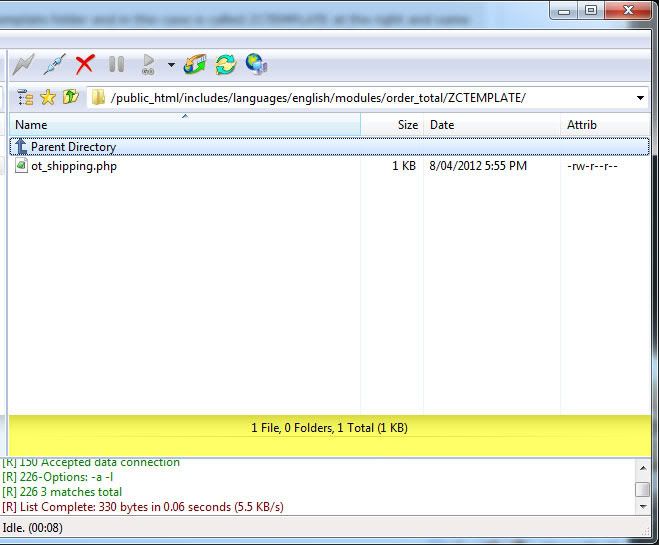
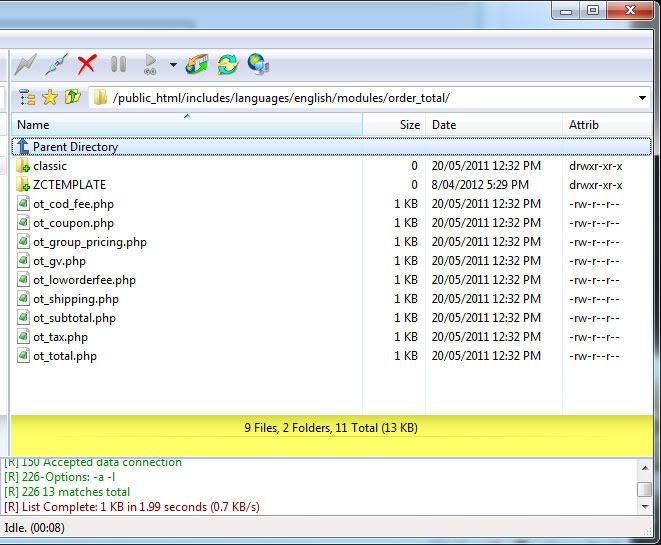
Please see the following images so you clearly see that I have my custom template folder and in this case is called ZCTEMPLATE at the right and same level as the classic folder as per your post. Then in the second image you can see that I have the "ot_shipping.php" file residing inside of it. Which should mean that the over rides system should work. But for some reason it isn't.

I have used the over rides system a number of times in the past with mods I have downloaded from the Free Addon's section without any issues until now. So this is why I don't understand why it's not working for me now.

So any additional thoughts or suggestions as to why it's not working for will be greatly appreciated and thanks once again for taking the time to help me.

9 Apr 2012, 12:16 PM
#6
badarac avatar

badarac

Totally Zenned

Join Date:
Aug 2009
Location:
Longs, SC
Posts:
635
Plugin Contributions:
0

Re: Overrides directory question about free shipping text.

At the risk of asking an obvious question. ZCTEMPLATE IS the name of the template you have active right?

9 Apr 2012, 1:27 PM
#7
cybagirl avatar

cybagirl

Zen Follower

Join Date:
Jul 2009
Posts:
119
Plugin Contributions:
0

Re: Overrides directory question about free shipping text.

badarac:

At the risk of asking an obvious question. ZCTEMPLATE IS the name of the template you have active right?

Hi and thanks for your reply. But oh yes I have checked this numerous times just to be sure. I even copied and pasted the name straight from another folder just to be sure that I have the spelling right even though the spelling is obvious :laugh: .

It's a real strange one to be honest and I'm just about to give up on it and just over write the core file as it really doesn't make any sense as the over rides system should be working just like it does on all the other mods.

:huh:

28 May 2012, 7:11 PM
#8
soyofthenorth avatar

soyofthenorth

New Zenner

Join Date:
Mar 2011
Posts:
19
Plugin Contributions:
0

Re: Overrides directory question about free shipping text.

I have been trying to do the same as CybaGirl and I am getting the same results.

Editing the core file changes the text.

Creating an override folder with the file in it does not change the text.

Strangely it seems to be limited to overrides for the order_total files. Creating overrides for the other modules folders works out fine. Possibly a bug perhaps?

28 May 2012, 10:20 PM
#9
ajeh avatar

ajeh

Oba-san

Join Date:
Sep 2003
Location:
Ohio
Posts:
62,757
Plugin Contributions:
1

Re: Overrides directory question about free shipping text.

Which file are you trying to override? :unsure:

8 Jun 2012, 6:31 AM
#10
cybagirl avatar

cybagirl

Zen Follower

Join Date:
Jul 2009
Posts:
119
Plugin Contributions:
0

Re: Overrides directory question about free shipping text.

soyofthenorth:

I have been trying to do the same as CybaGirl and I am getting the same results.

Editing the core file changes the text.

Creating an override folder with the file in it does not change the text.

Strangely it seems to be limited to overrides for the order_total files. Creating overrides for the other modules folders works out fine. Possibly a bug perhaps?

Glad to see I am not the only one who had this issue! There is a definite problem here and I think there is a limitation on the directory depth and this is why it's not working. Because either the OS or ZenCart isn't capable of reading past a certain amount of characters more or less like Windows does.

Ajeh:

Which file are you trying to override? :unsure:

The file is called ot_shipping.php if you modify this core file and put it inside an over rides directory ZenCart still reads the original core file and not the one located in the over rides directory.

I ended up just modifying the core file as the over ride folder in this instance does not work for some reason.

8 Jun 2012, 1:02 PM
#11
ajeh avatar

ajeh

Oba-san

Join Date:
Sep 2003
Location:
Ohio
Posts:
62,757
Plugin Contributions:
1

Re: Overrides directory question about free shipping text.

NOTE: On the Payment, Shipping and Order Total Modules, only the language files have overrides ...

The code files do NOT have overrides ...

On the file:
/includes/languages/modules/order_total/ot_shipping.php

what are you trying to overrides that is not working ... what is the condition that makes the shipping Free?

9 Jun 2012, 3:24 AM
#12
cybagirl avatar

cybagirl

Zen Follower

Join Date:
Jul 2009
Posts:
119
Plugin Contributions:
0

Re: Overrides directory question about free shipping text.

Hello Linda and thank you for taking the time to reply again.

As I mentioned in my first post in this thread I wanted to change the text from the default wording which says:

Free shipping for orders over %s

which is located in this file:

/includes/languages/modules/order_total/ot_shipping.php

to

Your order qualifies for free shipping as the total is over %s

by placing the ot_shipping.php file inside an over rides directory like so:

/includes/languages/modules/order_total/MYTEMPLATE/ot_shipping.php

The condition that makes it free shipping is when the order totals over $200.00.

I don't know what else to say as I have tried this numerous times to get this to work in an over rides directory but it doesn't. It only works if I change the text in the main file located here.

/includes/languages/modules/order_total/ot_shipping.php

Hope this makes sense.

9 Jun 2012, 9:10 AM
#13
schoolboy avatar

schoolboy

Totally Zenned

Join Date:
Jun 2005
Location:
Cumbria, UK
Posts:
10,327
Plugin Contributions:
0

Re: Overrides directory question about free shipping text.

/includes/languages/modules/order_total/

Where is the LANGUAGE?

/includes/languages/english/modules/order_total/

9 Jun 2012, 5:13 PM
#14
ajeh avatar

ajeh

Oba-san

Join Date:
Sep 2003
Location:
Ohio
Posts:
62,757
Plugin Contributions:
1

Re: Overrides directory question about free shipping text.

CybaGirl:

Hello I seem to be facing an issue with the over rides directory and changing the text "Free shipping for orders over %s" which is shown on the shopping carts first page.

I understand how the over rides directory works and I have used it a number of times in the past without any problems. But for some reason it doesn't seem to work with the text changes I have made to the files that control what is said on this page.

For example I used the Developers Tool Kit to find "Free shipping for orders over" and the search told me that this text is in the following three files:

/home/mysite/public_html/includes/languages/english/checkout_shipping.php

Line #30 : // when free shipping for orders over $XX.00 is active

Line #32 : define('FREE_SHIPPING_DESCRIPTION', 'Free shipping for orders over %s');

> 
> ```
/home/mysite/public_html/includes/languages/english/modules/order_total/ot_shipping.php

Line #26 : define('FREE_SHIPPING_DESCRIPTION', 'Free shipping for orders over %s'); 

/home/mysite/public_html/includes/modules/order_total/ot_shipping.php

Line #111 : $db->Execute("insert into " . TABLE_CONFIGURATION . " (configuration_title, configuration_key, configuration_value, configuration_description, configuration_group_id, sort_order, use_function, date_added) values ('Free Shipping For Orders Over', 'MODULE_ORDER_TOTAL_SHIPPING_FREE_SHIPPING_OVER', '50', 'Provide free shipping for orders over the set amount.', '6', '4', 'currencies->format', now())");

> 
> So I changed the first two files on their respective lines to reflect the text that I want the shopping cart to display and in this case I want it to display "Your order qualifies for free shipping as the total is over %s"
> 
> I then saved these files as new files with the same name of course and created over ride directories as follows:
> 
> ```
/home/mysite/public_html/includes/languages/english/MY_TEMPLATE/checkout_shipping.php

/home/mysite/public_html/includes/languages/english/modules/order_total/MY_TEMPLATE/ot_shipping.php

> 
> But for some reason the text is not changed :dontgetit .
> 
> However if I replace the ot_shipping.php file located here and without using the over rides directory:
> 
> ```
/home/mysite/public_html/includes/languages/english/modules/order_total/ot_shipping.php

with the edited one I just created the text is changed to what I want it to display. But of course this is not the ideal solution due to upgrade purposes in the future etc and I would prefer it to work with the over rides directory if possible.

So I guess my question is. Is the over rides directory suppose to work in this case? As the order_total directory contains a classic directory inside of it. So I assumed that by adding the name of my template directory" inside of the order_total directory and then placing the new file inside it I could then use the over rides system as per normal. But it doesn't seem to work.

:blink:

So any thoughts or suggestions as to what might be causing this issue would be greatly appreciated.

Thanks.
There is something off on some of the Order Total modules for overrides ... so I am moving this to the Bug Reports for further review in future releases ...

11 Jun 2012, 4:39 AM
#15
cybagirl avatar

cybagirl

Zen Follower

Join Date:
Jul 2009
Posts:
119
Plugin Contributions:
0

Re: Overrides directory question about free shipping text.

Thank you very much Linda I am pleased that you understood what I was trying to achieve as I was starting to go crazy over it as I was sure I was doing everything right. Especially considering I have used the over ride system numerous times in the past to change things in both the ZenCart files and mods for that matter.

Thank you for your helpful input it has been very much appreciated. I'm still using version 1.39h on two of my stores due to mods being upgraded to work with 1.5 so I am unable to test to see if this issue is present in 1.5 at the moment.