Zen Cart Logo
Forums / Templates, Stylesheets, Page Layout / Extend stretch Top header Menu/Navigation and search bar

Extend stretch Top header Menu/Navigation and search bar

Views: 2,384

Results 1 to 11 of 11
22 May 2012, 2:53 AM
#1
jdmkuruma avatar

jdmkuruma

New Zenner

Join Date:
Dec 2011
Posts:
24
Plugin Contributions:
0

Extend stretch Top header Menu/Navigation and search bar

Hi All,

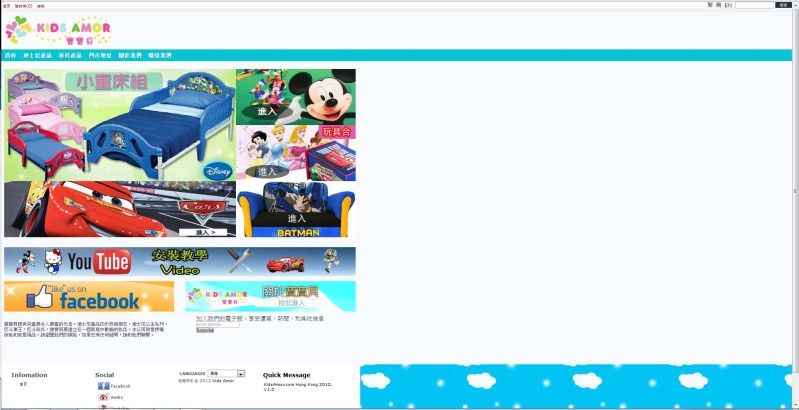
I would like to know on how to stretch the top menu header and navigation bar?

My site now:

Want to extend the top bars (Photoshop)

site: https://www.kidsamor.com
Thanks All!!

23 May 2012, 5:43 PM
#2
jdmkuruma avatar

jdmkuruma

New Zenner

Join Date:
Dec 2011
Posts:
24
Plugin Contributions:
0

Re: Extend stretch Top header Menu/Navigation and search bar

Someone please help :)

23 May 2012, 6:13 PM
#3
stevesh avatar

stevesh

Black Belt

Join Date:
Feb 2005
Location:
Lansing, Michigan USA
Posts:
19,793
Plugin Contributions:
2

Re: Extend stretch Top header Menu/Navigation and search bar

Screenshots don't help, and you have some sort of redirect going on that prevents us from viewing the actual site.

24 May 2012, 6:58 PM
#4
jdmkuruma avatar

jdmkuruma

New Zenner

Join Date:
Dec 2011
Posts:
24
Plugin Contributions:
0

Re: Extend stretch Top header Menu/Navigation and search bar

Thanks Steve!
I have removed the forwarding, so hope this works now.
https://www.kidsamor.com

30 May 2012, 10:03 PM
#5
jdmkuruma avatar

jdmkuruma

New Zenner

Join Date:
Dec 2011
Posts:
24
Plugin Contributions:
0

Re: Extend stretch Top header Menu/Navigation and search bar

Someone please help :)

5 Jun 2012, 6:35 AM
#6
jdmkuruma avatar

jdmkuruma

New Zenner

Join Date:
Dec 2011
Posts:
24
Plugin Contributions:
0

Re: Extend stretch Top header Menu/Navigation and search bar

So this is the closest I have come to:

What I did was:
remove the code in #mainwrapper
.topmenu width set to 100%, and remove "no-repeat scroll left center". I manged to get the topmenu bar stretched all the way left and right.

Now the problem:
how to position the home, shopping cart, login, company logo..etc to position at its original position?
how to make the background show up on both sides of my main content? It only appears on the footer and below section.

Thanks!
web: kidsamor.com

5 Jun 2012, 5:10 PM
#7
keneso avatar

keneso

Totally Zenned

Join Date:
May 2009
Posts:
1,273
Plugin Contributions:
3

Re: Extend stretch Top header Menu/Navigation and search bar

why don't you just edit the background image adding the white, and blu-green striper above your cloud background image?
It appears you keep the nav menu, and logo etc. all within the mainwrapper, and all you want is to stretch the white, and blu-green, removing the clouds.
You can make it 200-300 wide for the clouds to repeat fine.

Background image:

white
white
white
white height 128 px
blu-green height 32 px
clouds
clouds
clouds
clouds
clouds
clouds
clouds
clouds
clouds
clouds

6 Jun 2012, 7:08 PM
#8
jdmkuruma avatar

jdmkuruma

New Zenner

Join Date:
Dec 2011
Posts:
24
Plugin Contributions:
0

Re: Extend stretch Top header Menu/Navigation and search bar

keneso:

why don't you just edit the background image adding the white, and blu-green striper above your cloud background image?
It appears you keep the nav menu, and logo etc. all within the mainwrapper, and all you want is to stretch the white, and blu-green, removing the clouds.
You can make it 200-300 wide for the clouds to repeat fine.

Background image:

white
white
white
white height 128 px
blu-green height 32 px
clouds
clouds
clouds
clouds
clouds
clouds
clouds
clouds
clouds
clouds

That's exactly what I want to do...but I don't know how to code it on .css.

7 Jun 2012, 8:40 AM
#9
keneso avatar

keneso

Totally Zenned

Join Date:
May 2009
Posts:
1,273
Plugin Contributions:
3

Re: Extend stretch Top header Menu/Navigation and search bar

Yes it is clear what you want, I suggested you don't need to code it in css to achieve it, at least not the way you intend.
All you need is to change the body background image in your css file.

Instead of the image you have use an image like this, all you have to do is to stretch it longer with the clouds part, maybe up to 1500px
Attachment 10571
Then in your stylesheet.css file change body background (line 71) to the correct image name.

8 Jun 2012, 12:29 AM
#10
jdmkuruma avatar

jdmkuruma

New Zenner

Join Date:
Dec 2011
Posts:
24
Plugin Contributions:
0

Re: Extend stretch Top header Menu/Navigation and search bar

keneso:

Yes it is clear what you want, I suggested you don't need to code it in css to achieve it, at least not the way you intend.
All you need is to change the body background image in your css file.

Instead of the image you have use an image like this, all you have to do is to stretch it longer with the clouds part, maybe up to 1500px
Attachment 10571
Then in your stylesheet.css file change body background (line 71) to the correct image name.

Thank You so much!!! I got it!! I am so happy now. Thanks again!!

8 Jun 2012, 8:42 AM
#11
keneso avatar

keneso

Totally Zenned

Join Date:
May 2009
Posts:
1,273
Plugin Contributions:
3

Re: Extend stretch Top header Menu/Navigation and search bar

You're welcome, glad you solved it.