Forums / All Other Contributions/Addons / Column Layout Grid v2.x Support

Column Layout Grid v2.x Support

Started by gjh42 on 20 Sep 2012, 7:00 PM · Views: 30,576

Results 161 to 176 of 176
29 Jan 2020, 4:15 AM
#161
jasonshanks avatar

jasonshanks

Zen Follower

Join Date:
Feb 2009
Location:
atlanta GA
Posts:
297
Plugin Contributions:
0

Column Layout Grid v2.x Support

twitchtoo:

You're right about the clumsy nature of the display, considering that there are both hard coded switches that can be on or off in admin and potentially hard coded module additions to the product listing... there is work to be done with any template out of the box.

These sites consider changing the CSS, instead of the hard code to accomplish a clean product listing display using column layout grid.

Bluu Gnome Gear
https://www.bg-gear.com/store/index.php?main_page=index&cPath=1

Edmonton Grocer
https://edmontongrocer.com/shop/

Sheldrake Automotive
http://sheldrakeautomotive.com/shop/index.php?main_page=index&cPath=3_117_6_19

German Wholesale Parts
http://germanwholesaleparts.ca/

Once the product listing is mastered you can review the new products, featured products and so on (preferred) or direct them to use the product listing page (existing features and future upgrades will need to interact correctly with a one page listing output method)

For pointers simply look at the source stylesheet.css and related files available in your web browser. You can copy the stylesheets into your own site and if the settings are similar for each display item -*** you will see the display cleaned up for a proper gallery :clap:***

Hello,

First off , thank you for writing this for us. I have question. which version should I install for a site with 1.5.5f and php 5.6 ? I see your latest version is for 1.5.6c. Is there any compatibility issues.

Zencart 1.5.6c PHP 7.2 Order Replacement AC Adapters and Power Cords Online https://www.missingcord.com

29 Jan 2020, 6:40 AM
#162
jasonshanks avatar

jasonshanks

Zen Follower

Join Date:
Feb 2009
Location:
atlanta GA
Posts:
297
Plugin Contributions:
0

Re: Column Layout Grid v2.x Support

Hello,

adding .centerBoxContentsProducts { padding: 1em 0; } to my stylesheet.css has no effect on the product image spacing in product listing. I am using your module on my test site salvagecrate.com and the most current version of your module from the zencart site and zencart 1.5.6c. Please help. I want to add this to my live site but the images for the products seem to be to close to the borders on the top.

Zencart 1.5.6c PHP 7.2 Order Replacement AC Adapters and Power Cords Online https://www.missingcord.com
20 May 2020, 12:06 AM
#163
twitchtoo avatar

twitchtoo

Totally Zenned

Join Date:
Apr 2007
Location:
Ontario, Canada
Posts:
1,733
Plugin Contributions:
14

Re: Column Layout Grid v2.x Support

jasonshanks:

Hello,

First off , thank you for writing this for us. I have question. which version should I install for a site with 1.5.5f and php 5.6 ? I see your latest version is for 1.5.6c. Is there any compatibility issues.

I did not build the 1.56 version 3.1. Version 3.0 will run properly on 1.55f - php 5.6. It has also been tested up to 1.55f - php 7.2

I am in the process of redeveloping Column Layout Grid 3.0 with Twitch Module compliance for Twitch Base6 as it appears time to fork the module and provide further support to my clients that comes with all Twitch Modules.

Twitch Modules have followed the stable Zen Cart releases for over a decade - to illustrate:
Zen Cart 1.39h > Zen Cart 1.51 > Zen Cart 1.54 > Zen Cart 1.55f > Zen Cart 1.56c

Twitch Modules for any Zen Cart release (1.55a, 1,55b, etc) between those listed above are forward compatible with the stable release.

Looks like this for Column Layout Grid for Product Listing:
Zen Cart 1.39h > CLG - Version 2.31

Zen Cart 1.51 > CLG - Version 2.31

Zen Cart 1.54 > CLG Version 3.0 - twitchtoo - Twitch Wholesale Certified (pre-base standards)

Zen Cart 1.55f > CLG - Version 3.0 - twitchtoo - Twitch Base4 Certified

Zen Cart 1.56c > CLG Version 3.1 - jeking - February 20, 2019
fork
Zen Cart 1.56c > CLG Version ? **- **twitchtoo - Currently being rebuilt for Twitch Base6 Certification.

I encourage those that want to use*** jeking's release CLG Version 3.1*** moving forward with your stock installation of Zen Cart 1.56 as Twitch Base6 is the newest Zen Cart CMS to be released June 1st to the public.

Twitch.
https://www.twitchtoo.com Do you work for free? Please donate.
June 7.2026 - NOW AVAILABLE - Twitch Base8 - Obsidian

25 Jun 2020, 8:29 AM
#164
mito0930 avatar

mito0930

New Zenner

Join Date:
Sep 2019
Location:
United States
Posts:
28
Plugin Contributions:
0

Re: Column Layout Grid v2.x Support

Is there anyway to have this plugin display products in a different number of columns according to screen size?
I'm using Zen Cart v1.5.6c

29 Jun 2020, 2:01 PM
#165
twitchtoo avatar

twitchtoo

Totally Zenned

Join Date:
Apr 2007
Location:
Ontario, Canada
Posts:
1,733
Plugin Contributions:
14

Re: Column Layout Grid v2.x Support

mito0930:

Is there anyway to have this plugin display products in a different number of columns according to screen size?
I'm using Zen Cart v1.5.6c

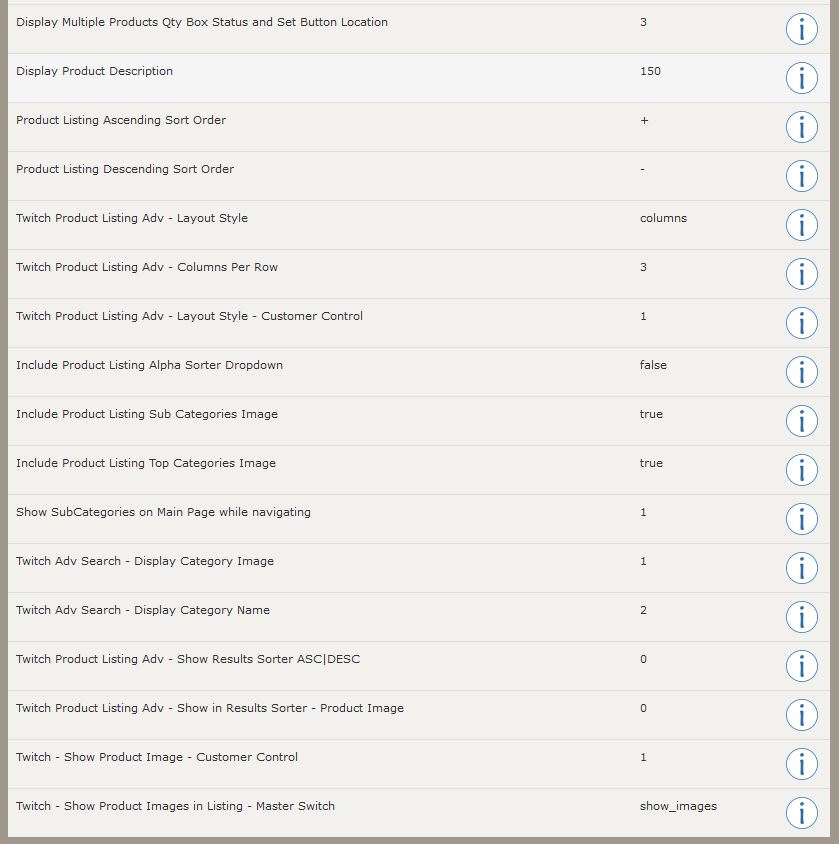
It currently auto adjusts based on the stock responsive template CSS and the column settings in Admin > Product Listing.

You want a more **static **or controllable columns per screen based on the mobile devices?

Twitch.
https://www.twitchtoo.com Do you work for free? Please donate.
June 7.2026 - NOW AVAILABLE - Twitch Base8 - Obsidian

1 Jul 2020, 8:03 PM
#166
mito0930 avatar

mito0930

New Zenner

Join Date:
Sep 2019
Location:
United States
Posts:
28
Plugin Contributions:
0

Re: Column Layout Grid v2.x Support

twitchtoo:

It currently auto adjusts based on the stock responsive template CSS and the column settings in Admin > Product Listing.

You want a more **static **or controllable columns per screen based on the mobile devices?

I want the columns to be more controllable, so that it responds to screen size.
Currently I have 4 columns shown for desktop and would want 2 or even 1 shown on mobile.
I didn't use the responsive template as framework for my current template (I used classic). Would it be possible to make it responsive like the responsive template or would I have to completely change templates?

1 Jul 2020, 8:28 PM
#167
twitchtoo avatar

twitchtoo

Totally Zenned

Join Date:
Apr 2007
Location:
Ontario, Canada
Posts:
1,733
Plugin Contributions:
14

Re: Column Layout Grid v2.x Support

mito0930 - yes. Using the Responsive Template is the first step.

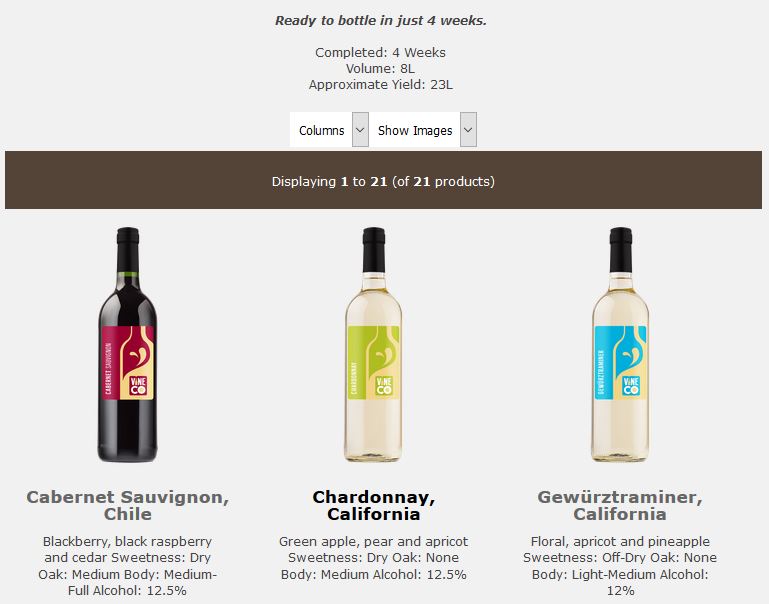
You can see the newest Zen Cart 1.56c - Twitch Base6 for public release running Twitch Product Listing Advanced (Column Layout Grid for 1.56c) here:

https://twitchbase6.com/index.php

And a *production *version with images, text and the newest features here:

**http://barnwoodwine.ca/index.php
**

I'll be releasing one final Column Layout Grid for 1.56c relative to **jeking's **last release with these features:

...that looks like this when it's displaying - using the Responsive Template:

Try both sites out on your various mobile devices and screen sizes on a desktop to see how it will adjust the display :happy:

Twitch.
https://www.twitchtoo.com Do you work for free? Please donate.
June 7.2026 - NOW AVAILABLE - Twitch Base8 - Obsidian

2 Jul 2020, 1:07 AM
#168
mito0930 avatar

mito0930

New Zenner

Join Date:
Sep 2019
Location:
United States
Posts:
28
Plugin Contributions:
0

Re: Column Layout Grid v2.x Support

Twitchtoo, what I'm looking for is something that automatically changes with different screen sizes. Adaptive might be a better word for it, instead of allowing it to be toggled manually. My original question was wondering if I could possibly make this adaptive as described above. I'm not too keen on reworking a brand new template when I've already worked to make one from the classic template. I've made the template as responsive as it can be between desktop, mobile and tablet with specific values. Would I be able to force the number of columns displayed according to those values?

2 Jul 2020, 4:03 AM
#169
twitchtoo avatar

twitchtoo

Totally Zenned

Join Date:
Apr 2007
Location:
Ontario, Canada
Posts:
1,733
Plugin Contributions:
14

Re: Column Layout Grid v2.x Support

To Clarify...
The stock template already adjusts the columns once you install column layout grid - this happens at the CSS level with a bit of php. The settings for this module allow a baseline control or starting point number of columns before the CSS takes over as the screen sizes change. I've added toggles and master switches to turn on/off display control on the *customer *side. By default that will maintain the *admin *selection as a starting point for the template CSS to continue doing what it always has done which is already adaptive/responsive from that perspective. It currently uses a simple equation to divide up the column width by the width set/available within the div it is contained.

If you want to reverse the responsive/adaptive number of columns and control each potential screen size with a static number of columns it would defeat the purpose of the already responsive behaviour but it would ensure that specific screen sizes get paired with specific column counts/sizes.

**
Alternately...**
Leaving the responsive CSS behaviour while forcing say:

  • mobile to use only rows with images

and

  • desktop/tablet to only show columns with images

Yes it is possible - by simply connecting the mobile detect value to admin selected (or hard coded) toggle positions.

The only drawback is when the automation makes a static decision while the CSS is being dynamic. CSS could be added/adjusted to keep the browser from guessing at the output and overlapping elements on the wrong device.

Twitch.
https://www.twitchtoo.com Do you work for free? Please donate.
June 7.2026 - NOW AVAILABLE - Twitch Base8 - Obsidian

2 Jul 2020, 12:37 PM
#170
mito0930 avatar

mito0930

New Zenner

Join Date:
Sep 2019
Location:
United States
Posts:
28
Plugin Contributions:
0

Re: Column Layout Grid v2.x Support

Oh, I think I finally understand. I understand that it defeats the purpose, but I realized that displaying 3 columns on a small device makes everything squish together. If that's the case, should I toggle the column grid off and work with the original product listing module code?

5 Jul 2020, 12:14 AM
#171
twitchtoo avatar

twitchtoo

Totally Zenned

Join Date:
Apr 2007
Location:
Ontario, Canada
Posts:
1,733
Plugin Contributions:
14

Re: Column Layout Grid v2.x Support

mito0930:

Oh, I think I finally understand. I understand that it defeats the purpose, but I realized that displaying 3 columns on a small device makes everything squish together. If that's the case, should I toggle the column grid off and work with the original product listing module code?

With this module installed in the responsive template you can add one more line of code that looks at the Mobile Detect switch and controls which **layout **should be used ***rows ***or columns. The responsive CSS and hard code will do the rest automatically regarding screen scaling.

Twitch.
https://www.twitchtoo.com Do you work for free? Please donate.
June 7.2026 - NOW AVAILABLE - Twitch Base8 - Obsidian

19 Aug 2020, 10:36 PM
#172
noppie avatar

noppie

Zen Follower

Join Date:
Mar 2004
Posts:
210
Plugin Contributions:
0

Re: Column Layout Grid v2.x Support

i install this and very thank full for this. i like the 3 column view and can get that with plugin,, but it shows the weight and item count on the product listing page.. I don't want that to show up on that page or at least not at the very top. I do like it shown when the customer actually clicks on the product so they know the weight and how many i have.
thank you

My Multi_Site Zen Carts
http://herasonlinemarket.com

19 Aug 2020, 10:41 PM
#173
dbltoe avatar

dbltoe

Totally Zenned

Join Date:
Jan 2004
Location:
N of San Antonio TX
Posts:
9,892
Plugin Contributions:
20

Re: Column Layout Grid v2.x Support

Need a hand with Zen Cart? Hire the team at myZenCartZone.com for upgrades, repairs, and custom plugins.
Zen Cart Certified hosting at myZenCartHost.com

19 Aug 2020, 11:26 PM
#174
noppie avatar

noppie

Zen Follower

Join Date:
Mar 2004
Posts:
210
Plugin Contributions:
0

Re: Column Layout Grid v2.x Support

thank you for the reply

i added attachments on what i mean

My Multi_Site Zen Carts
http://herasonlinemarket.com

20 Aug 2020, 3:40 AM
#175
noppie avatar

noppie

Zen Follower

Join Date:
Mar 2004
Posts:
210
Plugin Contributions:
0

Re: Column Layout Grid v2.x Support

now i really fill stupid.. i actually read the links you sent me. and now it works.. thank you so much

have a great day.. again thank you

My Multi_Site Zen Carts
http://herasonlinemarket.com

20 Aug 2020, 4:50 AM
#176
noppie avatar

noppie

Zen Follower

Join Date:
Mar 2004
Posts:
210
Plugin Contributions:
0

Re: Column Layout Grid v2.x Support

ok now i have in the product listing page.. i have 3 columns but the add to cart button in above picture and i would like below picture.. and i can't seem to figure out how to do this. thank you

i added a picture so you know what i am talking about

My Multi_Site Zen Carts
http://herasonlinemarket.com