Zen Cart Logo
Forums / Addon Shipping Modules / Media Mail restriction mod to new, 3-7-14 usps module, any help?

Media Mail restriction mod to new, 3-7-14 usps module, any help?

Views: 11,610

Results 21 to 40 of 62
7 Oct 2014, 6:00 PM
#21
buildingblocks avatar

buildingblocks

Totally Zenned

Join Date:
Jun 2008
Posts:
629
Plugin Contributions:
0

Media Mail restriction mod to new, 3-7-14 usps module, any help?

ok, I will worry about the sub sub cats in a bit

To start I have added:

// see below use of $chk_cart
// eof: example to block USPS Priority MailTM Small Flat Rate Box when anything from master_categories_id 12 or 15 are in the cart

// bof: skip Products in any subcategory for parents_id 486
      $subcategories_array = array();
      $chk_cat = '486'; // parent categories_id
      $chk_cart = 0;
      zen_get_subcategories($subcategories_array, $chk_cat);
      for ($i=0, $n=sizeof($subcategories_array); $i<$n; $i++ ) {
        $chk_cart += $_SESSION['cart']->in_cart_check('master_categories_id', $subcategories_array[$i]);
      }
//echo 'USPS products in parent category 486: ' . $chk_cart . '<br>';
// eof: skip Products in any subcategory for parents_id 486
      for ($i=0; $i<$PackageSize; $i++) {

I also have this code in place

$show_hiddenCost = '';
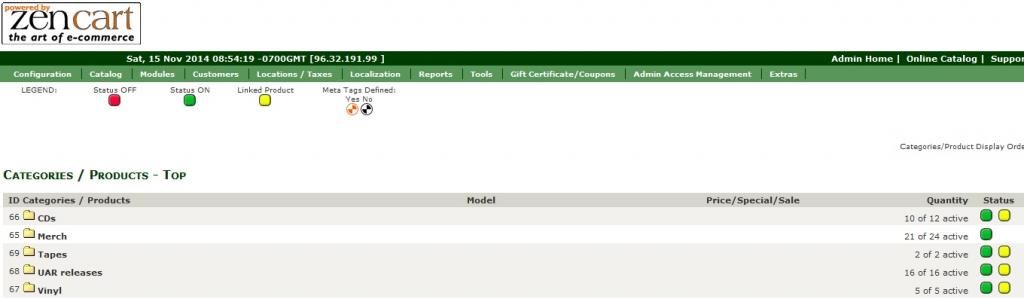
// bof: test contents for Media Mail
          if ($type == 'Media Mail Parcel' && $skip_media) {
            // skip Media Mail
          } else {
          $methods[] = array('id' => $type_rebuilt,
                             'title' => $title . $show_hiddenCost,
                             'cost' => $cost,
                            );
          }
// eof: test contents for Media Mail
        } else {
         {

When I add a non media item, media mail is still offered. When I add a book from a sub cat and a non media item, media mail is still offered. Have I done something wrong? Should I be combining the code with what was posted in post #4?

7 Oct 2014, 7:06 PM
#22
ajeh avatar

ajeh

Oba-san

Join Date:
Sep 2003
Location:
Ohio
Posts:
62,757
Plugin Contributions:
1

Re: Media Mail restriction mod to new, 3-7-14 usps module, any help?

You never set:
$skip_media

so you need an IF or something to set that once you get the results ...

Linda McGrath
If you have to think ... you haven't been zenned ...

**Did YOU buy the Zen Cart Team a cup of coffee and a donut today? Just click here to support the Zen Cart Team!!**

Are you using the latest? Perhaps you've a problem that's fixed in the latest version: [Upgrade today!]
Officially PayPal-Certified! Just click here

Try our Zen Cart Recommended Services - Hosting, Payment and more ...
Signup for our Announcements Forums to stay up to date on important changes and updates!

7 Oct 2014, 8:27 PM
#23
buildingblocks avatar

buildingblocks

Totally Zenned

Join Date:
Jun 2008
Posts:
629
Plugin Contributions:
0

Re: Media Mail restriction mod to new, 3-7-14 usps module, any help?

Ajeh:

You never set:
$skip_media

so you need an IF or something to set that once you get the results ...

yeah...so I'm lost lol. I have tried multiple variations most of which broke things. This one is the latest one I tried which doesn't break my cart but doesn't offer media for anything. I'm sure this must look like a lame attempt


// bof: skip Products in any subcategory for parents_id 486

     $subcategories_array = array();
     $chk_cat = '486'; // parent categories_id
     $chk_cart = 0;
     zen_get_subcategories($subcategories_array, $chk_cat);
     for ($i=0, $n=sizeof($subcategories_array); $i<$n; $i++ ) {
       $chk_cart += $_SESSION['cart']->in_cart_check('master_categories_id', $subcategories_array[$i]);

     }if ($chk_media != $_SESSION['cart']->count_contents()) {
         $skip_media = true;}
//echo 'USPS products in parent category 486: ' . $chk_cart . '<br>';
// eof: skip Products in any subcategory for parents_id 486
7 Oct 2014, 8:39 PM
#24
ajeh avatar

ajeh

Oba-san

Join Date:
Sep 2003
Location:
Ohio
Posts:
62,757
Plugin Contributions:
1

Re: Media Mail restriction mod to new, 3-7-14 usps module, any help?

I used $chk_cart and you are using $chk_media ...

Something like this:

// bof: skip Products in any subcategory for parents_id 486

      $subcategories_array = array();
      $chk_cat = '486'; // parent categories_id
      $chk_cart = 0;
      zen_get_subcategories($subcategories_array, $chk_cat);
      for ($i=0, $n=sizeof($subcategories_array); $i<$n; $i++ ) {
        $chk_cart += $_SESSION['cart']->in_cart_check('master_categories_id', $subcategories_array[$i]);

      }
if ($chk_cart != $_SESSION['cart']->count_contents()) {
  $skip_media = true;
}
//echo 'USPS products in parent category 486: ' . $chk_cart . '<br>';
// eof: skip Products in any subcategory for parents_id 486  

might work better ...

NOTE: I do not know if that is your code or your copy and paste that made your IF test look so odd ...

Linda McGrath
If you have to think ... you haven't been zenned ...

**Did YOU buy the Zen Cart Team a cup of coffee and a donut today? Just click here to support the Zen Cart Team!!**

Are you using the latest? Perhaps you've a problem that's fixed in the latest version: [Upgrade today!]
Officially PayPal-Certified! Just click here

Try our Zen Cart Recommended Services - Hosting, Payment and more ...
Signup for our Announcements Forums to stay up to date on important changes and updates!

7 Oct 2014, 9:23 PM
#25
buildingblocks avatar

buildingblocks

Totally Zenned

Join Date:
Jun 2008
Posts:
629
Plugin Contributions:
0

Re: Media Mail restriction mod to new, 3-7-14 usps module, any help?

Ajeh:

I used $chk_cart and you are using $chk_media ...

Something like this:

// bof: skip Products in any subcategory for parents_id 486

  $subcategories_array = array();
  $chk_cat = '486'; // parent categories_id
  $chk_cart = 0;
  zen_get_subcategories($subcategories_array, $chk_cat);
  for ($i=0, $n=sizeof($subcategories_array); $i<$n; $i++ ) {
    $chk_cart += $_SESSION['cart']->in_cart_check('master_categories_id', $subcategories_array[$i]);

  }

if ($chk_cart != $_SESSION['cart']->count_contents()) {
$skip_media = true;
}
//echo 'USPS products in parent category 486: ' . $chk_cart . '<br>';
// eof: skip Products in any subcategory for parents_id 486

> 
> might work better ... 
> 
> 
> 
> NOTE: I do not know if that is your code or your copy and paste that made your IF test look so odd ...

Awesome, that works great! Adding media items from sub cats and sub sub cats are offered media shipping option. Mixing media and non media items are not offered media shipping option. Adding only non media items are not offered media shipping option. Thank you so much for your help with this.

Not sure what it is that looks odd but I'm sure it must be something I did. Is it the 'if' not starting on a new line that is wrong?
8 Oct 2014, 12:25 AM
#26
ajeh avatar

ajeh

Oba-san

Join Date:
Sep 2003
Location:
Ohio
Posts:
62,757
Plugin Contributions:
1

Re: Media Mail restriction mod to new, 3-7-14 usps module, any help?

Code is usually written where the IF would be on its own lines and not bunched up in there ...

Glad that this is now working for you ... :smile:

Linda McGrath
If you have to think ... you haven't been zenned ...

**Did YOU buy the Zen Cart Team a cup of coffee and a donut today? Just click here to support the Zen Cart Team!!**

Are you using the latest? Perhaps you've a problem that's fixed in the latest version: [Upgrade today!]
Officially PayPal-Certified! Just click here

Try our Zen Cart Recommended Services - Hosting, Payment and more ...
Signup for our Announcements Forums to stay up to date on important changes and updates!

15 Nov 2014, 3:57 PM
#27
dalecooper avatar

dalecooper

New Zenner

Join Date:
Nov 2014
Location:
Athens, GA
Posts:
25
Plugin Contributions:
0

Re: Media Mail restriction mod to new, 3-7-14 usps module, any help?

Hi,

I'm fairly new to ZenCart and all the way new to php. However, I do have some experience in coding (just a bit) so it doesn't all look like a complete foreign language to me. I'm trying to set up this same thing - exclude media mail as a shipping option for just one category of items in my shop. However, it doesn't seem to be working. What I've done so far is add the recommended code to usps.php; uploaded the modified file to my server under includes / modules / shipping, and verified that the file there is the custom one; and even reinstalled the USPS module afterward, because I wasn't sure if I needed to or not (I know you need to when USPS releases a new version). Still it doesn't seem to work.

Here is what I have added in the .php:

// see below use of $chk_cart
// eof: example to block USPS Priority MailTM Small Flat Rate Box when anything from master_categories_id 12 or 15 are in the cart

// bof: test contents for Media Mail
$skip_media = false;
$chk_media = 0;
$chk_media += $_SESSION['cart']->in_cart_check('master_categories_id','65');
if ($chk_media != $_SESSION['cart']->count_contents()) {
$skip_media = true;
}
// eof: test contents for Media Mail

  for ($i=0; $i<$PackageSize; $i++) {

Then further down:

$show_hiddenCost = '';
// bof: test contents for Media Mail
if ($type == 'Media Mail Parcel' && $skip_media) {
// skip Media Mail
} else {

$methods[] = array('id' => $type_rebuilt,
'title' => $title . $show_hiddenCost,
'cost' => $cost,
'insurance' => $usps_insurance_charge,
);
** }
// eof: test contents for Media Mail**
//echo 'setting insurance: ' . $usps_insurance_charge . '<br>';
} else {

My category ID (it's merch, a.k.a. shirts and whatnot) does appear to be 65:

What am I missing? The code seems straightforward to me - if category is 65 for any product in the cart (and it is in my tests), then disable the media mail option. But in both estimate shipping and actual checkout, media mail is still coming up.

15 Nov 2014, 4:05 PM
#28
dalecooper avatar

dalecooper

New Zenner

Join Date:
Nov 2014
Location:
Athens, GA
Posts:
25
Plugin Contributions:
0

Re: Media Mail restriction mod to new, 3-7-14 usps module, any help?

Should also note, I tried changing each instances of chk_media to chk_cart and reinstalling again, but that had no effect either.

15 Nov 2014, 4:07 PM
#29
ajeh avatar

ajeh

Oba-san

Join Date:
Sep 2003
Location:
Ohio
Posts:
62,757
Plugin Contributions:
1

Re: Media Mail restriction mod to new, 3-7-14 usps module, any help?

Are there only Products in Category 65?

Are you using the current USPS October 30, 2014 K6 version?
http://www.zen-cart.com/showthread.php?215103-USPS-RateV4-Intl-RateV2-October-30-2014-K6-for-November-2-2014

This is also a good time to ensure that you are subscribed to the News & Announcements forum:
http://www.zen-cart.com/forumdisplay.php?2-Zen-Cart-Release-Announcements

And it never hurts to test the correct USPS module is on the server:
Go to your Zen Cart Admin and go to Tools ... Developers Tool Kit ...

In the bottom input box enter:
usps.php

Then, select Catalog ... click SEARCH ...

What comes up on the paths to the files and the lines for:

Linda McGrath
If you have to think ... you haven't been zenned ...

**Did YOU buy the Zen Cart Team a cup of coffee and a donut today? Just click here to support the Zen Cart Team!!**

Are you using the latest? Perhaps you've a problem that's fixed in the latest version: [Upgrade today!]
Officially PayPal-Certified! Just click here

Try our Zen Cart Recommended Services - Hosting, Payment and more ...
Signup for our Announcements Forums to stay up to date on important changes and updates!

15 Nov 2014, 4:18 PM
#30
dalecooper avatar

dalecooper

New Zenner

Join Date:
Nov 2014
Location:
Athens, GA
Posts:
25
Plugin Contributions:
0

Re: Media Mail restriction mod to new, 3-7-14 usps module, any help?

Thanks for the quick response -

I have products in category 65 and others. I did a few tests to see how it would behave - checking out one product in another category; then checking out one product from 65; then a combined checkout with a product from each category. In all cases I got a media mail option.

Yes, I'm using the current USPS module. I just installed the newest one this morning before I tackled this project.

The last question might get to the problem, I don't know. This is what came back:

/home2/unspeak4/public_html/purchase/includes/languages/english/modules/shipping/usps.php

Line #12 : * @version $Id: usps.php 2014-09-07 ajeh Version K5 $

/home2/unspeak4/public_html/purchase/includes/modules/shipping/usps.php

Line #14 : * @version $Id: usps.php 2014-10-30 ajeh Version K6 $

I actually only installed to modules / shipping - should the same file go under languages / english / modules / shipping as well?

EDIT - Never mind, I see that I didn't install the languages... .php file, but it's a different file entirely with a lot less in it. Going to load it now just in case that's part of my problem...

15 Nov 2014, 4:25 PM
#31
ajeh avatar

ajeh

Oba-san

Join Date:
Sep 2003
Location:
Ohio
Posts:
62,757
Plugin Contributions:
1

Re: Media Mail restriction mod to new, 3-7-14 usps module, any help?

The shipping language file only contains define statements ...

The code file that goes in the /includes/modules/shipping directory has all of the code in it ...

Linda McGrath
If you have to think ... you haven't been zenned ...

**Did YOU buy the Zen Cart Team a cup of coffee and a donut today? Just click here to support the Zen Cart Team!!**

Are you using the latest? Perhaps you've a problem that's fixed in the latest version: [Upgrade today!]
Officially PayPal-Certified! Just click here

Try our Zen Cart Recommended Services - Hosting, Payment and more ...
Signup for our Announcements Forums to stay up to date on important changes and updates!

15 Nov 2014, 4:25 PM
#32
dalecooper avatar

dalecooper

New Zenner

Join Date:
Nov 2014
Location:
Athens, GA
Posts:
25
Plugin Contributions:
0

Re: Media Mail restriction mod to new, 3-7-14 usps module, any help?

Well, I did update the file at languages / english / modules / shipping with the new version, and reinstalled again for good measure. However, the shipping behavior is the same - still getting media mail as an option even when items from cat #65 are in my cart.

15 Nov 2014, 4:26 PM
#33
ajeh avatar

ajeh

Oba-san

Join Date:
Sep 2003
Location:
Ohio
Posts:
62,757
Plugin Contributions:
1

Re: Media Mail restriction mod to new, 3-7-14 usps module, any help?

You said ...

I have products in category 65 and others.

Does this mean that you have mixed Categories and Products into categories_id 65?

Linda McGrath
If you have to think ... you haven't been zenned ...

**Did YOU buy the Zen Cart Team a cup of coffee and a donut today? Just click here to support the Zen Cart Team!!**

Are you using the latest? Perhaps you've a problem that's fixed in the latest version: [Upgrade today!]
Officially PayPal-Certified! Just click here

Try our Zen Cart Recommended Services - Hosting, Payment and more ...
Signup for our Announcements Forums to stay up to date on important changes and updates!

15 Nov 2014, 4:32 PM
#34
dalecooper avatar

dalecooper

New Zenner

Join Date:
Nov 2014
Location:
Athens, GA
Posts:
25
Plugin Contributions:
0

Re: Media Mail restriction mod to new, 3-7-14 usps module, any help?

Ajeh:

You said ...

I have products in category 65 and others.

> 
> Does this mean that you have mixed Categories and Products into categories_id 65?

Sorry, this is where my newness to ZenCart is probably a liability, because I'm not sure what you mean.  My shop is set up very simply - the 5 categories you see in the screenshot posted previously are the only ones I've got.  When I drill down into cat #65, I have a bunch of products listed there, but no other categories or sub-categories.  I'm actually not sure how to make a sub-category but I don't seem to have any, regardless.  And I'm just assuming that the Merch category has master_categories_id = 65, because that's the ID that shows on screen next to that category.  I don't know how to check the database to verify the actual value at the field level.
15 Nov 2014, 4:36 PM
#35
dalecooper avatar

dalecooper

New Zenner

Join Date:
Nov 2014
Location:
Athens, GA
Posts:
25
Plugin Contributions:
0

Re: Media Mail restriction mod to new, 3-7-14 usps module, any help?

I also notice this tiny message when I go into my categories/products:

NOTE: Category has SubCategories
Products cannot be added

I'm not sure if that means I'm already inside a master category, and am viewing sub-categories..? This is a bit confusing.

15 Nov 2014, 4:48 PM
#36
ajeh avatar

ajeh

Oba-san

Join Date:
Sep 2003
Location:
Ohio
Posts:
62,757
Plugin Contributions:
1

Re: Media Mail restriction mod to new, 3-7-14 usps module, any help?

A Category holds Products or Categories ... never both ...

If your Category 65 has both Categories and Products, you need to either move the Products to their own Category, which would then become its master_categories_id or you need to move the Categories in there out to be their own Categories ...

Have you an URL to your site where we can peek at the layout of your Categories/Products?

Linda McGrath
If you have to think ... you haven't been zenned ...

**Did YOU buy the Zen Cart Team a cup of coffee and a donut today? Just click here to support the Zen Cart Team!!**

Are you using the latest? Perhaps you've a problem that's fixed in the latest version: [Upgrade today!]
Officially PayPal-Certified! Just click here

Try our Zen Cart Recommended Services - Hosting, Payment and more ...
Signup for our Announcements Forums to stay up to date on important changes and updates!

15 Nov 2014, 4:50 PM
#37
dalecooper avatar

dalecooper

New Zenner

Join Date:
Nov 2014
Location:
Athens, GA
Posts:
25
Plugin Contributions:
0

Re: Media Mail restriction mod to new, 3-7-14 usps module, any help?

For testing purposes, I've also tried adding a specific product ID that I am using to play with. I modified the first section of code as follows:

// bof: test contents for Media Mail
$skip_media = false;
$chk_cart = 0;
$chk_cart += $_SESSION['cart']->in_cart_check('products_id','219');
$chk_cart += $_SESSION['cart']->in_cart_check('master_categories_id','65');
if ($chk_cart != $_SESSION['cart']->count_contents()) {
$skip_media = true;
}
// eof: test contents for Media Mail

219 being a hooded sweatshirt in the store. When I go to checkout with this item, it's still allowing media mail even though both the product ID and the category ID seem like it should be excluded.

I feel like I must be missing something dumb somewhere, because this seems so simple in what it's doing.

15 Nov 2014, 4:51 PM
#38
dalecooper avatar

dalecooper

New Zenner

Join Date:
Nov 2014
Location:
Athens, GA
Posts:
25
Plugin Contributions:
0

Re: Media Mail restriction mod to new, 3-7-14 usps module, any help?

Ajeh:

A Category holds Products or Categories ... never both ...

Oh - well as far as I can tell, it only holds products.

If your Category 65 has both Categories and Products, you need to either move the Products to their own Category, which would then become its master_categories_id or you need to move the Categories in there out to be their own Categories ...

Have you an URL to your site where we can peek at the layout of your Categories/Products?

Certainly - it's located at http://www.unspeakableaxerecords.com/purchase

Here is category 65: http://www.unspeakableaxerecords.com/purchase/index.php?main_page=index&cPath=65

15 Nov 2014, 5:13 PM
#39
ajeh avatar

ajeh

Oba-san

Join Date:
Sep 2003
Location:
Ohio
Posts:
62,757
Plugin Contributions:
1

Re: Media Mail restriction mod to new, 3-7-14 usps module, any help?

Remove this line:

$chk_cart += $_SESSION['cart']->in_cart_check('products_id','219');

If I have ONLY Product from categories_id 65 in the cart, you want to see Media, correct?

If I have Products in the cart and none are in categories_id 65, you do NOT want to see Media, correct?

And if I have a Product from categories_id 65 and something from another categories_id in the cart, you do NOT want to see Media, correct?

Linda McGrath
If you have to think ... you haven't been zenned ...

**Did YOU buy the Zen Cart Team a cup of coffee and a donut today? Just click here to support the Zen Cart Team!!**

Are you using the latest? Perhaps you've a problem that's fixed in the latest version: [Upgrade today!]
Officially PayPal-Certified! Just click here

Try our Zen Cart Recommended Services - Hosting, Payment and more ...
Signup for our Announcements Forums to stay up to date on important changes and updates!

15 Nov 2014, 5:14 PM
#40
dalecooper avatar

dalecooper

New Zenner

Join Date:
Nov 2014
Location:
Athens, GA
Posts:
25
Plugin Contributions:
0

Re: Media Mail restriction mod to new, 3-7-14 usps module, any help?

Ajeh:

Remove this line:

$chk_cart += $_SESSION['cart']->in_cart_check('products_id','219');

> 
> If I have ONLY Product from categories_id 65 in the cart, you want to see Media, correct?
> 
> If I have Products in the cart and none are in categories_id 65, you do NOT want to see Media, correct?
> 
> And if I have a Product from categories_id 65 and something from another categories_id in the cart, you do NOT want to see Media, correct?

It's the other way around - if any product from 65 is in the cart, by itself or combined with another product, then I do NOT want to see Media.  If non-category 65 products are in the cart, then Media is fine.