

Totally Zenned
- Join Date:
- Apr 2007
- Location:
- Ontario, Canada
- Posts:
- 1,733
- Plugin Contributions:
- 14
Twitch Shopping Cart - Empty Cart - Button for 1.56c
Twitch Shopping Cart - Empty Cart - Button for 1.56c
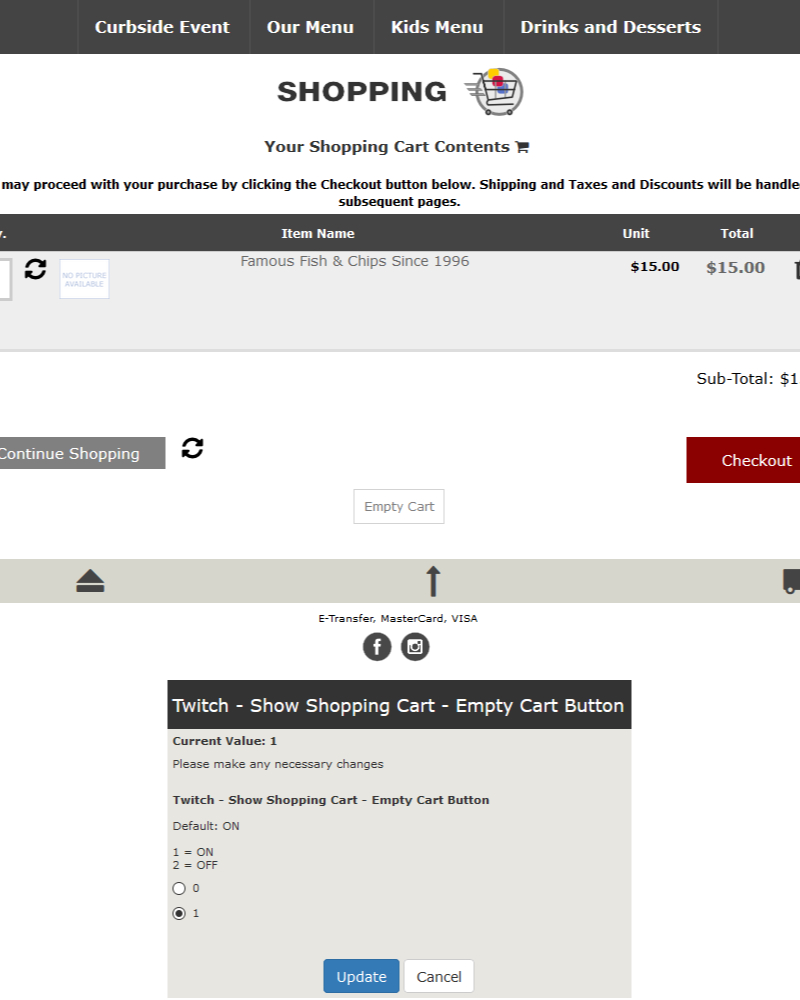
Not all customers know to check product delete checkboxes then click the refresh/update button so - let's add a button to clear the entire cart!
Backup your things BEFORE making changes. This is an add-only mini module!
Relevant shopping cart button controls are here:
Admin > Configuration > Stock
Install control switch
SQL Update:
INSERT INTO configuration (configuration_title, configuration_key, configuration_value, configuration_description, configuration_group_id, sort_order, set_function, date_added) VALUES ('Twitch - Show Shopping Cart - Empty Cart Button', 'TWI_SHOPPING_CART_EMPTY_CART_BUTTON', '1', '<br />Default: ON<br /><br />1 = ON<br />2 = OFF', '9', '21', 'zen_cfg_select_option(array('0', '1'), ', now());
If you would like to remove this mini module in the future:
Uninstall Only
DELETE FROM configuration WHERE configuration_key in ('TWI_SHOPPING_CART_EMPTY_CART_BUTTON');
Uninstall Only
We will add the following switch...
<?php if (TWI_SHOPPING_CART_EMPTY_CART_BUTTON == 1) {// Show Empty Cart Button on shopping cart page ?> <div id="emptyCartButtonBlock"> <div id="emptyCartButton"><a href="<?php echo zen_href_link(FILENAME_SHOPPING_CART, 'action=empty_cart'); ?>" >Empty Cart</a></div> </div> <?php } ?>...to the hard code in:
includes/templates/YOUR_TEMPLATE/templates/tpl_shopping_cart_default.php
replace this:
<!--bof shopping cart buttons--> <div class="buttonRow forward"><?php echo '<a href="' . zen_href_link(FILENAME_CHECKOUT_SHIPPING, '', 'SSL') . '">' . zen_image_button(BUTTON_IMAGE_CHECKOUT, BUTTON_CHECKOUT_ALT) . '</a>'; ?></div> <div class="buttonRow back"><?php echo zen_back_link() . zen_image_button(BUTTON_IMAGE_CONTINUE_SHOPPING, BUTTON_CONTINUE_SHOPPING_ALT) . '</a>'; ?></div> <?php // show update cart button if (SHOW_SHOPPING_CART_UPDATE == 2 or SHOW_SHOPPING_CART_UPDATE == 3) { ?> <div class="buttonRow back"><?php echo zen_image_submit(ICON_IMAGE_UPDATE, ICON_UPDATE_ALT); ?></div> <?php } else { // don't show update button below cart ?> <?php } // show update button ?> <!--eof shopping cart buttons-->with this:
<!--bof shopping cart buttons--> <div class="buttonRow forward"><?php echo '<a href="' . zen_href_link(FILENAME_CHECKOUT_SHIPPING, '', 'SSL') . '">' . zen_image_button(BUTTON_IMAGE_CHECKOUT, BUTTON_CHECKOUT_ALT) . '</a>'; ?></div> <div class="buttonRow back"><?php echo zen_back_link() . zen_image_button(BUTTON_IMAGE_CONTINUE_SHOPPING, BUTTON_CONTINUE_SHOPPING_ALT) . '</a>'; ?></div> <?php // show update cart button if (SHOW_SHOPPING_CART_UPDATE == 2 or SHOW_SHOPPING_CART_UPDATE == 3) { ?> <div class="buttonRow back"><?php echo zen_image_submit(ICON_IMAGE_UPDATE, ICON_UPDATE_ALT); // Twitch pulled from pages/header_php.php - ICON_IMAGE_UPDATE loads ?></div> <?php if (TWI_SHOPPING_CART_EMPTY_CART_BUTTON == 1) {// Show Empty Cart Button on shopping cart page ?> <div id="emptyCartButtonBlock"> <div id="emptyCartButton"><a href="<?php echo zen_href_link(FILENAME_SHOPPING_CART, 'action=empty_cart'); ?>" >Empty Cart</a></div> </div> <?php } ?> <?php } else { // don't show update button below cart ?> <?php } // show update button ?> <!--eof shopping cart buttons-->Sprinkle in some CSS...
add to the bottom of includes/templates/YOUR_TEMPLATE/css/stylesheet.css
/* bof Twitch Shopping Cart - Empty Cart - Button for 1.56c /
#emptyCartButtonBlock {clear: both;padding: 0 .8em;margin: 0;}
#emptyCartButton {padding: .8em;}
#emptyCartButton a {color: grey;border: thin solid lightgrey;padding: .8em;}
#emptyCartButton a:hover {color: white; background: darkred;}
/ eof Twitch Shopping Cart - Empty Cart - Button for 1.56c */
Lets make a little less space at the bottom of the page.
replace this:
#contentMainWrapper{padding-bottom:30px;}
with this:
#contentMainWrapper{padding-bottom:.8em;}
Lets see it!
If my work has helped you today in any way - I appreciate your donations!