Zen Cart Logo
Forums / Addon Admin Tools / Quickbooks Import QBI

Quickbooks Import QBI

Views: 373,817

Results 1,101 to 1,120 of 1,218
3 Nov 2010, 12:31 PM
#1101
kallyloo avatar

kallyloo

New Zenner

Join Date:
Jun 2009
Posts:
6
Plugin Contributions:
0

Quickbooks Import QBI

Hi I'm from the UK and really need some form of integration with accounts software and thought this might be good as a friend uses QB but not with zen cart for his business.

Will this work with QB UK software and what QB, simplestart, Pro,or Premier?
Thank you.:smile:

4 Nov 2010, 5:06 AM
#1102
adam5532 avatar

adam5532

Totally Zenned

Join Date:
Jan 2005
Location:
Oregon
Posts:
517
Plugin Contributions:
0

Re: Quickbooks Import QBI

kallyloo:

Hi I'm from the UK and really need some form of integration with accounts software and thought this might be good as a friend uses QB but not with zen cart for his business.

Will this work with QB UK software and what QB, simplestart, Pro,or Premier?
Thank you.:smile:

It will not work with QB UK. The taxation and import field names are different from the US version.

Thanks,
Adam

4 Nov 2010, 5:47 AM
#1103
drbyte avatar

drbyte

Sensei

Join Date:
Jan 2004
Posts:
63,513
Plugin Contributions:
176

Re: Quickbooks Import QBI

adam5532:

The existing free QBI 3.21 add-on should work fine with Zen Cart 1.39, although I have not tested it with PHP5.

The latest version of QBI, 3.85, is available for purchase at www. qbisoftware. com

Thanks,
Adam

Adam,
Will there continue to be updates to the free version?
Or is it strictly a commercial addon nowadays?

.
Zen Cart - putting the dream of business ownership within reach of anyone!
Donate to: DrByte directly or to the Zen Cart team as a whole

Remember: Any code suggestions you see here are merely suggestions. You assume full responsibility for your use of any such suggestions, including any impact ANY alterations you make to your site may have on your PCI compliance.
Furthermore, any advice you see here about PCI matters is merely an opinion, and should not be relied upon as "official". Official PCI information should be obtained from the PCI Security Council directly or from one of their authorized Assessors.

5 Nov 2010, 5:46 AM
#1104
adam5532 avatar

adam5532

Totally Zenned

Join Date:
Jan 2005
Location:
Oregon
Posts:
517
Plugin Contributions:
0

Re: Quickbooks Import QBI

DrByte:

Adam,
Will there continue to be updates to the free version?
Or is it strictly a commercial addon nowadays?
I have been thinking of making an updated free version when QBI 4 is released, as 3.21 is quite old now. But I can't make any promises.

Thanks,
Adam

5 Nov 2010, 6:46 AM
#1105
drbyte avatar

drbyte

Sensei

Join Date:
Jan 2004
Posts:
63,513
Plugin Contributions:
176

Re: Quickbooks Import QBI

Okay.

This is just a friendly reminder that commercial products are not allowed to be advertised here on the forum.
Please do not post links to commercial addons/services.

.
Zen Cart - putting the dream of business ownership within reach of anyone!
Donate to: DrByte directly or to the Zen Cart team as a whole

Remember: Any code suggestions you see here are merely suggestions. You assume full responsibility for your use of any such suggestions, including any impact ANY alterations you make to your site may have on your PCI compliance.
Furthermore, any advice you see here about PCI matters is merely an opinion, and should not be relied upon as "official". Official PCI information should be obtained from the PCI Security Council directly or from one of their authorized Assessors.

6 Nov 2010, 6:25 AM
#1106
letsmod avatar

letsmod

New Zenner

Join Date:
Sep 2008
Posts:
42
Plugin Contributions:
0

Re: Quickbooks Import QBI

I think the price they are charging for the commercial app is TOO MUCH, I would rahter sit here and type each order in then pay somone $180 after paying over $200 for quickbooks pro, :censored:

11 Dec 2010, 10:28 PM
#1107
exotacinc avatar

exotacinc

New Zenner

Join Date:
Apr 2010
Posts:
5
Plugin Contributions:
0

Re: Quickbooks Import QBI

Zencart V1.3.8a with QBI 3.2.1

Have a few issues and I'm not sure if they're setup problems or bugs:

  1. Only a fraction of my orders are importing. When I look at the iif file, it goes from 976 to 1325 for no apparent reason. In QBI, here is what I see:

All Previous Orders
Quan: 68
No.: 901 to 1554
Date: Dec 8, 2009 5:39 pm to Nov 9, 2010 1:38 pm

  1. I have Matched every shipping method and I still see "Ship Via" in the iif file says "Method not set". It looks like these orders are the ones that are "Free shipping" but I have that matched to
    "USPS Priority". The option "Method not set" doesn't even exist in the matched list.

  2. Paypal Payment method is coming across as "Check / MO". I've checked this and double checked it. Under payment setup, I've set "Paypal" to "Paid online" and under match I've set "Purchase (paypal)" to "Paypal". Under configure I have "Invoice terms paid online:" set to "Credit Card" and "Invoice terms not prepaid:" set to "Check / MO"

So it looks like I'm missing something but where?

Thanks in advance!

12 Dec 2010, 7:40 AM
#1108
adam5532 avatar

adam5532

Totally Zenned

Join Date:
Jan 2005
Location:
Oregon
Posts:
517
Plugin Contributions:
0

Re: Quickbooks Import QBI

Hi,

ExotacInc:

Zencart V1.3.8a with QBI 3.2.1

Have a few issues and I'm not sure if they're setup problems or bugs:

  1. Only a fraction of my orders are importing. When I look at the iif file, it goes from 976 to 1325 for no apparent reason. In QBI, here is what I see:

All Previous Orders
Quan: 68
No.: 901 to 1554
Date: Dec 8, 2009 5:39 pm to Nov 9, 2010 1:38 pm
QBI only exports orders that 1) have not been exported before by QBI, and 2) meet the status criteria you've set on the QBI configuration page (download orders with status: pending, for example). Of the 600+ orders between 901 and 1554, you have 68 that meet both criteria.
2. I have Matched every shipping method and I still see "Ship Via" in the iif file says "Method not set". It looks like these orders are the ones that are "Free shipping" but I have that matched to
"USPS Priority". The option "Method not set" doesn't even exist in the matched list.
You may need to manually update QBI's shipping methods table to properly list the free shipping option. "Method not set" appears when no match is found.
3. Paypal Payment method is coming across as "Check / MO". I've checked this and double checked it. Under payment setup, I've set "Paypal" to "Paid online" and under match I've set "Purchase (paypal)" to "Paypal". Under configure I have "Invoice terms paid online:" set to "Credit Card" and "Invoice terms not prepaid:" set to "Check / MO"
Again, you may have to manually update QBI's payment methods table to properly match PayPal. However, walking you through how to do that is beyond the scope of the support I offer for the free version of QBI.

Thanks,
Adam
(QBI developer)

12 Dec 2010, 5:24 PM
#1109
exotacinc avatar

exotacinc

New Zenner

Join Date:
Apr 2010
Posts:
5
Plugin Contributions:
0

Re: Quickbooks Import QBI

Adam,

Thanks for the support you DO provide on the free version. It is definitely above and beyond what's expected.

After posting I looked into another post you had made in this thread that describes generally what needs to be done to add the shipping/payment methods to the tables. I'll try this today.

Your paid version doesn't list anything about doing this better. Maybe you've already thought of something however it would be nice to have two text boxes and a submit button to manually enter them. This way I don't have to go into mysql admin. It's only a one time thing so it's probably fine.

Your answer to #1 helped very much. I remembered that I have two identical status for "shipped". One has 42 orders, the other has the remainder. I guess I'll finally have to figure out how to fix this or just export in two rounds and not fix it at all :).

If I can get this working, i'll save me a lot of time and I'll send over some lunch money ;).

thanks!

13 Dec 2010, 8:25 AM
#1110
adam5532 avatar

adam5532

Totally Zenned

Join Date:
Jan 2005
Location:
Oregon
Posts:
517
Plugin Contributions:
0

Re: Quickbooks Import QBI

Hi,

ExotacInc:

Adam,

After posting I looked into another post you had made in this thread that describes generally what needs to be done to add the shipping/payment methods to the tables. I'll try this today.

Your paid version doesn't list anything about doing this better. Maybe you've already thought of something however it would be nice to have two text boxes and a submit button to manually enter them. This way I don't have to go into mysql admin. It's only a one time thing so it's probably fine.
The free version automatically detects and adds the shipping and payment methods. Unfortunately, because the modules are not implemented in a consistent manner, QBI can't always detect them all correctly. I believe (it's been a while since I wrote version 3.21) that you'll need to disable the automatic system by commenting out a line, so that it doesn't revert your manual changes -- this should be somewhere in earlier posts.

For the paid version, I gave up on the automatic system and just pre-populated the tables with the most common entries.

Manual boxes is an idea, but the problem is that you'd have to go into the database anyway to know what to put in them, as the values stored in the db with an order are not necessarily what's shown on the screen.

I'm hoping to revisit this and re-implement the automatic system with improvements in the future.

Good luck!

Thanks,
Adam

13 Dec 2010, 2:55 PM
#1111
exotacinc avatar

exotacinc

New Zenner

Join Date:
Apr 2010
Posts:
5
Plugin Contributions:
0

Re: Quickbooks Import QBI

adam5532:

Hi,

The free version automatically detects and adds the shipping and payment methods. Unfortunately, because the modules are not implemented in a consistent manner, QBI can't always detect them all correctly. I believe (it's been a while since I wrote version 3.21) that you'll need to disable the automatic system by commenting out a line, so that it doesn't revert your manual changes -- this should be somewhere in earlier posts.

For the paid version, I gave up on the automatic system and just pre-populated the tables with the most common entries.

Manual boxes is an idea, but the problem is that you'd have to go into the database anyway to know what to put in them, as the values stored in the db with an order are not necessarily what's shown on the screen.

I'm hoping to revisit this and re-implement the automatic system with improvements in the future.

Good luck!

Thanks,
Adam

I discovered just that when I started looking through the code and troubleshooting some of these problems. Looks like a big mess. I'm surprised you've got it working as well as it does.

I've just added my matches to the tables rather than edit them. This way it doesn't over write my changes (at least in my testing it didn't)

Last Question:
My attribute options are not matching up to my QB item number. Instead, QBI is just passing them through. I have only one attribute with several options. Everything is matched up in QBI too.

Looking through the QBI code, it should find the model number and option number, then match it to determine which QB item number to use. I can only guess it is failing somewhere when trying to find a match. Seeing as though everything is matched up, I can't figure out why.

Can you point me in the right direction?

Thanks again!

14 Dec 2010, 4:55 AM
#1112
exotacinc avatar

exotacinc

New Zenner

Join Date:
Apr 2010
Posts:
5
Plugin Contributions:
0

Re: Quickbooks Import QBI

Let me clarify that I meant the shipping modules look like a big mess, not the QBI code. The more I look through the QBI code, the more I realize how much time you have in this! Thanks again!

14 Dec 2010, 4:13 PM
#1113
dunk avatar

dunk

Zen Follower

Join Date:
Dec 2007
Location:
London
Posts:
184
Plugin Contributions:
0

Re: Quickbooks Import QBI

adam5532:

It will not work with QB UK. The taxation and import field names are different from the US version.

Thanks,
Adam

Hi, I'm also from the UK. Is there any solution out there that would allow us to import Zen Cart orders into Quickbooks?

Thanks!

23 Jan 2011, 8:12 PM
#1114
kidpub avatar

kidpub

New Zenner

Join Date:
Jul 2009
Posts:
13
Plugin Contributions:
0

Re: Quickbooks Import QBI

I just wanted to add a thank-you to Adam for the paid version of QBI. It has dramatically reduced my workload on the accounting side, literally to just a few clicks each week. I run a pretty active bookstore and it was getting to the point that I was going to need to hire someone part-time to do data transfer between QB and Zencart..the plugin has already paid for itself.

It took a few hours to get everything set up correctly in terms of products and accounts, but once that was done everything is seamless. Thank you!

Perry
KidPub Press

27 Jan 2011, 12:13 PM
#1115
vaige avatar

vaige

New Zenner

Join Date:
Mar 2009
Posts:
43
Plugin Contributions:
0

Re: Quickbooks Import QBI

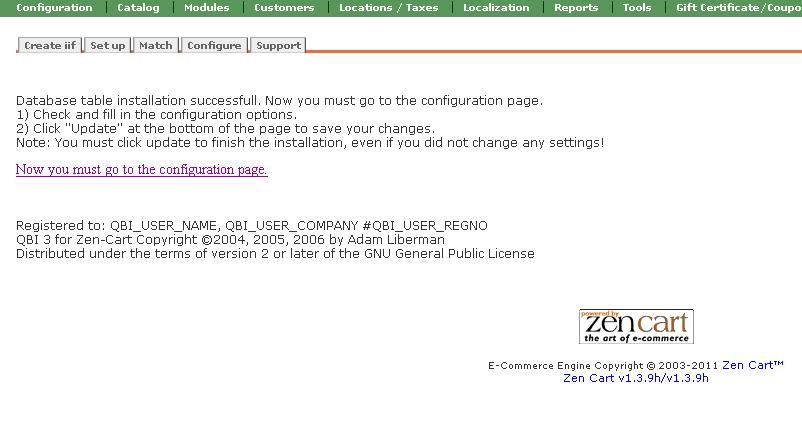
I cant get pass installation. Can anyone help?

After i click on "Install QBI database table now?'

I do not see the "Update" Button...

when i click on
"Now you must go to the configuration page."

the page goes back to
"Install QBI database table now?'

Thanks !

21 Feb 2011, 6:21 PM
#1116
golfrguy avatar

golfrguy

New Zenner

Join Date:
Feb 2011
Posts:
4
Plugin Contributions:
0

Re: Quickbooks Import QBI

Hi Adam,
First of all thank you for this zencart app.! I think it will save so much time. Unfortunately it isn't working for me yet...I have gone through all the configs and when I go to the admin section, it shows how many orders, customers and products available to download. Problem is, whenever I click on any tab or any download button in the admin area, I get a page not found error page. Any ideas to get me up and running? Thanks

Using Apple zen template, Zencart Version 1.3.8a, php version 5.2.9. Virtual merchant and Canada Post plugins installed...

22 Feb 2011, 7:33 AM
#1117
adam5532 avatar

adam5532

Totally Zenned

Join Date:
Jan 2005
Location:
Oregon
Posts:
517
Plugin Contributions:
0

Re: Quickbooks Import QBI

golfrguy:

... Problem is, whenever I click on any tab or any download button in the admin area, I get a page not found error page. Any ideas to get me up and running? Thanks
I am giving limited support for the free version, as it is quite old now. However, this one is pretty easy. If the page is not found, then either you are going to the wrong place, or the page is missing. Look at where the tab is taking you, and review that you have installed all the QBI files in the correct location.
Adam

1 Mar 2011, 11:18 PM
#1118
hockey2112 avatar

hockey2112

Zen Follower

Join Date:
Jun 2010
Posts:
204
Plugin Contributions:
0

Re: Quickbooks Import QBI

I integrated QBI version 3.21 into a ZC 1.3.8a website (yes, he desperately needs an upgrade) but the client is having issues importing the resulting iif file into QuickBooks. Would it safe for me to upload the iif file here (it only has one test order within)? I'm interested to see if anyone else experiences the issues my client is experiencing, and if anyone has any feedback on how I can correct this issue.

Here is my client's feedback:

"I do see the name and address in the customer list but can not find an actionable transaction, order, item etc"

Thanks!

2 Mar 2011, 1:41 AM
#1119
helpme avatar

helpme

Totally Zenned

Join Date:
Apr 2007
Posts:
632
Plugin Contributions:
0

Re: Quickbooks Import QBI

Forgive the stupidity of this question but I am struggling to find a good way to keep up on books without giving myself a migrane :blush:
Do you find it better to update orders and such through QB or through ZC? My problem is, I am used to using ZC to update, send new info to customers and I like it because they can login and see any updates I have made.
Plus it keeps things more odvious for me if there is a pending order that was missed, etc.

How do you all handle this? I am open to any ideas, just really struggling at this point.
Thanks!!

2 Mar 2011, 6:43 AM
#1120
adam5532 avatar

adam5532

Totally Zenned

Join Date:
Jan 2005
Location:
Oregon
Posts:
517
Plugin Contributions:
0

Re: Quickbooks Import QBI

hockey2112:

I integrated QBI version 3.21 into a ZC 1.3.8a website (yes, he desperately needs an upgrade) but the client is having issues importing the resulting iif file into QuickBooks. Would it safe for me to upload the iif file here (it only has one test order within)? I'm interested to see if anyone else experiences the issues my client is experiencing, and if anyone has any feedback on how I can correct this issue.

Here is my client's feedback:

"I do see the name and address in the customer list but can not find an actionable transaction, order, item etc"

Thanks!
Don't try to copy the iif into a post -- the columns get messed up and it is unreadable.

Did they look in both Sales Receipts and Invoices?

  • Adam