Forums / Templates, Stylesheets, Page Layout / HELP! need changes but don't know how.

HELP! need changes but don't know how.

Locked

Views: 3,358

Results 1 to 14 of 14
This thread is locked. New replies are disabled.
24 Jun 2006, 5:10 AM
#1
kogepan avatar

kogepan

New Zenner

Join Date:
Jun 2006
Posts:
1
Plugin Contributions:
0

HELP! need changes but don't know how.

OK guys i installed Zen this morning and have spent literally the whole day trying to customize it and im very tired my neck is hurting so i gave up and decided to just ask for help. it's very simple but maybe ive been readin too much info that i overlooked the solution. But at this point i just need someone to point it out for me instead of me readin pages of pages of thread for another 3 days. Here goes.
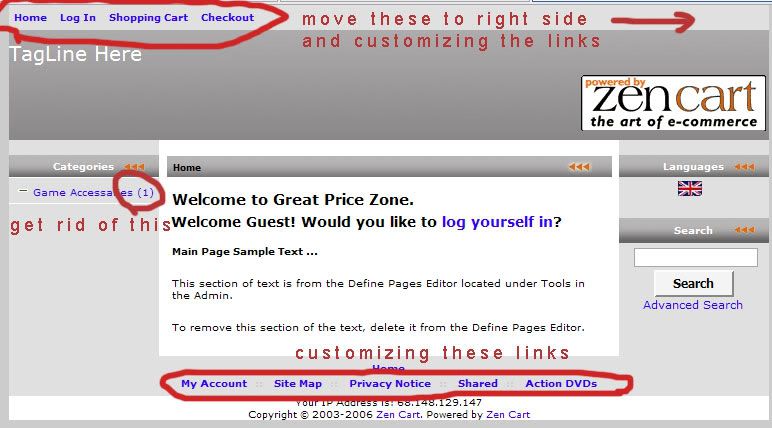
i want to made the changes that i have illustrated on the pic if anyone can help me out it'll be great!! man i really need sleep now!!

thanks in advance!:shocking:

25 Jun 2006, 10:39 PM
#2
monkeymadness avatar

monkeymadness

Zen Follower

Join Date:
Feb 2006
Posts:
270
Plugin Contributions:
0

Re: HELP! need changes but don't know how.

hello

in the stylesheet.css

customize top links (navMain) with...

#navMainWrapper
#navMain ul li
#navMain ul li a

(careful as they are bundled with the bottom links ...navsupp... in styling so seperate them if you want different styles for the top and bottom links)

adding ...

#navMain {float: right;}
.... should put right align the top links

customize ez pages bottom links (navSupp) with...

#navSuppWrapper
#navSupp

number next to the category is turned off in admin

configuration>my store>Show Category Counts ....change to false

hope you slept well :wink2:

26 Jun 2006, 5:33 AM
#3
kaptain_jack avatar

kaptain_jack

New Zenner

Join Date:
May 2006
Location:
On a ship near an island far, far away...
Posts:
15
Plugin Contributions:
0

Re: HELP! need changes but don't know how.

I need to make some of the same changes. I've been working all day trying to find the stylesheet.css but I just can't seem to find it. Where is it?

"There will come a moment when you have the chance to do the right thing."
"I love those moments. I like to wave at them as they pass by."

26 Jun 2006, 5:59 AM
#4
kobra avatar

kobra

Black Belt

Join Date:
Aug 2005
Location:
Arizona
Posts:
31,500
Plugin Contributions:
4

Re: HELP! need changes but don't know how.

Stylesheet:

includes/templates/your_template/css

Zen-Venom Get Bitten

26 Jun 2006, 6:51 PM
#5
indyguitarist avatar

indyguitarist

New Zenner

Join Date:
Jun 2006
Posts:
5
Plugin Contributions:
0

Re: HELP! need changes but don't know how.

I'm in the same boat.

I've used frontpage forever, this is my first time with php.
How the heck do I edit the stylesheet? Isn't there a user-friendly interface to do this? Surely there is!!??

Here's my page:
http://www.indyguitarist.com/shoppingcart/

At the top, underneath the banner are the words "Sales Message Goes Here".
How in the WORLD do I get rid of this? "tools -> define pages" doesn't do it.

I'm very frustrated... :cry: :wacko:

27 Jun 2006, 4:25 AM
#8
kobra avatar

kobra

Black Belt

Join Date:
Aug 2005
Location:
Arizona
Posts:
31,500
Plugin Contributions:
4

Re: HELP! need changes but don't know how.

Ooooh and please do not use Front page on the php files or you will most probably suffer the consequences.

Zen-Venom Get Bitten

30 Jun 2006, 8:43 AM
#9
indyguitarist avatar

indyguitarist

New Zenner

Join Date:
Jun 2006
Posts:
5
Plugin Contributions:
0

Re: HELP! need changes but don't know how.

kobra:

Ooooh and please do not use Front page on the php files or you will most probably suffer the consequences.

I have dreamweaver also -- would this be better? If not, what would I use that has an easy wysiwyg type interface?

Thanks,
Brian

30 Jun 2006, 8:58 AM
#10
indyguitarist avatar

indyguitarist

New Zenner

Join Date:
Jun 2006
Posts:
5
Plugin Contributions:
0

Re: HELP! need changes but don't know how.

indyguitarist:

Here's my page:
http://www.indyguitarist.com/shoppingcart/

At the top, underneath the banner are the words "Sales Message Goes Here".
How in the WORLD do I get rid of this? "tools -> define pages" doesn't do it.

I'm very frustrated...

Anyone know how to do this?

30 Jun 2006, 8:35 PM
#11
dbltoe avatar

dbltoe

Totally Zenned

Join Date:
Jan 2004
Location:
N of San Antonio TX
Posts:
9,858
Plugin Contributions:
18

Re: HELP! need changes but don't know how.

Using the search link at the top of the page and typing in "Sales Message Goes Here" will lead to 172 (currently) topics.

Probably the best in the bunch is here. Take the time to search and read.
As Ajeh is want to say, "Even if you read something slightly off subject, you might just learn something."

Need a hand with Zen Cart? Hire the team at myZenCartZone.com for upgrades, repairs, and custom plugins.
Zen Cart Certified hosting at myZenCartHost.com

1 Jul 2006, 3:35 AM
#12
indyguitarist avatar

indyguitarist

New Zenner

Join Date:
Jun 2006
Posts:
5
Plugin Contributions:
0

Re: HELP! need changes but don't know how.

dbltoe:

Using the search link at the top of the page and typing in "Sales Message Goes Here" will lead to 172 (currently) topics.

Probably the best in the bunch is here. Take the time to search and read.
As Ajeh is want to say, "Even if you read something slightly off subject, you might just learn something."

good stuff - thanks!
:smile:

3 Jul 2006, 3:24 AM
#13
kobra avatar

kobra

Black Belt

Join Date:
Aug 2005
Location:
Arizona
Posts:
31,500
Plugin Contributions:
4

Re: HELP! need changes but don't know how.

I have dreamweaver also -- would this be better? If not, what would I use that has an easy wysiwyg type interface?

For the css edits, a good interactive wysiwyg editor is FireFox with the web developers tools extention.

After installed, select under the css tab 'edit css' make a change & immediately see the effect, make all your alterations and save the result locally. Upload to your server and you are done

Zen-Venom Get Bitten