Zen Cart Logo
Forums / All Other Contributions/Addons / Simple Google Analytics - Support

Simple Google Analytics - Support

Views: 451,188

Results 1,021 to 1,040 of 2,165
7 Oct 2009, 8:24 PM
#1021
inovermyhead avatar

inovermyhead

Zen Follower

Join Date:
Feb 2007
Posts:
154
Plugin Contributions:
0

Simple Google Analytics - Support

econcepts:

Bob,

Hang on ...

OK, thanks ...

Bob

7 Oct 2009, 8:29 PM
#1022
inovermyhead avatar

inovermyhead

Zen Follower

Join Date:
Feb 2007
Posts:
154
Plugin Contributions:
0

Re: Simple Google Analytics - Support

KristinaLynn:

Thanks for your help! I do believe I have everything installed correctly. I went in to the admin side of my site and put in the UA code but nothing is showing up in my analytics for my store. Do I need to add a new account in Google Analytics and point it to my store? Will there be more code I need to enter?
Don't know if you need a new account, you may need a new profile, though ... go to your Google Analytics account overview page, click on the account name to get to the profiles. See if the status of profile associated with the UA number is checked in green to show active. Or are there any obvious messages for that profile?

7 Oct 2009, 10:59 PM
#1023
kristinalynn avatar

kristinalynn

New Zenner

Join Date:
Aug 2009
Posts:
16
Plugin Contributions:
0

Re: Simple Google Analytics - Support

inovermyhead:

Don't know if you need a new account, you may need a new profile, though ... go to your Google Analytics account overview page, click on the account name to get to the profiles. See if the status of profile associated with the UA number is checked in green to show active. Or are there any obvious messages for that profile?

Ok I set up a new profile associated with my store. It gave me the google analytics code which I pasted into the tpl_main_page.php file. Is this where it needed to go? I also updated the UA number in my administrative panel. In my google anayltics account it still says that tracking is not installed. Where am I going wrong? :blink:

8 Oct 2009, 2:42 PM
#1024
econcepts avatar

econcepts

Totally Zenned

Join Date:
Dec 2005
Posts:
1,505
Plugin Contributions:
2

Re: Simple Google Analytics - Support

KristinaLynn:

Ok I set up a new profile associated with my store. It gave me the google analytics code which I pasted into the tpl_main_page.php file. Is this where it needed to go? I also updated the UA number in my administrative panel. In my google anayltics account it still says that tracking is not installed. Where am I going wrong? :blink:

Post the link to your site and I'll take a look.

Did you make sure that the tracking code is actually showing on the pages of your site?

One way to check is to view your website in a browser than perform a "view source" to look at the code behind the page.

Scroll to the bottom and see if the "Google Analytics" tracking code is present. If so, then you have the website portion setup correctly but the likely issue lies within the way your Google Analytics account sees it.

If the code is not existent on the bottom of your pages then you didn't properly place the code from "Step 3" of the read me onto your template file (or the correct template file that is.)

We'll get to the bottom of it here.

Post the link and I can point you in the right direction.

9 Oct 2009, 5:29 PM
#1025
webwiz avatar

webwiz

New Zenner

Join Date:
Jan 2006
Location:
wv
Posts:
21
Plugin Contributions:
0

Re: Simple Google Analytics - Support

I'm running a heavily modded 1.3.8 and just tried installing googly analytics...

I uploaded the files (paying close attn to my custom folder), files went to the right place.

I added the code to my tpl_main_page.php and ran the sql patch...

now my store is GONE. Every page is blank.

Please...please help.

I've already ran the UNINSTALL sql patch and re-uploaded the orig tpl_main_page.php file and my store is still gone!

I need help in a hurry please! I just ran a massive email marketing campaign (my first one!) hence the need to try google analytics today...and people are trying to get on my site right NOW. Oh gosh, this is the worst possible thing to happen!

9 Oct 2009, 5:39 PM
#1026
webwiz avatar

webwiz

New Zenner

Join Date:
Jan 2006
Location:
wv
Posts:
21
Plugin Contributions:
0

Re: Simple Google Analytics - Support

Disregard my prev post. PROBLEM RESOLVED!!

It was NOT this app that caused the issue. :blush:

It was a plugin from mailchimp called Ecommerce 360 that was causing me grief, and a quick search through these forums pointed me to instructions for debugging/correcting the issue. (Thanks Dr. Byte!)

Everything's fine now, site's up & running.

I'll try to install google analytics again later, after my nerves recover. :-)

13 Oct 2009, 10:13 PM
#1027
inovermyhead avatar

inovermyhead

Zen Follower

Join Date:
Feb 2007
Posts:
154
Plugin Contributions:
0

Re: Simple Google Analytics - Support

econcepts:

Bob,

You can still use the "http:" portion and domain for the url that won't be a problem. Google just recommends the other way (but I do it both).

The best thing to do here might be for me to take a look at what you have in the backend. I'll do some more looking at the front end now that I have links and see if I can't turn anything up.

Hang on ...
Hello, Eric, was wondering if you'd had a chance to look into this ...
let me know if we can add any info ...

Thanks,
Bob

21 Oct 2009, 6:46 PM
#1028
unicorn avatar

unicorn

Zen Follower

Join Date:
Sep 2008
Posts:
107
Plugin Contributions:
0

Re: Simple Google Analytics - Support

Hi,

I have a problem with SGA and ecommerce revenue... I have JAM affiliate installed aswell, and that seems to mess up the GA code, as the JAM has its own tpl_footer (placed in a folder called .../[my template]/checkout_success). That footer overrides the other one, and thus removes the SGA code from checkout success - where I need it to be, to track revenue etc...

Any idea how to work around this?

22 Oct 2009, 5:50 PM
#1029
econcepts avatar

econcepts

Totally Zenned

Join Date:
Dec 2005
Posts:
1,505
Plugin Contributions:
2

Re: Simple Google Analytics - Support

Unicorn:

Hi,

I have a problem with SGA and ecommerce revenue... I have JAM affiliate installed aswell, and that seems to mess up the GA code, as the JAM has its own tpl_footer (placed in a folder called .../[my template]/checkout_success). That footer overrides the other one, and thus removes the SGA code from checkout success - where I need it to be, to track revenue etc...

Any idea how to work around this?

Yes, the fix for how to integrate the two (JAM and SGA) can be found here:

http://www.zencartoptimization.com/2007/08/15/now-available-google-analytics-uncovered-for-zen-cart-the-workbook/

Scroll all the way to the bottom of the page (in the comments section). I've detailed out how to integrate the two there.

Let me know if you have any questions.

25 Oct 2009, 1:42 AM
#1030
bobthemolder avatar

bobthemolder

Zen Follower

Join Date:
Nov 2008
Posts:
164
Plugin Contributions:
0

Re: Simple Google Analytics - Support

Question: once this is all setup and configured - analytics and conversion tracking done - should the checkout_success page contain some sort of analytics code at the bottom?
I just processed on offline order (the lead was generated through the website but not through the cart) to test everything, and the final checkout_success page contains no tracking code.

25 Oct 2009, 1:50 AM
#1031
bobthemolder avatar

bobthemolder

Zen Follower

Join Date:
Nov 2008
Posts:
164
Plugin Contributions:
0

Re: Simple Google Analytics - Support

edit: tracked the problem: I extracted into my zenCart folder on my HD and missed the google_analytics folder inside includes/templates/my_template (lol)

Stuck it back in, refreshed the checkout_success page, and tracking code is now there. Let's see if it turns up tomorrow.

25 Oct 2009, 5:41 PM
#1032
bobthemolder avatar

bobthemolder

Zen Follower

Join Date:
Nov 2008
Posts:
164
Plugin Contributions:
0

Re: Simple Google Analytics - Support

Works brilliantly.

25 Oct 2009, 5:58 PM
#1033
bobthemolder avatar

bobthemolder

Zen Follower

Join Date:
Nov 2008
Posts:
164
Plugin Contributions:
0

Re: Simple Google Analytics - Support

If I only have a few sales already, is there any way I can enter them manually, at the times they happened?

26 Oct 2009, 2:46 PM
#1034
econcepts avatar

econcepts

Totally Zenned

Join Date:
Dec 2005
Posts:
1,505
Plugin Contributions:
2

Re: Simple Google Analytics - Support

bobthemolder:

If I only have a few sales already, is there any way I can enter them manually, at the times they happened?

You can't enter them through Zen Cart unless of course you checkout.

You also can't add them through GA (directly) but might be able to come up with a "fake" thank you page that has the code (goal tracking only ... likely won't work for ecommerce as that is dynamic in nature) hit that page and it should register the sale.

My suggestion would be to simply keep a log of the missed sales since the tracking code and know they are there. Unless there were a ton, it really won't make a difference in the overall picture of things anyhow (bigger samples provide better measurement.)

29 Oct 2009, 2:11 AM
#1035
rival904 avatar

rival904

New Zenner

Join Date:
Oct 2009
Posts:
32
Plugin Contributions:
0

Re: Simple Google Analytics - Support

I have downloaded and installed the files needed, and the SQL patch as per the OP.

I then went to Configuration from the admin panel, then to the Google Analytics, then added my # starting with the UA, UA-50140XX-XX.

We posted the site on a few forums, and according to GA, the site received no traffic, but according to Zen Cart, we got 800+.

Any help as to why this happened would be nice.

Thanks guys.

29 Oct 2009, 2:47 PM
#1036
econcepts avatar

econcepts

Totally Zenned

Join Date:
Dec 2005
Posts:
1,505
Plugin Contributions:
2

Re: Simple Google Analytics - Support

rival904:

I have downloaded and installed the files needed, and the SQL patch as per the OP.

I then went to Configuration from the admin panel, then to the Google Analytics, then added my # starting with the UA, UA-50140XX-XX.

We posted the site on a few forums, and according to GA, the site received no traffic, but according to Zen Cart, we got 800+.

Any help as to why this happened would be nice.

Thanks guys.

Two things.

  1. Zen cart only tracks "hits". It is not a good indicator of actual traffic received to the site. You need to use Google Analytics to truly get an idea.

This article might help clarify the difference:
http://www.zencartoptimization.com/2007/05/26/all-web-site-traffic-is-not-created-equal/

  1. Post a URL to your site and I'll see if you have it installed on the page.

  2. Did you "verify" the url with GA once you added the tracking? Does Google say "Tracking not installed", "Waiting for Data", or "Gathering Data"?

29 Oct 2009, 6:36 PM
#1037
rival904 avatar

rival904

New Zenner

Join Date:
Oct 2009
Posts:
32
Plugin Contributions:
0

Re: Simple Google Analytics - Support

econcepts:

Two things.

  1. Zen cart only tracks "hits". It is not a good indicator of actual traffic received to the site. You need to use Google Analytics to truly get an idea.

This article might help clarify the difference:
http://www.zencartoptimization.com/2007/05/26/all-web-site-traffic-is-not-created-equal/

  1. Post a URL to your site and I'll see if you have it installed on the page.

  2. Did you "verify" the url with GA once you added the tracking? Does Google say "Tracking not installed", "Waiting for Data", or "Gathering Data"?

It says gathering data

https://www.downlowcaraudio.com

30 Oct 2009, 3:50 AM
#1038
divavocals avatar

divavocals

Totally Zenned

Join Date:
Jan 2007
Location:
Los Angeles, California, United States
Posts:
10,011
Plugin Contributions:
3

Re: Simple Google Analytics - Support

Love this add-on.. Installed like a dream, and I am impressed with the support the author has provided..

30 Oct 2009, 12:13 PM
#1039
bobthemolder avatar

bobthemolder

Zen Follower

Join Date:
Nov 2008
Posts:
164
Plugin Contributions:
0

Re: Simple Google Analytics - Support

DivaVocals:

Love this add-on.. Installed like a dream, and I am impressed with the support the author has provided..
Ditto. The "20 ways to increase zen cart conversions" from his site is pure gold. It's not a book you skim through, it's actually taken me a few days to get a few things done - but they're great suggestions. I'll be buying the book he has on the site, and probably using his affiliate link for my new PRWEB release.

2 Nov 2009, 12:11 AM
#1040
rival904 avatar

rival904

New Zenner

Join Date:
Oct 2009
Posts:
32
Plugin Contributions:
0

Re: Simple Google Analytics - Support

econcepts:

Two things.

  1. Zen cart only tracks "hits". It is not a good indicator of actual traffic received to the site. You need to use Google Analytics to truly get an idea.

This article might help clarify the difference:
http://www.zencartoptimization.com/2007/05/26/all-web-site-traffic-is-not-created-equal/

  1. Post a URL to your site and I'll see if you have it installed on the page.

  2. Did you "verify" the url with GA once you added the tracking? Does Google say "Tracking not installed", "Waiting for Data", or "Gathering Data"?

rival904:

It says gathering data

https://www.downlowcaraudio.com
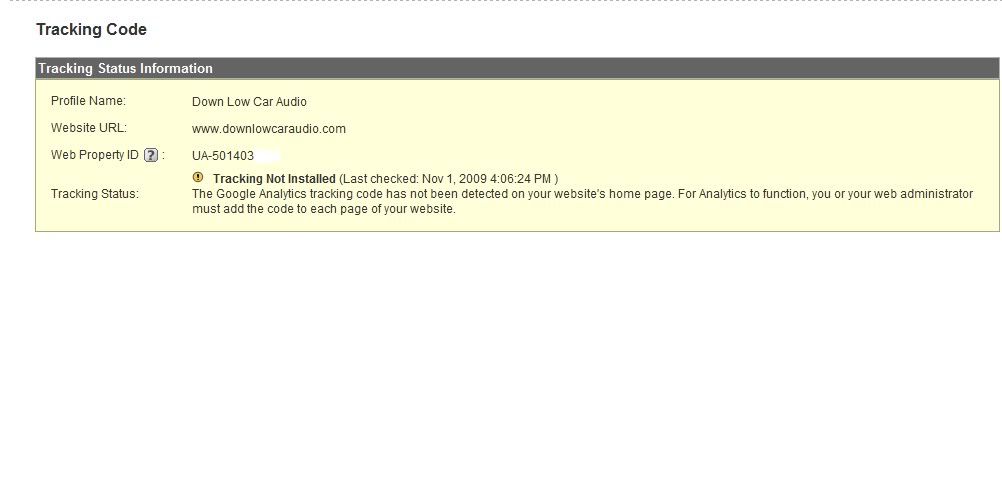
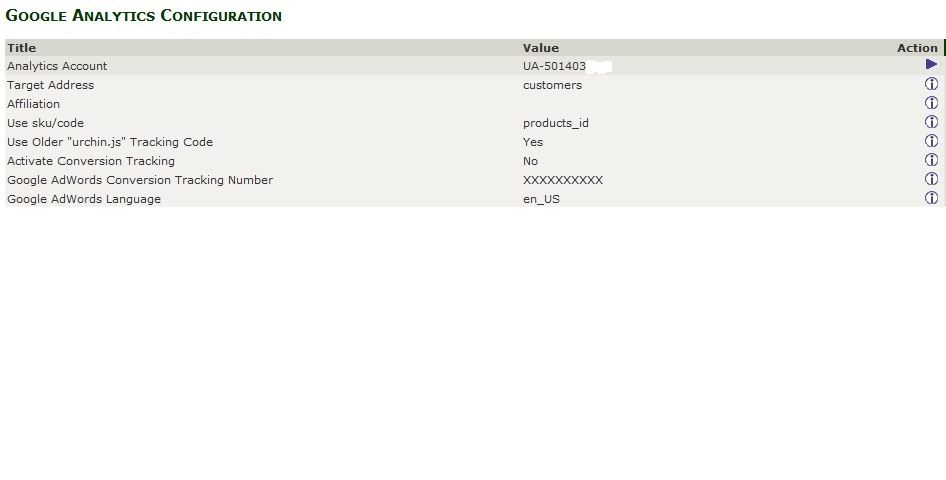
I know its been a few days, but I am still having problems.


Thanks man, any and all help is really appreciated