Zen Cart Logo
Forums / PayPal Express Checkout support / Help? (Invalid Parameter)?

Help? (Invalid Parameter)?

Locked

Views: 14,434

Results 41 to 60 of 64
This thread is locked. New replies are disabled.
16 Feb 2007, 4:33 AM
#41
rememberthemoments avatar

rememberthemoments

New Zenner

Join Date:
Aug 2006
Posts:
50
Plugin Contributions:
0

Help? (Invalid Parameter)?

Ohh! Off to try it now!!

There are a few paypalwpp.php files. Were is it locater?

includes/modules/payment/paypalwpp.php

or

includes/lanugage/english/modules/payment/paypalwpp.php

16 Feb 2007, 4:37 AM
#42
cafeprima avatar

cafeprima

New Zenner

Join Date:
Feb 2007
Posts:
41
Plugin Contributions:
0

Re: Help? (Invalid Parameter)?

includes/modules/payment/paypalwpp.php

I made the fix in that file and have been able to successfully (but slowly) check out

16 Feb 2007, 4:42 AM
#43
rememberthemoments avatar

rememberthemoments

New Zenner

Join Date:
Aug 2006
Posts:
50
Plugin Contributions:
0

Re: Help? (Invalid Parameter)?

Add me to the list of people that want to kiss you!

It works seemlessly for me (knock on wood) at the moment! Not even any lag! LOVE IT!

Thank you! Thank you ! THANK YOU!

16 Feb 2007, 4:46 AM
#44
cafeprima avatar

cafeprima

New Zenner

Join Date:
Feb 2007
Posts:
41
Plugin Contributions:
0

Re: Help? (Invalid Parameter)?

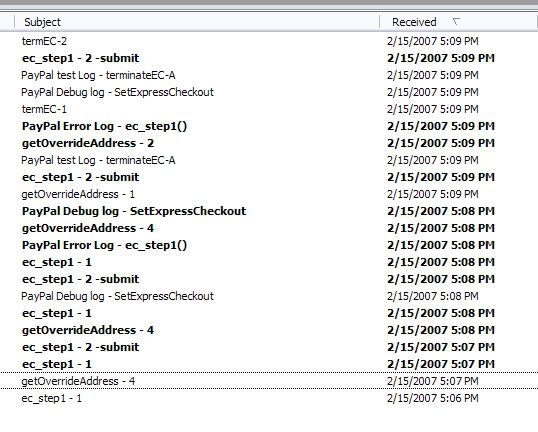
This is a screen shot of all the emails I received when I had "log and error debug" turned on in admin->modules->payment->paypal express checkout. These are all the emails I received in two failed transactions that generated the invalid parameter error.

If you tell me which of these to post (if any) I can :) Sorry for doing this in such an "zen for dummies" way but it's the only way I know how to make sure I'm doing exactly what you're telling me to do

16 Feb 2007, 4:55 AM
#45
drbyte avatar

drbyte

Sensei

Join Date:
Jan 2004
Posts:
63,513
Plugin Contributions:
177

Re: Help? (Invalid Parameter)?

CafePrima:

This is a screen shot of all the emails I received when I had "log and error debug" turned on in admin->modules->payment->paypal express checkout. These are all the emails I received in two failed transactions that generated the invalid parameter error.

If you tell me which of these to post (if any) I can :) Sorry for doing this in such an "zen for dummies" way but it's the only way I know how to make sure I'm doing exactly what you're telling me to do

Ideally one that says "ec_step2_finish - 1" or "PayPal Debug log - GetExpressCheckoutDetails" would be most useful.

16 Feb 2007, 5:00 AM
#46
cafeprima avatar

cafeprima

New Zenner

Join Date:
Feb 2007
Posts:
41
Plugin Contributions:
0

Re: Help? (Invalid Parameter)?

I'm sorry-it doesn't look like I have any of those that you requested. Which is odd because I was getting the error in question!

16 Feb 2007, 5:17 AM
#47
cafeprima avatar

cafeprima

New Zenner

Join Date:
Feb 2007
Posts:
41
Plugin Contributions:
0

Re: Help? (Invalid Parameter)?

One of my team members is from the Netherlands. She just checked out on my site (I used the fix posted last page about fixing the country) and was able to do so successfully! Hope that helps!

Also, noticed that now my paypal receipts have an itemized list of what's ordered. I think that's what's causing my lag. Is it supposed to do that? It didn't do it before. I don't mind it but I'd prefer speed. Is there a way to turn it off? Let me know if I should move/delete this question so as to not belabor the thread

16 Feb 2007, 5:17 AM
#48
andrabr avatar

andrabr

New Zenner

Join Date:
Jan 2007
Posts:
36
Plugin Contributions:
0

Re: Help? (Invalid Parameter)?

Got the logs all packed and ready. Do PM me with an address and I'll email them to you.

A>

16 Feb 2007, 5:57 AM
#49
drbyte avatar

drbyte

Sensei

Join Date:
Jan 2004
Posts:
63,513
Plugin Contributions:
177

Re: Help? (Invalid Parameter)?

CafePrima:

Also, noticed that now my paypal receipts have an itemized list of what's ordered. I think that's what's causing my lag. Is it supposed to do that? It didn't do it before. I don't mind it but I'd prefer speed. Is there a way to turn it off? Let me know if I should move/delete this question so as to not belabor the thread

No, the line-item details is not causing the speed problem.

I suspect that your speed problem is related to communication slowness between your webserver and the PayPal site. (the webserver uses CURL to talk to PayPal from your Zen Cart shop).

As you mention, it's not related to the current discussion at hand.

16 Feb 2007, 5:59 AM
#50
cafeprima avatar

cafeprima

New Zenner

Join Date:
Feb 2007
Posts:
41
Plugin Contributions:
0

Re: Help? (Invalid Parameter)?

thanks dr byte--I moved it to its own thread :D. I'll edit my post here if it will let me

Ok I can't seem to edit that post but feel free to delete if you think it might derail the thread. Thanks!

16 Feb 2007, 5:59 AM
#51
drbyte avatar

drbyte

Sensei

Join Date:
Jan 2004
Posts:
63,513
Plugin Contributions:
177

Re: Help? (Invalid Parameter)?

PART ONE of the fix:
the fix proposed by andrabr is ideal, and should help ease the problem:

/includes/modules/payment/paypalwpp.php
approx line 1778 (depending on which patch version you have installed)
change this:if (!isset($paypal_ec_payer_info['ship_country_code'])) $paypal_ec_payer_info['ship_country_code'] = $country1->fields['countries_iso_code_2'];to this:```
if (!isset($paypal_ec_payer_info['ship_country_code']) || $paypal_ec_payer_info['ship_country_code'] == '') $paypal_ec_payer_info['ship_country_code'] = $country1->fields['countries_iso_code_2'];


For the technical-minded among us, the problem is that PayPal is now sending back different data, which, as andrabr suggested, was causing confusion.  This fix catches that and forces the alternative lookup method to be used.
16 Feb 2007, 6:25 AM
#52
drbyte avatar

drbyte

Sensei

Join Date:
Jan 2004
Posts:
63,513
Plugin Contributions:
177

Re: Help? (Invalid Parameter)?

PART TWO of the fix:
The above fix is useful, but this one is even more helpful ...

PayPal changed SHIPTOCOUNTRY to SHIPTOCOUNTRYCODE in their recent system update, which is causing the problem.

So, the fix appears to be this:

/includes/modules/payment/paypalwpp.php
approx line 1730 (depending on the patch installed):
change this:'ship_country_code' => urldecode($response['[B]SHIPTOCOUNTRY[/B]']),to this:```
'ship_country_code' => urldecode($response['[B]SHIPTOCOUNTRYCODE[/B]']),

16 Feb 2007, 4:45 PM
#54
rememberthemoments avatar

rememberthemoments

New Zenner

Join Date:
Aug 2006
Posts:
50
Plugin Contributions:
0

Re: Help? (Invalid Parameter)?

Edited to remove question.

I am just going to download your new patch!!

17 Feb 2007, 4:41 AM
#55
exittheapple avatar

exittheapple

New Zenner

Join Date:
Nov 2005
Posts:
53
Plugin Contributions:
0

Re: Help? (Invalid Parameter)?

thanks so much! i also see this patch fixes a comments issue i had.

so fabulous.

19 Feb 2007, 6:41 PM
#57
biztekpc avatar

biztekpc

New Zenner

Join Date:
Feb 2007
Posts:
5
Plugin Contributions:
0

Re: Help? (Invalid Parameter)?

I had a customer from Canada buy something from my site (in USA) via Paypal. The customer tried two times and got a screen of HTML and not a confirmation of payment screen. He does have a group pricing discount.

This is the screen he got:

Warning: reset() [function.reset]: Passed variable is not an array or
object in
/home/biztekpc/public_html/zen/includes/modules/order_total/ot_group_pricing.php
on line 77

Warning: Variable passed to each() is not an array or object in
/home/biztekpc/public_html/zen/includes/modules/order_total/ot_group_pricing.php
on line 78

Warning: reset() [function.reset]: Passed variable is not an array or
object in
/home/biztekpc/public_html/zen/includes/modules/order_total/ot_tax.php
on line 38

Warning: Variable passed to each() is not an array or object in
/home/biztekpc/public_html/zen/includes/modules/order_total/ot_tax.php
on line 39

Warning: Cannot modify header information - headers already sent by
(output started at
/home/biztekpc/public_html/zen/includes/modules/order_total/ot_group_pricing.php:77)
in
/home/biztekpc/public_html/zen/includes/functions/functions_general.php
on line 44

I tried to install the patches as previously mentioned but I have no clue what I'm doing and there is no install instructions. Please Advise.

20 Feb 2007, 6:33 AM
#58
drbyte avatar

drbyte

Sensei

Join Date:
Jan 2004
Posts:
63,513
Plugin Contributions:
177

Re: Help? (Invalid Parameter)?

You need to apply the patches, as you have read.

To install, simply unzip the files to a temporary folder ... just like your main Zen Cart files. Then upload the files to the same folders as they're contained in within the zip file ... overwriting the masters on your server.

If you installed via Fantastico, you will need to either talk to your hosting company about how to FTP files to your site, and/or go to our FAQ section and read up on FTP and uploading files. You will need to learn this to manage your website anyway.

As an addendum, the patches were updated earlier today:
http://www.zen-cart.com/forum/showthread.php?p=331974#post331974

20 Feb 2007, 10:59 AM
#59
no1im avatar

no1im

New Zenner

Join Date:
Feb 2006
Location:
Washington State
Posts:
44
Plugin Contributions:
0

Re: Help? (Invalid Parameter)?

DrByte, I want to thank you for your speedy response to this problem.

20 Feb 2007, 6:30 PM
#60
biztekpc avatar

biztekpc

New Zenner

Join Date:
Feb 2007
Posts:
5
Plugin Contributions:
0

Re: Help? (Invalid Parameter)?

Thanks for your help on the installing patches but I was able to fix it without installing any patches. The problem is now completely resolved.