Zen Cart Logo
Forums / Addon Templates / Cherry Zen Template Support Thread

Cherry Zen Template Support Thread

Views: 845,037

Results 2,541 to 2,560 of 3,245
20 Mar 2009, 5:46 PM
#2541
jettrue avatar

jettrue

Totally Zenned

Join Date:
Jan 2005
Location:
USA, St. Louis
Posts:
3,651
Plugin Contributions:
5

Cherry Zen Template Support Thread

jfoster1980:

I am getting this same error with your Cherry Zen Template Where are the language files supposed to be placed? Thanks in advance!

Open up my template folder on your computer. All the files are where the should be once they are uploaded.

Look at the actual files that are uploaded onto the server.

Make sure each one is in the correct folder.

25 Mar 2009, 2:59 PM
#2542
imagino avatar

imagino

New Zenner

Join Date:
Mar 2008
Posts:
31
Plugin Contributions:
0

Re: Cherry Zen Template Support Thread

I saved graphics used for shadows flattened into GIF, I have solid background and it was no problem. Then I updated CSS from PNG to GIF files.

But IE6 still do not display shadows around page.
Does any body know why?

25 Mar 2009, 9:17 PM
#2543
spottedhaggis avatar

spottedhaggis

Zen Follower

Join Date:
Dec 2005
Location:
Maidstone, Kent, UK
Posts:
310
Plugin Contributions:
0

Re: Cherry Zen Template Support Thread

Hi

Fantastic template, just love it, and its a perfect upgrade to one of my friends sites that now looks terrible, though 3 years ago looked great, lol.

Anyway, I have made a few minor mods to it, but have a single question.

How does one get rid of the shadows, He does not like them, and I assume its a stylesheet but I am darned if I can find it anywhere.

Thanks

25 Mar 2009, 11:37 PM
#2544
jettrue avatar

jettrue

Totally Zenned

Join Date:
Jan 2005
Location:
USA, St. Louis
Posts:
3,651
Plugin Contributions:
5

Re: Cherry Zen Template Support Thread

imagino:

I saved graphics used for shadows flattened into GIF, I have solid background and it was no problem. Then I updated CSS from PNG to GIF files.

But IE6 still do not display shadows around page.
Does any body know why?

Did you remove this:

  • html #nw, * html #ne, * html #se, * html #sw, * html #n, * html #s, * html #w, * html #e {background:none!important;}
25 Mar 2009, 11:39 PM
#2545
jettrue avatar

jettrue

Totally Zenned

Join Date:
Jan 2005
Location:
USA, St. Louis
Posts:
3,651
Plugin Contributions:
5

Re: Cherry Zen Template Support Thread

spottedhaggis:

Hi

Fantastic template, just love it, and its a perfect upgrade to one of my friends sites that now looks terrible, though 3 years ago looked great, lol.

Anyway, I have made a few minor mods to it, but have a single question.

How does one get rid of the shadows, He does not like them, and I assume its a stylesheet but I am darned if I can find it anywhere.

Thanks

LOL, I hid it from you in plain sight. :P
stylesheet_dropshadow.css controls the outer site drop shadow.

The section below controls the product images drop shadow in stylesheet.css.

/* css for product image drop shadow and border. To disable the drop shadow and border, simply delete or comment out this section */

#productMainImage {
	float:left;
	background: url("../images/shadowAlpha.png") no-repeat bottom right !important;
	background: url("../images/shadow.gif") no-repeat bottom right;
	margin: 10px 0 0 10px !important;
	margin: 10px 0 0 5px;
}
#productMainImage img {
	display: block;
	position: relative;
	background: #fff;
	margin: -3px 6px 6px -3px;
	border: 1px solid #a9a9a9; /* defines the border for the product image. To remove the border delete or comment out this line, AND padding: 4px; below */
	padding: 4px;
}
/* end css for product image drop shadow */
27 Mar 2009, 5:28 PM
#2546
thrifty_int avatar

thrifty_int

New Zenner

Join Date:
Jan 2009
Posts:
10
Plugin Contributions:
0

Re: Cherry Zen Template Support Thread

:cry:
I am trying to Update my attribute value sort order using store manager.

It dose not work, and it appeares from the serve error log that my hosting company was kind enough to send me that it may have something to do with my template. I am a Total Newbie and know next nothing about php works to figure this out.

Someone Please HELP.

This Is The email I Received From My Hosting Company (HostGator)

I checked the error logs, and it looks like there's a problem with the configuration of zen cart:

[Thu Mar 26 08:52:01 2009] [error] [client 70.130.193.64] Premature end of script headers: store_manager.php, referer: http://thrifty-int.com/shops/admin/store_manager.php

I looked further into the matter, and found that the issue is caused by init_languages.php not opening the correct file:

[email protected] [~/public_html/shops/admin]# php store_manager.php
X-Powered-By: PHP/5.2.8
Set-Cookie: zenAdminID=6c72b3c3e6d885e8b9f020aa6e487e93; path=/; domain=thrifty-int.com
Expires: Thu, 19 Nov 1981 08:52:00 GMT
Cache-Control: no-store, no-cache, must-revalidate, post-check=0, pre-check=0
Pragma: no-cache
Content-type: text/html

<br /> <b>Warning</b>: include(includes/languages/english/) [<a href='function.include'>function.include</a>]: failed to open stream: No such file or directory in <b>/home/thrifty/public_html/shops/admin/includes/init_includes/init_languages.php</b> on line <b>34</b><br /> <br /> <b>Warning</b>: include(includes/languages/english/) [<a href='function.include'>function.include</a>]: failed to open stream: No such file or directory in <b>/home/thrifty/public_html/shops/admin/includes/init_includes/init_languages.php</b> on line <b>34</b><br /> <br /> <b>Warning</b>: include() [<a href='function.include'>function.include</a>]: Failed opening 'includes/languages/english/' for inclusion (include_path='.:/usr/lib/php:/usr/local/lib/php') in <b>/home/thrifty/public_html/shops/admin/includes/init_includes/init_languages.php</b> on line <b>34</b><br /> <br /> <b>Warning</b>: Cannot modify header information - headers already sent by (output started at /home/thrifty/public_html/shops/admin/includes/init_includes/init_languages.php:34) in <b>/home/thrifty/public_html/shops/admin/includes/init_includes/init_templates.php</b> on line <b>36</b><br /> <br /> <b>Warning</b>: Cannot modify header information - headers already sent by (output started at /home/thrifty/public_html/shops/admin/includes/init_includes/init_languages.php:34) in <b>/home/thrifty/public_html/shops/admin/includes/functions/general.php</b> on line <b>21</b><br />

I appended the language=en option to the URL you provided, and it works:

http://thrifty-int.com/shops/admin/store_manager.php?action=update_all_products_attributes_sort_order?language=en

However, this has not resolved the issue. There is an underlying problem with the way zen cart is configured, and you'll need to contact the zen cart support forums for further assistance.

Thanks In Advance
Thrifty
Bob
[email protected]

28 Mar 2009, 10:00 AM
#2547
the_doomsayer avatar

the_doomsayer

New Zenner

Join Date:
Feb 2009
Location:
Thailand
Posts:
50
Plugin Contributions:
0

Re: Cherry Zen Template Support Thread

Im not 100% sure id this is to do with the template or not but here goes. Ive installed one of the lightbox add ons and noticed that on the product page underneath the product image the "larger image" text is sitting at the bottom of the box with the drop shadow but isnt aligned properly. Had a look through the CSS but I cant see where this element is.

Larger Image text query

Nothing major, only minor cosmetic but these things bug me after I cant find where to fix them.

28 Mar 2009, 8:16 PM
#2548
jettrue avatar

jettrue

Totally Zenned

Join Date:
Jan 2005
Location:
USA, St. Louis
Posts:
3,651
Plugin Contributions:
5

Re: Cherry Zen Template Support Thread

thrifty-int:

:cry:
I am trying to Update my attribute value sort order using store manager.

It dose not work, and it appeares from the serve error log that my hosting company was kind enough to send me that it may have something to do with my template. I am a Total Newbie and know next nothing about php works to figure this out.

Someone Please HELP.

This Is The email I Received From My Hosting Company (HostGator)

I checked the error logs, and it looks like there's a problem with the configuration of zen cart:

[Thu Mar 26 08:52:01 2009] [error] [client 70.130.193.64] Premature end of script headers: store_manager.php, referer: http://thrifty-int.com/shops/admin/store_manager.php

I looked further into the matter, and found that the issue is caused by init_languages.php not opening the correct file:

[email protected] [~/public_html/shops/admin]# php store_manager.php
X-Powered-By: PHP/5.2.8
Set-Cookie: zenAdminID=6c72b3c3e6d885e8b9f020aa6e487e93; path=/; domain=thrifty-int.com
Expires: Thu, 19 Nov 1981 08:52:00 GMT
Cache-Control: no-store, no-cache, must-revalidate, post-check=0, pre-check=0
Pragma: no-cache
Content-type: text/html

<br /> <b>Warning</b>: include(includes/languages/english/) [<a href='function.include'>function.include</a>]: failed to open stream: No such file or directory in <b>/home/thrifty/public_html/shops/admin/includes/init_includes/init_languages.php</b> on line <b>34</b><br /> <br /> <b>Warning</b>: include(includes/languages/english/) [<a href='function.include'>function.include</a>]: failed to open stream: No such file or directory in <b>/home/thrifty/public_html/shops/admin/includes/init_includes/init_languages.php</b> on line <b>34</b><br /> <br /> <b>Warning</b>: include() [<a href='function.include'>function.include</a>]: Failed opening 'includes/languages/english/' for inclusion (include_path='.:/usr/lib/php:/usr/local/lib/php') in <b>/home/thrifty/public_html/shops/admin/includes/init_includes/init_languages.php</b> on line <b>34</b><br /> <br /> <b>Warning</b>: Cannot modify header information - headers already sent by (output started at /home/thrifty/public_html/shops/admin/includes/init_includes/init_languages.php:34) in <b>/home/thrifty/public_html/shops/admin/includes/init_includes/init_templates.php</b> on line <b>36</b><br /> <br /> <b>Warning</b>: Cannot modify header information - headers already sent by (output started at /home/thrifty/public_html/shops/admin/includes/init_includes/init_languages.php:34) in <b>/home/thrifty/public_html/shops/admin/includes/functions/general.php</b> on line <b>21</b><br />

I appended the language=en option to the URL you provided, and it works:

http://thrifty-int.com/shops/admin/store_manager.php?action=update_all_products_attributes_sort_order?language=en

However, this has not resolved the issue. There is an underlying problem with the way zen cart is configured, and you'll need to contact the zen cart support forums for further assistance.

Thanks In Advance
Thrifty
Bob
[email protected]

That has nothing to do with the template. My cherry zen template does not affect the admin in any way shape or form.

28 Mar 2009, 8:16 PM
#2549
jettrue avatar

jettrue

Totally Zenned

Join Date:
Jan 2005
Location:
USA, St. Louis
Posts:
3,651
Plugin Contributions:
5

Re: Cherry Zen Template Support Thread

the_doomsayer:

Im not 100% sure id this is to do with the template or not but here goes. Ive installed one of the lightbox add ons and noticed that on the product page underneath the product image the "larger image" text is sitting at the bottom of the box with the drop shadow but isnt aligned properly. Had a look through the CSS but I cant see where this element is.

Larger Image text query

Nothing major, only minor cosmetic but these things bug me after I cant find where to fix them.

It's because the lightbox mod uses a file that my template does, so you have to be sure to merge any changes.

29 Mar 2009, 1:42 AM
#2550
the_doomsayer avatar

the_doomsayer

New Zenner

Join Date:
Feb 2009
Location:
Thailand
Posts:
50
Plugin Contributions:
0

Re: Cherry Zen Template Support Thread

Which file(s) would that be?

29 Mar 2009, 3:42 AM
#2551
thrifty_int avatar

thrifty_int

New Zenner

Join Date:
Jan 2009
Posts:
10
Plugin Contributions:
0

Re: Cherry Zen Template Support Thread

:frusty::frusty:

I have all but given up on this - now I cant even get my hosting company to send me the server error log. I have made some changes but attribute sort order updater still throws an internal server error and without the server error log I don't anyone can.

Thanks For All Your Help.

Bob
Thrifty-Int

29 Mar 2009, 4:10 AM
#2552
jettrue avatar

jettrue

Totally Zenned

Join Date:
Jan 2005
Location:
USA, St. Louis
Posts:
3,651
Plugin Contributions:
5

Re: Cherry Zen Template Support Thread

thrifty-int:

:frusty::frusty:

I have all but given up on this - now I cant even get my hosting company to send me the server error log. I have made some changes but attribute sort order updater still throws an internal server error and without the server error log I don't anyone can.

Thanks For All Your Help.

Bob
Thrifty-Int

Did you ask in the general forum? This has nothing to do with my template, and others might be more familiar with something like this than me. :cool:

29 Mar 2009, 7:00 AM
#2553
vaige avatar

vaige

New Zenner

Join Date:
Mar 2009
Posts:
43
Plugin Contributions:
0

Re: Cherry Zen Template Support Thread

hi all, i have tried to search etc but i cant find a solution to this.. im not good with my php.. can anyone expert help me on this?

thanks!

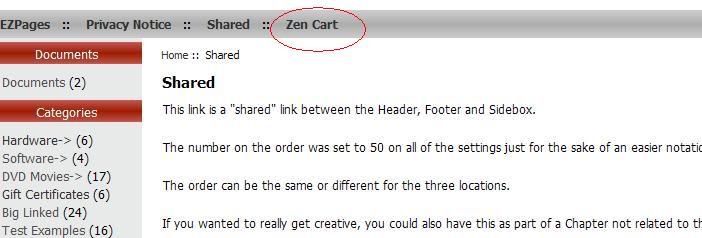
i wish to remove the zen cart link. as circled in the photo.. im using cherry zen template as shown.. but i have no idea how to change that.

29 Mar 2009, 7:33 PM
#2554
jettrue avatar

jettrue

Totally Zenned

Join Date:
Jan 2005
Location:
USA, St. Louis
Posts:
3,651
Plugin Contributions:
5

Re: Cherry Zen Template Support Thread

vaige:

hi all, i have tried to search etc but i cant find a solution to this.. im not good with my php.. can anyone expert help me on this?

thanks!

i wish to remove the zen cart link. as circled in the photo.. im using cherry zen template as shown.. but i have no idea how to change that.

That's the ezpages header, go to "tools", "Ezpages" and turn off the "header" option for that item, or delete it altogether.

29 Mar 2009, 8:35 PM
#2555
vaige avatar

vaige

New Zenner

Join Date:
Mar 2009
Posts:
43
Plugin Contributions:
0

Re: Cherry Zen Template Support Thread

Thank you for your help!!!

30 Mar 2009, 2:28 AM
#2556
imagino avatar

imagino

New Zenner

Join Date:
Mar 2008
Posts:
31
Plugin Contributions:
0

Re: Cherry Zen Template Support Thread

jettrue:

Did you remove this:

  • html #nw, * html #ne, * html #se, * html #sw, * html #n, * html #s, * html #w, * html #e {background:none!important;}

Be sure I missed!

Thank you, now it works fine ;o)

31 Mar 2009, 8:16 PM
#2557
merbay avatar

merbay

New Zenner

Join Date:
Mar 2009
Posts:
41
Plugin Contributions:
0

Re: Cherry Zen Template Support Thread

Hi, I'm new and absolutely love this template!

Two quick questions:
Is there a copy of the readme file here. I can't seem to find it.
also,
Is there a way to search just this thread?-- I'm sure that my question has already been answered. I tried using quotes but that just brought me to this thread.

31 Mar 2009, 9:30 PM
#2558
vaige avatar

vaige

New Zenner

Join Date:
Mar 2009
Posts:
43
Plugin Contributions:
0

Re: Cherry Zen Template Support Thread

hi to all, can you please help me with these 2 issues? i been trying and searching for 3 days with no answers.

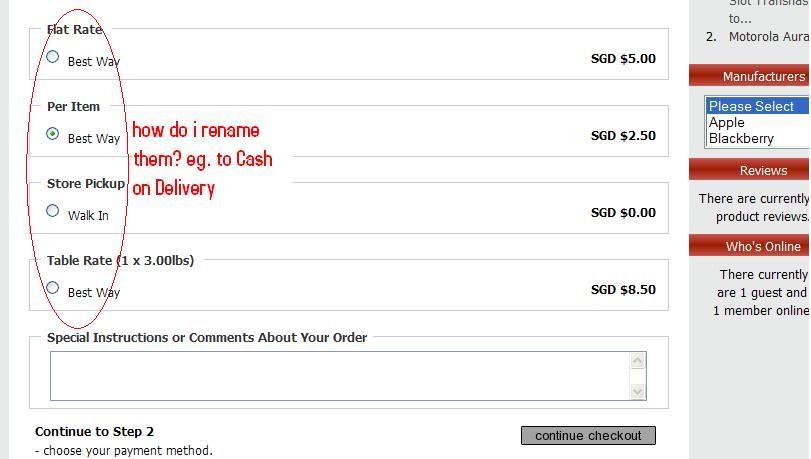
  1. How to i rename the shipping Method to customise for myself?

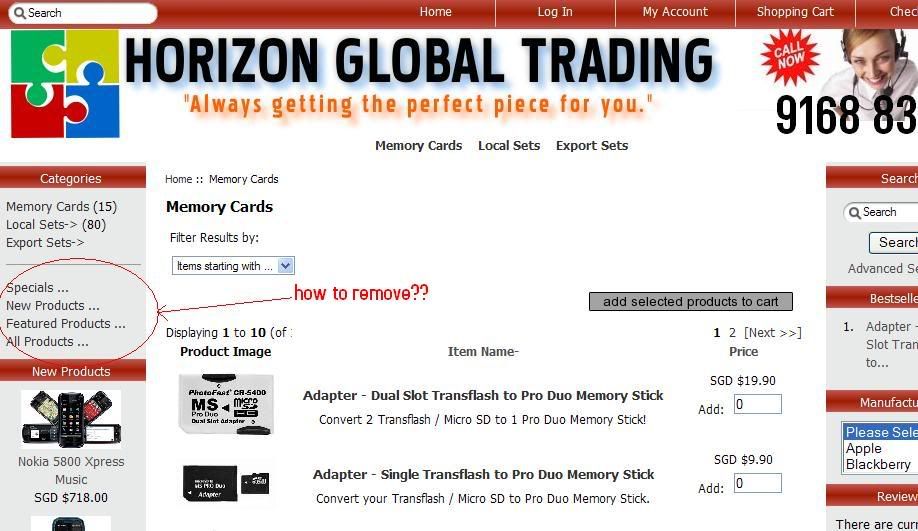
  2. And how can i remove the circled items? 'Specials,New Products etc '?

Thanks in advance!!

1 Apr 2009, 1:14 AM
#2559
jettrue avatar

jettrue

Totally Zenned

Join Date:
Jan 2005
Location:
USA, St. Louis
Posts:
3,651
Plugin Contributions:
5

Re: Cherry Zen Template Support Thread

merbay:

Hi, I'm new and absolutely love this template!

Two quick questions:
Is there a copy of the readme file here. I can't seem to find it.
also,
Is there a way to search just this thread?-- I'm sure that my question has already been answered. I tried using quotes but that just brought me to this thread.

Right up at the top of this thread, there is a "Search this thread" link.

For the readme... could you just re-download the file?

1 Apr 2009, 1:56 AM
#2560
jettrue avatar

jettrue

Totally Zenned

Join Date:
Jan 2005
Location:
USA, St. Louis
Posts:
3,651
Plugin Contributions:
5

Re: Cherry Zen Template Support Thread

vaige:

hi to all, can you please help me with these 2 issues? i been trying and searching for 3 days with no answers.

  1. How to i rename the shipping Method to customise for myself?

  2. And how can i remove the circled items? 'Specials,New Products etc '?

Thanks in advance!!

These are both great questions for the general forum. :cool:

  1. this is done in the language files

  2. this is done in the admin, "configuration", "layout settings".