Zen Cart Logo
Forums / Addon Templates / Cherry Zen Template Support Thread

Cherry Zen Template Support Thread

Views: 844,975

Results 2,881 to 2,900 of 3,245
23 Feb 2010, 4:55 PM
#2881
golden_synergy avatar

golden_synergy

Zen Follower

Join Date:
Aug 2009
Location:
Westland, Michigan
Posts:
107
Plugin Contributions:
0

Cherry Zen Template Support Thread

daymobrew:

I went to the Zen Cart Tutorials/FAQ and searched for "logo". I got 7 articles.
These 5 look most relevant:
https://www.zen-cart.com/tutorials/index.php?article=256
https://www.zen-cart.com/tutorials/index.php?article=158
https://www.zen-cart.com/tutorials/index.php?article=125
https://www.zen-cart.com/tutorials/index.php?article=112
https://www.zen-cart.com/tutorials/index.php?article=126

Daymobrew, Thanks for your response. My problem is finding the files I need in Cherry Zen.
define('HEADER_ALT_TEXT', 'Powered by Zen Cart :: The Art of E-Commerce');
define('HEADER_LOGO_WIDTH', '192px');
define('HEADER_LOGO_HEIGHT', '64px');
define('HEADER_LOGO_IMAGE', 'logo.gif');

I found English.php in Includes/languages/Cherry_zen but I just can't find the lines with Header_logo ---

23 Feb 2010, 11:03 PM
#2882
frank18 avatar

frank18

Deceased

Join Date:
Nov 2007
Location:
Sunny Coast, Australia
Posts:
3,427
Plugin Contributions:
2

Re: Cherry Zen Template Support Thread

I found English.php in Includes/languages/Cherry_zen but I just can't find the lines with Header_logo ---

/includes/languages/english/cherry_zen/header.php

23 Feb 2010, 11:49 PM
#2883
golden_synergy avatar

golden_synergy

Zen Follower

Join Date:
Aug 2009
Location:
Westland, Michigan
Posts:
107
Plugin Contributions:
0

Re: Cherry Zen Template Support Thread

frank18:

/includes/languages/english/cherry_zen/header.php

Frank:
Thank you. This just seem a bit puzzling. Now that I edited the Header .php to show:
define('HEADER_LOGO_WIDTH', '200px');
define('HEADER_LOGO_HEIGHT', '70px');
define('HEADER_LOGO_IMAGE', 'logo.gif');

the next step is :

find the following line in admin/invoice.php and admin/packingslip.php

I am truly looking all over the place for this, and it is no place to be found. Could you guide me again.
The places that the tutorials are telling me to go don't seem to exist.

24 Feb 2010, 12:03 AM
#2884
frank18 avatar

frank18

Deceased

Join Date:
Nov 2007
Location:
Sunny Coast, Australia
Posts:
3,427
Plugin Contributions:
2

Re: Cherry Zen Template Support Thread

Admin -> Tools -> Developers Tool Kit lets you find any file or key within admin, catalog or both. Use the one on the bottom that says > Look-up in all files and select where you want to look, admin, catalog or both

Very useful tool :yes:

24 Feb 2010, 1:01 AM
#2885
golden_synergy avatar

golden_synergy

Zen Follower

Join Date:
Aug 2009
Location:
Westland, Michigan
Posts:
107
Plugin Contributions:
0

Re: Cherry Zen Template Support Thread

frank18:

Admin -> Tools -> Developers Tool Kit lets you find any file or key within admin, catalog or both. Use the one on the bottom that says and select where you want to look, admin, catalog or both

Very useful tool :yes:

Yes that tool did help me find what I needed.

25 Feb 2010, 1:04 PM
#2886
artecy avatar

artecy

New Zenner

Join Date:
Feb 2010
Posts:
1
Plugin Contributions:
0

Re: Cherry Zen Template Support Thread

Hi,

I have just set up a 1.3.8 zen cart website with the cherry zen template. I did not upload the cherry zen tpl_product_info_display.php as per the read me file. I have gone with the default as I did not want to specify the product images width at 220 or less.

Anyway it all is working perfectly in many browser such as firefox, opera, chrome IE 7 and IE 8, but for some reason in IE6 I get the product layout going into the left sidebox and pushing all the categories down to the bottom of the page. If you have IE6 you can see what I am saying here http://artecyshop.com/index.php?main_page=product_info&cPath=1_2&products_id=2

Is there anyway to fix this?

Thanks
TC

27 Feb 2010, 9:35 PM
#2887
mowerman40 avatar

mowerman40

New Zenner

Join Date:
Dec 2009
Posts:
9
Plugin Contributions:
0

Re: Cherry Zen Template Support Thread

Can you all Tell me what pixel size a banner image will be for the Cherry Zen template this is the banner in the header at the top of the site and does anyone know of someone that can build one from scratch for me thank you
Calvin

Mainly for a Gift Shop online type store candles and more items

5 Mar 2010, 1:40 AM
#2888
drunkguy avatar

drunkguy

New Zenner

Join Date:
May 2009
Location:
Longmont, CO
Posts:
91
Plugin Contributions:
0

Re: Cherry Zen Template Support Thread

Hi everybody.
Im trying to use 4 Column Footer Menu Mod from Clyde Jones and have a couple of problems. I know the menu_footer.css is the culprit. Clyde suggested I look here to see is anyone has experienced the same problem. A search turned up nothing.

Zen 1.38a and cherry-zen template. Url= http://www.angiejolee.com/store/

The issues are:

  1. Messes up the top main navigation a bit.
  2. Links in sideboxes (other than categories) are aligned left (normal) but centered in a narrower space forcing long text to wrap.

Any suggestions would be appreciated.
Thanks

8 Mar 2010, 2:13 AM
#2889
jazzmasta25 avatar

jazzmasta25

New Zenner

Join Date:
Dec 2007
Posts:
6
Plugin Contributions:
0

Re: Cherry Zen Template Support Thread

Hello,

I would like to move the header, and the entire page UP so the header is at the very top of the page. Can someone point me in the right direction?

Thank You

12 Mar 2010, 9:02 PM
#2890
adnimas5 avatar

adnimas5

Zen Follower

Join Date:
Dec 2005
Posts:
117
Plugin Contributions:
0

Re: Cherry Zen Template Support Thread

I am trying to place an image in the header. I placed it in 'headerWrapper', but its shifted to the right by 5-10 pixels. I tried putting "padding:0;" right underneath of that, but nothing seems to work. Any input? Thank you.

13 Mar 2010, 3:27 AM
#2891
countrycharm avatar

countrycharm

Totally Zenned

Join Date:
Jul 2007
Posts:
2,179
Plugin Contributions:
2

Re: Cherry Zen Template Support Thread

adnimas5:

I am trying to place an image in the header. I placed it in 'headerWrapper', but its shifted to the right by 5-10 pixels. I tried putting "padding:0;" right underneath of that, but nothing seems to work. Any input? Thank you.

Try this
padding-left:00px;
text-align:center;

13 Mar 2010, 10:39 AM
#2892
daymobrew avatar

daymobrew

New Zenner

Join Date:
Oct 2008
Posts:
48
Plugin Contributions:
0

Re: Cherry Zen Template Support Thread

adnimas5:

I am trying to place an image in the header. I placed it in 'headerWrapper', but its shifted to the right by 5-10 pixels. I tried putting "padding:0;" right underneath of that, but nothing seems to work. Any input? Thank you. Please post a link to your site. People can use Firebug to quickly locate the problem.

13 Mar 2010, 9:39 PM
#2893
adnimas5 avatar

adnimas5

Zen Follower

Join Date:
Dec 2005
Posts:
117
Plugin Contributions:
0

Re: Cherry Zen Template Support Thread

I apolagize, What I did was right, it's working now, it was the image causing issues.

Thank you

13 Mar 2010, 9:43 PM
#2894
adnimas5 avatar

adnimas5

Zen Follower

Join Date:
Dec 2005
Posts:
117
Plugin Contributions:
0

Re: Cherry Zen Template Support Thread

I have the 3-column set up on my store. Left Center and Right. If I want a frame around just the center column, what would I add to the CSS file?

I do know how to create an outline, but just don't know which part I should add it to.

Thank you

14 Mar 2010, 8:39 PM
#2895
daymobrew avatar

daymobrew

New Zenner

Join Date:
Oct 2008
Posts:
48
Plugin Contributions:
0

Re: Cherry Zen Template Support Thread

adnimas5:

I have the 3-column set up on my store. Left Center and Right. If I want a frame around just the center column, what would I add to the CSS file? Please post a link to your site. People can use Firebug to quickly locate the problem.

15 Mar 2010, 4:55 AM
#2896
jokermode avatar

jokermode

New Zenner

Join Date:
Mar 2010
Posts:
26
Plugin Contributions:
0

Re: Cherry Zen Template Support Thread

helloo jettrue...:)
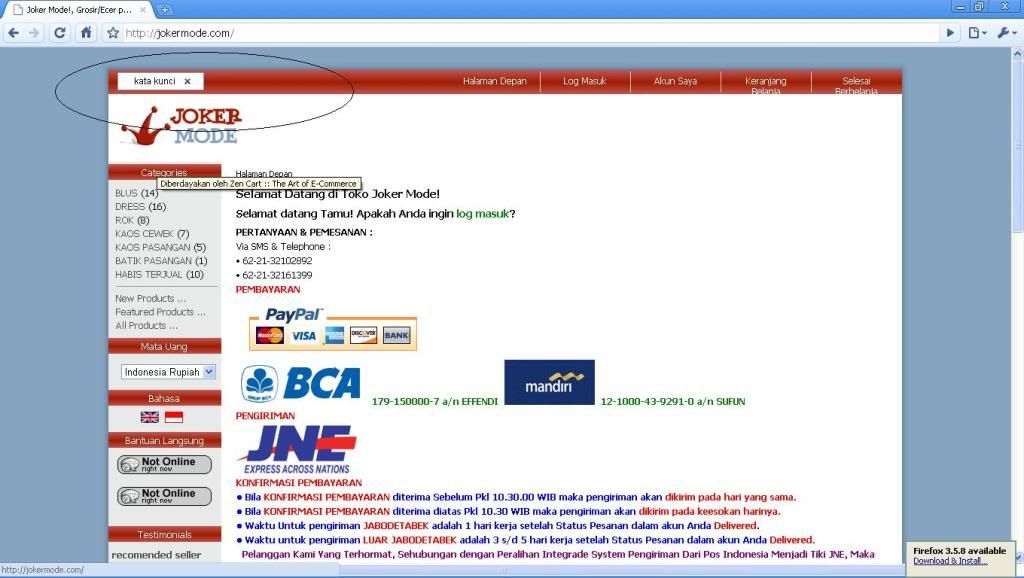
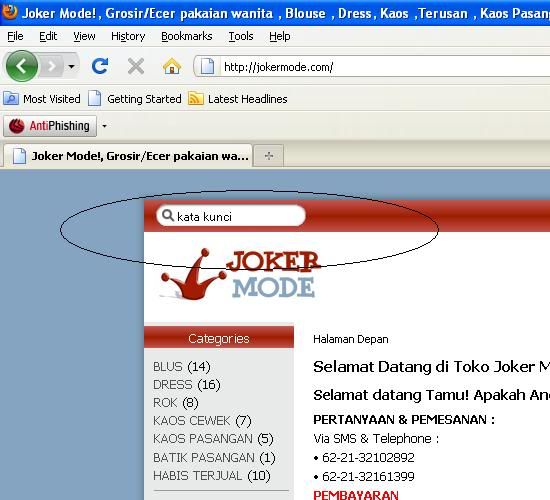
i found bug with cherry zen template
when i open with google crome browser
like this

and i open with firefox like this....

could you fixed it...
thx before

15 Mar 2010, 4:28 PM
#2897
adnimas5 avatar

adnimas5

Zen Follower

Join Date:
Dec 2005
Posts:
117
Plugin Contributions:
0

Re: Cherry Zen Template Support Thread

daymobrew:

Please post a link to your site. People can use Firebug to quickly locate the problem.

I really do not prefer to post it on the thread. I will PM you the site.

Thank you

19 Mar 2010, 5:21 PM
#2898
division avatar

division

New Zenner

Join Date:
Apr 2008
Posts:
14
Plugin Contributions:
0

Re: Cherry Zen Template Support Thread

Division:

Okay, I have done that.

I need to make the links below the banner logo centrered please.

Can I have an update on this please?

20 Mar 2010, 6:20 AM
#2899
shahjee99 avatar

shahjee99

New Zenner

Join Date:
Mar 2010
Posts:
1
Plugin Contributions:
0

Re: Cherry Zen Template Support Thread

I am using cherry zen on my domain http://www.moongtraders.com. I want to add images on main page just like on http://www.mysarisarishop.com/ main page

I want to add all 4 images just like this please tell me where i add this code. Urgent help I am very very thankful to you.

20 Mar 2010, 10:03 AM
#2900
daymobrew avatar

daymobrew

New Zenner

Join Date:
Oct 2008
Posts:
48
Plugin Contributions:
0

Re: Cherry Zen Template Support Thread

adnimas5:

I have the 3-column set up on my store. Left Center and Right. If I want a frame around just the center column, what would I add to the CSS file?

I do know how to create an outline, but just don't know which part I should add it to.

Thank you This has been resolved via PM.
adnimas5 has added a border to .contentWrap (line 238 in stylesheet.css).