Zen Cart Logo
Forums / General Questions / Add a field into create account

Add a field into create account

Views: 51,600

Results 81 to 100 of 138
21 Jan 2010, 6:50 PM
#81
sjolie avatar

sjolie

New Zenner

Join Date:
Oct 2009
Posts:
53
Plugin Contributions:
0

Add a field into create account

[QUOTE=
11c. Now search for:

<tr> <td class="main"><?php echo ENTRY_FAX_NUMBER; ?></td> <td class="main"> <?php if ($processed == true) { echo $cInfo->customers_fax . zen_draw_hidden_field('customers_fax'); } else { echo zen_draw_input_field('customers_fax', $cInfo->customers_fax, zen_set_field_length(TABLE_CUSTOMERS, 'customers_fax', 15)); } ?> </td> </tr>

DO NOT ERASE THIS CODE SIMPLY GO DIRECTLY UNDER THIS CODE AND ADD IN THE FOLLOWING CODE:

<tr> <td class="main"><?php echo ENTRY_TAXID_NUMBER; ?></td> <td class="main"> <?php if ($processed == true) { echo $cInfo->customers_taxid . zen_draw_hidden_field('customers_taxid'); } else { echo zen_draw_input_field('customers_taxid', $cInfo->customers_taxid, zen_set_field_length(TABLE_CUSTOMERS, 'customers_taxid', 15)); } ?> </td> </tr>[/QUOTE]

I cannot find the first part anywhere in the file... is there something new since this post was made?

27 Jan 2010, 10:40 PM
#82
honeypot avatar

honeypot

New Zenner

Join Date:
Jan 2007
Posts:
55
Plugin Contributions:
0

Re: Add a field into create account

Someone asked in an earlier post about getting a javascript error for drop down menus in create account. I manage to do this for the How did you hear about us add on drop down menu as follows:

**1. First install How did you hear about us add on

  1. Then find

** /includes/languages/YOURTEMPLATE/english.php

Search for:
define('ENTRY_REFERENCE_FROM', 'How did you hear about us?');

…right after that line enter the following…

define('ENTRY_REFERENCE_FROM_ERROR', 'You must select a choice from How did you hear about us? pull down menu.');

3. Then find
/includes/modules/pages/create_account/jscript_form_check.php

Search for:

check_select("country", "", "<?php echo ENTRY_COUNTRY_ERROR; ?>");

…right after that line enter the following…

check_select("source", "", "<?php echo ENTRY_REFERENCE_FROM_ERROR; ?>");

That should give a java script error for the dropdown menu itself.

However, I need some help to do a javascript error if someone chooses the other option from the how did you hear about us drop down menu but leaves the other field blank. Any help would be greatly appreciated.

8 Feb 2010, 7:10 PM
#83
jdw1979 avatar

jdw1979

Zen Follower

Join Date:
Jun 2009
Location:
NC
Posts:
174
Plugin Contributions:
0

Re: Add a field into create account

I've noticed previous posts associated with this particular question, but no answers to the issue.

I have done what was outlined in this thread to the letter, and I have successfully created a "free input field" (as it was called earlier in this thread) that is present on the Registration page, and inserts its respective data into the database. But, I'm curious on how to make it a dropdown. We're a medical supply company and would like to enable facilities to list their specialty to better target email marketing campaigns.

Any help would be greatly appreciated,

Johnathan D. Walker
Wilburn Medical USA

10 Feb 2010, 7:06 PM
#84
jdw1979 avatar

jdw1979

Zen Follower

Join Date:
Jun 2009
Location:
NC
Posts:
174
Plugin Contributions:
0

Re: Add a field into create account

So, no takers, huh? Well, if and when I figure it out, I'll post the solution.

Johnathan D. Walker
Wilburn Medical USA

14 Feb 2010, 1:17 AM
#85
honeypot avatar

honeypot

New Zenner

Join Date:
Jan 2007
Posts:
55
Plugin Contributions:
0

Re: Add a field into create account

jdw1979:

I've noticed previous posts associated with this particular question, but no answers to the issue.

I have done what was outlined in this thread to the letter, and I have successfully created a "free input field" (as it was called earlier in this thread) that is present on the Registration page, and inserts its respective data into the database. But, I'm curious on how to make it a dropdown. We're a medical supply company and would like to enable facilities to list their specialty to better target email marketing campaigns.

Any help would be greatly appreciated,

Hi,
You could probably figure this out with the how did you hear about us add on and this thread. The how did you hear about us add on includes a drop dow menu into the create account page. Let me know if you cannot figure it out. Thanks

15 Feb 2010, 1:53 PM
#86
jdw1979 avatar

jdw1979

Zen Follower

Join Date:
Jun 2009
Location:
NC
Posts:
174
Plugin Contributions:
0

Re: Add a field into create account

I've been wrestling with this particular issue on and off for a few days now. Thank you very much for your suggestion. I've perused the mod you mentioned, and it very well could work with a little tweaking...I'll update on my progress.

Johnathan D. Walker
Wilburn Medical USA

15 Feb 2010, 5:40 PM
#87
thegoodlifestore avatar

thegoodlifestore

New Zenner

Join Date:
Oct 2007
Location:
North Carolina
Posts:
102
Plugin Contributions:
0

Re: Add a field into create account

These instructions were great. Pretty easy to implement.

BUT ...

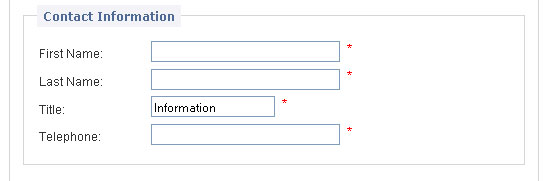
The new "Title" field I have created is pulling the value "Information" from somewhere ... and I can't figure out where.

SNAPSHOT:

PHP CODE:
<label class="inputLabel" for="title"><?php echo ENTRY_TITLE; ?></label>

<?php echo zen_draw_input_field('title', $value='', '', zen_set_field_length(TABLE_CUSTOMERS, 'customers_title', '40') . ' id="title"') . (zen_not_null(ENTRY_TITLE_TEXT) ? '<span class="alert">' . ENTRY_TITLE_TEXT . '</span>': ''); ?> <br class="clearBoth" />

SOURCE CODE FROM BROWSER:
<label class="inputLabel" for="title">Title:</label>
<input type="size = "33" maxlength = "32" id="title"" name="title" value="Information" /><span class="alert">*</span><br class="clearBoth" />

LINK TO PAGE:
http://platinumnc.com/papers/index.php?main_page=create_account

If anyone could point me in the proper direction for a solution it would be greatly appreciated.

Thanks!
Charles

18 Feb 2010, 2:08 PM
#88
wolderiii avatar

wolderiii

New Zenner

Join Date:
May 2007
Posts:
9
Plugin Contributions:
0

Re: Add a field into create account

thegoodlifestore,
here is where your "information" is coming from.

look at the code you posted for this
name="title" value="Information"

where it says value = "information" that is why it is displaying that in the box.

simply take the "information" out like this

value=""

  • never mind i re-read your post and see that is coming in from the browser. you may want to look at your variables to see where it might be coming from.

you may want to look at it in multiple browsers as well and see if it shows up in all of them like that.

you may also want to look at if "title" is used anywhere else as variable.

also look at ENTRY_TITLE_TEXT, and especially in the english.php file to see if "information" is set there.
if all else fails i would re-write the code (doesn't take that long) and use different names/variables

18 Feb 2010, 2:14 PM
#89
wolderiii avatar

wolderiii

New Zenner

Join Date:
May 2007
Posts:
9
Plugin Contributions:
0

Re: Add a field into create account

i do have a questions of my own that no one else has seemed to ask in this thread.
when using the ENTRY_FAX_NUMBER_TEXT

example

<?php echo zen_draw_input_field('magtxt', $account->fields['customers_hear_magtxt'], 'id="magtxt"') . (zen_not_null(ENTRY_FAX_NUMBER_TEXT) ? '<span class="alert">' . ENTRY_FAX_NUMBER_TEXT . '</span>': ''); ?>

how can you make the input box bigger?
i have added quite a few entries to the create_account.php and there are a couple of them i would like to be longer or multi-line.

thanks in advance

12 Mar 2010, 8:42 PM
#90
jdw1979 avatar

jdw1979

Zen Follower

Join Date:
Jun 2009
Location:
NC
Posts:
174
Plugin Contributions:
0

Re: Add a field into create account

Well, just an update. For those of you looking to create a dropdown menu on your customer registration page, I highly recommend just taking the "How Did You Hear About Us" mod from the downloads section and customize it to your needs. You can add fields, and modify fields directly from the admin, thus creating a dropdown that does get entered into the database. In order to modify the text that is actually output to the end user (both customers and administrators), you will need to modify the "referral_defines.php" file in the "extra definitions" folder. It actually is quite easy. I am currently using that mod as a way for doctors and purchasing agents to indicate what type of facility they represent and it is working flawlessly. (I'm running a medical supply site). So, I'm calling my particular problem solved, thanks to the Zen Cart community. :flex:

Johnathan D. Walker
Wilburn Medical USA

13 Mar 2010, 10:45 PM
#91
chrissiemags avatar

chrissiemags

New Zenner

Join Date:
Sep 2008
Posts:
40
Plugin Contributions:
0

Re: Add a field into create account

Followed the directions and all has worked great except when I try to edit the customers.php for the admin area. I keep getting an error on line #(insert line here changes each time I tweek the code). I'm running 1.3.8a and can't view the tax id or edit the tax id in the admin area...UGH any help please?

I did find the post about the person who is running 1.3.8a and tried his suggestion, still getting an error message in the admin area following his directions...maybe I'm not understanding it correctly

TIA for any help!

21 Mar 2010, 11:19 PM
#92
perkiekat avatar

perkiekat

Zen Follower

Join Date:
Aug 2009
Location:
Carmi, IL
Posts:
354
Plugin Contributions:
0

Re: Add a field into create account

jdw1979:

Well, just an update. For those of you looking to create a dropdown menu on your customer registration page, I highly recommend just taking the "How Did You Hear About Us" mod from the downloads section and customize it to your needs. You can add fields, and modify fields directly from the admin, thus creating a dropdown that does get entered into the database. In order to modify the text that is actually output to the end user (both customers and administrators), you will need to modify the "referral_defines.php" file in the "extra definitions" folder. It actually is quite easy. I am currently using that mod as a way for doctors and purchasing agents to indicate what type of facility they represent and it is working flawlessly. (I'm running a medical supply site). So, I'm calling my particular problem solved, thanks to the Zen Cart community. :flex:

I have a question for you about the "How did you hear about us" module. I see you got to work properly. I installed this and everything shows up but I do not know where to retrieve the customers input. I tried the double click Other under the Extras but nothing shows up. I looked in the customers information and there isn't anything in that area about referrals.

Could you please tell me how you retrieve your referrals customers choose? I am using Zen Cart 1.3.8a

Thanks,
Pkat

Zen Cart user all the way for online stores!

22 Mar 2010, 2:16 AM
#93
perkiekat avatar

perkiekat

Zen Follower

Join Date:
Aug 2009
Location:
Carmi, IL
Posts:
354
Plugin Contributions:
0

Re: Add a field into create account

perkiekat:

I have a question for you about the "How did you hear about us" module. I see you got to work properly. I installed this and everything shows up but I do not know where to retrieve the customers input. I tried the double click Other under the Extras but nothing shows up. I looked in the customers information and there isn't anything in that area about referrals.

Could you please tell me how you retrieve your referrals customers choose? I am using Zen Cart 1.3.8a

Thanks,
Pkat

Nevermind...here is the answer:

If you are using other templates you need to put the create_account.php in

includes/modules/yourtemplate/

and it should work.

Zen Cart user all the way for online stores!

7 Apr 2010, 6:38 PM
#94
ajames avatar

ajames

New Zenner

Join Date:
Oct 2006
Posts:
21
Plugin Contributions:
0

Re: Add a field into create account

I've used the great postd from this thread to create a seies of new fields and need help changing from text input to checkbox. Can't seem to get it right.

Working on includes/custom.templates/ tpl_modules_create_account.php

Existing working

<br class="clearBoth" /> <label class="inputLabel" for="lead"><?php echo ENTRY_LEAD; ?></label> <?php echo zen_draw_input_field('lead', $account->fields['customers_lead'], 'id="lead"') . (zen_not_null(ENTRY_LEAD_TEXT) ? '<span class="alert">' . ENTRY_LEAD_TEXT . '</span>': ''); ?>

** Proposed**

<?php if (ENTRY_LEAD != 0) { ?> <?php echo zen_draw_checkbox_field('lead', '1', $lead, 'id="lead-checkbox"') . '<label class="checkboxLabel" for="lead_checkbox">' . ENTRY_LEAD . '</label>' . (zen_not_null(ENTRY_LEAD_TEXT) ? '<span class="alert">' . ENTRY_LEAD_TEXT . '</span>': ''); ?> <br class="clearBoth" /> <?php } ?>

Thanks

30 Apr 2010, 1:51 PM
#95
torvista avatar

torvista

Totally Zenned

Join Date:
Aug 2007
Location:
Gijón, Asturias, Spain
Posts:
2,875
Plugin Contributions:
7

Re: Add a field into create account

In 1.39a /modules/create_account.php line 55 and 56 the first and lastname are now being run through a function zen_sanitize_string.

1.38a:

  $firstname = zen_db_prepare_input($_POST['firstname']);
  $lastname = zen_db_prepare_input($_POST['lastname']);

1.39a:

  $firstname = zen_db_prepare_input(zen_sanitize_string($_POST['firstname']));
  $lastname = zen_db_prepare_input(zen_sanitize_string($_POST['lastname']));

While I can guess what that does, the successive user inputs are not using this function.

At this point in the code I have an extra field to collect the users tax id.
My question is, what is the criteria for using this function and should I use it for my extra field, ie

  $taxid = zen_db_prepare_input($_POST['taxid']);

or this

  $taxid = zen_db_prepare_input(zen_sanitize_string($_POST['taxid']));

thanks
Steve

Steve
github.com/torvista: BackupMySQL, Structured Data, Multiple Copy-Move-Delete, Google reCaptcha, Image Checker, Spanish Language Pack and more...

2 Jun 2010, 3:15 PM
#97
ajames avatar

ajames

New Zenner

Join Date:
Oct 2006
Posts:
21
Plugin Contributions:
0

Re: Add a field into create account

MySQL checkbox data display problem

I have the following field (customers_lead) added on the signup sheet. The data posts to the new field ( customers_lead ) created in the 'customers' file. The existing data for the checkboxes checked do not appear checked on either the user's sign-in or edit pages because I have not found out how to properly code the read-out of the data stored in the database.

The data posts correctly and is visible in PhpMyAdmin. If updated the changes will also show up in PhpMyAdmin.

I have scoured the forums for an answer but no joy.

I would appreciate any help in the formating of the data selection/display side of the equation.

Existing Code:

<?php if (ENTRY_LEAD != 0) ?> <?php if ($processed == true) { echo $cInfo->customers_lead . zen_draw_checkbox_field('lead, 0,'); } else { echo zen_draw_checkbox_field('lead', '1', false, $lead, 'id="lead-checkbox"') . '<label class="checkboxLabel" for="lead-checkbox">' . 'Serve as a Team Leader' . '</label>' . (zen_not_null(ENTRY_LEAD_TEXT) ? '<span class="alert">' . '' . '</span>': ''); } ?> <br class="clearBoth" />

Thanks

12 Jul 2010, 10:46 AM
#98
sabrina_it avatar

sabrina_it

New Zenner

Join Date:
Jul 2010
Location:
Italy
Posts:
5
Plugin Contributions:
0

Re: Add a field into create account

Hello,
I am using V. 1.3.8 Italian and followed all the steps.
Everything works fine, the new customer can view and fill new field.
But, on the admin customers page, the field "taxid" is empty.
That is, even the customer has filled it (and on the database through phpmyadmin I can see the value) the field results empty (blank)...
I'm sure I have copied everything correctly, have also tried with another ZC installation, but the result is the same.
Does anyone know what the problem could be?
Any suggestion would be very appreciated!
Please note that I've just begun with php and zc, so I'm not very experienced in it :blush:
Many thanks in advance!

Sabrina

23 Jul 2010, 4:52 PM
#99
jackie_taferner avatar

jackie_taferner

Totally Zenned

Join Date:
Jun 2009
Location:
Orange County, California
Posts:
547
Plugin Contributions:
3

Re: Add a field into create account

UPDATE! DO NOT USE the module I listed above! It has many many errors and is quite the headache to deal with. (I don't know why he even uploaded such a thing to the download section, it must have cost many people their sanity!)

I decided to take all the helpful instructions here, and create an easy-install module. It is not yet in the download section, but has been submitted.

Jackie Taferner - JT Website Design
Custom Website Design and Ecommerce
Support the community. Don't Private Message, post your questions in the forum.

24 Jul 2010, 10:22 AM
#100
jackie_taferner avatar

jackie_taferner

Totally Zenned

Join Date:
Jun 2009
Location:
Orange County, California
Posts:
547
Plugin Contributions:
3

Re: Add a field into create account

Sorry guys, I guess my download link has been moderated in the post above, so you cannot download the module yet...

But as soon as it's available I'll post it here!!

Jackie Taferner - JT Website Design
Custom Website Design and Ecommerce
Support the community. Don't Private Message, post your questions in the forum.