Attribute out of stock

Locked

Views: 1,489

Results 1 to 8 of 8
This thread is locked. New replies are disabled.
13 Dec 2007, 6:45 AM
#1
jgkiefer avatar

jgkiefer

Zen Follower

Join Date:
May 2004
Posts:
64
Plugin Contributions:
0

Attribute out of stock

How can I set an attribute as being out of stock without setting the product as being out of stock?

Example:
Product = Widget
Attributes = Red, Yellow or Blue

I am out of the Blue Widget. How do I set this attribute as out of stock?

-Jeff

13 Dec 2007, 2:31 PM
#3
jgkiefer avatar

jgkiefer

Zen Follower

Join Date:
May 2004
Posts:
64
Plugin Contributions:
0

Re: Attribute out of stock

Duh, right under my nose. Thanks!

-Jeff

18 Dec 2007, 4:30 AM
#4
ajay avatar

ajay

New Zenner

Join Date:
Dec 2007
Posts:
3
Plugin Contributions:
0

Re: Attribute out of stock

Misty, thanks for the link to the mod.

I tried installing the module. I am new to Zen cart and I think I messed up something. :oops:

I followed the given instructions, stated in the "readme.html" file in the package.

Prepare the package for upload to your server by renaming the following folders to match your template name: includes/modules/YOUR_TEMPLATE and includes/templates/YOUR_TEMPLATE.

If you are installing onto a new install or upgrade of Zen Cart 1.3.5 or later then with most good FTP programs (such as FileZilla) you can simply drag and drop the admin and includes directories into the root directory of your site. The files are already arranged in their directory structure.

There are six core Zen Cart files modified by this add-on. If you have installed other add-ons or customised your cart since your Zen Cart installation or upgrade, you will need to check whether they have changed any of the following files:

admin/includes/stylesheet.css
admin/orders.php
includes/classes/order.php
includes/functions/functions_lookups.php
includes/modules/pages/checkout_shipping/header_php.php
includes/modules/pages/shopping_cart/header_php.php
In addition, one file is over-ridden

includes/templates/template_default/templates/tpl_shopping_cart_default.php

So far, I have been able to set the quantities as per the attributes. The user is also warned if a particular attribute product is out of stock. The user can place an order. However, in the admin section I cannot veiw the orders.

If gives me the following error when I click on "customers -> orders"

Fatal error: Call to undefined function zen_get_orders_comments() in /home/.elvine/shop2/shop2.ajayenterprise.com/admin/orders.php on line 807

I am also attaching the screen shot of the error I am getting.
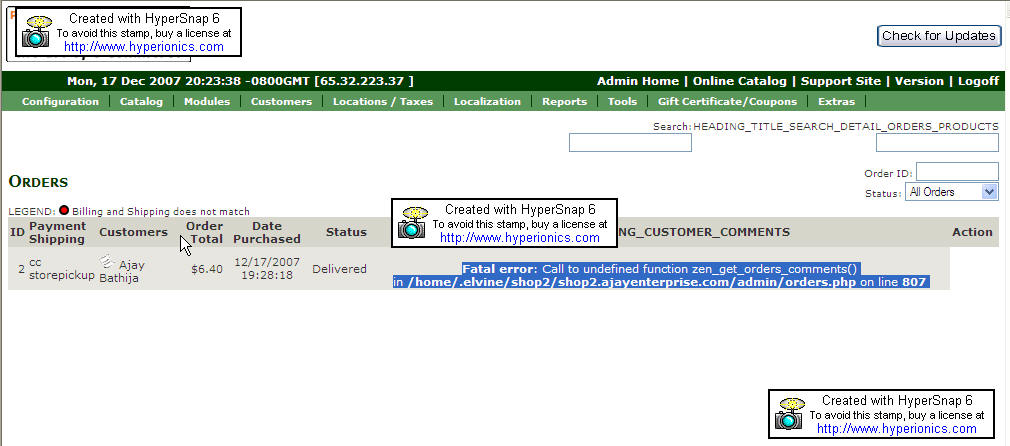
I have tried to copy all the files twice to the server to make sure that I have not missed any. But I think I have missed some file. I would highly appreciate if any one could help me figure the file I have messed up while coping.

Thanks for the help in advance.

Ajay Bathija

18 Dec 2007, 5:00 AM
#5
ccantrell31 avatar

ccantrell31

New Zenner

Join Date:
May 2007
Posts:
12
Plugin Contributions:
0

Re: Attribute out of stock

I am getting the same error in my admin panel. The rest of the mod seems to be working just fine except for this one column. Any ideas?

18 Dec 2007, 5:45 AM
#6
misty avatar

misty

Inactive

Join Date:
Apr 2004
Location:
UK
Posts:
5,752
Plugin Contributions:
1

Re: Attribute out of stock

http://www.zen-cart.com/forum/showthread.php?t=34977&page=36
Suggest you post your problem queries in stock by attributes support thread above..
Also, the latest version of this mod is for zencart 1.38/1.38a only,
so if you are using earlier zencart releases,
you would need to install correct version of mod..

Dezina ZenCart Templates
Please do not PM for support queries..Post in forums..help others

19 Dec 2007, 4:36 PM
#7
ajay avatar

ajay

New Zenner

Join Date:
Dec 2007
Posts:
3
Plugin Contributions:
0

Re: Attribute out of stock

Misty Thanks for bringing this to my notice..

I better read what I am installing before I take the jump. :eek:

I was using 1.3.7 version of Zen cart. I just replaced the "orders.php" in the admin section from V4.6 of the mod and everything seems to be working fine now.

Thanks a lot for the help. :smile:

3 Jan 2008, 1:02 PM
#8
kuroi avatar

kuroi

Totally Zenned

Join Date:
Apr 2006
Location:
London, UK
Posts:
10,475
Plugin Contributions:
11

Re: Attribute out of stock

Ajay, Glad you sorted out the problem. Misty was right on the button. The missing function zen_get_orders_comments() wasn't introduced until version 1.3.8 of Zen Cart, so as your success confirms this was a case of mismatching the version of Zen Cart and the version of the Stock by Attributes mod.

Kuroi Web Design and Development | Twitter

(Questions answered in the forum only - so that any forum member can benefit - not by personal message)