Zen Cart Logo
Forums / Setting Up Categories, Products, Attributes / Only one Attribute required - error for all

Only one Attribute required - error for all

Locked

Views: 1,057

Results 1 to 3 of 3
This thread is locked. New replies are disabled.
7 Apr 2008, 6:49 PM
#1
jasmel avatar

jasmel

Zen Follower

Join Date:
Feb 2008
Location:
Washington State
Posts:
230
Plugin Contributions:
0

Only one Attribute required - error for all

I have a cart that has three text box attributes with only one required.

When a customer clicks the "buy now" button without setting the required attribute they get an error telling them to fill out all three attributes. When in fact the error message should tell them only to input something for the *required one.

How can I modify the error message or correct this issue?

Zen-Cart version 1.3.8a
PHP Version 5.2.3
MYSQL API 5.0.16

Site in error: http://www.justmymusic.com/store/

7 Apr 2008, 7:15 PM
#2
dbltoe avatar

dbltoe

Totally Zenned

Join Date:
Jan 2004
Location:
N of San Antonio TX
Posts:
9,799
Plugin Contributions:
15

Re: Only one Attribute required - error for all

make sure that the block in the attributes controller is not checked for Required. That's the Red block (last in the list for the product). If it is, just click on it to change it.

7 Apr 2008, 7:25 PM
#3
jasmel avatar

jasmel

Zen Follower

Join Date:
Feb 2008
Location:
Washington State
Posts:
230
Plugin Contributions:
0

Re: Only one Attribute required - error for all

dbltoe:

make sure that the block in the attributes controller is not checked for Required. That's the Red block (last in the list for the product). If it is, just click on it to change it.

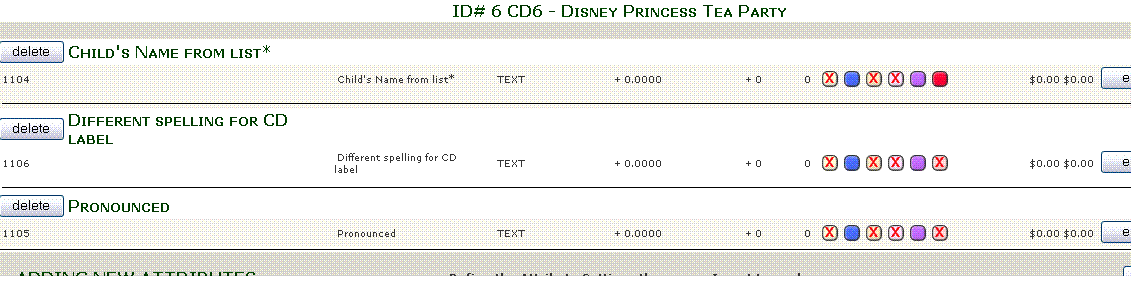
Only the first attribute is set to "red".

I have been getting orders with only the first attribute filled out. However, if they forget to put in the first attribute they get a error message not only asking for the first one but all three.

Screen shot of the attributes controller:

I think it has something to do with the error message. Somehow it thinks that all are required when in-fact only one is. You can repeat the error message by adding a product to the cart and not fill in the first attribute. Then you will see a message as shown:

Great..... Now that I try to get a screen shot of the error it now is working correctly. Only thing I did was open the attributes controller to take a screen shot. Works in both IE and Firefox.

Never mind... Thanks! :clap: