Forums / Templates, Stylesheets, Page Layout / Moving the attributes on the product info page

Moving the attributes on the product info page

Locked

Views: 1,481

Results 1 to 6 of 6
This thread is locked. New replies are disabled.
17 Jul 2008, 3:54 PM
#1
qwert302 avatar

qwert302

Zen Follower

Join Date:
Mar 2008
Posts:
148
Plugin Contributions:
0

Moving the attributes on the product info page

I am looking to move the attributes further up the page on my product info as demonstrated in this picture.
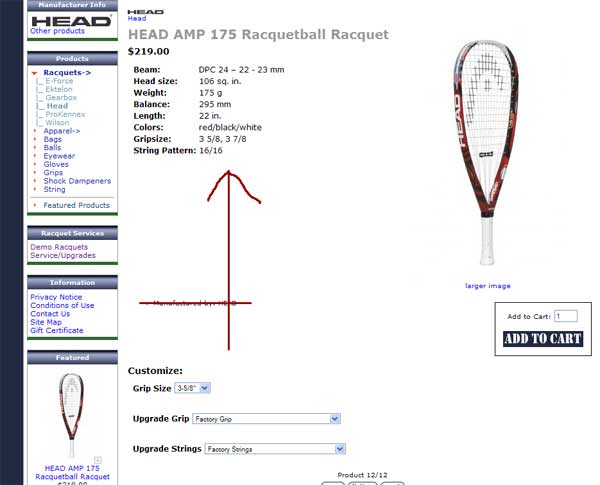
It's not as simple as moving the code around in /tpl_product_info_display.php. I've got to use some sort of code to make it move it right up below the product description.

I've removed the "manufactured by" display and now the attributes move up next to the add to cart, but I'm not happy with how it looks. Here is the url

http://www.racquetballgearonline.com/index.php?main_page=product_info&cPath=1_17&products_id=41

I think I would have to adjust some CSS but I'm not smart enough to figure it out myself.

Thanks.

17 Jul 2008, 6:22 PM
#2
gjh42 avatar

gjh42

Black Belt

Join Date:
Jul 2005
Location:
Upstate NY
Posts:
21,876
Plugin Contributions:
8

Re: Moving the attributes on the product info page

It's not quite as simple as moving code in tpl_product_info_display.php, but you can't accomplish what you want until you do move the code.

What is holding the attributes below the image is the <br class="clearBoth" /> after the description.
In your tpl_product_info_display.php, find this```php

<!--eof Product description --> <br class="clearBoth" /> <!--bof Add to Cart Box -->
Then move the <!--bof Attributes Module --> code block up to get this:
```php
<!--eof Product description -->
<br />
<!--bof Attributes Module -->
...
<!--eof Attributes Module -->
<!--bof Add to Cart Box -->
```You will probably have to remove some class="clearBoth" from lines in 
/includes/templates/your_template/templates/tpl_modules_attributes.php so that lower lines of the attributes will also come up under the description.
17 Jul 2008, 8:23 PM
#3
qwert302 avatar

qwert302

Zen Follower

Join Date:
Mar 2008
Posts:
148
Plugin Contributions:
0

Re: Moving the attributes on the product info page

Thanks! I'm learning more all the time. I was actually pretty sure that's what I needed to do, but was scared to implement it without consulting the masters.

Thanks again!

18 Jul 2008, 3:10 AM
#4
qwert302 avatar

qwert302

Zen Follower

Join Date:
Mar 2008
Posts:
148
Plugin Contributions:
0

Re: Moving the attributes on the product info page

Now, how would I go about centering the add to cart button under the image? I'm moving it around and using different breaks and I can't get it to go where I want. I'll probably have to CSS it, right?

Thanks for all the help you have provided.

18 Jul 2008, 3:15 AM
#5
gjh42 avatar

gjh42

Black Belt

Join Date:
Jul 2005
Location:
Upstate NY
Posts:
21,876
Plugin Contributions:
8

Re: Moving the attributes on the product info page

To get the add button below the image, you need to make it clear right-floated elements (the image).```
#cartAdd {clear: right; margin-right: 4em;}

18 Jul 2008, 3:36 AM
#6
qwert302 avatar

qwert302

Zen Follower

Join Date:
Mar 2008
Posts:
148
Plugin Contributions:
0

Re: Moving the attributes on the product info page

Thanks again.

I just realized that my tinkering screwed everything up when viewed in IE. I had a bunch of overlaps etc.

I'm going to have to spend some more time with this and play with it until I get IE to behave.

Are there any other commands I should be using besides moving stuff around and adding breaks?