Forums / Managing Customers and Orders / mail payments to

mail payments to

Locked

Views: 2,385

Results 1 to 17 of 17
This thread is locked. New replies are disabled.
23 Sep 2008, 3:22 PM
#1
phat avatar

phat

New Zenner

Join Date:
Jul 2007
Location:
south africa
Posts:
73
Plugin Contributions:
0

mail payments to

hi guys okay my next problem is on step 3 of check out see the pic below by the red arrow
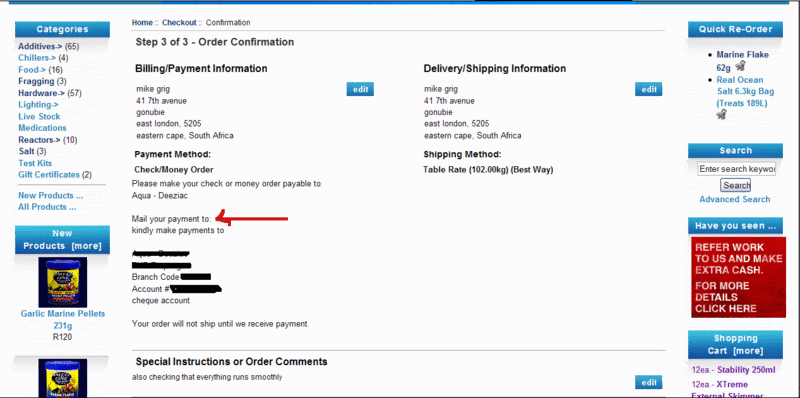
i thought it would have been taken from the shops e-mail address

i found through the developers tool kit that it sits in

includes>languages>english>modules>paymet>moneyorder.php

on line 24 i added the e-mail addy there but it still does not show, any idea's?

getting zenned out...

23 Sep 2008, 3:37 PM
#3
phat avatar

phat

New Zenner

Join Date:
Jul 2007
Location:
south africa
Posts:
73
Plugin Contributions:
0

Re: mail payments to

yes i have i added the banking details there

getting zenned out...

23 Sep 2008, 3:44 PM
#4
fairestcape avatar

fairestcape

Totally Zenned

Join Date:
Mar 2008
Location:
Cape Town & London (depends on the season)
Posts:
2,957
Plugin Contributions:
0

Re: mail payments to

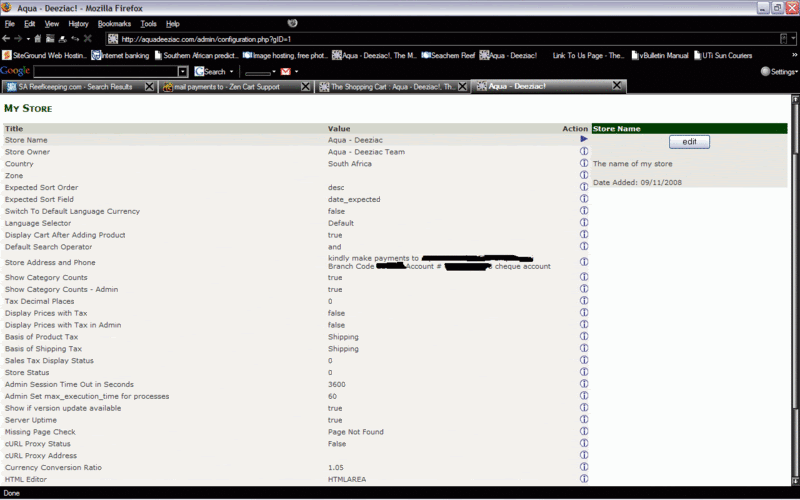
Grab a screenshot of your ADMIN>>>CONFIGURATION>>>MY STORE page and post it like you did the image above.

(Hide any sensitive info, as with image above).

I want to see how you've input your address...

23 Sep 2008, 3:47 PM
#5
phat avatar

phat

New Zenner

Join Date:
Jul 2007
Location:
south africa
Posts:
73
Plugin Contributions:
0

Re: mail payments to

busy with it

getting zenned out...

23 Sep 2008, 3:50 PM
#6
fairestcape avatar

fairestcape

Totally Zenned

Join Date:
Mar 2008
Location:
Cape Town & London (depends on the season)
Posts:
2,957
Plugin Contributions:
0

Re: mail payments to

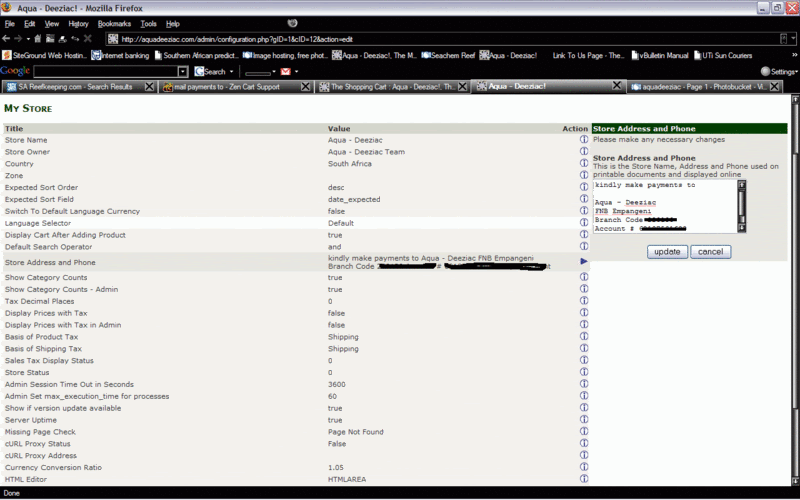
If you click "Store Address and Phone", you get the following input screen:

Make sure you've inputted the text correctly

23 Sep 2008, 3:52 PM
#7
phat avatar

phat

New Zenner

Join Date:
Jul 2007
Location:
south africa
Posts:
73
Plugin Contributions:
0

Re: mail payments to

getting zenned out...

23 Sep 2008, 3:55 PM
#8
phat avatar

phat

New Zenner

Join Date:
Jul 2007
Location:
south africa
Posts:
73
Plugin Contributions:
0

Re: mail payments to

getting zenned out...

23 Sep 2008, 3:58 PM
#9
fairestcape avatar

fairestcape

Totally Zenned

Join Date:
Mar 2008
Location:
Cape Town & London (depends on the season)
Posts:
2,957
Plugin Contributions:
0

Re: mail payments to

Okay...

You shouldn't put "kindly make payment payable to (etc)..." in this input section.

Try putting the account info into the ADMIN>>>MODULES>>>PAYMENT>>>MONEYORDER/CHECK input field (right at the bottom of the edit screen for Moneyorder/check .

23 Sep 2008, 4:00 PM
#10
phat avatar

phat

New Zenner

Join Date:
Jul 2007
Location:
south africa
Posts:
73
Plugin Contributions:
0

Re: mail payments to

fairestcape:

Make sure you've inputted the text correctly

okay now i get it, i wanted the e - mail address there, shot!!!

i see you also from SA - capetown!!

getting zenned out...

23 Sep 2008, 4:02 PM
#11
phat avatar

phat

New Zenner

Join Date:
Jul 2007
Location:
south africa
Posts:
73
Plugin Contributions:
0

Re: mail payments to

fairestcape:

Okay...

You shouldn't put "kindly make payment payable to (etc)..." in this input section.

Try putting the account info into the ADMIN>>>MODULES>>>PAYMENT>>>MONEYORDER/CHECK input field (right at the bottom of the edit screen for Moneyorder/check .

i have done that and it still does not show the only shipping module i have now is money order until i can sort out the credit card story which seems to be a PITA in this country:shocking:

getting zenned out...

23 Sep 2008, 4:25 PM
#12
fairestcape avatar

fairestcape

Totally Zenned

Join Date:
Mar 2008
Location:
Cape Town & London (depends on the season)
Posts:
2,957
Plugin Contributions:
0

Re: mail payments to

I just registered as a customer and done a test checkout (to step 2).

You cannot put an e-mail address in the Moneyorder/Check "Pay To" section. (how are people going to post a check to an e-mail address???). This text must just be the name of the bank account to which a cheque must be made out.

Then, in your My Store>>>Store Address and Phone, you just put in the physical address to which an envelope containing a cheque is sent to you. Get rid of "Kindly make payments to"... and all the account number bumf...

PS: I rarely go to Cape Town these days - London is safer!

24 Sep 2008, 11:36 AM
#13
phat avatar

phat

New Zenner

Join Date:
Jul 2007
Location:
south africa
Posts:
73
Plugin Contributions:
0

Re: mail payments to

PS: I rarely go to Cape Town these days - London is safer!

lol okay so what module can i use for EFT's ( electonic funds transfer) i dont want cheques mailed just internet transfers and hopefully soon accept credit cards

getting zenned out...

24 Sep 2008, 2:02 PM
#14
fairestcape avatar

fairestcape

Totally Zenned

Join Date:
Mar 2008
Location:
Cape Town & London (depends on the season)
Posts:
2,957
Plugin Contributions:
0

Re: mail payments to

You can reword some of the language defines in moneyorder/check to give appropriate text messages that advise your shoppers to use electronic transfer.

In SA there are a couple of payment gateways for c-cards that work with Zencart:

http://www.zen-cart.com/index.php?main_page=product_contrib_info&cPath=40_48&products_id=448

http://www.zen-cart.com/index.php?main_page=product_contrib_info&cPath=40_48&products_id=462

25 Sep 2008, 11:15 PM
#15
lissae avatar

lissae

Totally Zenned

Join Date:
Oct 2007
Location:
Australia
Posts:
814
Plugin Contributions:
0

Re: mail payments to

phat:

lol okay so what module can i use for EFT's ( electonic funds transfer) i dont want cheques mailed just internet transfers and hopefully soon accept credit cards

I have this mod which allows ppl to transfer funds directly into my account:

http://www.zen-cart.com/index.php?main_page=product_contrib_info&products_id=151

There is also this one, which I haven't used so I don't know if it will suit or not:

http://www.zen-cart.com/index.php?main_page=product_contrib_info&products_id=1107

HunnyBee Design
"A man's manners are a mirror in which he shows his portrait." ~ Johann Wolfgang von Goethe

27 Sep 2008, 4:59 AM
#16
matchmanhattan avatar

matchmanhattan

New Zenner

Join Date:
Mar 2008
Location:
Montreal, Canada. Manhattan, New York, USA
Posts:
60
Plugin Contributions:
0

Re: mail payments to

Hi fairestcape,

I put in the same info as you listed at the My Store -- store address and phone. but I did a test purchase with the money order payment option, there was no instruction on payment address, etc.. for the customer at all. It just has the thank you for purchase.. checkout success screen..

Same with COD ootion I tested on. What status should I set for the money order payment option at the module --- payment ---money order..?? default / pending / processing, etc ???? same question for paypal too.. should I set it to procvessing status???

Thanks.

Judy

you can go and test it at my site: https://www.ftabonus.com

fairestcape:

If you click "Store Address and Phone", you get the following input screen:

Make sure you've inputted the text correctly

https://www.pansatpro.com
FTA Free TV Equipments

10 Oct 2008, 1:48 PM
#17
phat avatar

phat

New Zenner

Join Date:
Jul 2007
Location:
south africa
Posts:
73
Plugin Contributions:
0

Re: mail payments to

christon26:

I have this mod which allows ppl to transfer funds directly into my account:

http://www.zen-cart.com/index.php?main_page=product_contrib_info&products_id=151

There is also this one, which I haven't used so I don't know if it will suit or not:

http://www.zen-cart.com/index.php?main_page=product_contrib_info&products_id=1107

thanks dude ;) will load and try tonight!!

getting zenned out...