

Yeah, the answers in the thread, maybe three or so pages back, but all you have to do is open the stylesheet and remove the last section starting with #loginBody it was a chunk of code I forgot to remove.Originally Posted by signs

As a future tip there's a search feature at the top of the thread so you can search in this thread only.

Results 1 to 10 of 3244
Hybrid View
-
27 Jul 2008, 02:55 AM #1
 Totally Zenned
- Join Date
- Jan 2005
- Location
- USA, St. Louis
- Posts
- 3,710
- Plugin Contributions
- 9
 Re: Cherry Zen Template Support Thread
-
27 Jul 2008, 03:03 AM #2
Zen Follower
- Join Date
- Jun 2006
- Posts
- 128
- Plugin Contributions
- 0
Re: Cherry Zen Template Support Thread
Thanks, Jade, I'll give that a try. I'm embarrassed to admit that I DID use the "search this thread" function but I guess I wasn't phrasing the search string correctly as none of the stuff it brought up was addressing the issue. Originally Posted by jettrue
-
27 Jul 2008, 03:17 AM #3
Zen Follower
- Join Date
- Jun 2006
- Posts
- 128
- Plugin Contributions
- 0
Re: Cherry Zen Template Support Thread
That fixed it, thanks! Might want to upload a corrected version maybe...so other folks don't waste a weekend thinking they did something wrong and pull nearly all their hair out.


So glad to have such a simple fix tho. Thanks!
-
27 Jul 2008, 12:56 PM #4
New Zenner
- Join Date
- Jun 2008
- Posts
- 5
- Plugin Contributions
- 0
Re: Cherry Zen Template Support Thread
Hi!
I've just installed the cherry templates, thank you for this beautiful template!
Any other pages looks great but not the login page. It just looks like this:
What have I done wrong?
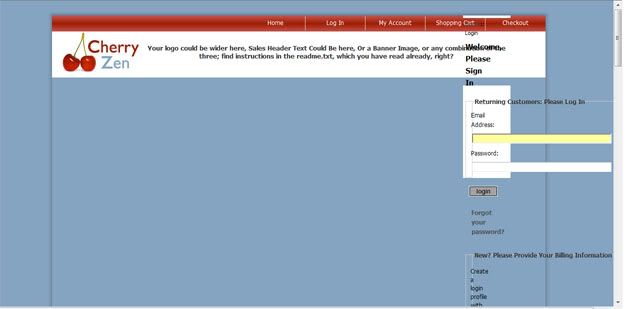
Please help!!!
-
27 Jul 2008, 05:17 PM #5
Totally Zenned
- Join Date
- Jan 2005
- Location
- USA, St. Louis
- Posts
- 3,710
- Plugin Contributions
- 9
Re: Cherry Zen Template Support Thread
Look three posts up. Originally Posted by MissKafra

This has been fixed in the latest version which is just awaiting approval in the downloads section.
-
27 Jul 2008, 05:38 PM #6
New Zenner
- Join Date
- Jun 2008
- Posts
- 5
- Plugin Contributions
- 0
Re: Cherry Zen Template Support Thread
Thank you so much for your help and a fast reply!!! Originally Posted by jettrue

The problem is fixed
I apologize for not going through all of the post before submitting my question, I began searching from the first page and then gave up
Thanks again!!
-
28 Jul 2008, 12:34 PM #7
New Zenner
- Join Date
- Jul 2005
- Posts
- 36
- Plugin Contributions
- 0
Re: Cherry Zen Template Support Thread
Hi,
Thank you for making it so much easier to give my zen-cart shop a different and nice look!
I don't know if it has been asked already, I've read about 14 pages and searched for the word header those pages:
Is it possible to have the menu (Home-Login etc.) underneath the logo?
I've tried it, but I'm still learning the basics of PHP, and my version didn't look nice lol.
How do I get the menu underneath the logo?
Thanks in advance!!
-
28 Jul 2008, 11:17 PM #8
Totally Zenned
- Join Date
- Jan 2005
- Location
- USA, St. Louis
- Posts
- 3,710
- Plugin Contributions
- 9
Re: Cherry Zen Template Support Thread
Sure, move the chunk starting with <!--bof navigation display--> through <!--eof navigation display--> then paste it after <!--eof branding display-->. If you are displaying the categories under the logo, you can paste it after <!--eof-optional categories tabs navigation display--> Originally Posted by thetankgirl
-
29 Jul 2008, 08:39 AM #9
New Zenner
- Join Date
- Jul 2005
- Posts
- 36
- Plugin Contributions
- 0
Re: Cherry Zen Template Support Thread
Perfect, thank you! Originally Posted by jettrue

 Reply With Quote
Similar Threads
-
Simple Zen Template - Support Thread
By jettrue in forum Addon TemplatesReplies: 461Last Post: 27 Apr 2013, 01:33 AM -
Fresh Zen -- JellyFish Template Support Thread
By magicbox in forum Addon TemplatesReplies: 93Last Post: 11 Apr 2012, 08:54 AM -
Free Template "Future Zen" v1.2 Support Thread
By kuroi in forum Addon TemplatesReplies: 69Last Post: 16 Jul 2010, 06:00 AM -
Mix Cherry Zen Template with Default template
By Globie in forum General QuestionsReplies: 1Last Post: 31 Oct 2008, 08:21 PM

