Forums / Addon Admin Tools / Product Extra Fields for text, pdfs and flash

Product Extra Fields for text, pdfs and flash

Views: 74,657

Results 61 to 80 of 381
24 Oct 2009, 8:25 AM
#61
ellivir avatar

ellivir

Zen Follower

Join Date:
Sep 2005
Posts:
444
Plugin Contributions:
0

Product Extra Fields for text, pdfs and flash

Ok, I found out that it should be added a piece of code in the collect_info.php that is located in admin/includes/modules/product/

added after line 458 in collect_info.php:

<!-- addition: editor for extra field -->
           <?php if ($_SESSION['html_editor_preference_status']=="FCKEDITOR") {
            $oFCKeditor = new FCKeditor('extra_field',$pInfo->extra_field) ;
            $oFCKeditor->Value = (isset($extra_field[$languages[$i]['id']])) ? stripslashes($extra_field[$languages[$i]['id']]) : zen_get_products_description($pInfo->products_id, $languages[$i]['id']) ;
            $oFCKeditor->Width  = '99%' ;
            $oFCKeditor->Height = '350' ;

// $oFCKeditor->Config['ToolbarLocation'] = 'Out:xToolbar' ;
// $oFCKeditor->Create() ;
$output = $oFCKeditor->CreateHtml() ; echo $output;
} else { // using HTMLAREA or just raw "source"

      echo zen_draw_textarea_field('extra field', 'soft', '100%', '30', stripslashes($pInfo->extra_field));
      } ?>
<!-- end of the addition -->

Otherwise it works but can't get the existing value (extra field text content) in to the editor that it could be actually edited.
This means that above line
$oFCKeditor->Value = (isset($extra_field[$languages[$i]['id']])) ? stripslashes($extra_field[$languages[$i]['id']]) : zen_get_products_description($pInfo->products_id, $languages[$i]['id']) ;

should be edited and should there be for example zen_get_extra_field instead of zen_get_products_description?
Then in that case there is no such function and I was trying to build one based on the example of the zen_get_products_description but didn't work out.
Is this function building necessary or there is another way to give the value for the editor?
It seems also that the language and product id's should be replaces by the extra_field id, or?

Elli

I may be blond but at least I found Zen.

24 Oct 2009, 12:33 PM
#62
delia avatar

delia

Totally Zenned

Join Date:
May 2006
Location:
Gardiner, Maine
Posts:
2,383
Plugin Contributions:
7

Re: Product Extra Fields for text, pdfs and flash

When using HTMLarea it does appear. No other editor was specifically integrated for this. I'll look into it when I can but since the extra field was done the same as product description, I think the answer lies with FCKeditor instead of with this mod. I would think that ellivir is on the right track.

The full-time Zen Cart Guru. WizTech4ZC.com
New template for 2.0 viewable here: 2.0 Demo

24 Oct 2009, 4:47 PM
#63
ellivir avatar

ellivir

Zen Follower

Join Date:
Sep 2005
Posts:
444
Plugin Contributions:
0

Re: Product Extra Fields for text, pdfs and flash

So, this code below seems to be working for adding the FCKeditor for the extra field:

<!-- addition: editor for extra field -->
           <?php if ($_SESSION['html_editor_preference_status']=="FCKEDITOR") {
            $oFCKeditor = new FCKeditor('extra_field',$pInfo->extra_field) ;
            $oFCKeditor->Value = (isset($extra_field)) ? stripslashes($extra_field) : ($pInfo->extra_field) ;
            $oFCKeditor->Width  = '99%' ;
            $oFCKeditor->Height = '350' ;

// $oFCKeditor->Config['ToolbarLocation'] = 'Out:xToolbar' ;
// $oFCKeditor->Create() ;
$output = $oFCKeditor->CreateHtml() ; echo $output;
} else { // using HTMLAREA or just raw "source"

      echo zen_draw_textarea_field('extra field', 'soft', '100%', '30', stripslashes($pInfo->extra_field));
      } ?>
<!-- end of the addition -->

Anyhow, please have a look if there is anything "dangerous" in the coding itself. This was merely a result of trial and error in this case, so I can't definitely suggest people to follow this if nobody knows this coding to be correct or proper for its usage. I was able to see the extra field content and update it successfully though.

I may be blond but at least I found Zen.

25 Oct 2009, 12:50 AM
#64
giuly avatar

giuly

Zen Follower

Join Date:
May 2007
Location:
Italy
Posts:
438
Plugin Contributions:
0

Re: Product Extra Fields for text, pdfs and flash

hello please can I see a demo on this addon in any way?
or a screenshot?
please :smile:

4 Dec 2009, 2:16 AM
#65
artmuns avatar

artmuns

New Zenner

Join Date:
Dec 2008
Posts:
11
Plugin Contributions:
0

Re: Product Extra Fields for text, pdfs and flash

The extra fields do not show when the product type used is "music". Did I miss something?

Thanks for any help.

Art

5 Dec 2009, 4:07 PM
#66
gjh42 avatar

gjh42

Black Belt

Join Date:
Jul 2005
Location:
Upstate NY
Posts:
21,876
Plugin Contributions:
8

Re: Product Extra Fields for text, pdfs and flash

"Ok, I found out that it should be added a piece of code in the collect_info.php that is located in admin/includes/modules/product/"

I believe there will be a set of files for each product type, so you would need to do the whole set of additions and edits for /product_music/ files or whatever the exact folder name is.

6 Dec 2009, 2:20 PM
#67
delia avatar

delia

Totally Zenned

Join Date:
May 2006
Location:
Gardiner, Maine
Posts:
2,383
Plugin Contributions:
7

Re: Product Extra Fields for text, pdfs and flash

artmuns:

The extra fields do not show when the product type used is "music". Did I miss something?

Thanks for any help.

Art

In other words this mod is just for the product - general and not the music or documents,etc. It's for a product type = not all products.

The full-time Zen Cart Guru. WizTech4ZC.com
New template for 2.0 viewable here: 2.0 Demo

26 Dec 2009, 9:48 PM
#68
damiendlskinsolution avatar

damiendlskinsolution

Zen Follower

Join Date:
Sep 2008
Posts:
97
Plugin Contributions:
0

Re: Product Extra Fields for text, pdfs and flash

Delia,

Awesome mod! love it!
I tried **Lat9 **"update" to get rid of the extra <li> with no luck so i ended removing the <li> straight from the tpl_product_info_display.php.

I still got a small issue:
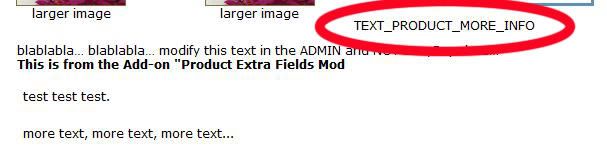
I got a piece of text saying "TEXT_PRODUCT_MORE_INFO" showing up on top of the extra text field and i can't figure why.
It's probably so obvious that i can't see it :blush:
From the Developers Tool Kit in the Admin, the only place i found "TEXT_PRODUCT_MORE_INFO" is in the tpl_product_info_display.php file:

<div class="files">
<?php if(isset($products_file_1_link) || isset($products_file_2_link) || isset($products_file_3_link) || isset($products_file_4_link) || isset($video_file_link) || isset($extra_field)) {
        echo  '<div class="filesHead">'.TEXT_PRODUCT_MORE_INFO.'</div><ul>';
		  }?>

How can i get rid of the extra line of text?

Thanks,

Damien


FYI: I moved the extra.field underneath the additional images, the add to cart button, etc...

27 Dec 2009, 12:48 AM
#69
damiendlskinsolution avatar

damiendlskinsolution

Zen Follower

Join Date:
Sep 2008
Posts:
97
Plugin Contributions:
0

Re: Product Extra Fields for text, pdfs and flash

To those who might have the same problem, i found out a solution to my problem posted above:
I simply added a definition to my "product_info.php" (the one in includes/languages/MYTEMPLATE/)

define('TEXT_PRODUCT_MORE_INFO', 'More information: ');

:clap:

Easy enough!

Damien

2 Jan 2010, 9:43 PM
#70
techiescot avatar

techiescot

New Zenner

Join Date:
Nov 2009
Posts:
59
Plugin Contributions:
0

Re: Product Extra Fields for text, pdfs and flash

HAPPY NEW YEAR from snowy SCOTLAND.

Thank you so much for all the help.... This is a great mod.

I seem to have managed to get it to work ... mostly. The only problem that I have is with the upload files. The text is appearing but the file is not. The links point here:

mydomain.com/Store/product_extra_files//tmp/phpAm4OCf

Can you shed any light on this? I am sure that it is something very simple.

Thanks again

Gillian

2 Jan 2010, 11:22 PM
#71
balihr avatar

balihr

Totally Zenned

Join Date:
Oct 2008
Location:
Croatia
Posts:
1,807
Plugin Contributions:
22

Re: Product Extra Fields for text, pdfs and flash

I like this contrib, it's very easy to install and use.

I have some questions, though.

  1. How do i get the extra fields to be multi-lingual?
  2. How do i make extra description NOT be part of main description? I'm using 'tabbed products pro' addon and would like to have the extra description in a seperate tab.

My site - Pro ZC Help
My portfolio | My plugins

4 Jan 2010, 10:38 AM
#72
balihr avatar

balihr

Totally Zenned

Join Date:
Oct 2008
Location:
Croatia
Posts:
1,807
Plugin Contributions:
22

Re: Product Extra Fields for text, pdfs and flash

OK, first, my apologies for my mistake - it's not a part of products main description. I wasn't looking carefully. :frusty:

Now, I found another problem - my flash files aren't working. They are normally uploaded, but don't play in the popup. What could be causing this?

BTW, I'm still looking for a way to have this mod multi-lingual...

My site - Pro ZC Help
My portfolio | My plugins

14 Jan 2010, 7:36 AM
#73
pathan avatar

pathan

New Zenner

Join Date:
Dec 2009
Posts:
19
Plugin Contributions:
0

Re: Product Extra Fields for text, pdfs and flash

Since I have applied this mod I get this error on Product info page in Admin area:

Warning: reset() [function.reset]: Passed variable is not an array or object in D:\xampplite\htdocs\shop\admin\includes\classes\object_info.php on line 29

Warning: Variable passed to each() is not an array or object in D:\xampplite\htdocs\shop\admin\includes\classes\object_info.php on line 30

Previous values are not populating anywhere.
Any Solution or at least tell me how to revert old settings.

14 Jan 2010, 12:35 PM
#74
delia avatar

delia

Totally Zenned

Join Date:
May 2006
Location:
Gardiner, Maine
Posts:
2,383
Plugin Contributions:
7

Re: Product Extra Fields for text, pdfs and flash

That either comes from installing the mod incorrectly or something else. The file references is not one changed by the mod.

When do you get the error?

The full-time Zen Cart Guru. WizTech4ZC.com
New template for 2.0 viewable here: 2.0 Demo

14 Jan 2010, 1:03 PM
#75
delia avatar

delia

Totally Zenned

Join Date:
May 2006
Location:
Gardiner, Maine
Posts:
2,383
Plugin Contributions:
7

Re: Product Extra Fields for text, pdfs and flash

Reading back thru the thread I saw that happens when you try to copy a product which wasn't tended to in the present release. I'm going to see if I can't get that working today.

Pathan:

Since I have applied this mod I get this error on Product info page in Admin area:

Warning: reset() [function.reset]: Passed variable is not an array or object in D:\xampplite\htdocs\shop\admin\includes\classes\object_info.php on line 29

Warning: Variable passed to each() is not an array or object in D:\xampplite\htdocs\shop\admin\includes\classes\object_info.php on line 30

> 
> Previous values are not populating anywhere. 
> Any Solution or at least tell me how to revert old settings.

The full-time Zen Cart Guru. WizTech4ZC.com
New template for 2.0 viewable here: 2.0 Demo

14 Jan 2010, 1:10 PM
#76
delia avatar

delia

Totally Zenned

Join Date:
May 2006
Location:
Gardiner, Maine
Posts:
2,383
Plugin Contributions:
7

Re: Product Extra Fields for text, pdfs and flash

balihr:

I like this contrib, it's very easy to install and use.

I have some questions, though.

  1. How do i get the extra fields to be multi-lingual?
  2. How do i make extra description NOT be part of main description? I'm using 'tabbed products pro' addon and would like to have the extra description in a seperate tab.

That would require some recoding of many of the files and changing the database. Not a newbie task at all.

The full-time Zen Cart Guru. WizTech4ZC.com
New template for 2.0 viewable here: 2.0 Demo

14 Jan 2010, 2:11 PM
#77
delia avatar

delia

Totally Zenned

Join Date:
May 2006
Location:
Gardiner, Maine
Posts:
2,383
Plugin Contributions:
7

Re: Product Extra Fields for text, pdfs and flash

I have the fixes, delete and copy edits done and would like someone to test them as I don't actually have a cart I can play with right now. Just let me know and I'll send you the link to the files.

The full-time Zen Cart Guru. WizTech4ZC.com
New template for 2.0 viewable here: 2.0 Demo

16 Jan 2010, 11:48 AM
#78
pathan avatar

pathan

New Zenner

Join Date:
Dec 2009
Posts:
19
Plugin Contributions:
0

Re: Product Extra Fields for text, pdfs and flash

delia:

I have the fixes, delete and copy edits done and would like someone to test them as I don't actually have a cart I can play with right now. Just let me know and I'll send you the link to the files.
HI,
I am interested. The above error occurs when I install the mode. I followed the instructions given in readme file.

16 Jan 2010, 12:10 PM
#79
balihr avatar

balihr

Totally Zenned

Join Date:
Oct 2008
Location:
Croatia
Posts:
1,807
Plugin Contributions:
22

Re: Product Extra Fields for text, pdfs and flash

I'm not sure what fixes, but if you give a short explanation, I'm willing to give it a try.

BTW, do you have any idea why my flash files don't work in the popup? I just get a blank popup with "close window" lines.

And, I gave up on the multilingual extra and on a special tab, now i just need the flash working in the popup...

My site - Pro ZC Help
My portfolio | My plugins

16 Jan 2010, 1:54 PM
#80
delia avatar

delia

Totally Zenned

Join Date:
May 2006
Location:
Gardiner, Maine
Posts:
2,383
Plugin Contributions:
7

Re: Product Extra Fields for text, pdfs and flash

Pathan:

HI,
I am interested. The above error occurs when I install the mode. I followed the instructions given in readme file.

What error?

balihr: I haven't had any other complaints about the flash - what browser are you using to view?

The full-time Zen Cart Guru. WizTech4ZC.com
New template for 2.0 viewable here: 2.0 Demo